HaoZuDui
- By

111.png
A2.png
Description
Raid Leader Secretary (HaoZuDui)
A raid leader assistant toolset for World of Warcraft: Wrath of the Lich King Classic (3.3.5)
English Description
Introduction
Raid Leader Secretary is a comprehensive assistant toolset designed for raid leaders in World of Warcraft: Wrath of the Lich King Classic (3.3.5). It integrates auto-invite, role-based quota filtering, and broadcast features to dramatically improve raid formation efficiency.
Features
1. Auto Invite
Whisper Keyword Trigger: Players sending configured keywords (e.g.,
1,group,invite) automatically trigger an invite checkConfigurable Keywords: Supports comma-separated keyword lists; leaving empty accepts all whispers
Leader/Assistant Permission Control: Optionally restrict to raid leader and assistants only
2. Role Filtering (RoleFilter)
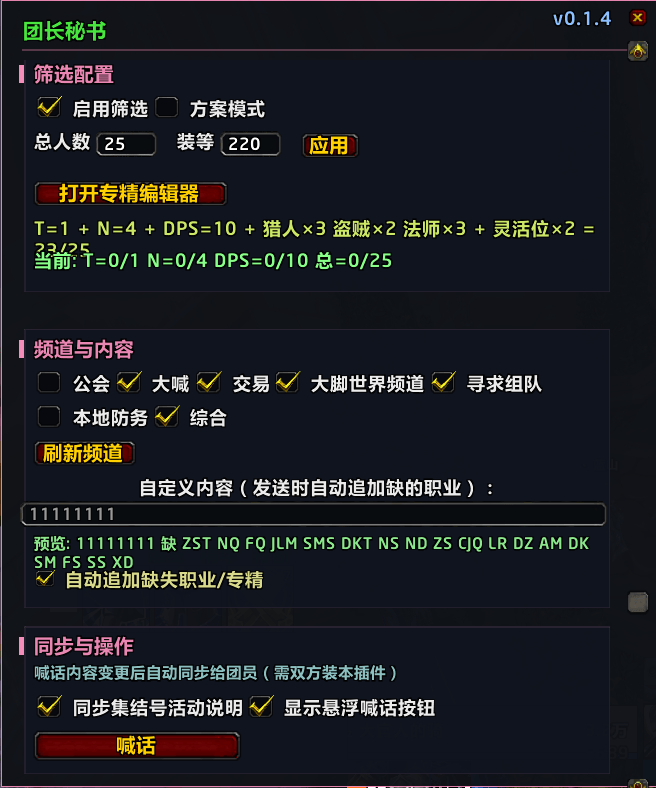
Plan Mode: Two presets for proven 25-man compositions
Plan 1 - Fixed 25: DKT + FQ + ZST, 4 healers (NQ/ND/NS/JLM), precise melee/ranged quotas
Plan 2 - Flexible 2T4N: 2 tanks hard cap, 4 healers (one of each type), melee hard cap 10, ranged hard cap 13, flexible DPS mix
Spec Quota Mode: Freely configure exact counts for any class/spec combination
Item Level Gate: Set minimum item level; auto-reject applicants below threshold
Tank/Healer Reservation: DPS slots auto-reserved until tanks and healers are filled
Smart Rejection Whispers: Auto-reply with current missing roles when rejecting applicants
3. Broadcast
Multi-Channel: Supports guild, yell, and all custom channels
Auto-Append Missing Roles: Broadcast message automatically appends currently needed classes/specs
MeetingHorn Sync: Auto-updates MeetingHorn activity description after broadcast
Raid Text Sync: When the leader edits broadcast text, it auto-syncs to raid members who also have this addon
60-Second Cooldown: Prevents spam
4. Player Info Service
Auto-Query Spec & Item Level: Retrieves player talent specialization and item level via TalentEmuX / NoWCL
Smart Caching: 30-minute TTL cache; offline members still counted in quotas
Polling Fallback: 0.5-second ticker continuously checks query results; auto-retries on 10-second timeout
Dependencies
Dependency
Type
Notes
MeetingHorn / HeroicMeetingHorn
Optional (Recommended)
Title bar button injection, broadcast activity sync
TalentEmuX / TalentedEmu
Optional (Recommended)
Player talent specialization queries
NoWCL
Optional
Auxiliary item level reading
The addon runs independently but strongly recommended to install MeetingHorn + TalentEmuX for the full experience.
Installation
Download the latest
.zipreleaseExtract to
World of Warcraft\_classic_\Interface\AddOns\Ensure the directory is
AddOns\RaidLeaderSecretary\Reload the game (
/reload)Usage
Panel Access
Title Bar Button: Small icon in the top-right of MeetingHorn's main panel — left click opens settings, right click toggles on/off
Bottom Text Button: "Auto Invite Assistant" button at the bottom of MeetingHorn's main panel
Slash Commands:
/tzmsor/mishiopens the settings panelSlash Commands
Command
Description
/tzms//mishiToggle settings panel
/tzms toggleMaster on/off switch
/tzms debugToggle debug logging
/tzms statusView current status
/tzms injectManually inject buttons into MeetingHorn
/tzms dumpemuDump TalentEmuX data
/rls//rlsscanScan raid members and query talents
/rls statusView raid quota status
/rls query <name>Force-query a specific player
Recommended Setup Flow
Open the settings panel (
/tzms)Go to Role Filtering section:
Plan mode: Check "Enable Plan Mode" → Choose Plan 1 or Plan 2
Quota mode: Set total slots → Fill per-class/per-spec requirements
Set item level threshold (optional)
Go to Auto Invite section: Enable auto-invite → Enter keywords (e.g.,
1,group,invite)Go to Broadcast section: Check channels → Enter custom text → Click broadcast
Start forming! Whispers with matching keywords automatically trigger filter checks and invites
File Structure
RaidLeaderSecretary/
├── RaidLeaderSecretary.toc     # Addon definition file
├── Core.lua                    # Core module: DB init, event framework, slash commands
├── UI.lua                      # UI builder: panels, FlowLayout engine, button injection
├── README.md                   # This file
├── CHANGELOG.md                # Version changelog
├── LICENSE.txt                 # License
└── Modules/
    ├── PlayerInfo.lua          # Player info service: talent/ilvl query, cache management
    ├── RoleFilter.lua          # Role quota filter: plan mode, spec quotas, reject logic
    ├── AutoInvite.lua          # Auto invite: keyword matching, flow control
    └── Broadcast.lua           # Broadcast: multi-channel, MeetingHorn sync, raid push
FAQ
Q: The addon shows "MeetingHorn not loaded" after enabling? A: This addon is designed as an assistant tool for MeetingHorn. Please install MeetingHorn first.
Q: A player whispered but wasn't invited? A: Check these points:
Master switch is on (
/tzms toggle)Auto Invite module is enabled
Keywords match the whisper content
Role Filtering is enabled and the player's class/spec is in demand
Enable debug logging (
/tzms debug) to see detailed rejection reasonsQ: Can't query player talent info? A: Make sure the target player has TalentEmuX or TalentedEmu installed, and both of you are on compatible versions.
版本 / Version
v0.1.6
作者 / Author
魔兽大官人
许可证 / License
This project is licensed under the MIT License - see the LICENSE.txt file for details.
链接 / Links
CurseForge: https://www.curseforge.com/wow/addons/Haozudui
QQ群 / QQ Group: 745473434
抖音 / Douyin: @魔兽大官人
The HaoZuDui Team