HandyNotes_FlightMasters
- By
Shows every flight master in WoW Forever on your world map and minimap, and the flight points you haven't discovered yet.
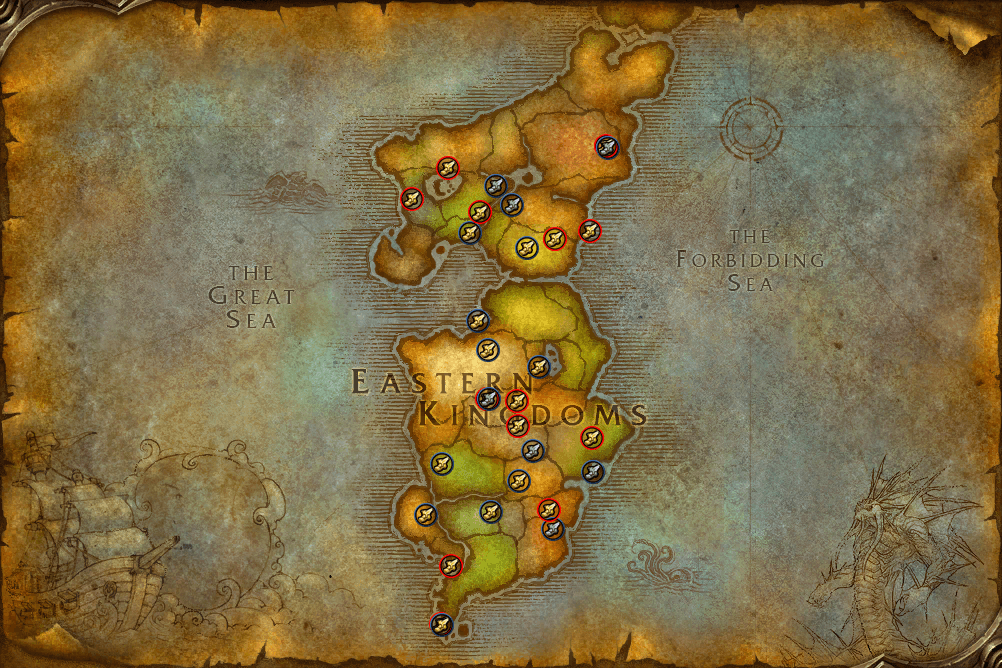
1-eastern-kingdoms.png
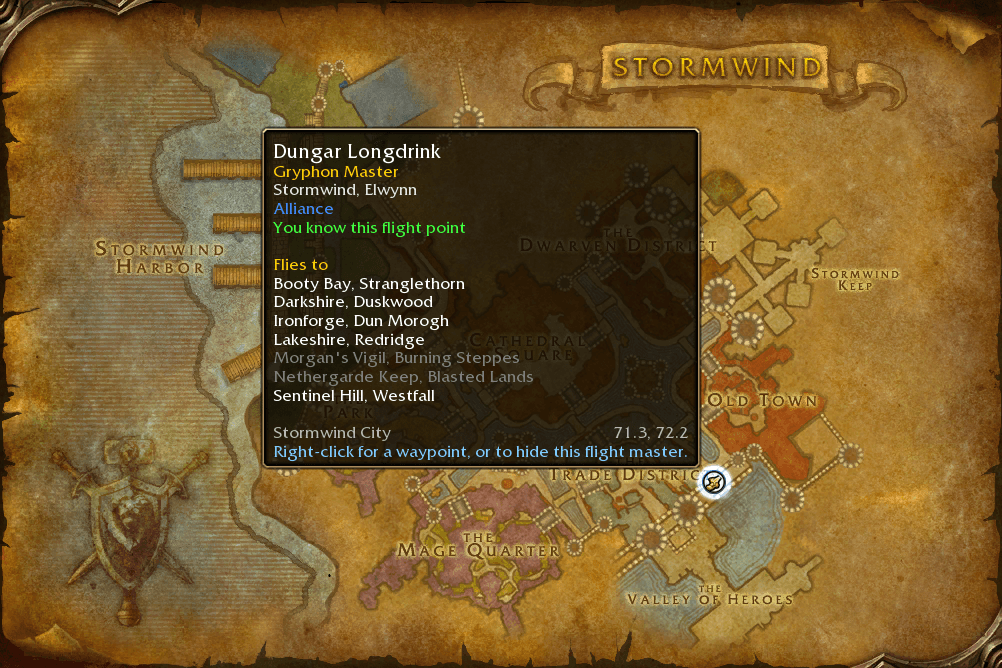
2-stormwind.png
Description
HandyNotes: Flight Masters
🚨 Reminder: This addon is a plugin for HandyNotes. You must have HandyNotes installed for this to work.
🧭 Introduction
HandyNotes: Flight Masters shows every flight master in World of Warcraft: Forever on your world map and minimap, with the flight point they look after and where you can fly from there. Flight points your character hasn't discovered yet get a grey boot, so you can see at a glance which ones you still have to pick up.
✨ Features
- 🗺️ 67 flight masters on 40 maps, including the new flight points on Mount Hyjal and in the Riverglades
- 🪄 A short setup the first time you log in, with a live preview on your own map
- 👢 A grey boot marks the flight points your character hasn't discovered yet, and the tooltip says whether you know one
- 🧭 Hover a flight master to see its flight point and every flight point you can fly to from there, with the ones you haven't discovered yet in grey
- 🔎 Hide the flight points you already know, to see only the ones left to discover
- 🛡️ Round icons in your faction's colours: blue for the Alliance, red for the Horde, gold for the ones both factions use, like Ratchet, Marshal's Refuge and Mount Hyjal
- 🌙 The two Moonglade flight masters who only fly Druids only show up on your Druids
- 📍 Right-click a flight master for a waypoint (TomTom if you have it, otherwise the game's own map pin), or to hide it
🚀 How to Use
- Install HandyNotes (it supports WoW Forever).
- Download this addon. If you're not using an addon manager, place the
HandyNotes_FlightMastersfolder inWorld of Warcraft/_forever_/Interface/AddOns. - Log in to World of Warcraft: Forever and answer the few setup questions.
- You're good to go!
🪄 First-time setup
The first time you log in, a setup window asks:
- Icon size and opacity, with sliders and a preview of the icons on your map, around the flight master nearest to you
- Show on the minimap?
- Show on the continent maps?
- Show the flight points you already know? Or only the ones you haven't discovered yet (asked when the game says which flight points your character knows)
- Show the other faction's flight masters?
Nothing changes until you press Finish. Skip it and the addon uses its defaults. Type /flightmasters setup or press Run setup again in the options to go through it again. When other HandyNotes plugins of this family ask their setup questions at the same time, their windows open one after the other.
⚙️ Options
Type /flightmasters (or /hnflights) to open the options, or open /handynotes and go to Plugins → Flight Masters.
| Option | What it does |
|---|---|
| Icon scale / Icon opacity | Size and transparency of the icons |
| Show on the world map / minimap | Where the icons show up |
| Show on continent maps | Flight masters on the Kalimdor and Eastern Kingdoms maps |
| Show the other faction's flight masters | Also show the other faction's |
| Show flight masters for both factions | The ones both factions fly with, like Ratchet, Marshal's Refuge and Mount Hyjal |
| Show flight points you already know | Turn it off to only see the flight points you haven't discovered yet |
| Show flight masters for other classes | Also show the Moonglade flight masters who only fly Druids on your other characters |
| Show hidden flight masters again | Brings back the icons you hid with right-click |
| Run setup again | Opens the first-time setup again |
Thanks for checking out the addon.
HandyNotes_FlightMasters Team

Owner