
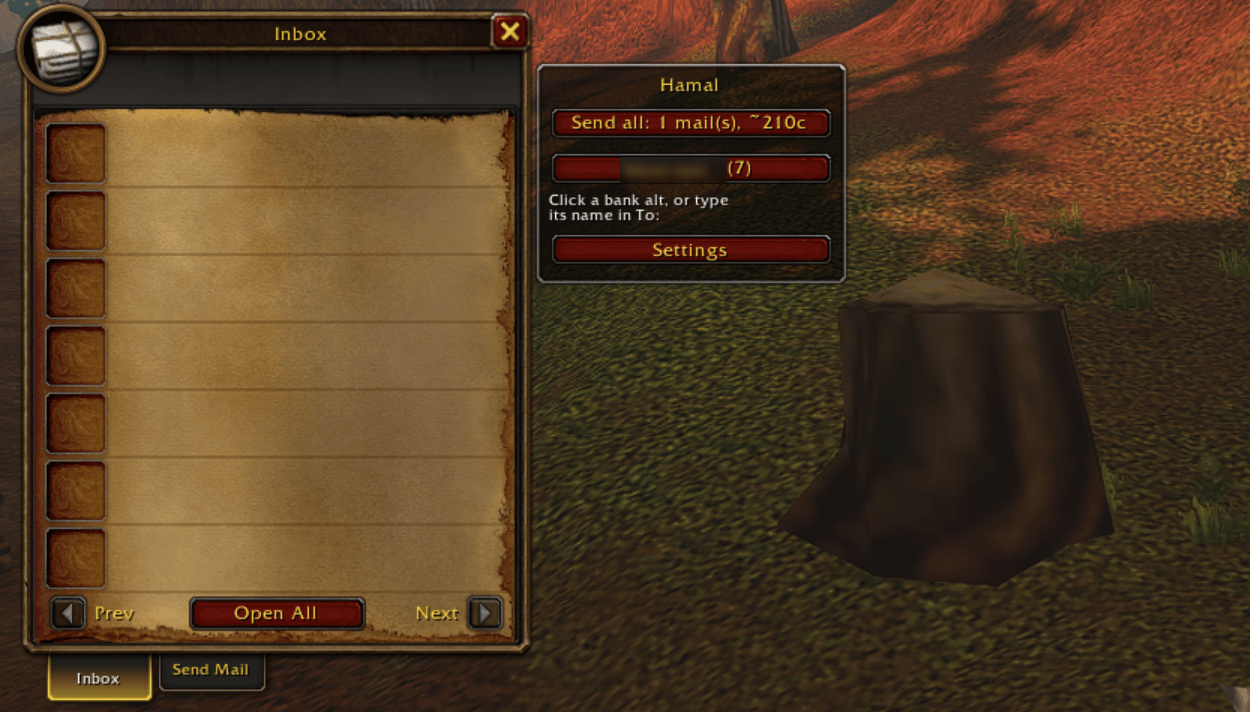
Open a mailbox and Hamal shows how many mails your bank alts get, and the postage.
Description
Hamal: send your materials to your bank alts in one click
Hamal is Turkish for "porter", someone who carries other people's loads. Open a mailbox, press Send all, and every bank alt gets the items that belong to it: cloth to one, herbs to another, gems to a third. Twelve stacks per mail, mail after mail, until your bags are clean.
Built for WoW: Forever (1.60.1). No libraries and no other addons needed.
Early release: tested in the game on Forever. If anything looks odd, please report it (see the end of this page).
Quick start
- Install Hamal and log in once on each bank alt. Hamal only mails characters it has seen log in on your account.
- On your main, type
/hamalor click the minimap button. On the Bank alts tab, tick your bank alts and the item types each one gets. - Open a mailbox and press Send all.
Hamal combines partial stacks first, fills every mail with 12 stacks and sends them one after another.
At the mailbox
- Send all mails every bank alt its items. The button shows what it will take before you press it, e.g.
Send all: 6 mail(s), ~21s 60c. Hover it to see the count for each bank alt. - One bank alt at a time: click its button in the Hamal panel, or type its name (or a short alias) in To:. Every stack about to go shows as an icon. Click one to keep it this time, Shift-click to never send that item.
- Lowest postage: partial stacks are combined before mailing (7 + 12 + 5 Linen Cloth become 20 + 4). Hamal measures the game's own postage and sends the fewest stacks and mails possible.
- See what's going: stacks about to be mailed look greyed out in the game's bags. Hover any item in your bags, at the mailbox or not, and its tooltip names the bank alt that gets it. The tooltip line works with bag addons such as Bagnon too.
- Optional: send everything as soon as you open a mailbox.
Settings
Bank alts. Your characters on this realm. Tick the ones that are bank alts, then tick the item types each one gets:
- cloth, leather, metal and stone, herbs, cooking ingredients, elemental, enchanting
- parts, explosives and devices, all trade goods, other crafting reagents
- gems, recipes, potions, elixirs and flasks, scrolls, food and drink, bandages
- unbound gear, green or better
Drag single items onto Always send these items, and give a bank alt a one-word shortcut for To:.
Items. Every item in your bags or seen on your characters before, with where it goes right now. Click one to choose: follow item types, always send to a bank alt, or never send.
Options. Fill the mail when you type a name, send every mail with one click, send when the mailbox opens, combine stacks, the never-send list, the tooltip line, the minimap button, and the look.
Your items never go to anyone else
- Only your own characters can be mailed: ones Hamal has seen log in on your account, on the same realm and in the same region. There is no way to type in another player's name.
- The recipient is checked again right before every mail.
- If the To: field changes to anything else, Hamal takes its items back out of the mail.
- No money and no C.O.D. ever go with a Hamal mail.
- Deleting a bank alt? Press Forget on it first, because its name becomes free for others.
Never sent
Soulbound and locked items, your Hearthstone, Thieves' Tools and profession tools, and anything on your never-send list. Quest items (such as Torn Bear Pelt) go only if you pick them for a bank alt yourself.
Works with your UI
- Works next to mail addons and UI suites that replace the mail window, such as DaylightUI. Hamal's panel then floats on its own, and Hamal never leaves items sitting in the mail form.
- Many ways in: a minimap button (drag it along the edge, Shift-drag it anywhere), key bindings,
/hamal, and the game's addon menu. - Two looks: the game's own, or a flat dark one (
/hamal look dark).
Light and quiet
Nothing runs while you play away from a mailbox, except one quick check when you hover an item in your bags. No chat messages at login and no error popups: if something ever breaks, you get one short line, and /hamal status shows the details.
Commands
| command | does |
|---|---|
/hamal |
open the settings |
/hamal list |
your bank alts and their rules |
/hamal preview Name |
what would be sent now |
/hamal exclude [item] |
never send an item |
/hamal status |
details for a bug report |
/ham works as a short form. The full list is on GitHub.
Bugs, ideas and source code
Hamal is open source (MIT): github.com/fehmialtinbas/Hamal. Report bugs and ideas in the issues. For a bug, type /hamal status at the mailbox and include what it prints.
Say thanks
Hamal is free and never asks for anything inside the game. If it saves you time, gold tips are welcome: mail them to Buyme Coffee on WoW: Forever (EU, PvP realm, Horde).
Hamal Team
