GuildChatFlow pitch.png
Description
GuildTagFlow
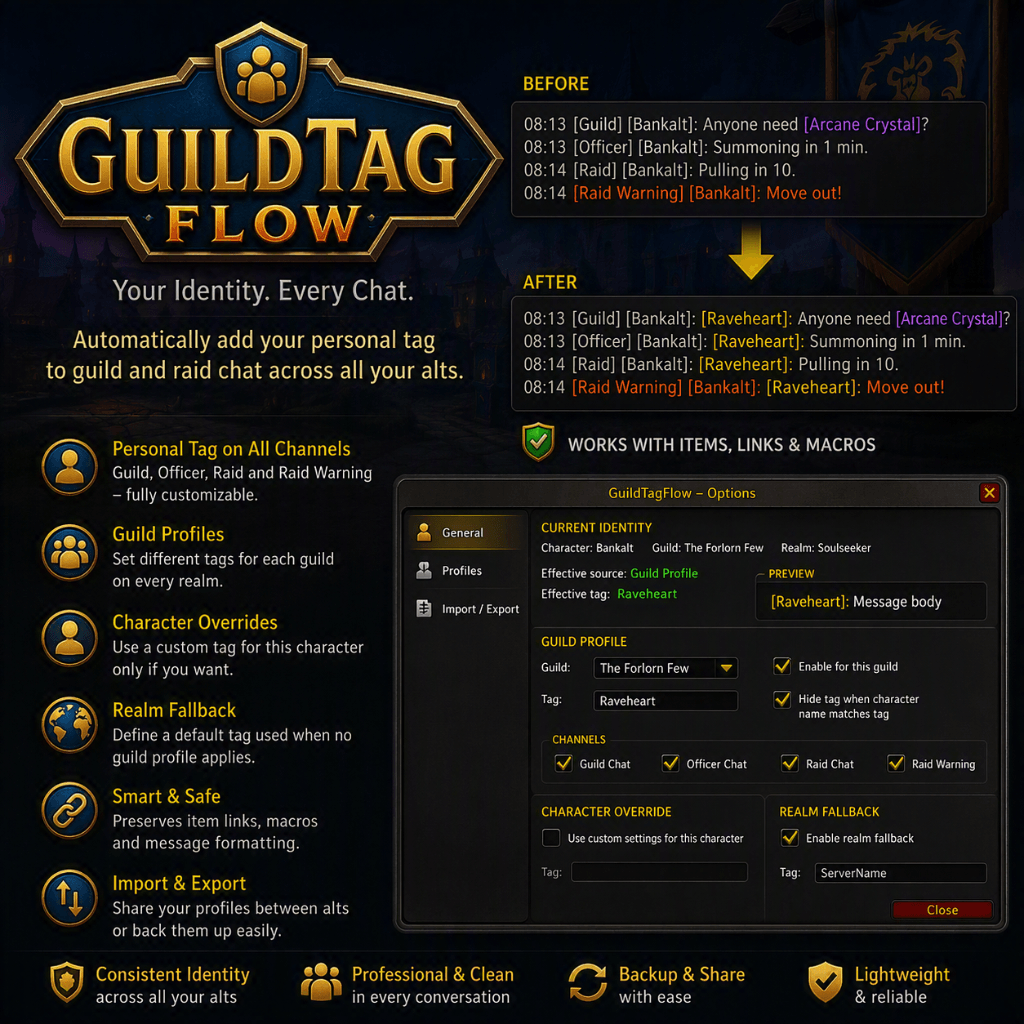
You run more than one character. Guildmates, officers and raid members do
not always know which one is typing. GuildTagFlow stamps a short identity
prefix - [YourMain]: - onto your outgoing Guild, Officer, Raid and Raid
Warning chat, automatically, per guild, so people always know who is
actually talking.
Version 1.0.0.
WoW Classic Era 1.15.x. Any class. English client.
Options: /gtf (also /guildtagflow)
================================================================================
1. WHAT IT DOES
================================================================================
When you send a message in Guild, Officer, Raid or Raid Warning chat,
GuildTagFlow checks whether a prefix is configured and enabled for that
guild and that channel, and if so rewrites your message from:
Need a hand at the Deadmines entrance
to:
[Lipblitz]: Need a hand at the Deadmines entrance
before it goes out. Everything else about the message - item links,
formatting, the rest of the text - goes through untouched.
It never changes what you receive, only what you send, and only in the
four channels above.
================================================================================
2. HOW SETTINGS ARE CHOSEN
================================================================================
GuildTagFlow figures out which prefix to use, in this order:
1. Character override - if you have turned this on for the current
character, its own prefix and on/off switch win, regardless of guild.
2. Guild profile - otherwise, if the character's current guild has its
own profile, that profile's prefix and channels apply.
3. Realm fallback - otherwise, the realm-wide default prefix applies.
Each guild profile (and the realm fallback) has its own on/off switch and
its own choice of which of the four channels get the prefix - you might
want it on Guild and Officer but not Raid, for example.
If your prefix matches your character's actual name, GuildTagFlow quietly
skips adding it - there is no point tagging a message with the name
already shown next to it in chat.
================================================================================
3. OPTIONS
================================================================================
Open the options with /gtf. The panel is organised in three parts:
GUILD PROFILE Pick a guild from the dropdown, set its prefix, and
choose which channels it applies to.
CHARACTER OVERRIDE Turn on a prefix just for the character you are
currently playing, overriding the guild profile.
REALM FALLBACK The prefix used when the current guild has no
profile of its own yet.
Guild profiles are created automatically the first time you log in while
in that guild - there is nothing to set up in advance.
================================================================================
4. IMPORT / EXPORT
================================================================================
If you run several accounts, "Import / Export..." (top right of the
options panel) saves retyping the same guild prefixes on each one.
Generate Export String bundles every guild profile on the current realm,
the realm fallback, and the current character's override into one text
string. Copy it, and paste it into the Import box on another account.
Importing never silently overwrites anything: if nothing you are
importing already exists on the target account, it is simply added. If
something would be replaced (a guild profile that is already configured
differently, say), you get a warning listing exactly what conflicts, with
the choice to cancel, merge only what is new, or overwrite everything.
================================================================================
5. BUG REPORTS AND FEATURE REQUESTS
================================================================================
This is a small addon doing one job, but I would rather hear about a
problem than have you quietly stop using it. If something is not working,
please say: your realm's locale if it is not English, which channel and
guild it happened in, and what you expected to see instead.
Feature requests are welcome too - no promises on turnaround, but I read
everything.
================================================================================
6. LICENCE
================================================================================
GuildTagFlow is free software, released under the GNU General Public
Licence, version 3. The full text is in COPYING.txt beside this file.
Copyright (C) 2026 Andreas Funk.
You may use it, change it and pass it on. If you pass on a changed
version, it has to carry the same licence and the source has to go with
it. There is no warranty.
GuildTagFlow Team