Guilded
- By
Raid attendance, EPGP, loot and guild tools for WoW Forever, with an optional hosted Discord bot. Small free pilot; KCaron's approval is required for each server.
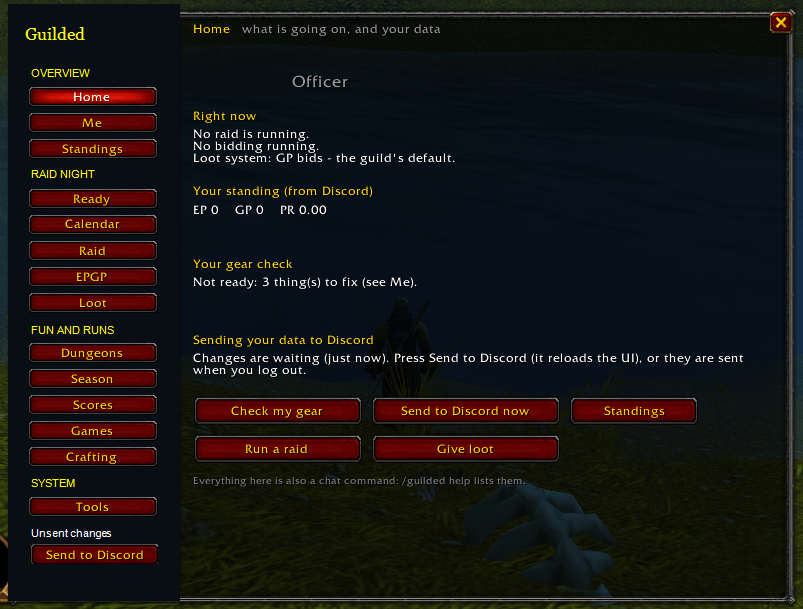
Open your guild tools from one in-game window: gear checks, standings, loot and crafting. Optional Discord integration requires setup and personal pairing. Character and guild identifiers have been redacted for privacy.
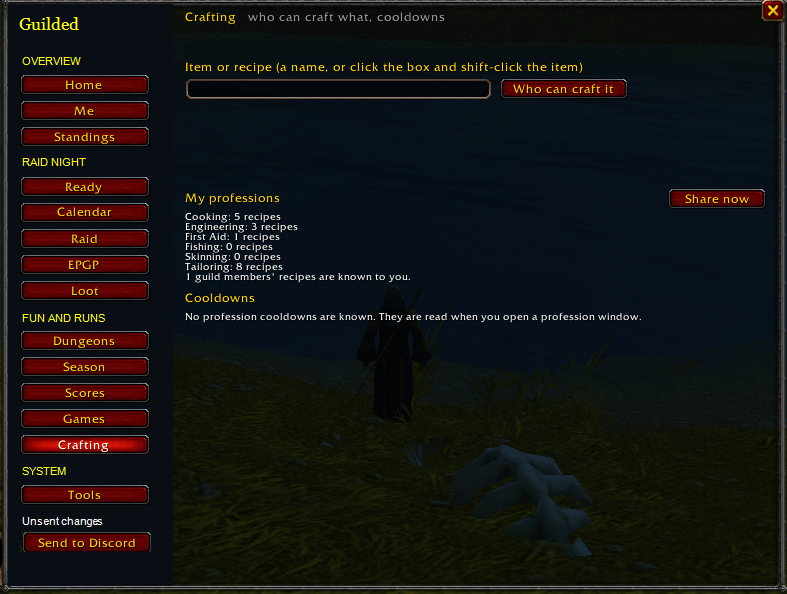
Search for an item or recipe, share your learned recipes, and view profession cooldowns. Names and identifying player-frame details are hidden for privacy.
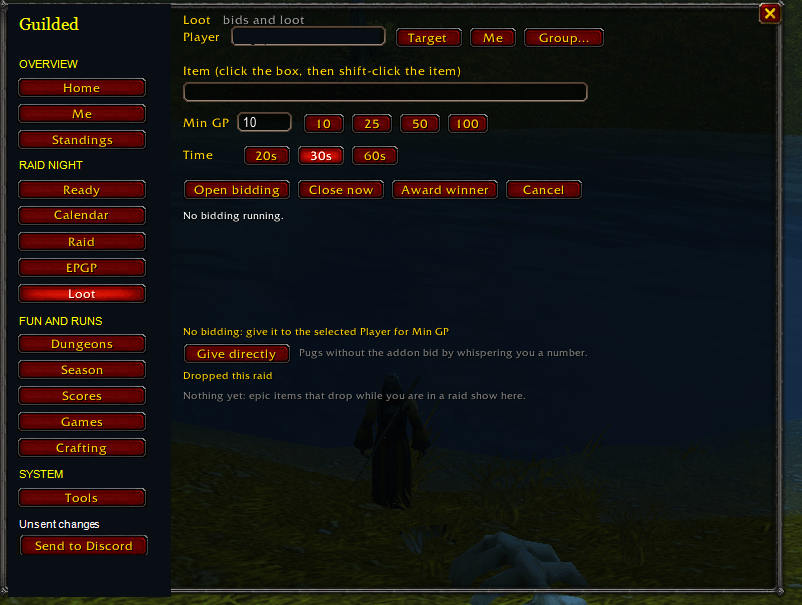
Set minimum GP and a bidding timer, collect responses, and award loot from one panel. This screenshot shows the idle setup state. Character identifiers are redacted.
Description
Guilded — Raid & Guild Management for WoW Forever
Organize raid nights, manage loot, and keep your guild connected—all from one in-game window.
Guilded brings raid tracking, EPGP, four loot systems, readiness checks, and everyday guild tools together. Use the addon on its own, or connect your guild’s optional Discord bot for signups, shared standings, and reports.
Available now: 6.1.2 Release. The addon works without Discord.
Browse the Images tab for real in-game views of the overview, crafting, loot bidding, gear checks and dungeon scores. Identifying player and guild details are redacted; development previews are labeled.
Add the Discord bot — KCaron's approval required
Add Guilded — request owner approval
A small number of guilds can join the free hosted pilot. KCaron must approve your Discord server before the bot works there. Adding Guilded sends a request; it does not guarantee a place or immediate access. After approval, run /setup start in your server. You do not need your own hosting or database.
Hosted pilot guide · Online companion · Member installation
Use your own Discord server ID and personal /character pair code. Independent hosting remains available.
Raid Management & Readiness
- Raid journal: Start and end raids, record attendance and bench credit, mark boss kills, and keep raid notes.
- Readiness dashboard: Officers and group leaders can review available gear, enchant, durability, flask, and food information, request refreshed checks, and run a ready check.
- Personal gear checks: Spot empty equipment slots, missing enchants, and other preparation issues.
- Attunement tracking: Record completed attunements for yourself or, with officer permissions, your raiders.
- Persistent records: Keep your active raid and saved records through reloads and disconnects.
Four Loot Systems
Choose the approach that fits your raid:
- GP Bidding — Let players bid GP on an item.
- Loot Council — Collect BiS, upgrade, and off-spec responses to help your council decide.
- Soft Reserves — Roll between reservers, with SR+ support for reserves that went unwon.
- EPGP Priority — Award priced items to the interested player with the highest priority, with configurable off-spec pricing.
Start a loot session with /guilded drop <item>. Addon users receive a response popup; whisper responses support players without Guilded.
EPGP management includes EP and GP awards, deductions, loot records, and priority standings. Officers can publish in-game standings without Discord; connected guilds can use bot-managed raid cores, rules, and item prices.
Soft Reserves & Item Information
- In-game reservations: Reserve linked items without visiting a website.
- Shared reserve lists: Share reservations with online Guilded users and see them on item tooltips.
- Officer controls: Open, lock, and manage the reserve list.
- Loot tooltips: Display available wishlist, historical GP cost, and priority information when supplied through the optional Discord integration.
Professions & Guild Tools
- Recipe sharing: Open your professions to share known recipes with online Guilded users.
- Crafter lookup: Find who can make an item with
/guilded recipes who <item>. - Profession cooldowns: Share supported cooldown information, including transmutes.
- Materials lists: Build a shopping list for your crafting plans.
- Guild map: See participating Guilded users on the world map and minimap, with controls to stop sharing or hide markers.
- Dungeon tracking & scores: Record runs and view scores on player tooltips and the Scores page—no Discord required.
- Roll games: Play high roll, deathroll, and 1v1 duels, with built-in explanations. No wagers or debts.
One Convenient Window
Click the gold coin on your minimap to open Guilded.
- A Home page for your standings, activity, and available sync status.
- Pages organized around raid night, guild activities, and settings.
- Optional modules you can switch off.
- A dedicated Guilded chat tab for addon messages.
- English and French localization.
- Separate saved data for each guild, with backup, restore, and restore undo.
Optional Discord Integration
Extend Guilded beyond the game with a free hosted pilot (owner approval first), or an independently hosted Discord bot:
- Raid planning: Role-based signups, waitlists, recurring raids, and core rosters.
- Loot management: Core-specific loot systems, item prices, wishlists, and soft reserves.
- Guild coordination: Crafting requests, crafter searches, readiness boards, and polls.
- Reports: Attendance history, raid seasons, Warcraft Logs integration, and weekly reports.
- Dungeon activities: Challenges and leaderboards.
- Calendar sync: Connect Discord raids and in-game events where the client supports the required calendar APIs.
- Raid invitations: Invite players from synced Discord signups with
/guilded invite raid.
Use the Windows companion to upload saved data after a reload or logout, or the browser companion for manual syncing. Discord integration requires your guild’s configured bot and personal pairing.
The addon works independently. Approved hosted-pilot guilds do not need to run their own bot or database. Independent hosting requires your own infrastructure.
Getting Started
- Extract the Guilded folder into your WoW client’s
Interface/AddOnsfolder. - Log in and click the gold minimap coin. Type
/guildedor/gdfor commands. - Officers can open the Raid page to begin tracking a raid.
- For Discord integration, use the hosted invitation above, wait for KCaron’s approval, then run
/setup start. See the hosted pilot guide.
Compatibility & Release Status
Designed for WoW Forever. Declared interface versions: 16001 and 20506. Feature availability depends on the game client and its addon APIs.
6.1.2 is available as a Release on CurseForge. Fresh-guild setup, Windows installation and recovery, concurrent award workflows, and full raid acceptance testing remain in progress. Back up SavedVariables before upgrading.
Guild map and shared information depend on participating addon users and available data. Raid markers, tank marking, and boss plans are not included in v6.
Free for noncommercial use under the PolyForm Noncommercial 1.0.0 license. Not affiliated with or endorsed by Blizzard Entertainment.
Optional support
Guilded is an independent project by KCaron. The addon and approved hosted pilot are free. Optional tips help fund bot hosting, the PostgreSQL database, backups and ongoing maintenance.
Support Guilded by KCaron in Canadian dollars (CAD), with one-time tips from C$5 and optional monthly support. Tips do not buy approval, priority or extra permissions. No payment is required to download Guilded, request bot access or ask for help. How your support helps.
Guilded website · KCaron creator page
Français : ajoutez Guilded pour demander l’accès au pilote gratuit. KCaron doit approuver votre serveur Discord avant son activation. Après son accord, lancez /setup start. Le soutien financier est facultatif et ne donne aucune priorité.
Guilded Team