Guild Ledger
- By
Guild Ledger is a WoW: Forever addon that syncs stats across your guild. Deaths, HKs, gold donated, quests, bosses, gathering, critters, biggest crits, and worst falls: 14 boards, each crowning a champion with a title in gold capitals.
Screenshot 2026-10-23 164809.png
Screenshot 2026-10-23 164828.png
Screenshot 2026-10-23 164843.png
Screenshot 2026-10-23 164857.png
Screenshot 2026-10-23 164917.png
Description
Guild Ledger
Guild leaderboards with no server and no website. Your guild's add-ons keep each other's numbers, crown a champion on every board, chase guild goals together, and know who can craft what.
Guild Ledger is a guild add-on for World of Warcraft: Forever. Everyone in your guild who installs it shares their numbers with everyone else who has it, over the guild's hidden addon channel. Honorable kills, boss kills, your biggest crit, every creature you slay, battlegrounds won, deaths (by fire and by falling too), your most embarrassing falls, fish, gold donated, repairs, quests, Exalted reputations and mounts: fifteen boards in three rows of five, each with a champion who wears its title.
There's nothing to set up and nothing to host. The add-on finds your guild by itself, every guild gets its own ledger, and guilds never see each other's. The Overview shows the message of the day, the latest ranking changes and everyone in the guild (click your own title to pick the one you wear); the Professions tab finds who can craft what you need. The Guild Master gets the tools to run it: fun titles, helpers, guild goals, linked alts and checks on numbers that look odd.
How it works
- Install it. Everyone who wants to be on the boards installs Guild Ledger. Guildmates without it still show up on the Overview, they just don't count.
- Just play. Your add-on counts what you do as it happens: every death, every deposit in the guild bank, every boar, murloc and rabbit that got in your way.
- The guild remembers for everyone. Your add-on shares your numbers with every guildmate who is online, and they pass them on to whoever logs in later. Log in after a week away and you're caught up shortly after you arrive.
- Open the ledger. Type
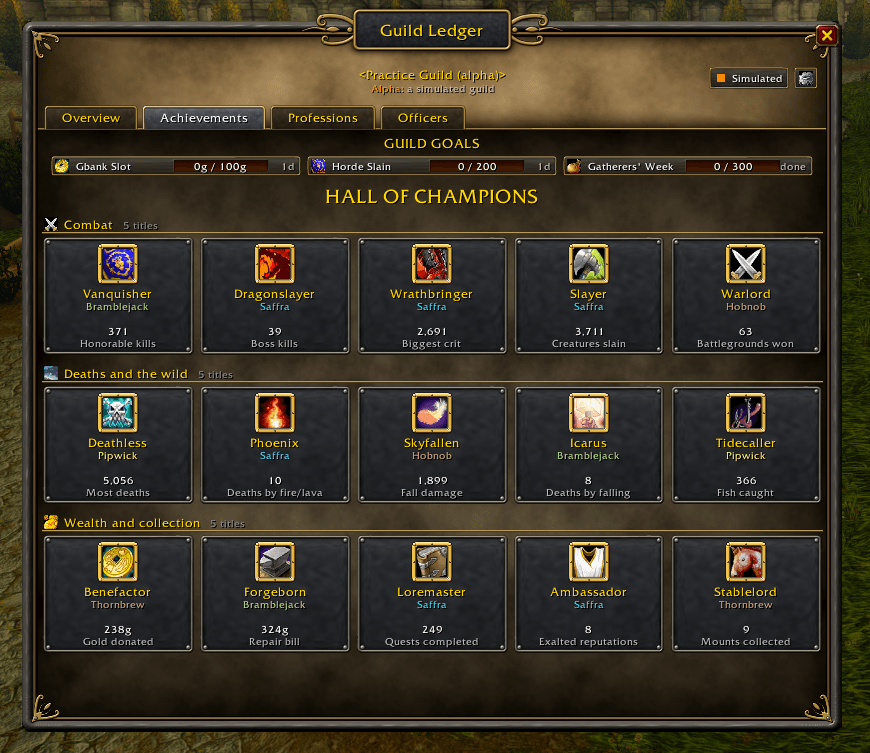
/ledgeror click the Guild Ledger logo on the minimap. The Overview shows the message of the day, the ranking changes and the members; the Achievements tab's Hall of Champions shows the number one of every board, in three rows of five: the board's emblem, its title (Vanquisher, Tidecaller, Stablelord), the champion's first name and surname, their number, and what the board measures. - Chase a goal. The Guild Master sets a goal for the whole guild ("500g for the raid fund this month"), with its own leaderboard that starts from zero.
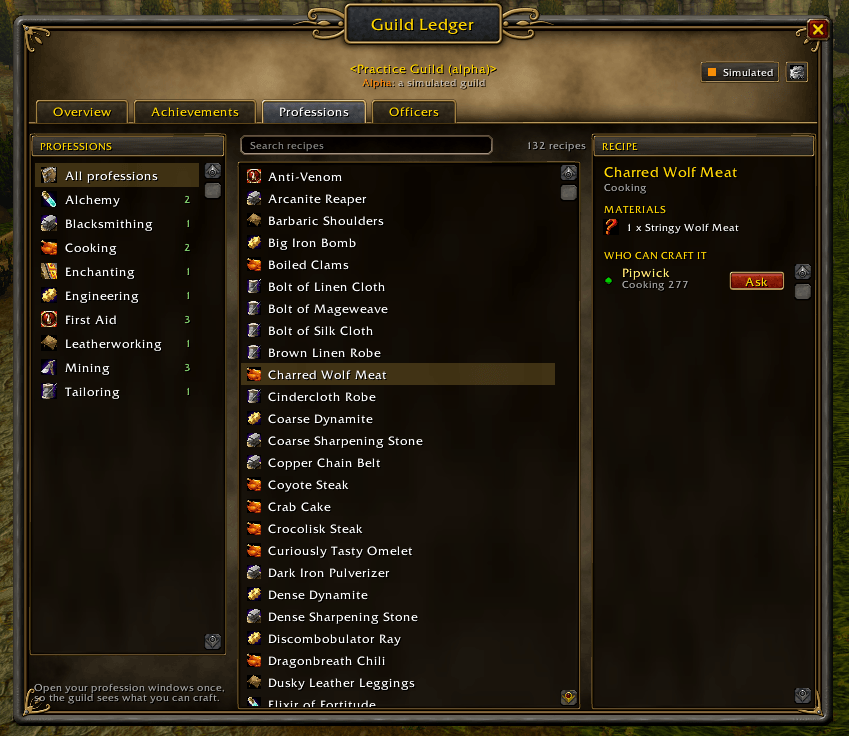
- Find a crafter. Open your profession windows once and your recipes are shared. On the Professions tab, type "mooncloth" and see who can make it; Ask opens a whisper to them.
- Take the crown and wear the title. The number one of a board carries its title, next to their name in the ledger and in front of what they say in chat, until someone takes the lead from them. Switch on banners for new champions and you get one, with a little fanfare when it's you.
Features
Fifteen boards, fifteen titles
Every board only goes up, and every board has its own champion title and game icon as its emblem. Eleven of them read the game's own Statistics page, so a new member arrives with their numbers.
Combat
- Vanquisher: Honorable kills
- Dragonslayer: Boss kills
- Wrathbringer: Biggest crit
- Slayer: Creatures slain (boars, murlocs, kobolds, dragons, and the occasional rabbit)
- Warlord: Battlegrounds won
Deaths and the wild
- Deathless: Most deaths
- Phoenix: Deaths by fire/lava
- Skyfallen: Fall damage taken and lived to tell the tale
- Icarus: Deaths by falling
- Tidecaller: Fish caught
Wealth and collection
- Benefactor: Gold donated to the guild bank
- Forgeborn: Gold spent on repairs
- Loremaster: Quests completed
- Ambassador: Exalted reputations
- Stablelord: Mounts collected
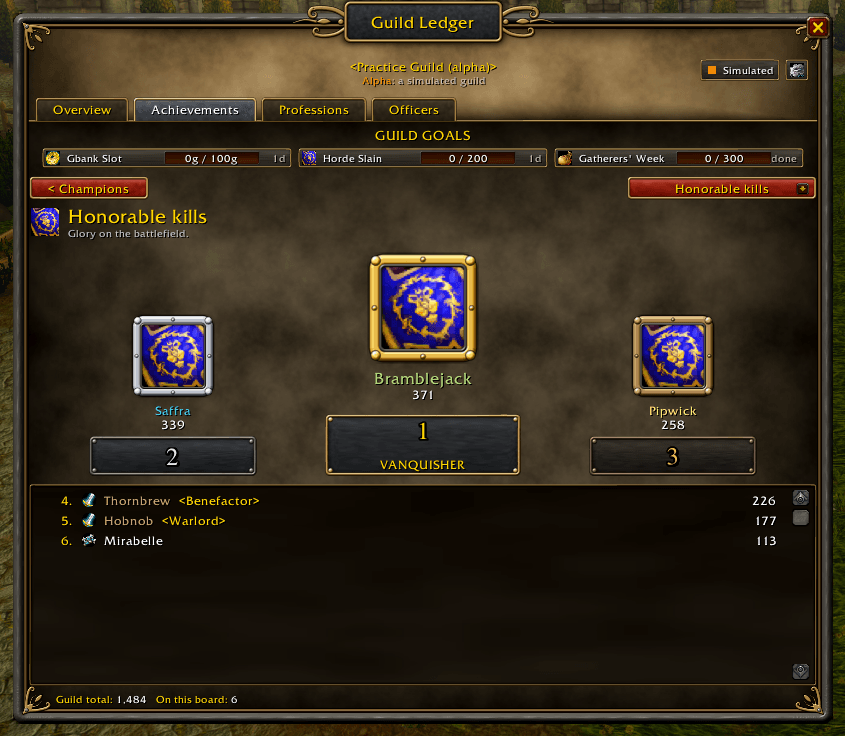
Click any champion to open their board: the top three stand on a podium in gold, silver and bronze frames, and everyone else follows in the list below. Your own cards get a gold rim and say YOU.
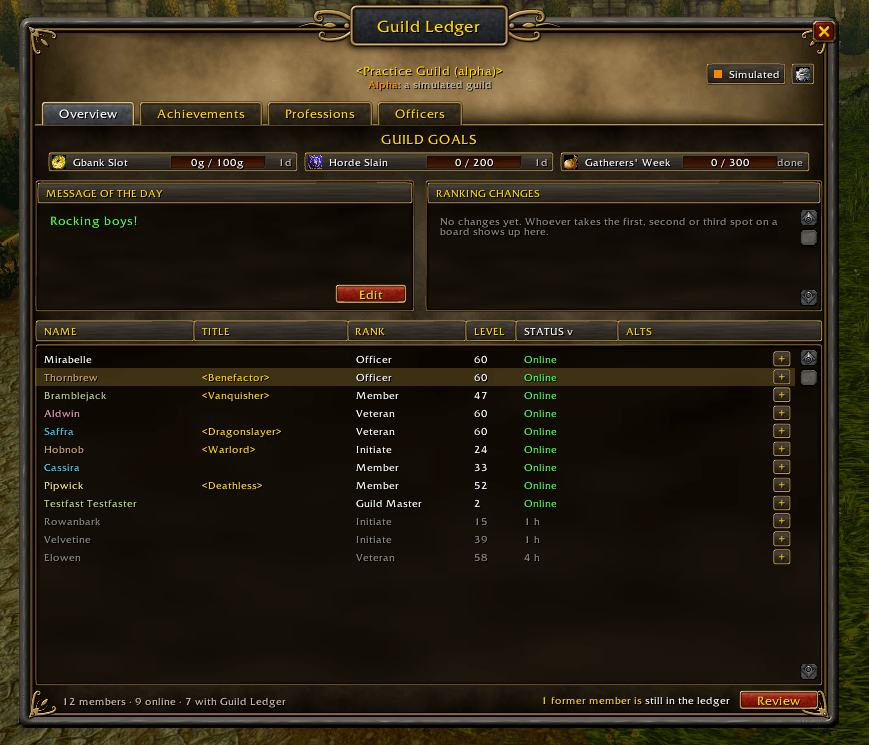
Overview
- Message of the day from the game, with Edit for officers whose rank may change it.
- Ranking changes: who took a number one spot from whom, and who moved up to second or third place on a board.
- Pick your title right there: click the title on your own row and choose from the titles you hold, automatic or none.
- Everyone in the guild like the game's roster: name in class colour, title, rank, level, status (online, or how long ago) and alts. Sort by any column, hover for notes and zone.
- Right-click a member: whisper, invite, and for officers promote, demote and the notes (as far as their guild rank allows), plus titles, corrections, helpers and alts.
Professions
- Search what the guild can craft. Pick a profession or all of them, type part of a name, and the recipes show as you type: what someone online can make right now first, then what offline guildmates can. Pick one to see who can make it.
- What it takes and who can make it: the recipe's materials (and how much of each you carry), then who can craft it, online first, with their skill, and an Ask button that opens a whisper with a question ready to send.
- Shared by itself. Open each of your profession windows once (and after learning new recipes): Guild Ledger reads your recipes and shares them. Old-style and newer profession windows both work, and a search filter in the window never loses recipes.
- Light on the channel. Recipes travel as the game's own ids, a few hundred bytes for a hundred recipes, and show in each player's own language.
Guild goals
- Its own leaderboard. A goal only counts what people did between its start and its end, so it's a fresh race every time. The Hall of Champions never restarts.
- Any mix of boards. "5,000 creatures and 200 fish this week" adds them up. Gold donated works for a raid fund, and the biggest crit makes a weekend contest.
- Flexible dates. Start now, today, next Monday or on the 1st of the month; run for three days, a week, two weeks, a month or to the end of the week or month, then fine-tune by a day.
- Up to three at once, side by side under the tabs on every tab, each with its progress bar and time left. Add a reward note ("the top donor picks the next raid night") and choose whether everyone sees who did the most.
- Counts for people who are offline. Each add-on keeps a short history of its own numbers, so a goal you hear about later, or one that started yesterday, still counts what you did.
Mains and alts
- Every character on its own. Each character, alts too, has its own score, crowns and titles. The Guild Master links alts to their main for the overview: the Overview's member list and profiles show who belongs to whom.
- One click to link. On the Overview every main has a + in the Alts column. It opens every character in the guild with a search box: click a character to make it an alt, click again to unlink.
- Same for everyone. The links travel with the Guild Master's permissions, so every copy of the ledger shows the same thing.
Guild Master tools
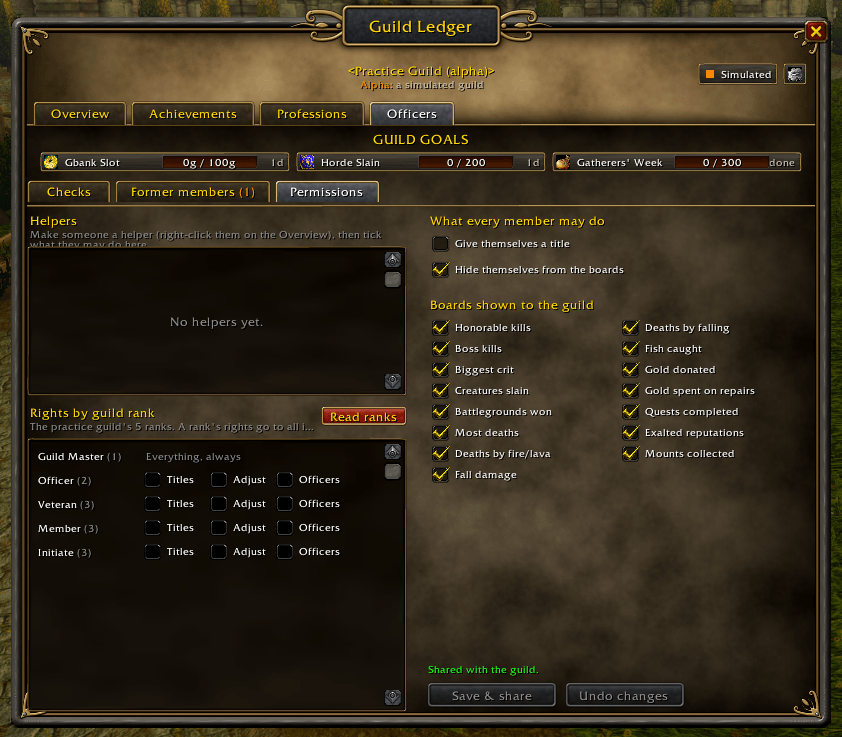
- Helpers and ranks. Give members, or whole guild ranks, any of three rights: Titles (hand out fun titles), Adjust (correct stats, for example gold donated before the add-on) and Officers (the Officers tab and its checks). Your guild's ranks are read straight from the game, every one of them.
- Fun titles in eight colours, shown next to names everywhere (a champion's crown title comes first). You can let members give themselves one.
- Choose the boards. Switch off any board your guild doesn't care about.
- Checks. Every copy of the ledger checks the numbers it receives. Numbers that rise faster than anyone can play, crits above the game's limit, and rewritten history show up under Officers > Checks, with the correction already filled in for you.
- Former members. People who leave the guild drop off the boards at once. Clear their numbers from everyone's ledger, one by one or all at once. If they ever rejoin, their add-on brings their numbers back.
For everyone
- Titles in chat. Everyone with Guild Ledger sees a guildmate's title in front of what they say, in every chat: guild, say, party, raid, whispers, channels.
/ledger titlesturns it off. - Settings for everyone behind the gear: banners, titles in chat, the minimap button and hiding from the boards.
- Numbers per guild, starting from your Statistics page. When you join a guild, deaths, honorable kills, quests, creatures slain, deaths from falling and fire, fish, battlegrounds, repairs, reputations and mounts start from the game's Statistics page. Every other board starts from zero. Leaving and coming back carries on where you were.
- Hide yourself from the boards under the gear (or
/ledger hide), if your Guild Master allows it. - Minimap button. The add-on's round logo on the edge of the minimap opens and closes the ledger; right-click it for the sync details, drag it to move it. On clients with the add-on compartment (the list of add-ons on the minimap), Guild Ledger is listed there too.
- Sync pill in the header shows at a glance whether you're in step with the guild ("In step · 7 online"). Click it for the details.
- Banners for new guild goals and goals reached. Banners for new champions are off unless you switch them on (
/ledger banners).
Your numbers are safe
- Numbers never go backwards. After a crash, a reinstall or a lost saved file, your add-on listens to the guild first and takes back what it had before.
- Signed. Your add-on signs your numbers with a key that never leaves your computer, so it recognises its own copies and can't be fooled by numbers someone made up.
- Your guild only. The game delivers the add-on's messages only to your own guild, and every copy also checks each message against the guild roster. Nobody outside the guild is listened to, and nobody but the Guild Master can hand out rights.
- Light on the wire. In a simulated 40-member guild with people logging in and out for half an hour, the add-on sent about 1.4 short messages per member per minute.
Try it without a guild
/ledger alpha starts alpha mode: a simulated guild that lives only in your client, with you as Guild Master. Twelve pretend guildmates (nine of them with the add-on) run real copies of the sync code and talk to you and to each other. Press Live and they start dying, donating, logging in and out and handing out titles. Someone joins brings in a recruit who starts from their Statistics page. Cheeky numbers has one of them edit his saved file to give himself 5,000 extra deaths, so you can watch the checks catch him. Nothing is ever sent to a real guild.
A look that fits the game
A dark iron window with brass filigree, a parchment header, slate cards with steel rims and red buttons with a brass edge. The board emblems are the game's own icons, taken straight from your client, in gold, silver and bronze frames.
WoW Forever
Guild Ledger is built for Forever (interface 16001) and its Midnight-era add-on API:
- First name and surname. Everyone is known by their full name ("Chehul Shammy"), the same in every copy of the ledger. Hyphenated surnames and characters without a surname work too.
- No combat log needed. Forever doesn't let add-ons use the combat log, and Guild Ledger never asks for it there (asking alone makes the game show a "blocked" warning). Every board that would use it (creatures, crits, falls) has a second way to notice things, and those backups never count someone else's kill or crit.
- The guild bank counts. Gold you deposit in the guild bank window goes on the Gold donated board. Gold mailed to a bank character isn't seen, but a helper with the Adjust right can add it.
- The Statistics page counts. Entries are found by their name on the page, so they're read correctly even if Forever numbers them differently from Retail.
- Separate ledgers per guild and realm, so an alt in another guild keeps its own.
Slash commands
/ledgeror/guildledger: open or close the ledger/ledger goal: the guild's goals/ledger overview: the Overview (message of the day, ranking changes, the members)/ledger officers: the Officers tab (Guild Master and the Officer rank)/ledger checks: numbers that look odd (Guild Master and the Officer rank)/ledger sync: compare ledgers with the guild now/ledger check: ask the guild who runs Guild Ledger, and which version/ledger status: what your copy sees (including your Statistics page), when guildmates don't show up/ledger hide: hide from the boards or show again (if the Guild Master allows it)/ledger banners: banners for new champions on or off (off at first)/ledger banners goals: banners for guild goals on or off/ledger titles: show guildmates' titles in chat, or not/ledger profile: your page: the title you wear and your places/ledger crafts [search]: the Professions tab, with the search filled in/ledger wear auto|none|given|<board>: choose the title you wear/ledger minimap: show or hide the minimap button/ledger alpha [on|off|reset]: the simulated guild/ledger stats take|keep|always|never: answer when the guild has higher numbers for you than this computer (alwaysif you play one character on several computers)/ledger debug: print sync messages in chat, for bug reports/ledger creatures: what the Statistics page counts for creatures killed, and what the add-on sees when you hit one
Guild Ledger Team