Guild Bank Alts
- By
See and request items from your guild's bank alts. Managed by hand: the addon automates nothing
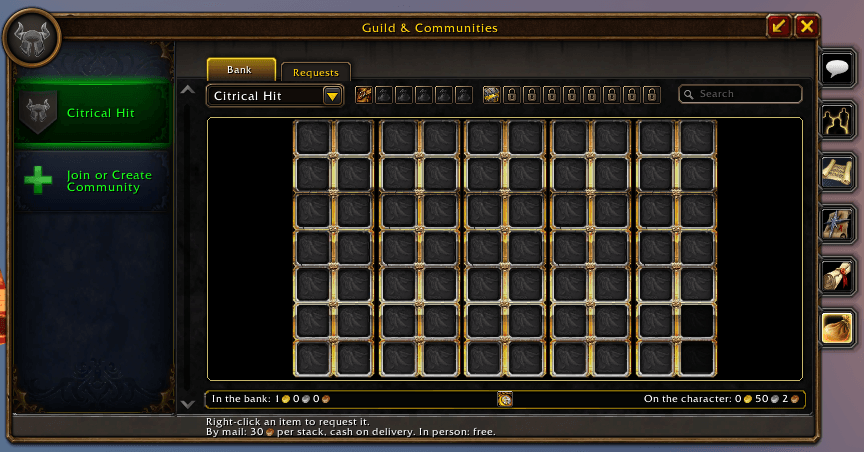
The Guild Bank tab on the guild window: pick a bank character, see its bag and bank slots laid out like the game's guild bank, search its items, and check its money and the guild bank's. Right-click an item to request it, in person for free or by mail
Description
Guild Bank Alts is for guilds that keep their bank on ordinary characters, the guild's bank alts. Every guild member with the addon sees what those characters hold in a tab of the guild window, and asks them for items. Made for WoW Forever.
Everything is done by hand. The bank characters are managed entirely by the players who log in with them: the addon automates nothing. It never moves, trades or mails items, never accepts or sends anything on its own, and never sets the cash on delivery of a mail. It only shows what the bank characters hold, keeps the list of requests, and notices the trades and mails their players make, to count them toward the requests.
Bank characters
Give a character the guild rank Banco or Bank (in any case) and log in with it once with the addon. It shares its money and its bags, slot by slot with the bag in each bag slot, whenever they change. The game only lets an addon read the bank while it is open, so open each bank character's bank once: its bank is shared each time it is opened, and the last read is kept. Other characters share nothing of this.
The Guild Bank tab
A new tab on the guild window, under the game's own:
- Choose a bank character in the dropdown.
- Its bag slots along the top: the backpack, its bags, the bank and the bank bag slots (locked, empty or with their bag). Point at one to light up its slots.
- All its slots at once, laid out like the game's guild bank and scaled to fit, with a search box that dims what does not match.
- At the bottom, the money of your guild's real guild bank (as last seen by any member who opened it) and the character's, with a clock that tells when each was last seen.
Requests
Right-click an item to request it: how many, how you want it, and an optional note.
- In person: you go to the bank of the city where the bank character is, and its player trades you the items, for free.
- By mail: the bank character's player sends you the items by mail, setting the cash on delivery by hand: the postage, 30 copper per stack.
A request is only a note for the bank character's player: nothing is delivered until that player does it by hand.
The Requests subtab lists every request with where it stands. Its maker can delete it until it is approved; a bank character, an officer (rank Oficial or Officer) or the guild master can reject it. Once the bank character's player has handed over all its items, by trade or by mail, in as many goes as it takes ("10/20 delivered" until then), the request is marked approved: the bank character's addon notices what its player gives and counts it. Approved and rejected requests stay listed for a week.
Notices
Bank characters are told in the chat of new requests and how to deliver them, and their tab shows the notification mark while requests wait. Members are told when their request is delivered, in part or in full, or rejected.
Good to know
- Needs LibGuildSync, the shared code of the guild addons: the CurseForge app installs it with Guild Bank Alts; by hand, copy its folder too.
- Everything travels through hidden addon messages, which never show in any chat. When you log in, a member who is online sends you whatever you are missing, so as long as someone with the addon is online, everyone ends up with the same data.
- Guild Professions & Recipes adds a tab to the guild window too; the two take turns and line up one under the other. Neither needs the other.
- Commands:
/gbalts(status),/gbalts sync,/gbalts language <code>|auto,/gbalts debug,/gbalts reset. - Translated into every client language: English, German, Spanish, French, Italian, Korean, Portuguese, Russian and Chinese.
Source code, tests and issues: GitHub.
Guild Bank Alts Team