GUIDZ
- By
Profession leveling guides for WoW: Forever (client 1.60.x), inside the game. All twelve professions, each with the popular guides from the web and a summary that puts them together, plus a list of every craft and every recipe item.
GUIDZ_2.png
GUIDZ_5.png
GUIDZ_4.png
Description
GUIDZ
Profession leveling guides for WoW: Forever (client 1.60.x), inside the game. All twelve professions, each with the popular guides from the web and a summary that puts them together, plus a list of every craft and every recipe item.
Please read first.
- Third-party content. The guides are written by their authors on other sites (classicwowforever.com, wow-professions.com, Wowhead, Warcraft Tavern) and the craft and recipe data comes from classicwowforever.com and Wowhead. GUIDZ only brings them into the game and is not affiliated with any of them.
- Not all of it is written for WoW: Forever. Only some guides are made for Forever; many are WoW Classic guides, and Forever changed skill ranges and recipes. GUIDZ checks the crafts against Forever data and hides or flags steps that are proven wrong there, but a step can still be off. Check the recipe colour in your profession window.
- Beta data. Everything was gathered during the WoW: Forever beta. Recipes, skill levels, trainers and sources may still change before launch.
- It will get more precise. Guides and data will be refreshed after the official launch and corrected as the game and the guides are updated.
The guides
GUIDZ ships guides from four sites, gathered ahead of time and converted for the game (an addon cannot go online):
- classicwowforever.com
- wow-professions.com
- Wowhead
- Warcraft Tavern
On top of those, every profession has a GUIDZ Summary: one route through 1-300 built from the source guides, offered first. Ranges and training follow the guides written for WoW: Forever; the Classic guides add alternatives where they fit. Where the sources take different roads (meat or fish for Cooking, for example) the summary keeps them as named variants, and every step says which site it came from.
Covered: Herbalism, Mining, Skinning, Alchemy, Blacksmithing, Enchanting, Engineering, Leatherworking, Tailoring, Cooking, First Aid and Fishing. Guides that differ by faction come in a Horde and an Alliance version.
In game
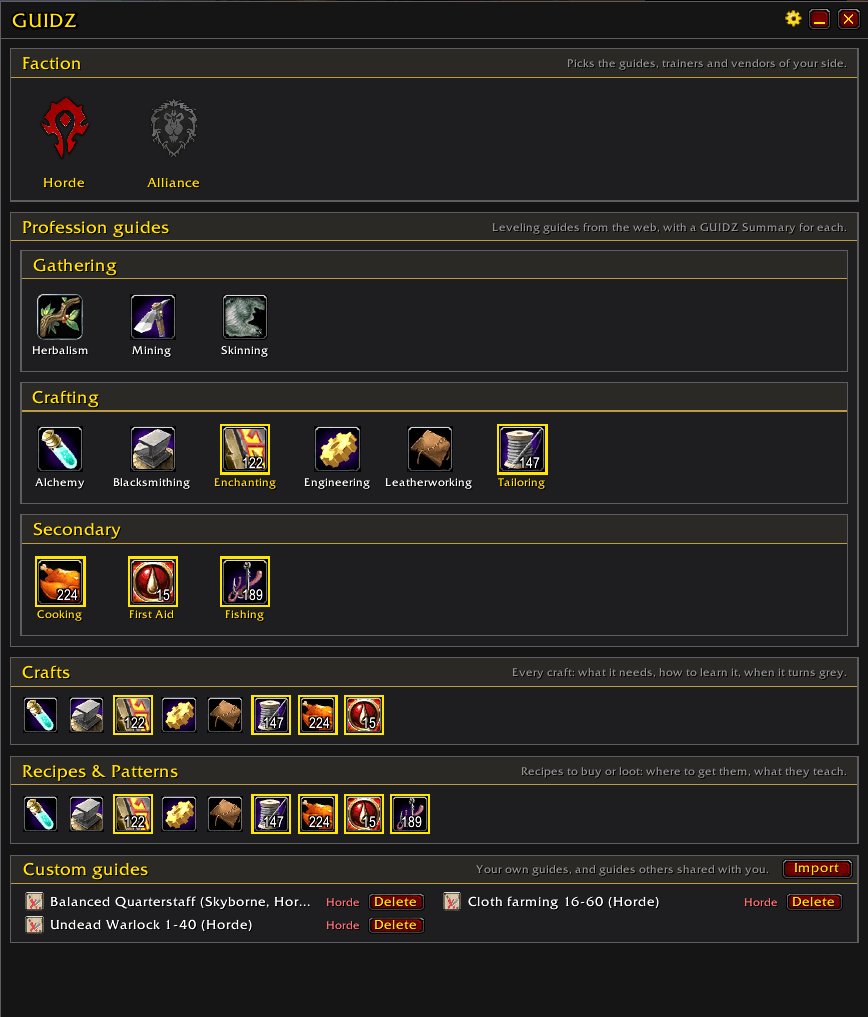
Home page. Pick your faction and a profession. The professions your character has are ringed in gold with your current skill on the icon. Two more rows open the Crafts and Recipes pages.
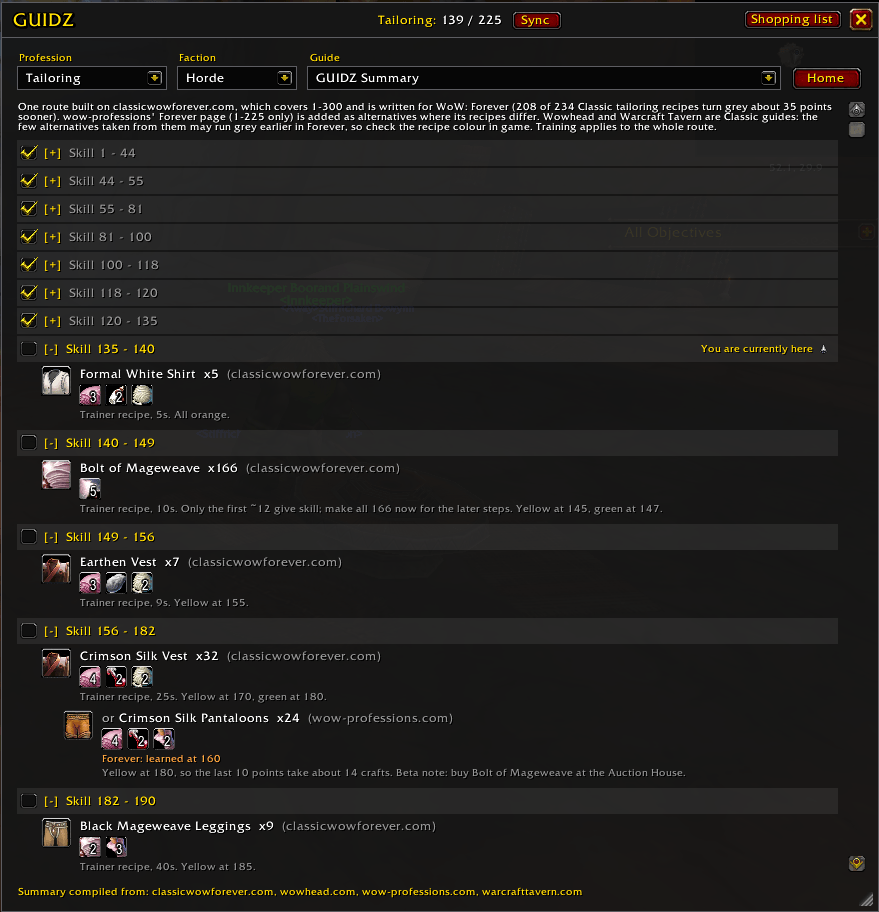
Guide page.
- The guide is split into sections by skill range, each with a checkbox. Tick a section when you are past it and it folds away.
- Progress is kept per profession and per character, not per guide: tick Cooking up to 75 in one guide and every Cooking guide shows it.
- The section your skill falls in is marked You are currently here.
- Your skill is shown at the top and updates as it rises. Sync ticks everything up to your real skill in one click.
- Items show their icon and the game's own tooltip; shift-click puts the link in chat or the item's name in the auction house search, the same as an item in your bags.
- Trainers, vendors and quest givers are clickable: a click sets a map waypoint on them and opens the map.
- Gathering guides show the author's route map as a thumbnail; click it for the full-size view.
- The source, author and date of every guide are always shown under it.
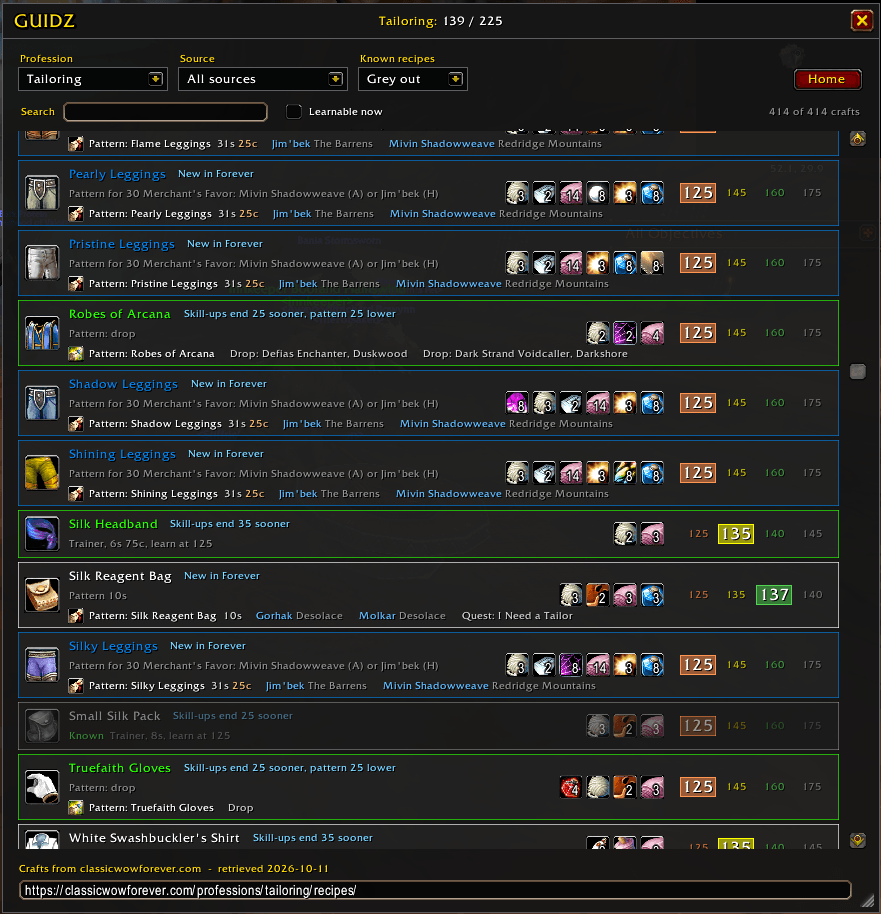
Crafts page. Every craft of a profession: what it makes, its reagents, the skill it is learned at and when it turns yellow, green and grey (the colour that applies at your current skill is highlighted), and where to learn it. A craft taught by a recipe item shows that item with its price and the vendors that sell it. Crafts that are new or changed in WoW: Forever are tagged, with the Classic version in the tooltip.
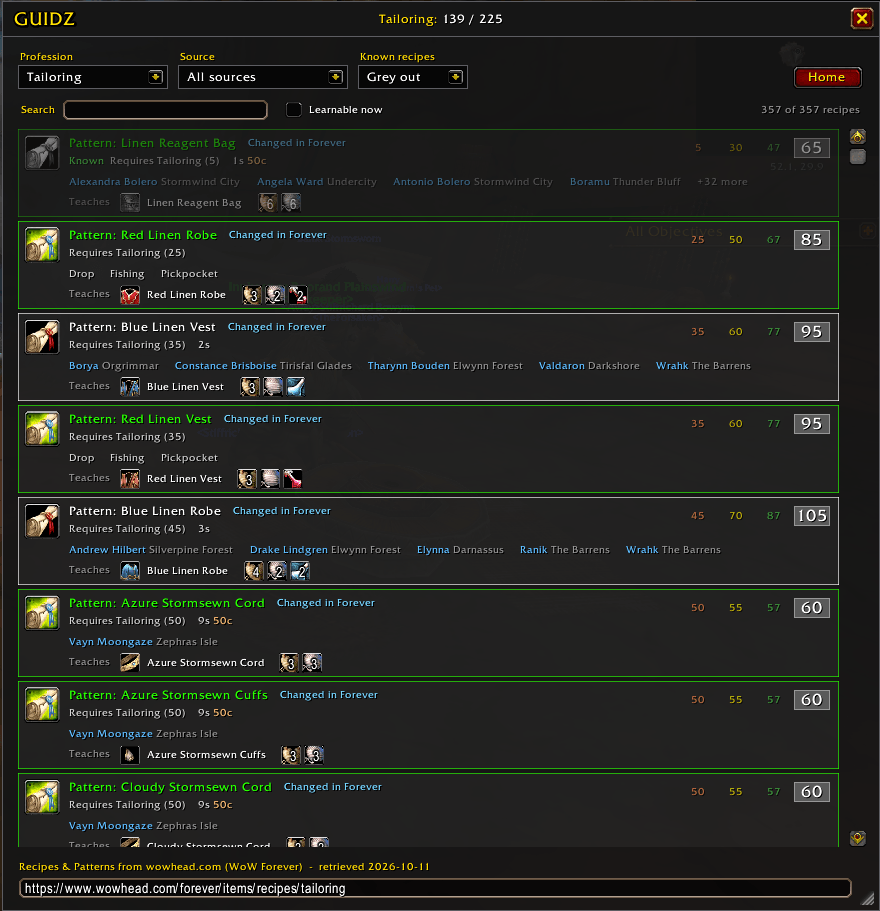
Recipes page. The recipe items of a profession, the "Recipe:", "Pattern:" and "Plans:" you buy or loot: where to get each one, its price, the skill it needs and what it teaches, with that craft's reagents.
Both pages have a search box (name, material, vendor or zone), a source filter, a Learnable now switch, and a choice to show, grey out or hide the recipes you already know (greyed out by default). Vendors in the lists are clickable for a waypoint, the same as in the guides.
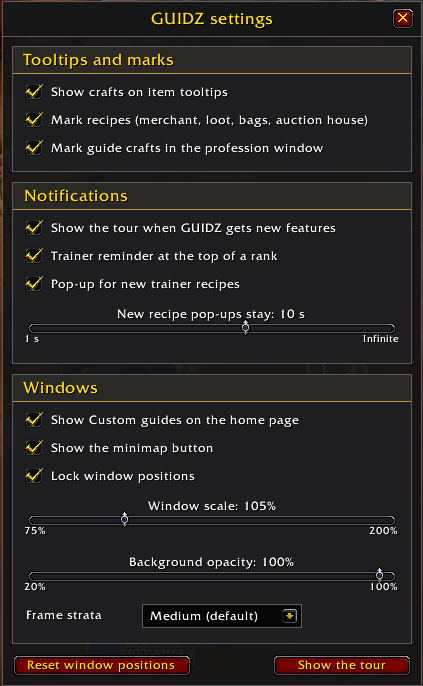
The window is resizable from the corner, remembers its size and reopens on the page you closed it on. A minimap button opens it.
Commands
| Command | |
|---|---|
/guidz |
open or close the window |
/guidz minimap |
hide or show the minimap button |
/guidz reset |
put the windows back in the middle (takes effect after /reload) |
/guidz check |
check every item in the guides against the game and list the ones it does not know |
/guidz notice |
show the "please read first" notice again |
/guidz import |
import a guide: a shared export text or one you wrote as JSON |
Write your own guide
Any guide you like, a profession route or a character leveling route, written as JSON and pasted into the game. It shows in the Custom guides panel of the home page like the other guides, with waypoints, item tooltips and progress.
/guidz import(or Home, Custom guides, Import) and click Example. That puts in a guide with every kind of step GUIDZ can show, which imports as it is: import it to see them all, or change it into your own.- Copy it into a text editor (Notepad is enough), change it, paste it back with Ctrl+V and click Import. A mistake is named with its line and column, or with its section and step ("section 2 step 3: …").
- To change a guide later, import it again: a guide with the same
idreplaces the old one.
To share a guide, open it and click Export: others paste that text into their Import window. The text holds data only; GUIDZ checks every field of it and never runs anything from it.
Writing JSON
JSON is plain text with a few strict rules. An editor that colours JSON and points at mistakes helps a lot: Notepad++ or VS Code (both free), or paste the text into jsonlint.com to check it before you go into the game.
{ }holds named fields,"name": value, separated by commas.[ ]is a list of values, separated by commas.- Text goes in double quotes:
"Orgrimmar". Inside text, write\"for a quote and\nfor a new line; a real line break inside quotes is an error. - Numbers,
trueandfalsego without quotes:"count": 30,"grind": true. Decimals use a point:52.5. - No comma after the last item of a list or the last field:
[1, 2], not[1, 2,]. This is the most common mistake. - Field names are case-sensitive:
"itemId", not"itemid".
Where to get the values:
- Item ids: the number in a Wowhead link,
wowhead.com/classic/item=2589is Linen Cloth,2589. After the import,/guidz checklists the items the game does not know. - Coordinates: the
xandyWowhead shows for an NPC or a place ("Location: 52.8, 49.6"), or the coordinates a map addon shows in game. - Zones: the name as the game writes it (
The Barrens,Stranglethorn Vale,Un'Goro Crater). - Quest ids: the number in a Wowhead quest link (
quest=5725).
A good way to start: click Example, or take a guide you already have and change it a section at a time, importing after each change.
The guide
{
  "profession": "mining",
  "title": "My mining route 1-125",
  "faction": "horde",
  "notes": "Optional text under the title.",
  "source": { "site": "My notes", "author": "Me" },
  "sections": [
    { "from": 1, "to": 65, "steps": [ ... ] },
    { "from": 65, "to": 125, "steps": [ ... ] }
  ]
}| Field | |
|---|---|
profession |
herbalism, mining, skinning, alchemy, blacksmithing, enchanting, engineering, leatherworking, tailoring, cooking, firstaid, fishing, or leveling for a character leveling route |
title |
the name in the guide list |
faction |
horde, alliance or both |
id |
optional; made from the title when left out. A guide with the same id replaces the old one |
notes |
optional |
races |
optional list for a race-specific route: Human, Dwarf, NightElf, Gnome, Orc, Scourge (Undead), Tauren, Troll |
source |
optional: site (required in it), author, url, retrieved |
sections |
skill ranges (character levels for leveling), going up, each with from below to |
Steps
Every step has a type. Any step can also have a note.
text: a line of your own. The only kind a leveling guide has.
{ "type": "text", "text": "Quest around the Crossroads.",
"location": { "zone": "The Barrens", "x": 52.0, "y": 31.5, "name": "Crossroads" } }location(optional) becomes a clickable waypoint.xandyare the map coordinates as/wayor Wowhead show them (0-100);zoneis the zone's name as the game writes it. For a place outside the zones and cities (a dungeon, say) add the game'smapId.questshows a quest line above the text:{ "name": "Lazy Peons", "action": "accept", "id": 5441, "npc": { "name": "Foreman Thazz'ril", "zone": "Durotar", "x": 44.6, "y": 68.6 } }.actionisaccept,turninorprogress;idandnpcare optional.dungeon(a dungeon's name) draws the step as a dungeon block."grind": truedraws it as a grinding spot, with an optionalname.items: up to six item ids shown as icons with their tooltip.
train: { "type": "train", "rank": "Journeyman", "trainer": "Makaru", "location": "Orgrimmar" }.
trainer and location are optional plain text.
gather: { "type": "gather", "zones": ["Durotar"], "items": [2770] }.
The zones to gather in and the item ids you get there.
craft: { "type": "craft", "name": "Bolt of Linen Cloth", "count": 30, "itemId": 2996, "reagents": [{ "itemId": 2589, "count": 2 }] }.
itemId and reagents are optional; with them the shopping list and the
item tooltips work.
Item ids are the ones in Wowhead's links (wowhead.com/classic/item=2770).
/guidz check lists the items the game does not know.
Rules
- Text in Latin-1 only: the game font shows other letters (č, ř, ł…) as
boxes, so they are refused. No
|either. - Route images cannot be imported.
- A step can name NPCs as
"npcs": [{ "id": 3357, "role": "trainer" }]only when GUIDZ already knows that NPC from its own guides; otherwise use a text step with alocation. - Up to 100 imported guides, 100 sections and 2000 steps per guide.
The example
The guide the Example button puts in, also listed in Custom guides from the start (its Delete hides it). It has every kind of step GUIDZ can show: copy it as a starting point.
{
  "profession": "tailoring",
  "title": "Showcase: everything a guide can show",
  "faction": "horde",
  "notes": "A test guide with every kind of step. Paste it into /guidz import.",
  "source": {
    "site": "My notes",
    "author": "Me",
    "url": "https://example.com/my-guide",
    "retrieved": "2026-10-12"
  },
  "sections": [
    {
      "from": 1,
      "to": 50,
      "steps": [
        {
          "type": "train",
          "rank": "Apprentice",
          "trainer": "Josef Gregorian",
          "location": "Undercity",
          "note": "A train step with a clickable trainer (npcs).",
          "npcs": [ { "id": 4576, "role": "trainer" } ]
        },
        {
          "type": "craft",
          "name": "Bolt of Linen Cloth",
          "count": 25,
          "itemId": 2996,
          "reagents": [ { "itemId": 2589, "count": 2 } ],
          "note": "A craft step: item tooltip, reagents and the shopping list."
        },
        {
          "type": "craft",
          "name": "Linen Belt",
          "count": 12,
          "itemId": 7026,
          "reagents": [ { "itemId": 2996, "count": 1 }, { "itemId": 2320, "count": 1 } ],
          "alternative": true,
          "note": "An alternative to the step above."
        }
      ]
    },
    {
      "from": 50,
      "to": 75,
      "steps": [
        {
          "type": "train",
          "rank": "Journeyman",
          "npcs": [ { "id": 4576, "role": "trainer" } ]
        },
        {
          "type": "craft",
          "name": "Simple Kilt",
          "count": 15,
          "itemId": 10047,
          "reagents": [ { "itemId": 2996, "count": 4 }, { "itemId": 2321, "count": 1 } ],
          "option": "Linen route",
          "note": "Variant one: steps with the same option belong together."
        },
        {
          "type": "craft",
          "name": "Bolt of Woolen Cloth",
          "count": 30,
          "itemId": 2997,
          "reagents": [ { "itemId": 2592, "count": 3 } ],
          "option": "Wool route",
          "note": "Variant two."
        }
      ]
    },
    {
      "from": 75,
      "to": 100,
      "steps": [
        {
          "type": "gather",
          "zones": [ "Silverpine Forest", "Hillsbrad Foothills" ],
          "items": [ 2592 ],
          "note": "A gather step: zones and the items you get there."
        },
        {
          "type": "text",
          "text": "A text step with a place: click it for a waypoint.",
          "location": { "zone": "Undercity", "x": 70.4, "y": 30.4, "name": "Tailoring trainer" }
        },
        {
          "type": "text",
          "text": "A text step with item icons.",
          "items": [ 2589, 2592, 4306 ]
        },
        {
          "type": "text",
          "text": "A quest to accept.",
          "quest": {
            "name": "Rude Awakening",
            "action": "accept",
            "id": 363,
            "npc": { "name": "Undertaker Mordo", "zone": "Tirisfal Glades", "x": 30.2, "y": 71.6 }
          }
        },
        {
          "type": "text",
          "text": "A quest you are working on: no icon.",
          "quest": { "name": "Rude Awakening", "action": "progress" }
        },
        {
          "type": "text",
          "text": "A quest to turn in.",
          "quest": {
            "name": "Rude Awakening",
            "action": "turnin",
            "id": 363,
            "npc": { "name": "Shadow Priest Sarvis", "zone": "Tirisfal Glades", "x": 30.8, "y": 66.2 }
          }
        }
      ]
    },
    {
      "from": 100,
      "to": 125,
      "steps": [
        {
          "type": "text",
          "text": "A quest for a dungeon: a small purple tag on the quest line.",
          "quest": {
            "name": "The Power to Destroy...",
            "action": "accept",
            "id": 5725,
            "npc": { "name": "Varimathras", "zone": "Undercity", "x": 56.2, "y": 92.4 }
          },
          "dungeon": "Ragefire Chasm"
        },
        {
          "type": "text",
          "text": "The dungeon run itself: a purple dungeon block.",
          "location": { "zone": "Orgrimmar", "x": 52.8, "y": 49.6, "name": "Ragefire Chasm entrance" },
          "dungeon": "Ragefire Chasm"
        },
        {
          "type": "text",
          "text": "A grinding spot: a red block with its name and item icons.",
          "grind": true,
          "name": "Silk Cloth",
          "items": [ 4306 ],
          "location": { "zone": "Thousand Needles", "x": 43.9, "y": 39.2 }
        }
      ]
    }
  ]
}
Worth knowing
The data reflects the WoW: Forever beta. The beta stops at skill 225, so the guides written for Forever mark 225-300 as untested; that part follows Classic until it is verified. The guides will be refreshed for launch.
Some Forever-only things are text only. Recipes, items and NPCs that exist only in WoW: Forever and have no entry in the data sources are named in the notes, without a tooltip or a waypoint.
Guides are a snapshot. They are fetched when a version is built; a change on the website reaches the game with the next release.
Credits
The guide content belongs to its authors. GUIDZ only presents it in the game, and every guide names its source under it.
- classicwowforever.com: guides and the craft lists
- wow-professions.com
- Wowhead: guides (Skinning by RenataKane) and the recipe item lists
- Warcraft Tavern: guides by Furious, Herbalism and Mining by Nevermore
Install
Drop the GUIDZ folder into Interface/AddOns.
Building from source
The guides live as JSON in guides/. dotnet run tools/build.cs validates
them and writes Data/Guides.lua, Data/Recipes.lua and the route images in
Media/routes/. The route images are not in the repository, so run the build
before testing in game or packaging. See docs/DESIGN.md.
Disclaimer
GUIDZ is provided as is, with no warranty of any kind. Use it at your own risk. The author takes no responsibility for any problem or consequence arising from its use, including anything that happens to your game client, your interface, your saved settings or your account.
License
MIT. The bundled libraries — LibStub, CallbackHandler-1.0, LibDataBroker-1.1 and LibDBIcon-1.0 — keep their own.
GUIDZ Team