promotional bannermobile promotional banner

gShortSkills

Shortens and cleans up Skill gain messages in the chat frame for a more readable and minimalist experience.
gShortSkills_Settings.png

gShortSkills_Settings.png

Description

Buy Me A Coffee


gShortSkills

A clean, minimal profession skill-up tracker for your chat frame.

gShortSkills replaces the default, often cluttered system messages for profession skill increases with a concise, color-coded line. It helps you keep track of your progress without filling your chat history with unnecessary text.

✨ Features

  • Concise Messaging: Replaces the standard "Your skill in [Profession] has increased…" with a short, modern format: S | Profession: +1 75/300.
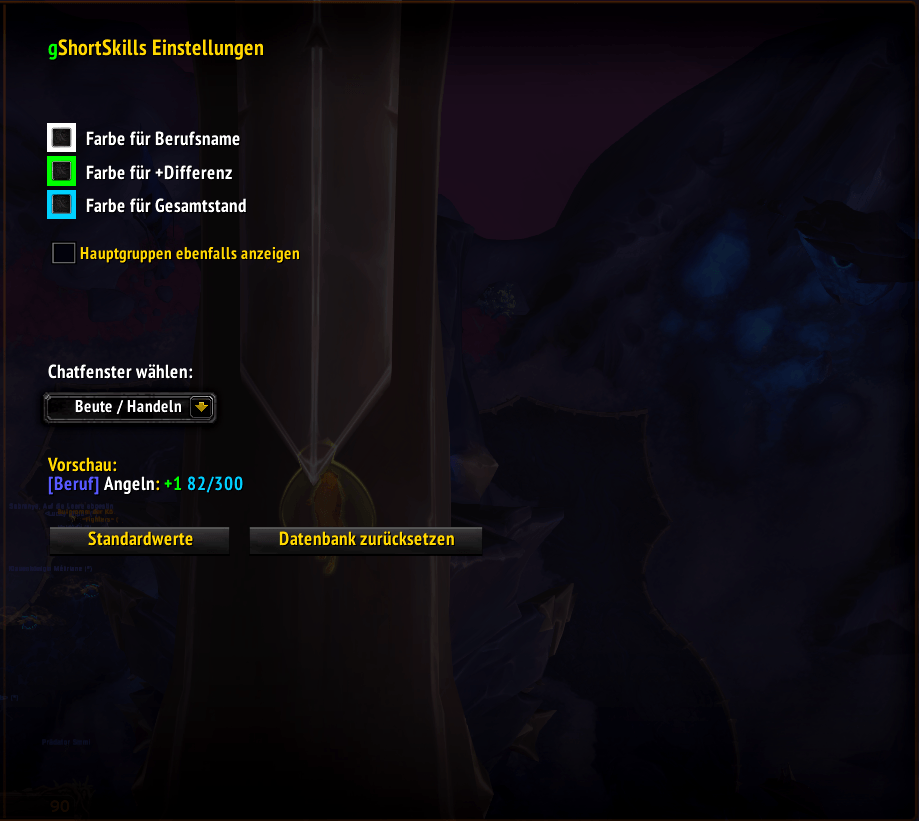
  • Customizable Colors: Adjust the colors for the profession name, the skill gain (+1), and the total progress value to match your UI.
  • Smart Filtering: * Automatically filters out racial traits and non-profession skills.
    • Option to hide "Main Category" spam (e.g., only show "Khaz Algar Tailoring" instead of the generic "Tailoring" header).
  • Multi-Expansion Support: Designed to handle the modern profession system, correctly identifying sub-categories from different expansions.
  • Database Sync: Includes a synchronization tool to ensure your maximum skill levels are always accurate, even when Blizzard's API is being stubborn.

🛠️ Slash Commands

  • /dumpprof: Opens a debug and synchronization window. It scans your known professions and updates the internal database to ensure max-skill values are correct.
  • /profinfo [ID]: Provides technical API information for a specific skill line ID (useful for debugging or curious users).

⚙️ Configuration

You can find the settings panel under Options > AddOns > gShortSkills. Here you can:

  1. Change the colors for every part of the message.
  2. Choose which Chat Frame the messages should appear in.
  3. Toggle the display of main profession categories.
  4. Reset the profession database if needed.

Installation

  1. Download the ZIP file.
  2. Extract the gShortSkills folder into your World of Warcraft\_retail_\Interface\AddOns directory.
  3. Log in and start crafting!

Developed to keep your chat clean and your crafting efficient.

The gShortSkills Team

profile avatar
Owner
  • 16
    Projects
  • 2.9K
    Downloads
Donate

More from gz2k2View all

  • gShortHouse project image

    gShortHouse

    • 35
    • Addons

    Shortens and cleans up Housing-XP gain messages in the chat frame for a more readable and minimalist experience.

    • 35
    • April 26, 2026
    • Addons
    • +1
  • gAlreadyOwned project image

    gAlreadyOwned

    • 57
    • Addons

    shows already owned mounts, pets, toys, ensembles, transmogs at Merchant and Auction House

    • 57
    • April 26, 2026
    • Addons
    • +4
  • gSpellSounds project image

    gSpellSounds

    • 63
    • Addons

    Why juggle hundreds of addons just for spell sounds? This lightweight tool lets you manage everything in one place. Designed for "plug-and-play" with your class abilities, it also offers deep customization for custom audio files and specific IDs.

    • 63
    • April 24, 2026
    • Addons
    • +1
  • gTalkingHead project image

    gTalkingHead

    • 142
    • Addons

    Another Talking Head mod. You can scale, hide single elements and mute or just completly disable the "Talking Head"

    • 142
    • April 24, 2026
    • Addons
    • +4
  • gShortHouse project image

    gShortHouse

    • 35
    • Addons

    Shortens and cleans up Housing-XP gain messages in the chat frame for a more readable and minimalist experience.

    • 35
    • April 26, 2026
    • Addons
    • +1
  • gAlreadyOwned project image

    gAlreadyOwned

    • 57
    • Addons

    shows already owned mounts, pets, toys, ensembles, transmogs at Merchant and Auction House

    • 57
    • April 26, 2026
    • Addons
    • +4
  • gSpellSounds project image

    gSpellSounds

    • 63
    • Addons

    Why juggle hundreds of addons just for spell sounds? This lightweight tool lets you manage everything in one place. Designed for "plug-and-play" with your class abilities, it also offers deep customization for custom audio files and specific IDs.

    • 63
    • April 24, 2026
    • Addons
    • +1
  • gTalkingHead project image

    gTalkingHead

    • 142
    • Addons

    Another Talking Head mod. You can scale, hide single elements and mute or just completly disable the "Talking Head"

    • 142
    • April 24, 2026
    • Addons
    • +4