Gryphon Loot
- By
GryphonLoot improves Blizzard's own loot window and roll frames instead of replacing them.

See completed loot rolls, so you can decide what to roll
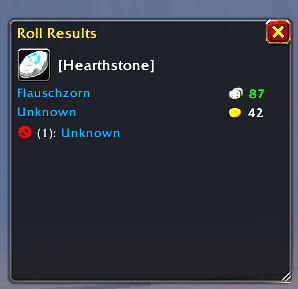
Roll results overview, just like /loot but you can configure it
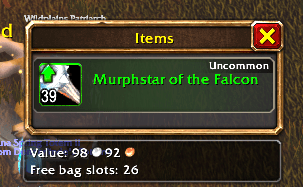
Enhanced loot window
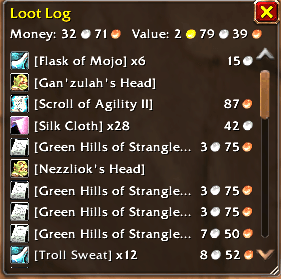
Personal loot log - want to now what lootet this session or forever?
Description
GryphonLoot
Better looting for World of Warcraft: Forever.
GryphonLoot improves Blizzard's own loot window and roll frames instead of replacing them.
Features
Loot window
- Item level on the icon of equipment
- Green arrow for upgrades over what you wear, red tint for items you cannot use
- Below the window: vendor value of the items, free bag slots (red if not everything fits) and a Loot All button
- Each part can be turned off in the options
Choices of the group
- See who chose need, greed or pass next to each roll frame, with all names in the tooltip
Results window
- A small scrolling window keeps the rolls grouped by item, newest first
- A roll already shows there after your own choice, with the players still to choose
- Drag it or size it with the mouse, also in combat, or use Edit Mode
- Edit Mode sets its size, padding, opacity, background, text size, item icons and class colors, per layout
- The window can close by itself after a time of your choice
Both are on by default; turn them off in the addon options or with /gryphonloot rolls off and
/gryphonloot results off, per character.
Loot log
- Records the items (also won rolls) and money you loot, per character, until you reset it
- A small window lists them newest first with money and vendor value; drag it, size it or use Edit Mode
- Reset it in the options, with
/gryphonloot log reset, or automatically on each login /gryphonloot logshows it,/gryphonloot log offstops recording
Options
Options > AddOns > GryphonLoot, or /gryphonloot options.
Slash commands
/gryphonloot– help/gryphonloot options– open the addon options/gryphonloot notify on|off– automatic messages/gryphonloot rolls on|off– choices of the group next to the roll frames/gryphonloot results on|off|test– window with the results of loot rolls/gryphonloot log [on|off|reset]– loot log
Gryphon Loot Team