Gryphon Threat
- By
A threat meter for World of Warcraft Retail that looks like the built-in damage meter.
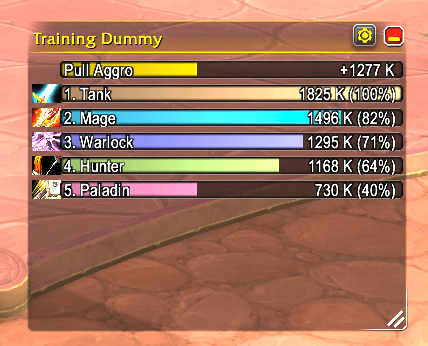
Each group member with class color, class icon, threat and percentage, highest first. The pull aggro bar on top shows how much threat you can still do before you pull aggro and turns from green to red as you get closer.
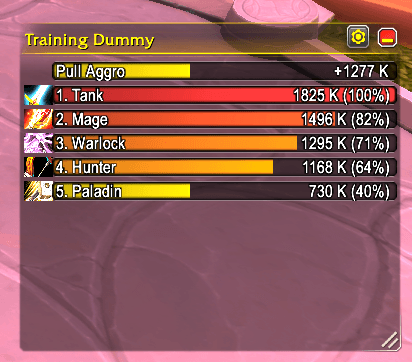
With class colors turned off, every bar shows how close the unit is to pulling aggro: from green over yellow to red. The tank with aggro is red, the paladin at 40 % still yellow. The pull aggro bar on top uses the same colors.
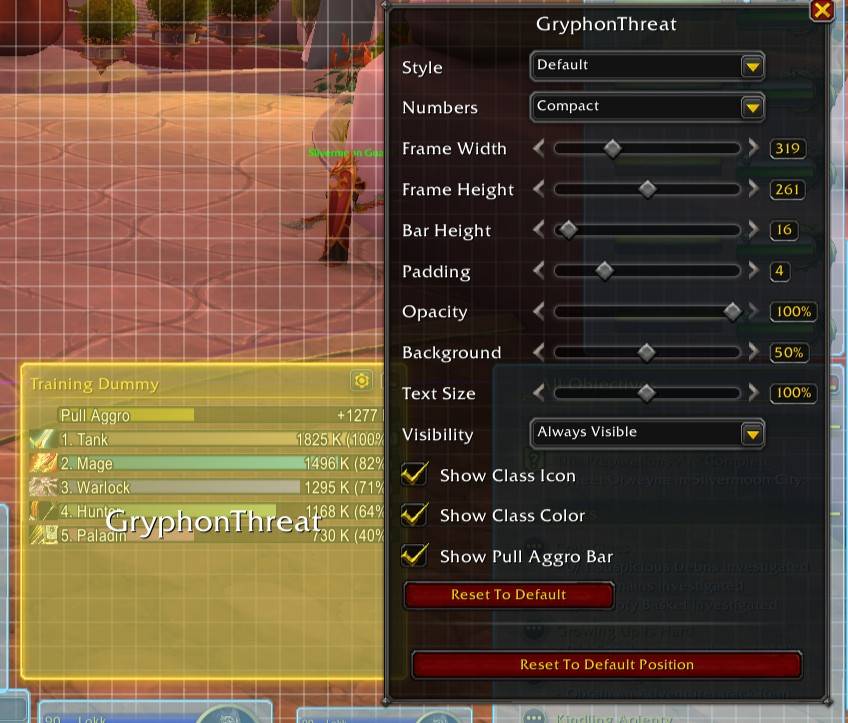
The window is part of Blizzard's Edit Mode with the settings of the damage meter: style, numbers, size, bar height, padding, opacity, background, text size, visibility, class icons, class colors and the pull aggro bar. Saved per Edit Mode layout
Description
GryphonThreat
A threat meter for World of Warcraft Retail that looks like the built-in damage meter.
GryphonThreat shows who has aggro on your target and how close everyone else is to pulling it, in a window that fits right next to Blizzard's damage meter: same header, same bars, same Edit Mode settings.
Features
Threat window
- One bar for each member of your group and their pets, highest threat first
- Class colors and class icons, 1. Name and threat (percent), just like the damage meter
- The bar shows how close a unit is to pulling aggro (100 % = has aggro)
- The title shows the name of your target
- Your own bar stays visible in large groups: if you are below the visible bars, the last one shows you
Pull aggro bar
While someone else has aggro, the first bar shows how much threat you can still do before you pull it:
- 110 % of the tank's threat in melee range, 130 % at range
- Fills up and turns from green over yellow to red as you get closer
- Can be turned off in Edit Mode
Edit Mode
The window is part of Blizzard's Edit Mode (Esc > Edit Mode) and has the settings of the damage meter:
- Style: default, bordered or thin
- Numbers: minimal, compact or complete
- Frame width and height, bar height, padding
- Opacity, background and text size
- Visibility: always, in combat, in group or hidden
- Class icons, class colors and the pull aggro bar on or off
Settings and position are saved per Edit Mode layout. While you preview the style, opacity or background, the selection overlay hides, just like for the damage meter.
Window
- Move it, resize it with the handle in the bottom right corner, minimize it in the header
- Lock or hide it in the menu of the gear button
- Test mode with sample bars to place the window without a fight; Edit Mode shows them too
Slash commands
| Command | Description |
|---|---|
/gryphonthreat or /gthreat |
Show all commands |
/gryphonthreat show / hide |
Show or hide the window |
/gryphonthreat lock |
Lock or unlock the window |
/gryphonthreat reset |
Reset position and size (current Edit Mode layout) |
/gryphonthreat test |
Show sample bars |
/gryphonthreat notify on\|off |
Turn the login message of this character on or off |
Good to know
- Supports Retail. WoW Forever is planned.
- Only the threat on your own target is shown, not on the target of a friendly target.
- In restricted content, Blizzard makes threat values secret. The window then shows the percentage only and keeps the group order.
- The window can not be changed in Edit Mode during combat.
- Languages: English, German, French.
Feedback & source code
Found a bug or have an idea? Please open an issue on GitHub: github.com/Clausi/gryphonThreat/issues
Source code and changelog: github.com/Clausi/gryphonThreat
Gryphon Threat Team