GroupFinder(魔兽集合石)
- By
GroupFinder enhances group finding and Mythic+ management in WoW Retail with advanced filters, recruitment tools, specialization displays, Warband tracking, keystone information, and Great Vault progress.
GroupFinder-Info-寻æ¾éä¼.webp
GroupFinder-Info-ç³è¯·äººç±»å.webp
GroupFinder-Info-æ¥è¯¢è§è²ä¿¡æ¯.webp
GroupFinder-Info-è§è².webp

gf_info_floating.png
Description
GroupFinder
GroupFinder is a Premade Groups enhancement addon for retail World of Warcraft. Built on Blizzard's native Premade Groups system, it offers Premade Groups, Mythic+, and Seasonal Raids modes, bringing together group searches and filters, listing and applicant management, specialization displays, player tags, and activity favorites. See group compositions and recruitment requirements at a glance.
Key benefits: No ads · No promotional pop-ups · No errors · Low resource usage · Fast response · Quiet in combat
Slash command: /GF
Release Policy Update
Effective immediately, GroupFinder's release policy is changing:
Stable releases will receive essential bug fixes only. All new features and improvements to existing features will be developed and released through beta builds, helping prevent feature changes from disrupting the experience for players using the stable release.
Future development will refocus on the addon's core purpose. Highly specific requests from a small number of players will no longer be the main driver of development.
Some recent improvements have drifted away from the addon's original goals: preserving the native WoW experience, welcoming new players, simplifying interactions, lowering the learning curve, and keeping configuration to a minimum.
If you're excited about GroupFinder and would like to help test new builds, suggest ideas, and share feedback, you're welcome to join our community group: 66872741.
Group Modes · Switch Views and See Your Composition
Choose from Premade Groups, Mythic+, and Seasonal Raids. Premade Groups mode lets you find and list groups for a wide range of activities, while Mythic+ mode brings together seasonal dungeon filters, character management, and keystone tools. The dedicated raid mode is planned for World of Warcraft Patch 12.1.5. In the meantime, you can find and list raid groups through Premade Groups mode.
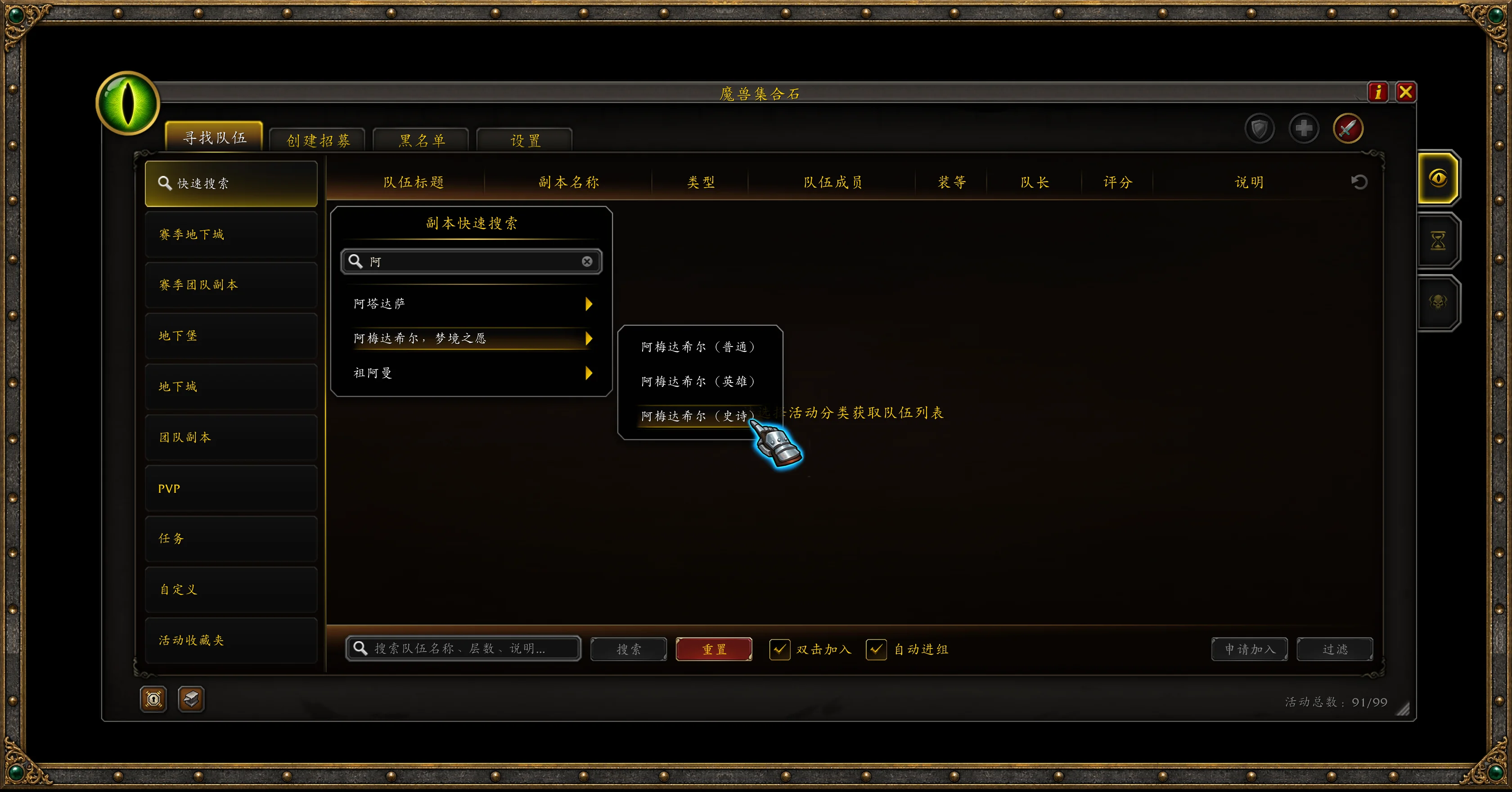
In Premade Groups mode, right-click a supported top-level category to search its group listings together, instead of switching between individual instances.
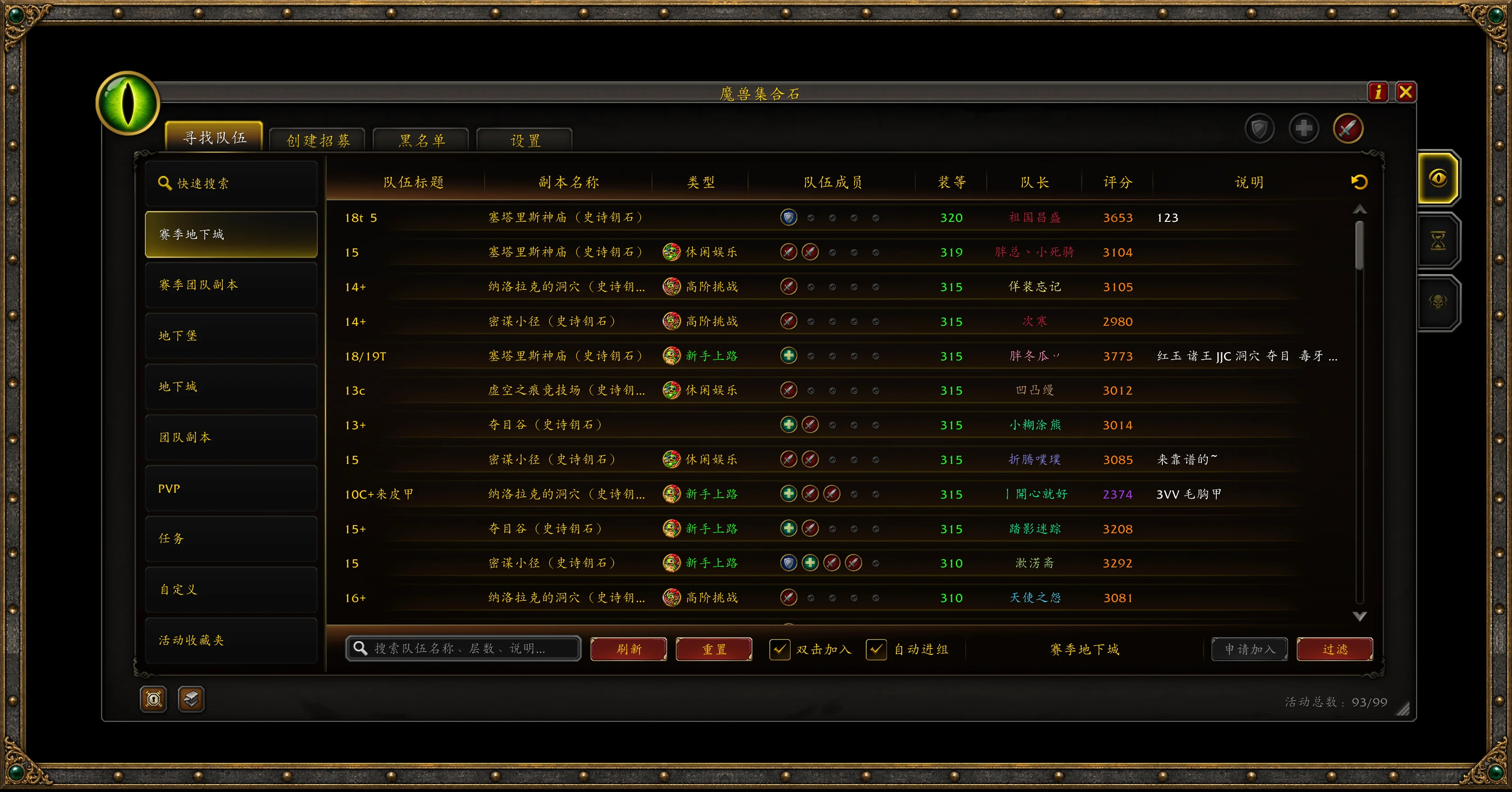
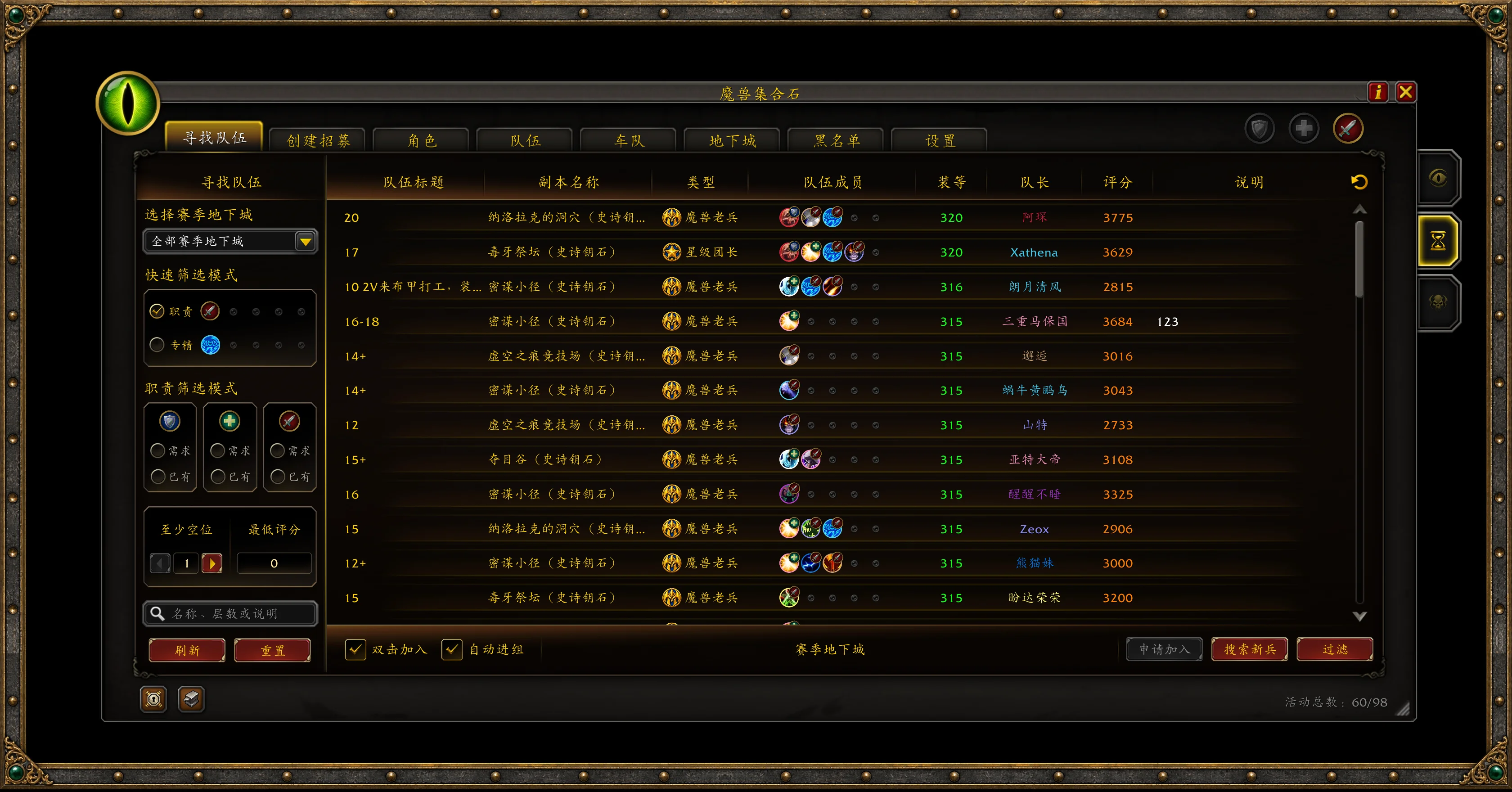
Specialization view: Go to Settings → List styles → List mode → Group member mode and select Specialization mode (standard) to display members' specs with role badges. Members are ordered by tank, healer, and DPS, so you can check the group's composition before applying.
Find a Group · Filter for the Right Fit
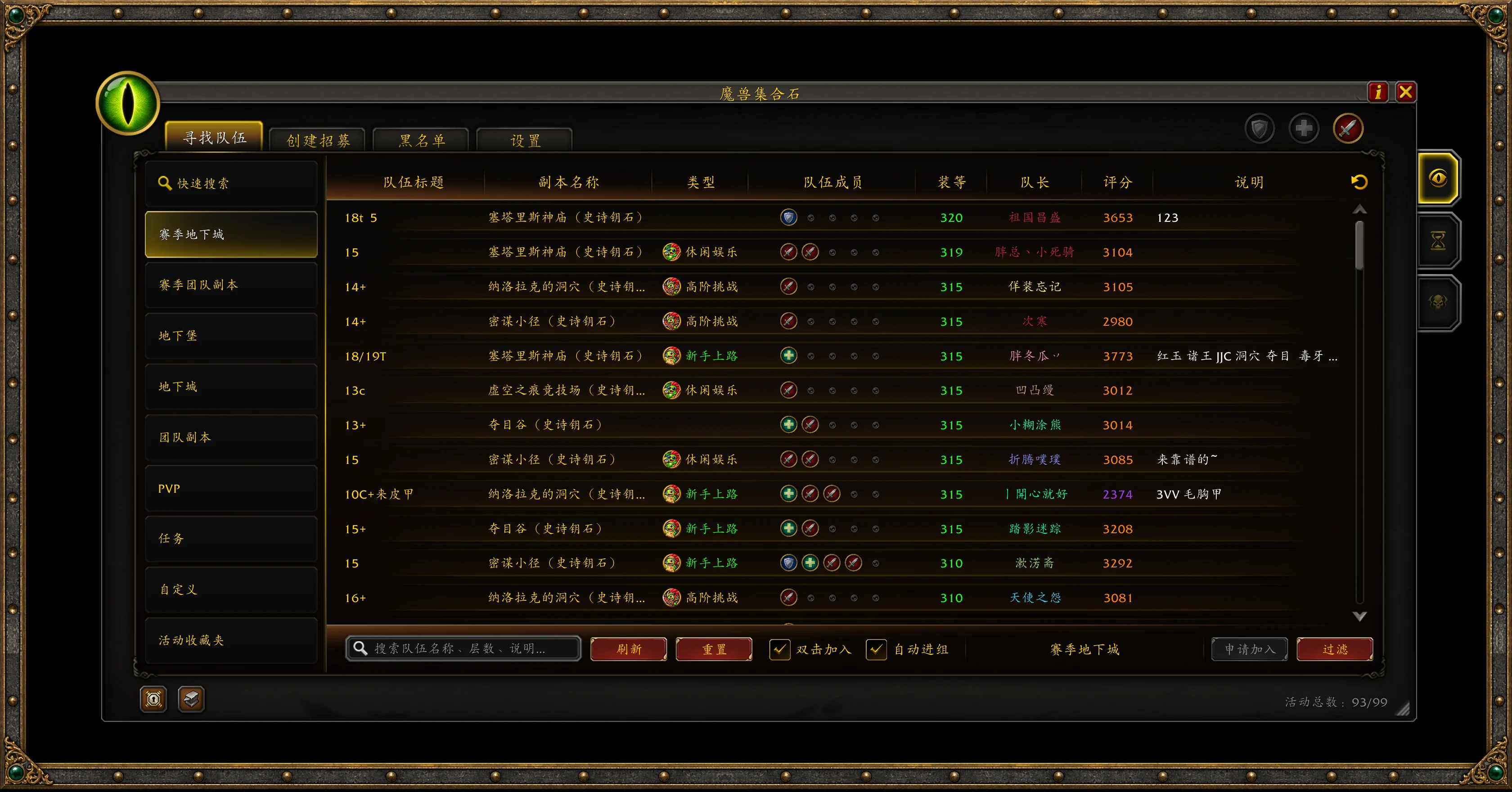
Browse clearly organized categories for dungeons, raids, Delves, PvP, quests, and custom activities. Listing titles, instances, group compositions, item level requirements, leader ratings, and descriptions appear together for easy browsing and comparison.
In Mythic+ mode, select multiple seasonal dungeons and combine filters for roles, open slots, and rating. Whether you're applying solo or with friends, match the group's remaining slots against your selected application roles or the roles associated with your current specs.
Advanced filters also include playstyle, Bloodlust/Heroism availability, voice chat, and more. Minimum admission uses the lowest equipped item level in your current party to filter out listings with requirements above that value. With double-click applications enabled, double-click a listing to apply. Applied, declined, and full groups are clearly marked.
Quick Search & Activity Favorites · Keep Your Regular Runs Within Reach
Enter an instance name or keyword to find the relevant instance and difficulty, then browse groups or start a listing. Whether you're pushing seasonal keys, farming older content, or hunting achievements, spend less time digging through expansion menus.
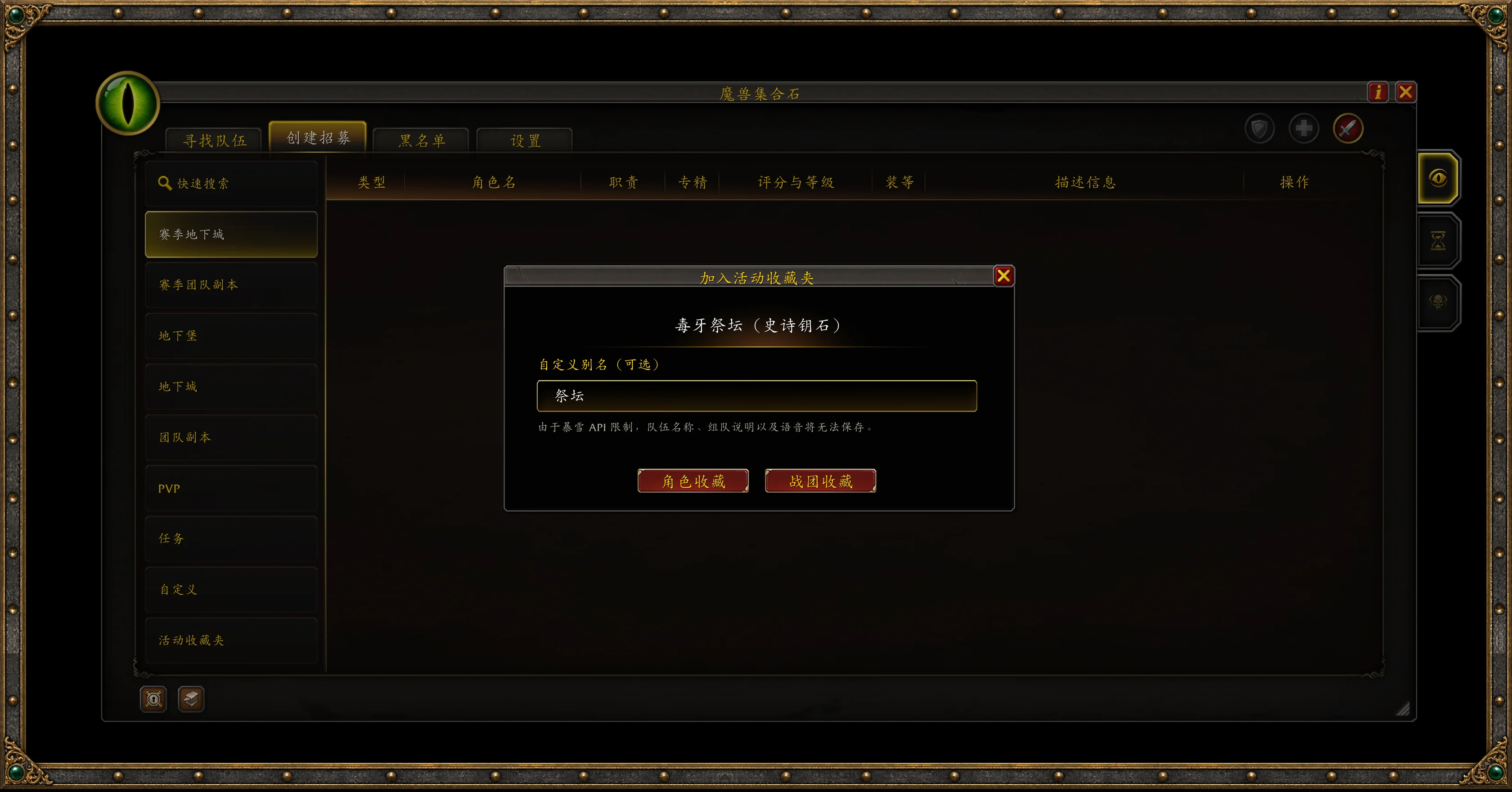
Save frequently played activities to your favorites with a custom name, playstyle, item level requirement, and rating requirement. Use a favorite to search for that activity or restore your usual settings when creating a listing.
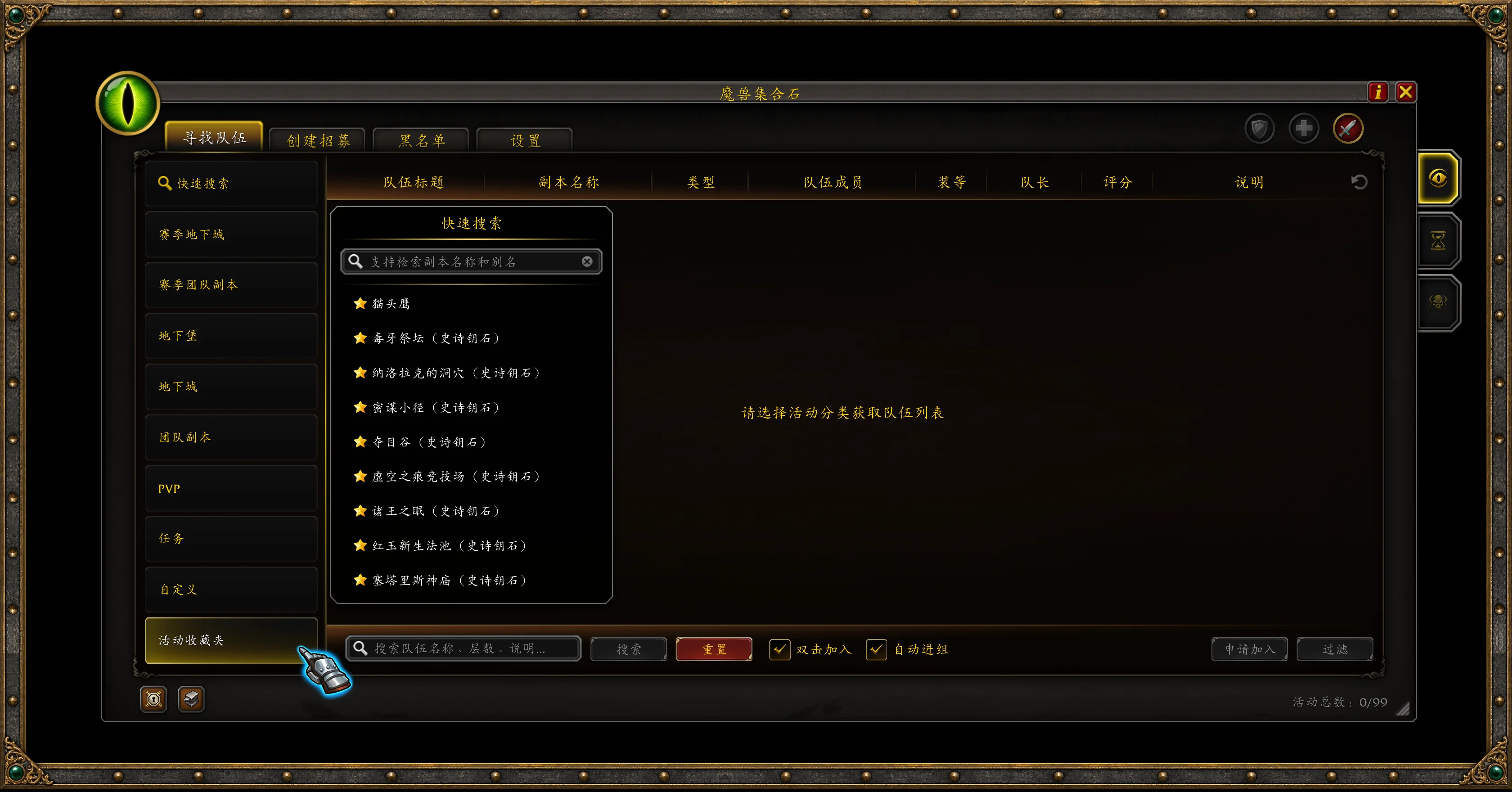
Choose Character Favorite to keep an activity specific to one character, or Warband Favorite to share it across characters on the same account. Search favorites by instance name or custom name to quickly find your next key push or regular run.
Listings & Character Profiles · Recruit with the Information You Need
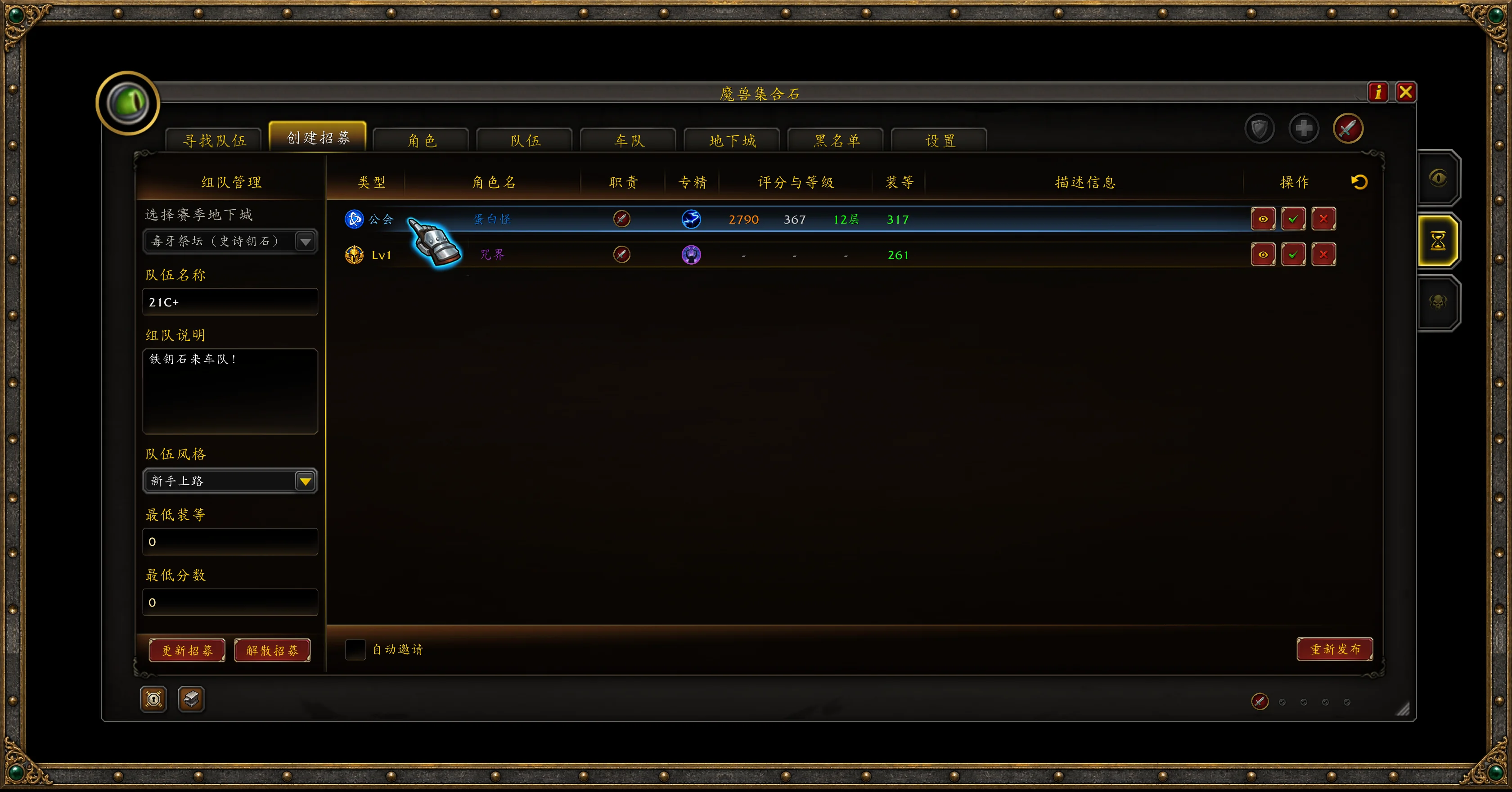
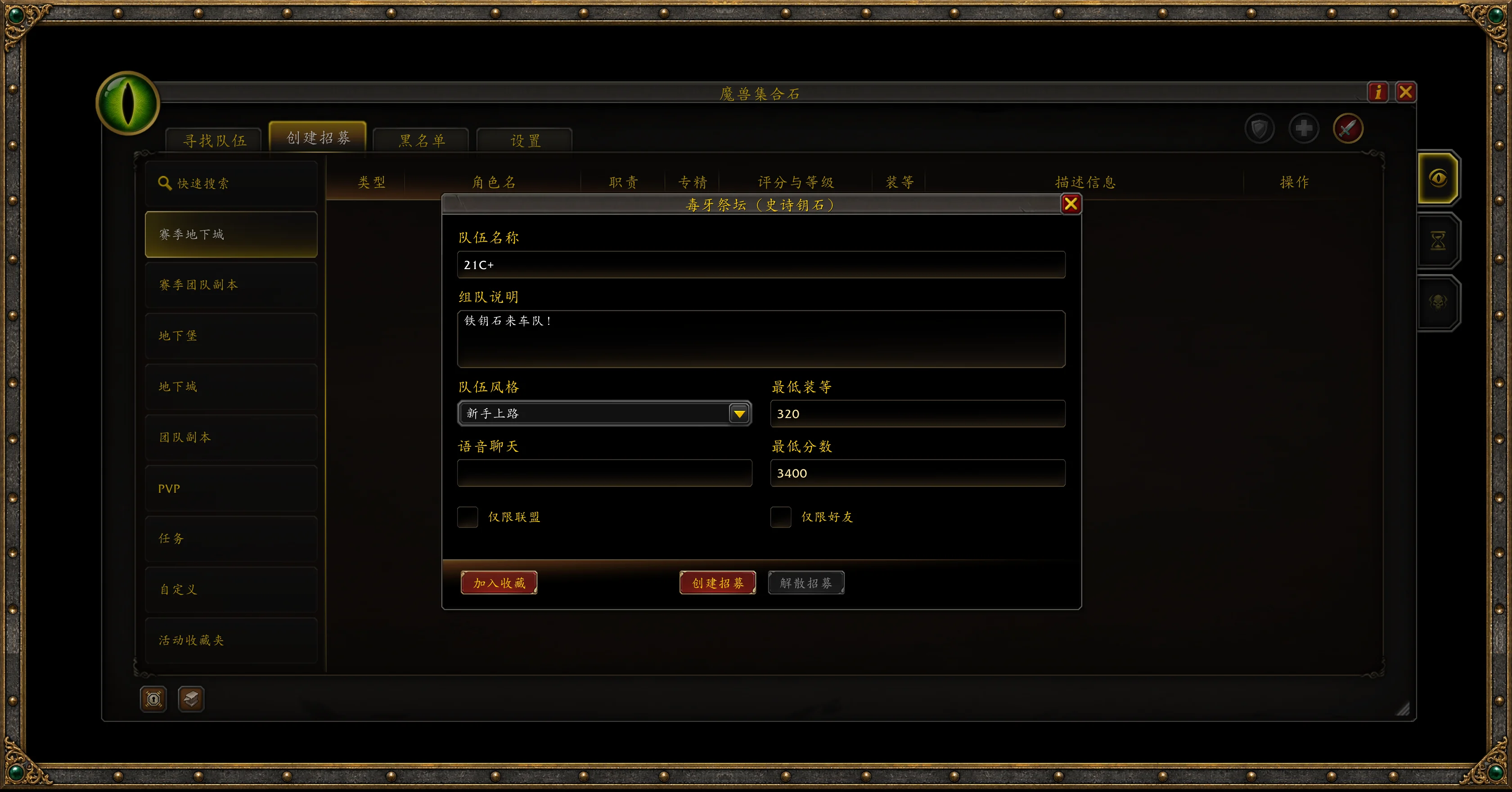
Set your group name, description, playstyle, and entry requirements in one place. Create, update, relist, or remove your listing from the same interface.
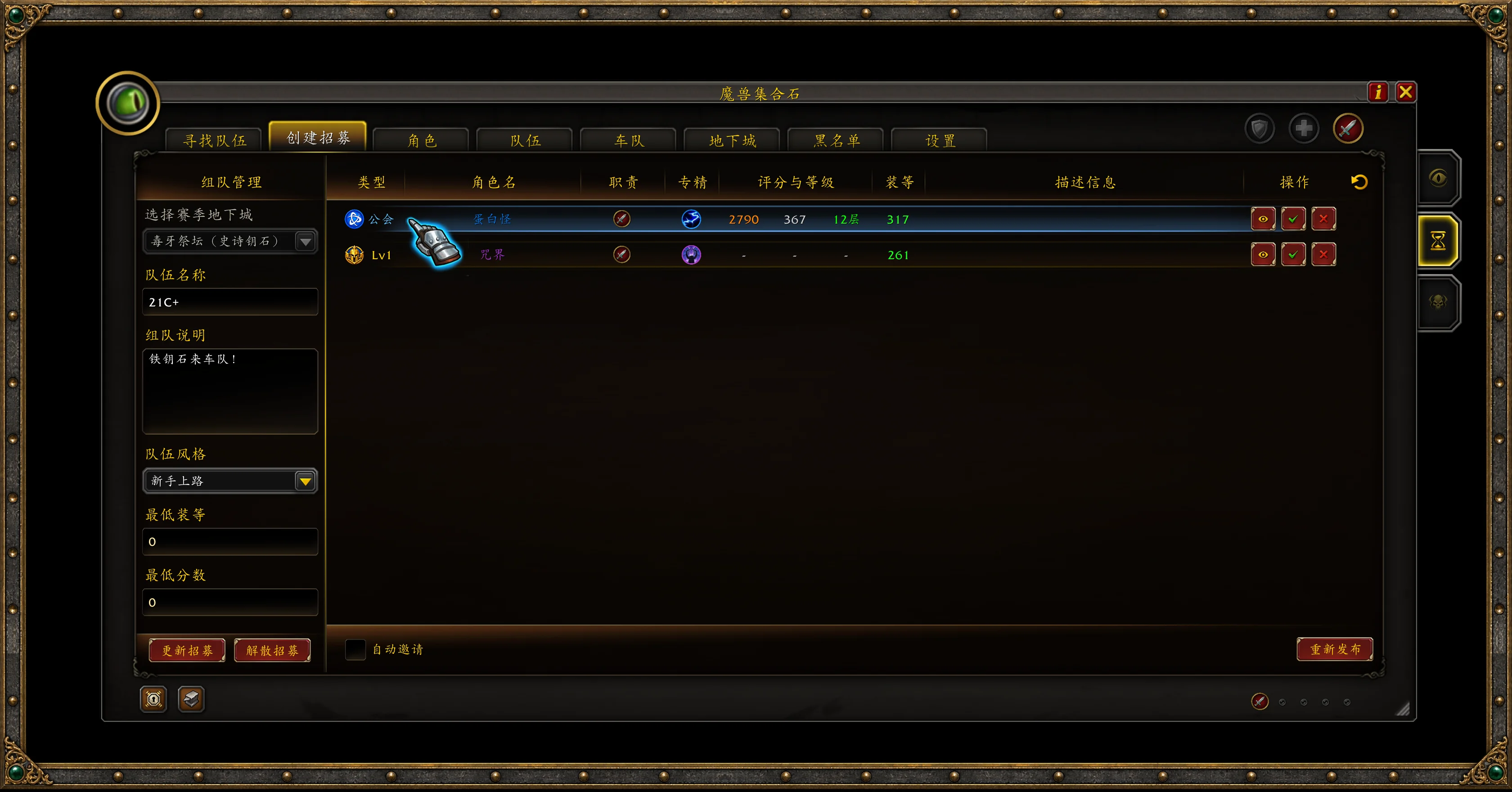
See each applicant's role, spec, rating, item level, and note directly in the list. When several players apply together, inspect each member's setup before inviting or declining the entire party, making it easier to decide whether they fit your group.
Group and applicant lists can display tags for friends, guildmates, blacklisted players, and Mythic+ leavers. Groups containing friends or guildmates can be prioritized. By default, blue highlights friend connections, while red flags blacklisted players or leavers. With NetEase player status lookups enabled in Mythic+ mode, groups containing newcomers can also be highlighted in green.
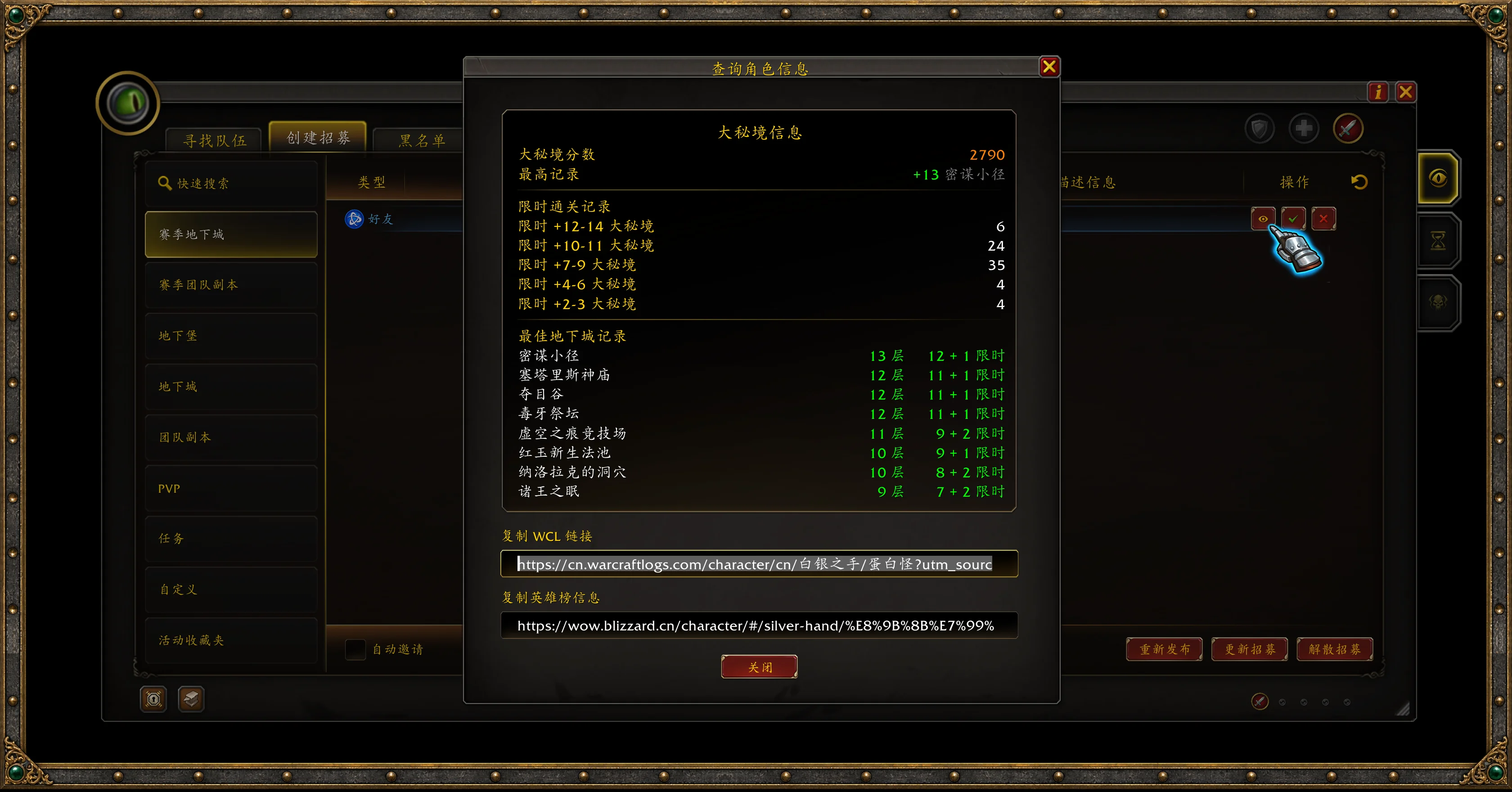
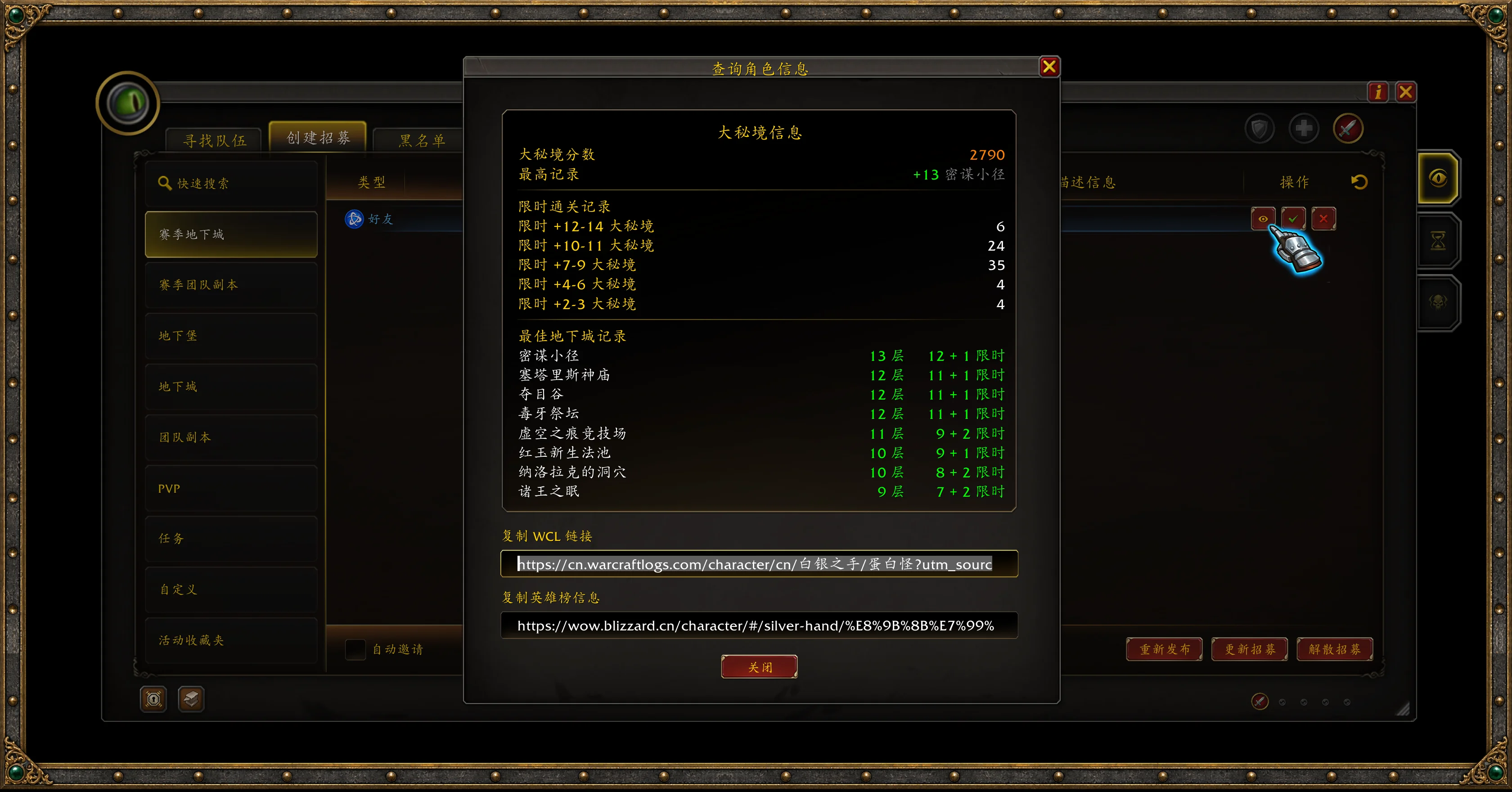
Use the profile button to view character information and copy Warcraft Logs (WCL) or Armory links. With Raider.IO, Archon Tooltip, or the relevant supported addon installed and profile data available, you can also view additional Mythic+ or raid information to help assess applicants.
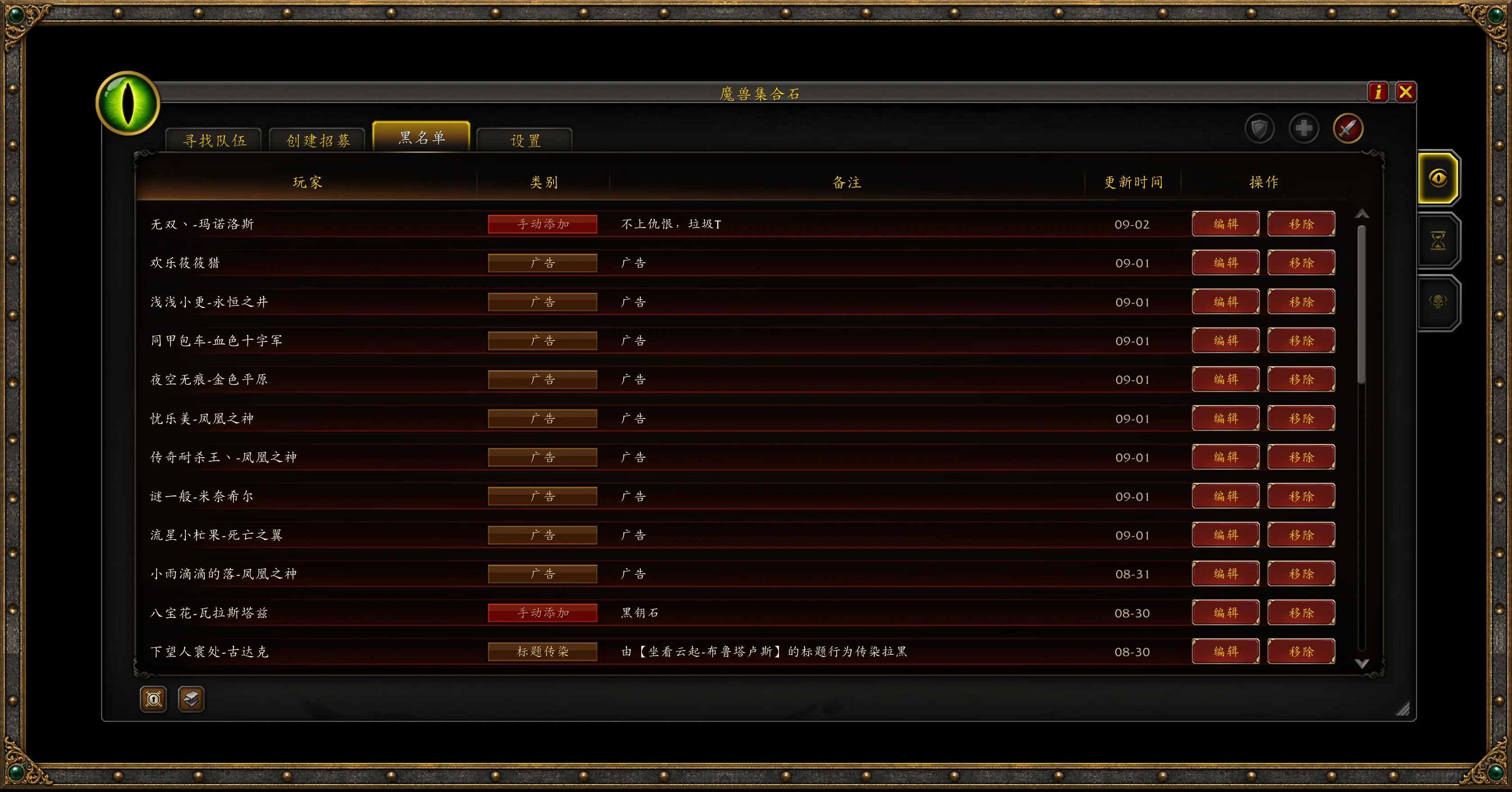
Blacklist · Filter Unwanted Listings and Keep Player Notes
Add players you'd rather not group with again to your blacklist and leave a note. Repeated advertising listings can also be blocked in bulk by title.
Listings that match your blocking rules are hidden. Groups with an identified blacklisted member receive a prominent warning. View, edit, or remove entries whenever you need to review your notes or update the list.
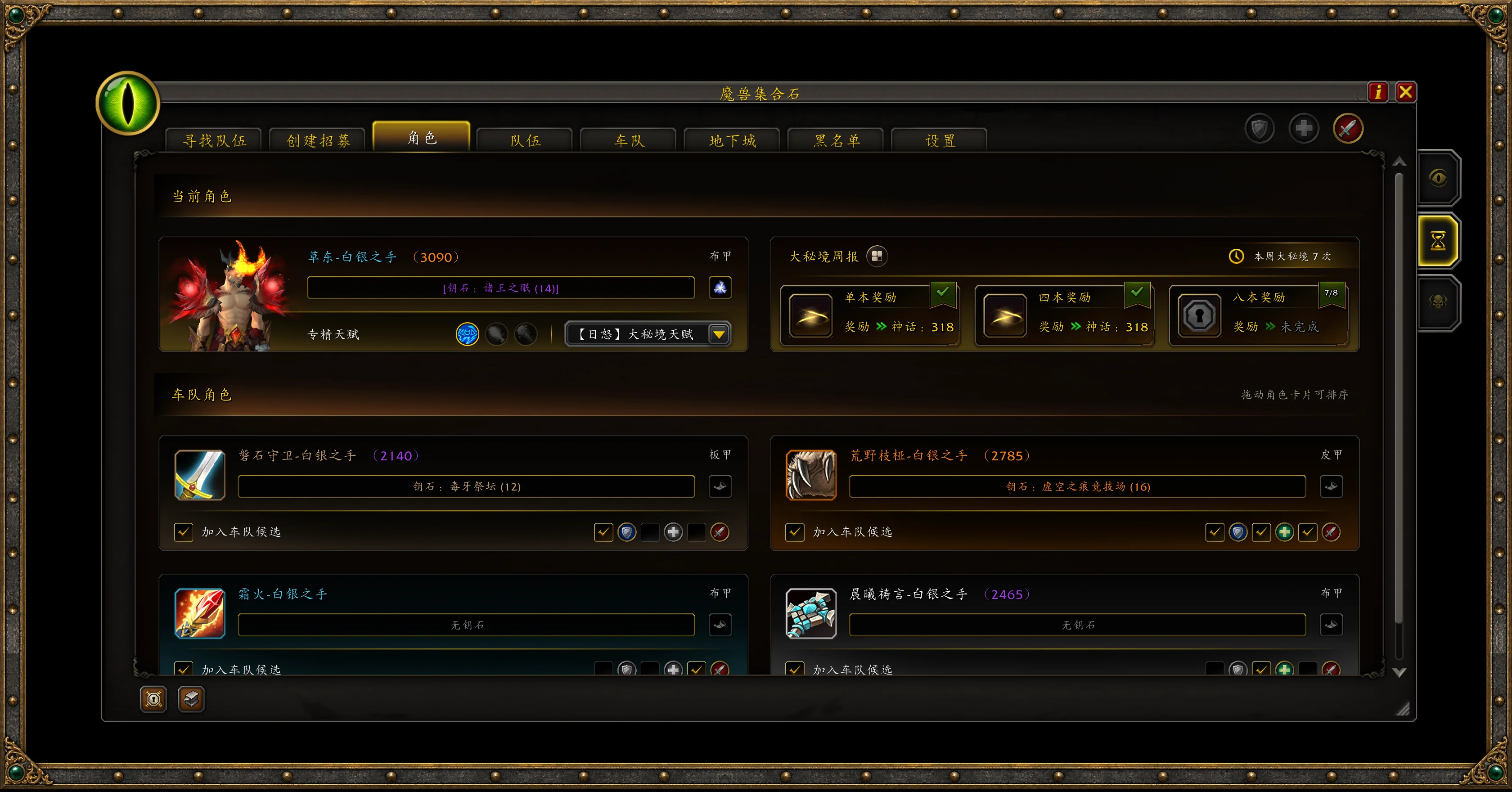
Characters & Weekly Progress · Track Your Keys and Great Vault
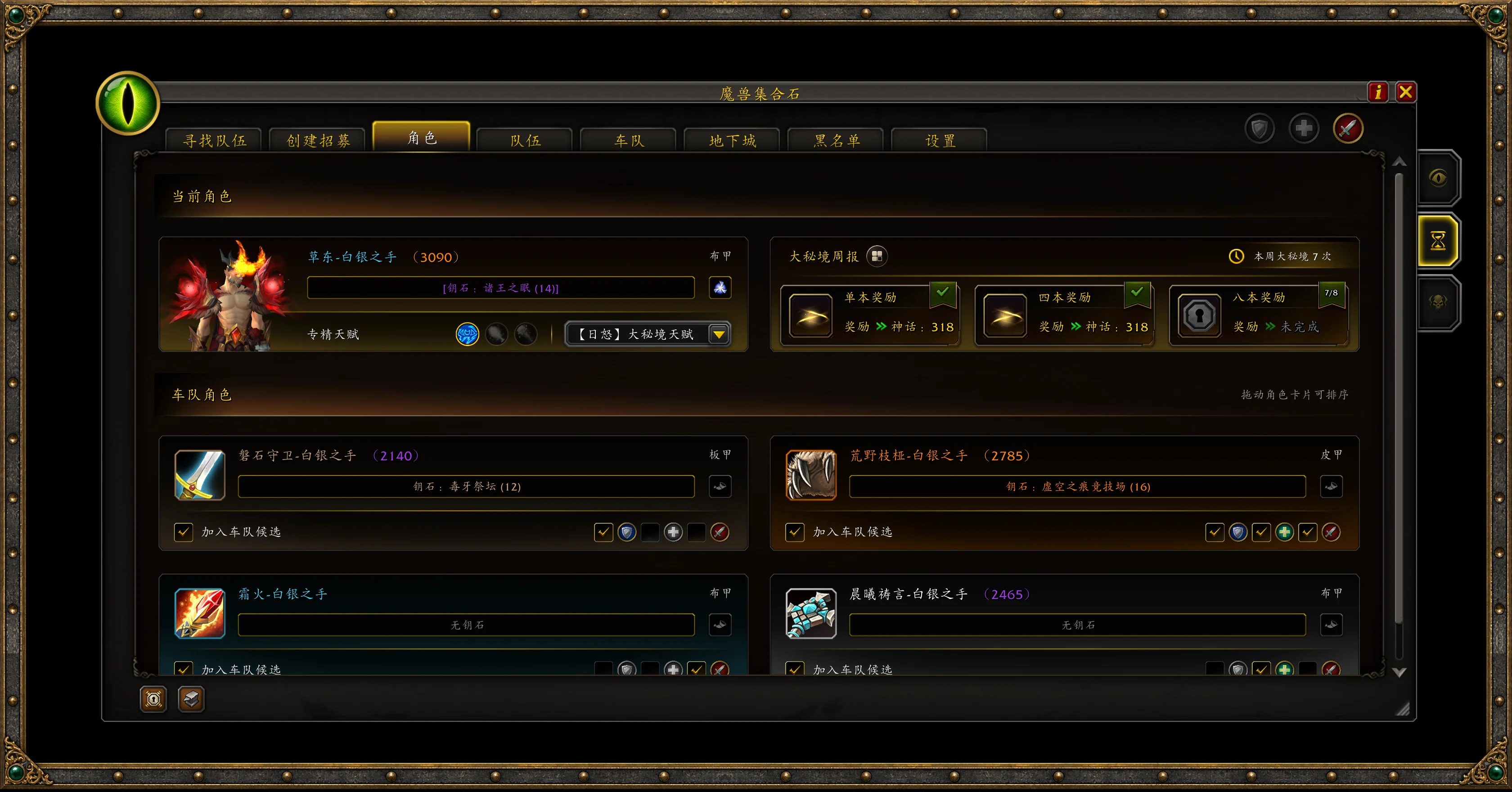
See your current character's keystone, seasonal Mythic+ rating, weekly dungeon progress, and Great Vault progress in one place. The Characters tab shows your completed runs, progress toward the next reward slot, and season-best runs for each dungeon.
Saved Warband characters appear as cards, letting you compare their keys, ratings, and available roles. Drag cards to reorder them and choose which alts to include as candidates for your premade group. On your current character, you can also quickly switch specs and select saved talent loadouts before heading out.
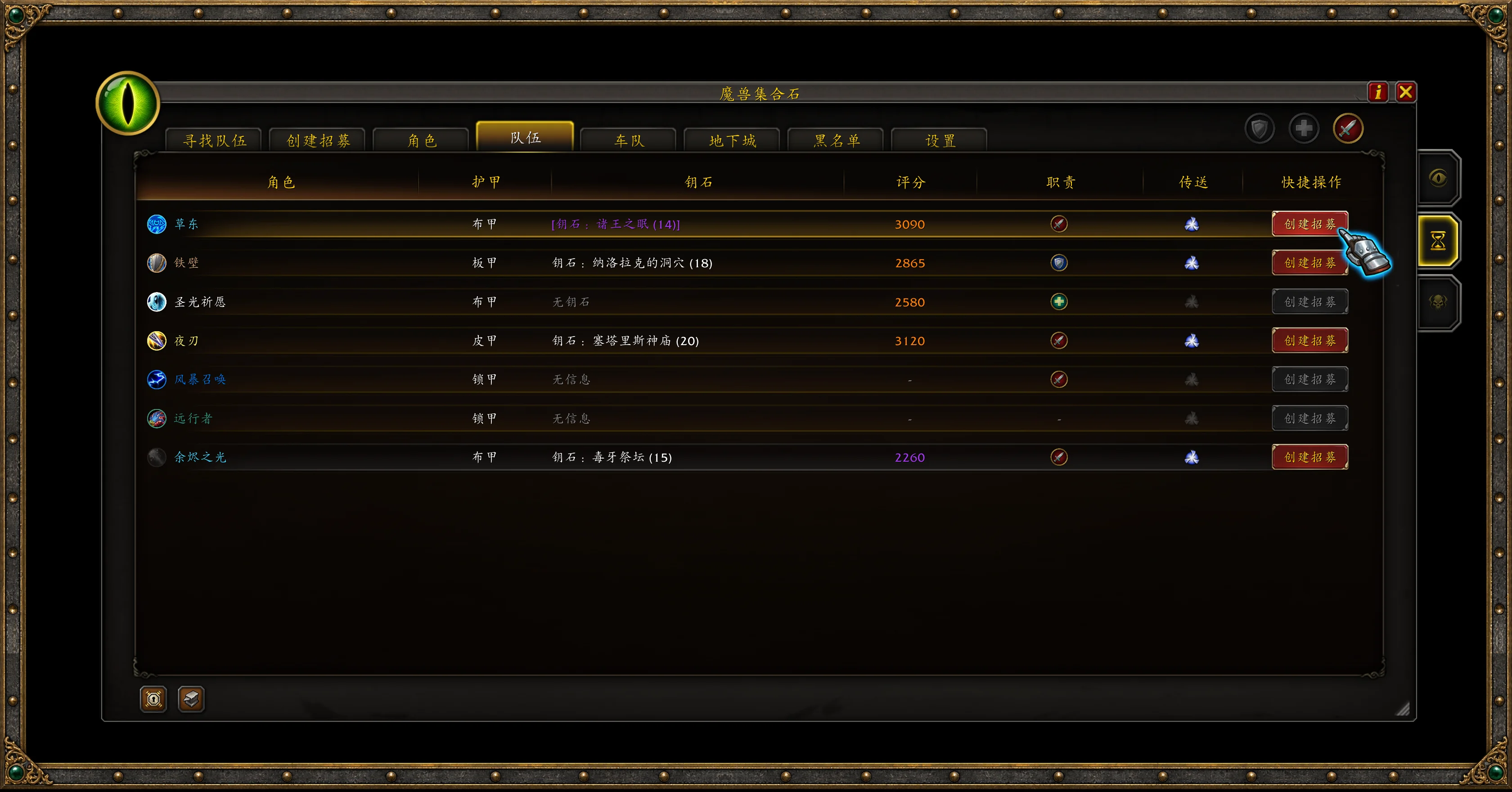
Party & Premade Planning · Compare Keys and Build Your Lineup
The Party tab shows members' roles, ratings, and available keystone information. If you have permission to manage listings, use a party member's keystone entry to open the listing form for that dungeon, saving you from finding and selecting it again.
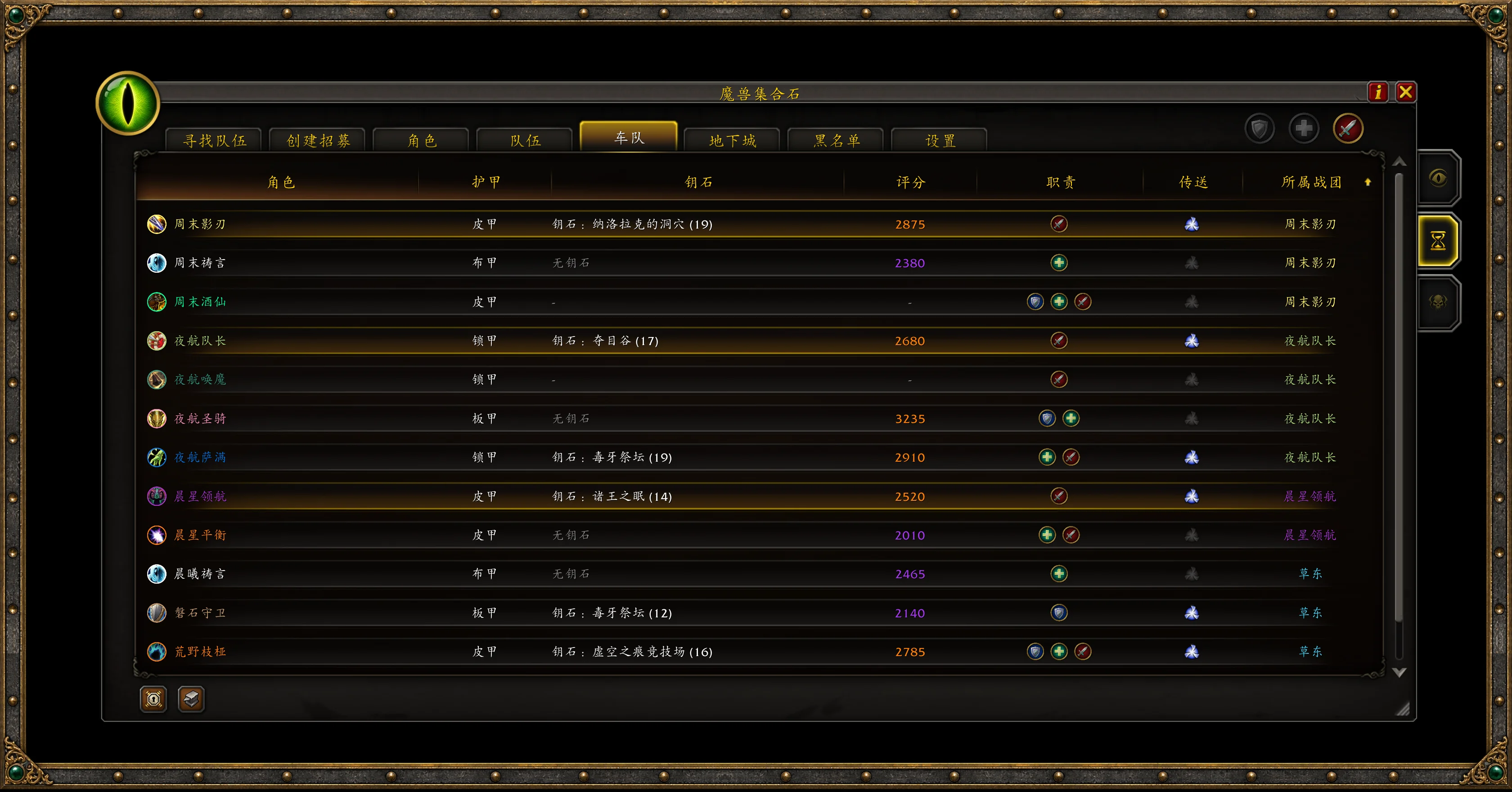
The Carpool tab organizes characters shared by you and your party members by Warband, helping you choose a key and put together a lineup. See who can tank, who can heal, and which character has the key you want to run.
Quick Teleports · Get Your Full Party to the Dungeon
Seasonal dungeon cards bring together dungeon ratings, best runs, available keystone information, and teleport status. Click to use a Hero's Path dungeon teleport that your character has unlocked and can currently cast.
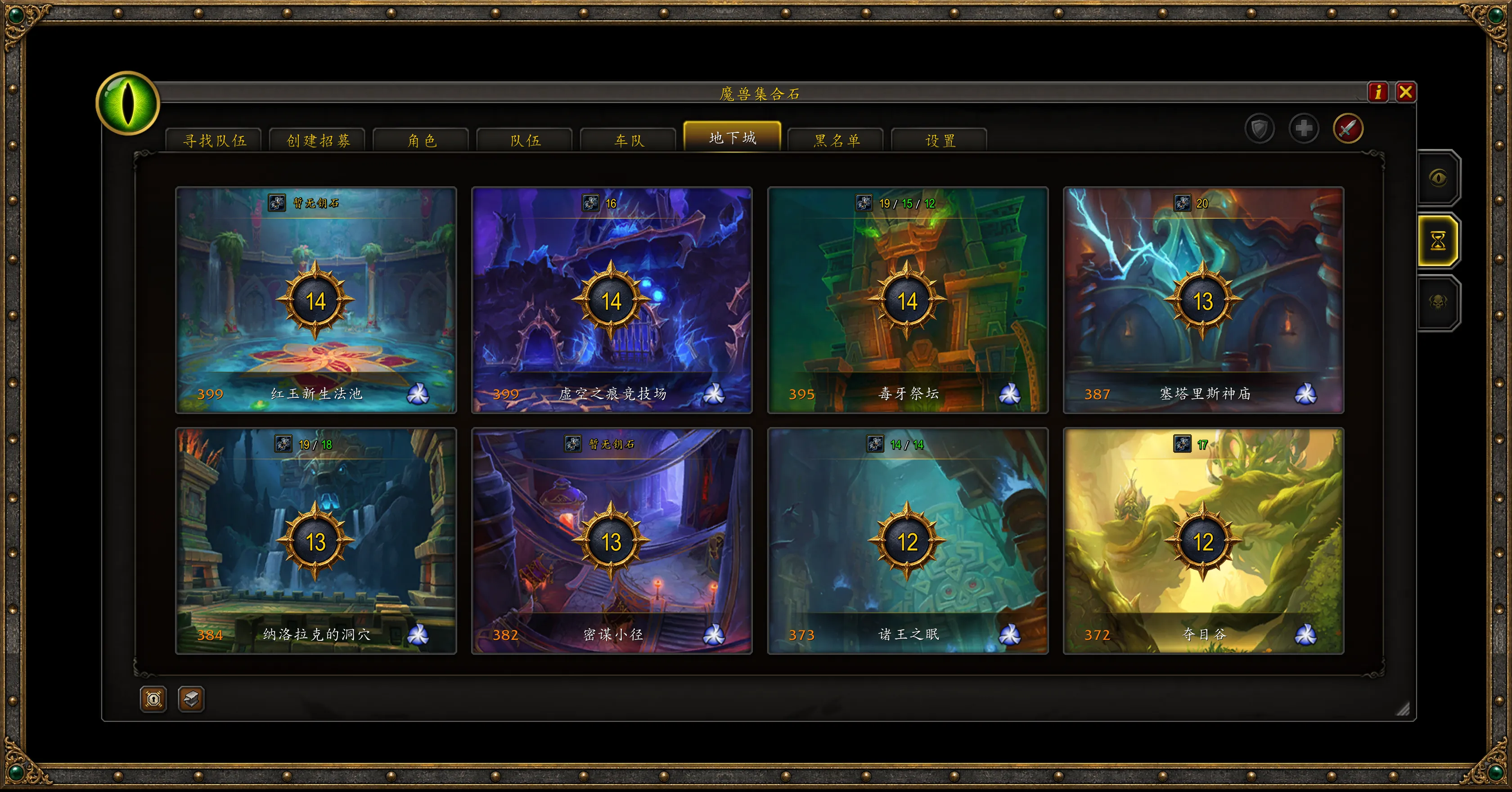
Full-party Teleport
When a group formed through a current-season Mythic+ listing fills up, a prompt appears for the target dungeon if the teleport is available. Confirm to cast the corresponding teleport.
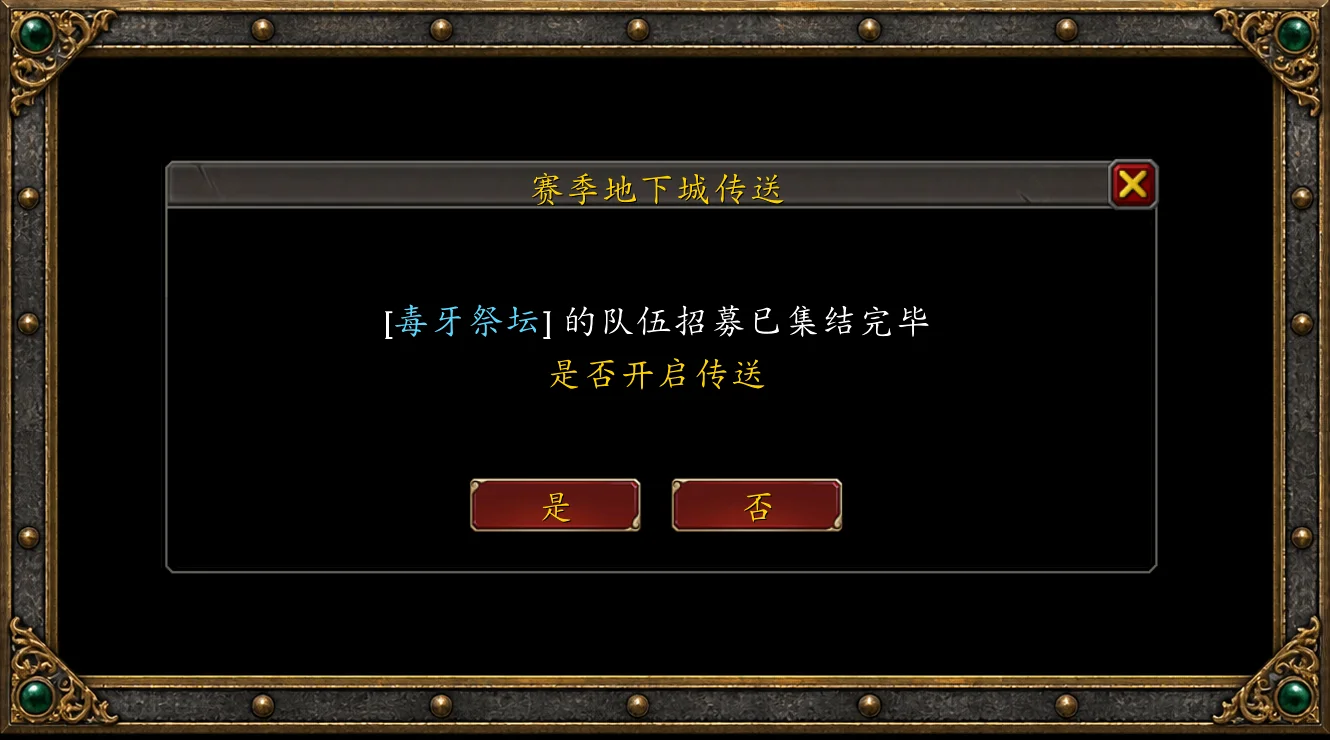
Follow Teleport
When a party member shares their teleport through the addon, the prompt shows their name and destination. If you've unlocked the same teleport and it is available, confirm to follow them.
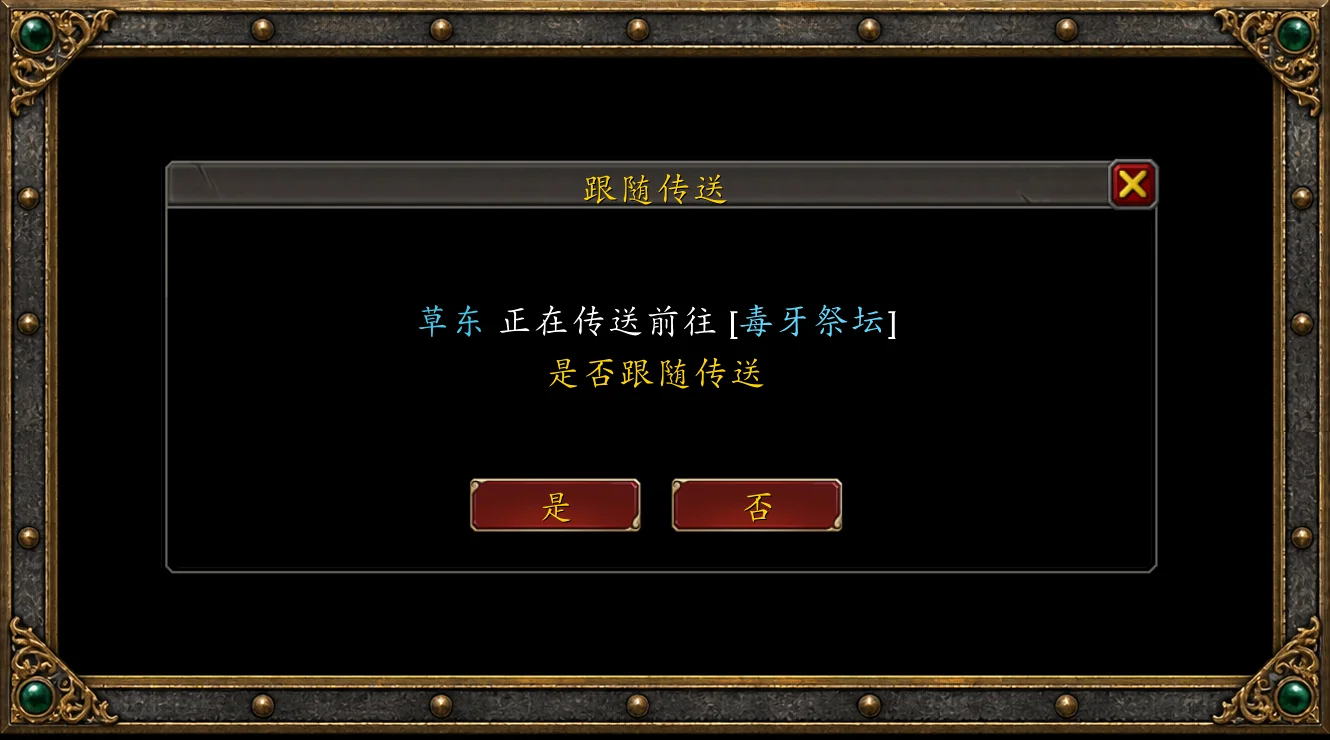
Full-party teleport and Follow teleport have separate toggles, so you can enable either or both. Every teleport requires your confirmation and respects unlock requirements, cooldowns, and combat restrictions.
Keystone Reroll Reminder · Finish the Run, Remember Your Key
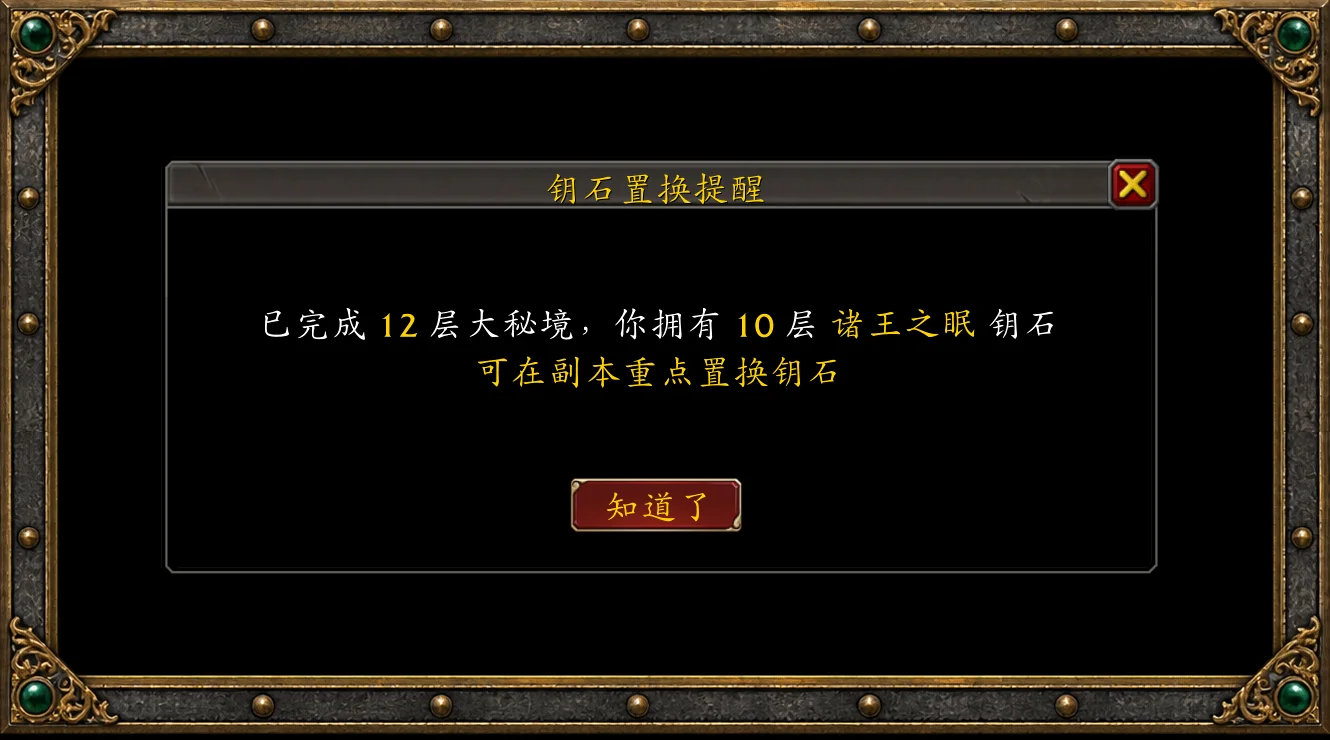
With Keystone replacement reminder enabled, completing another party member's Mythic+ key in time at a level equal to or higher than your own key triggers a reminder to reroll your keystone at the end of the dungeon. Avoid leaving the instance before remembering to reroll your key.
You can also enable keystone change announcements, teleport announcements, and custom dungeon messages to share updated keys, your destination, and tactical reminders with the party.
Instance Difficulty Overlay · Check Difficulty and Lockouts Before Entering
Approach a supported dungeon or raid entrance to see the instance name, difficulty, and your character's lockout progress. Hover for boss kill status, or click to change difficulty when you have permission.
Left-click the instance name to open its Adventure Guide entry. When available, right-click to open the game's instance reset confirmation. Whether you're farming older raids, collecting transmog, or changing difficulty, the controls are right there at the entrance. Reposition the overlay through the game's Edit Mode.
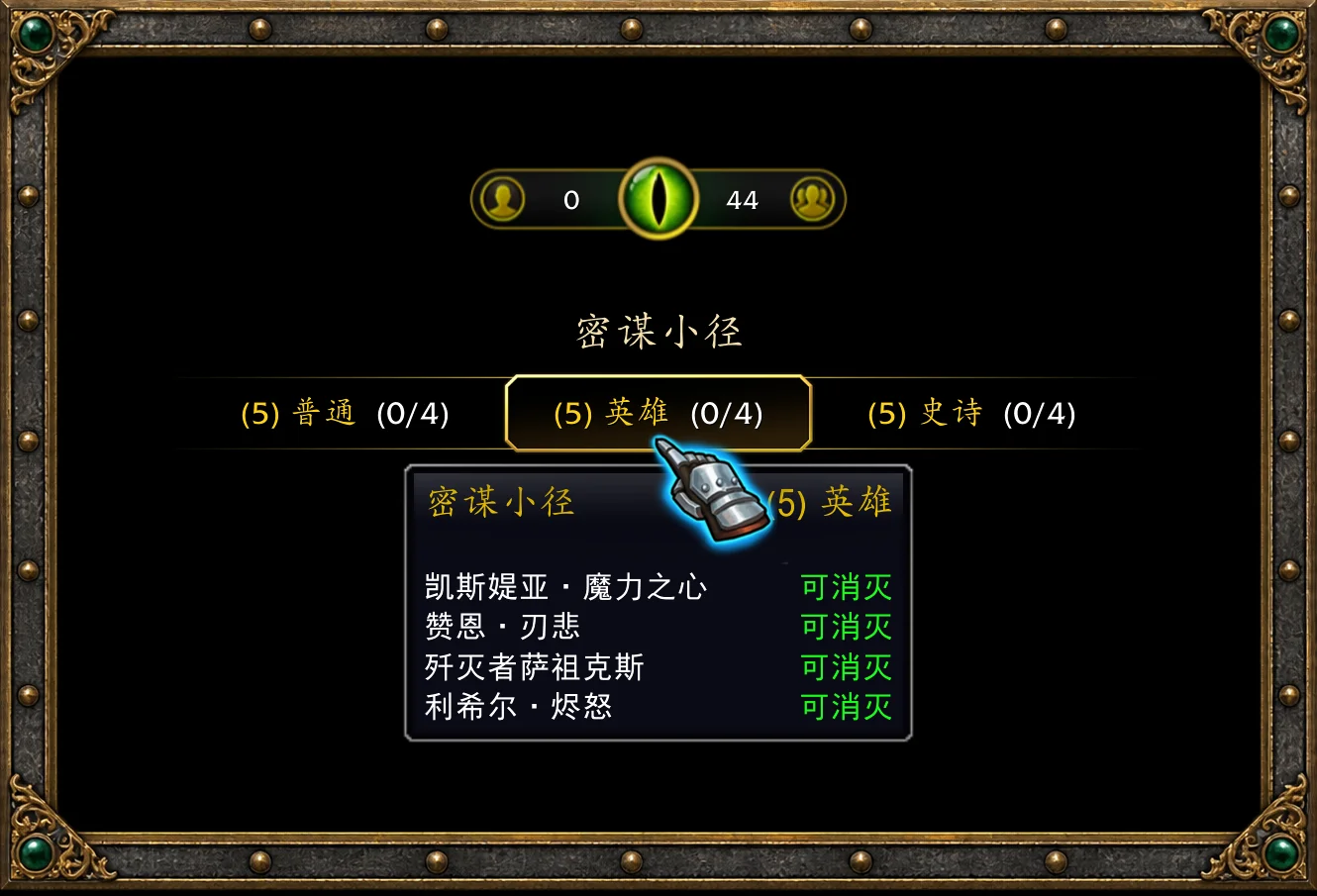
NetEase Newcomer Event · Check Player Status and Complete Event Objectives
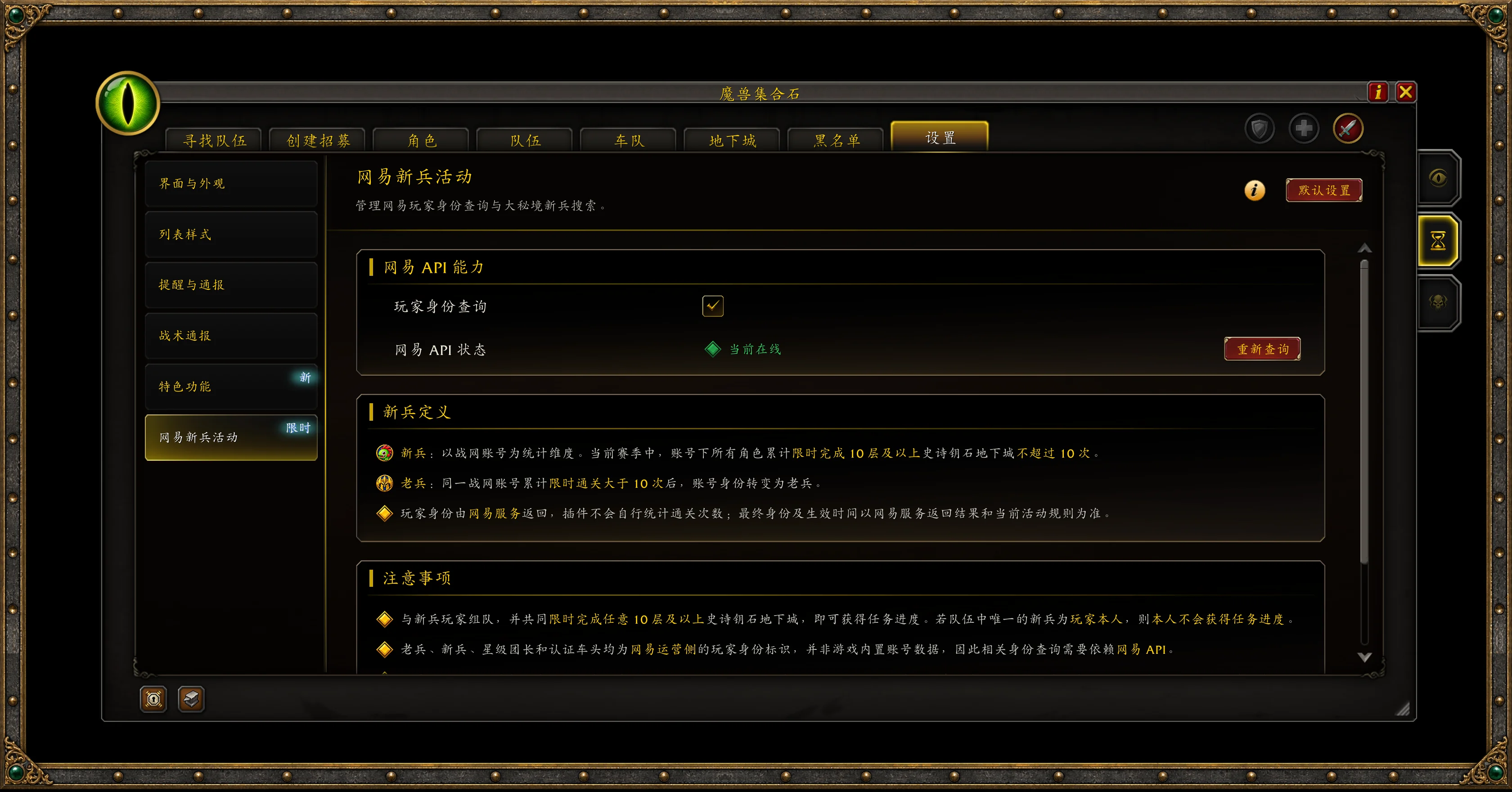
Players using the Simplified Chinese client in the China region can optionally enable NetEase player status lookups. While the event and service are available, Mythic+ group and applicant lists can display NetEase event tags such as Mythic+ Newbie, WoW Veteran, Certified Leader, and Star-rated Leader.
Use Search Newbies to find groups containing newcomers and meet other players participating in the event. Player status is based on the information returned by NetEase's service.
Interface & Alerts · Easy Access, Your Preferred Setup
The floating launcher keeps group tools and recruitment updates within reach, so you can check your listing and handle applications while playing.

- Quick access: When you don't have an active listing, open Find a Group or Start a Group. While recruiting, jump straight to applicant management.
- Live alerts: See the number of groups and applicants, with visual notifications and configurable sounds for new applications.
- Flexible controls: Move, scale, or hide the launcher. Open frequently used pages through the minimap icon, the native Premade Groups entry point, the
/GFcommand, or keybindings.
Customize panel skins, scale, list styles, notification sounds, and reminders to suit your preferences while keeping the familiar look and feel of WoW's UI.
Download GroupFinder and type /GF in game. Spend less time finding a group, filling your party, and getting everyone to the dungeon—and more time adventuring.
Feature Feedback
Suggestions and feedback on the addon's features are welcome. Promising ideas may be included in future updates.
Leave a suggestion or report an issue in the User Comments section on NewBeeBox.
You can also share feedback through the author's website.
魔兽集合石(GroupFinder) 是一款适用于《魔兽世界》正式服的预组队增强插件。基于暴雪原生预组队系统,提供集合石、大秘境与赛季团本三种模式,整合队伍搜索与筛选、招募及申请管理、成员专精展示、玩家类型标记和活动收藏,让队伍配置与招募需求更加清晰。
核心优势:无广告、无推广弹窗、无报错、低占用、快速响应、战斗静默。
快捷命令:/GF
版本更新调整公告:
即日起插件正式调整更新节奏:
后续正式版仅推送必要 BUG 修复,所有新增功能、现有功能优化内容将统一在测试版迭代上线,避免新增改动影响普通玩家稳定游玩体验。
插件后续开发逻辑将回归核心定位,不再以少量玩家个性化需求作为主要开发导向。
现阶段部分优化内容已偏离插件最初设计初衷 —— 还原暴雪原生游戏体验、适配新手玩家、简化操作逻辑、降低上手门槛、减少复杂配置步骤。
若你对 GroupFinder 插件抱有期待,愿意参与内测、一同为插件创新提供建议与反馈,欢迎加入交流群:66872741
组队模式 · 按需切换,看清阵容
提供「集合石」「大秘境」与「赛季团本」三种模式:集合石模式覆盖多类活动的寻找队伍与创建招募,大秘境模式集中提供赛季副本筛选、角色管理与钥石工具。团队副本专属模式计划于《魔兽世界》12.1.5 版本开放;目前可通过集合石模式搜索与创建团队副本招募。
在集合石模式下,右键点击支持聚合搜索的一级分类,即可集中查看该分类下的招募队伍,减少逐个切换副本的操作。
成员专精视图:在「设置 → 列表样式 → 列表模式 → 队伍成员模式」中选择「专精模式」,即可通过专精图标与职责角标查看成员配置。成员按坦克、治疗、输出依次排列,申请前就能看清队伍阵容。
寻找队伍 · 多维筛选,快速匹配
地下城、团队副本、地下堡、PvP、任务与自定义活动分类清晰。队伍标题、副本、成员配置、装等要求、队长评分与招募说明集中展示,方便快速浏览与比较。
大秘境支持同时筛选多个赛季副本,并组合职责、空位与评分等条件。单人寻找队伍或与好友共同申请时,可按所选申请职责,或按当前专精对应的职责,筛选能够容纳申请成员的队伍。
高级过滤器还提供游戏风格、嗜血需求、语音等条件。「下限准入」参考当前小队最低已穿戴装等,过滤入队门槛过高的招募。开启双击申请后,双击目标队伍即可提交申请;已申请、已拒绝、已满员等状态也会清晰标注。
快速搜索与活动收藏 · 常用活动,快捷直达
输入副本名称或关键词,即可快速定位对应副本与难度,进入寻找队伍或创建招募。无论是挑战赛季副本,还是刷旧本、做成就,都能减少翻找资料片目录的时间。
常玩活动可加入收藏夹,自定义别名,并保存玩法风格、装等与评分门槛等设置。再次使用时,可搜索对应活动,或在创建招募时恢复常用条件。
支持「角色收藏」与「战团收藏」:不同角色可以分别保存活动,也可让同账号角色共享收藏。收藏夹支持按副本名称或别名搜索,冲层目标与日常安排都方便查找。
创建招募与角色查询 · 信息清晰,招募有数
队伍名称、组队说明、玩法风格与入队要求集中设置,发布、更新、重新发布和解散招募均可在同一界面完成。
申请者的职责、专精、评分、装等与留言直接呈现。多人共同申请时,可逐个查看成员配置,再整队邀请或拒绝,方便判断是否符合当前阵容需求。
队伍与申请者列表可显示好友、公会、黑名单及大秘境逃兵等标记。好友与公会队伍可优先展示;默认配色用蓝色突出好友关系,用红色提示黑名单或逃兵。在大秘境中开启网易身份查询后,包含新兵的队伍还可用绿色标记。
点击查看按钮可打开角色信息,并复制 WCL 或英雄榜链接。安装 Raider.IO、Archon Tooltip 等对应插件且资料可用时,还能查看扩展的大秘境或团队副本信息,为招募提供更多参考。
黑名单 · 屏蔽干扰,保留组队记录
不想再次组队的玩家,可加入黑名单并填写备注;重复出现的广告招募,也可按标题进行批量屏蔽。
命中屏蔽规则的招募会被隐藏;识别到队伍中有黑名单成员时,会显示醒目标记。名单支持查看、编辑与移除,方便记录原因并随时调整。
角色与周报 · 钥石进度,集中查看
当前角色的钥石、赛季评分、大秘境周报与宏伟宝库进度集中展示。本周已完成的次数、下一档奖励所需进度,以及各副本的赛季最佳记录,都能在角色页查看。
已记录的战团角色以卡片汇总,可对照钥石、评分与可承担职责,并通过拖动排序、选择车队候选安排出场角色。当前角色还可快捷切换专精与已保存的天赋配置,方便出发前完成准备。
队伍与车队 · 汇总钥石,搭配阵容
「队伍」页集中展示当前成员的职责、评分与可获取的钥石信息。具备招募权限时,可从队友的钥石入口快速进入对应副本的创建招募页面,减少重复选择与查找。
「车队」页按所属战团汇总你和队友已共享的角色,方便共同选择钥石与安排阵容。谁能补坦克、谁能切治疗、哪个角色持有目标钥石,都有直观参考。
快速传送 · 满员提醒,便捷集结
赛季地下城以卡片展示,副本评分、最佳记录、可查看的钥石与传送状态集中呈现。角色已解锁且当前可用的英雄之路传送,可直接点击使用。
满员传送
当前赛季大秘境招募队伍满员后,在满足传送条件时弹出目标副本提示,点击确认即可使用对应传送。
跟随传送
队友通过插件共享传送信息时,会显示发送者与目的地。自己的对应传送已解锁且可用,即可点击确认跟随。
满员传送与跟随传送支持独立开关,可按习惯分别启用。传送均由玩家确认,并遵循角色解锁、冷却与战斗限制。
钥石置换提醒 · 通关之后,及时换石
开启「钥石置换提醒」后,限时完成队友开启的大秘境,且完成层数不低于自己持有的钥石层数时,会提示你前往副本终点置换钥石,减少离开副本后才想起换石的情况。
还可按需启用钥石变更通报、传送通报与自定义战术通报,方便向队友传达钥石变化、集合目标与副本内注意事项。
副本难度悬浮窗 · 难度进度,进门先看
靠近支持的地下城或团队副本入口时,自动显示副本名称、难度与当前角色的锁定进度。鼠标悬停可查看首领状态,具备权限时可直接点击切换难度。
左键点击副本名称可打开对应冒险指南;符合条件时,右键可打开系统副本重置确认。刷旧副本、收集幻化或切换难度时,常用操作就在入口附近,悬浮窗位置也可通过系统编辑模式调整。
网易新兵活动 · 查询身份,完成活动
国服简体中文客户端可按需开启网易玩家身份查询。在活动及服务可用期间,大秘境队伍与申请者列表可展示「大秘新兵」「魔兽老兵」「认证车头」「星级团长」等身份信息。
通过「搜索新兵」可查找包含新兵的队伍,方便参与活动、寻找同行伙伴。身份以网易服务返回结果为准。
界面与提醒 · 入口便捷,按需设置
组队悬浮窗将常用入口与招募动态放在手边,便于在游戏过程中查看状态、处理申请。
- 快捷进入:未发布招募时,可打开寻找队伍或创建招募;招募进行中,可快速进入管理页面查看申请者。
- 动态提醒:显示队伍数量与申请者人数,新申请到来时提供动态提示与可配置的提示音。
- 灵活使用:支持拖动、缩放与开关设置,也可通过小地图图标、系统预组队入口、/GF 命令或快捷键打开常用页面。
面板皮肤、缩放、列表样式、提示音与多项提醒均可按需调整,在熟悉的魔兽界面风格中,找到适合自己的使用方式。
下载魔兽集合石,在游戏中输入 /GF,让找队、开组与集结更顺手,把更多时间留给冒险。
undefined
功能反馈:
欢迎各位玩家针对插件的功能提出建议,如果有好的功能反馈会在后续版本进行更新。
你可以通过新手盒子“用户评论”针对插件的功能提出建议或反馈。
或者你可以访问作者的主页进行反馈:https://www.gaicas.com/wow-groupfinder.html
The GroupFinder(魔兽集合石) Team