popup 1.0.0.png
Description
Group Quest Finder
Find players for the open-world group quests you have—or plan to do—without constantly watching LookingForGroup chat.
I made Group Quest Finder because I had several group quests sitting unfinished in my quest log. Layering makes it surprisingly difficult to find other players with the same quest: people can be in the same zone but on different layers, while LookingForGroup moves quickly and is mostly filled with dungeon and raid groups.
Group Quest Finder watches chat for you, provides tools for posting your own searches, and only gets your attention when a search is relevant to you.
Chat Watch
The addon monitors supported chat channels even when they are placed in a hidden or inactive chat tab.
It recognizes common search phrases such as:
LF,LFG, andLFM- Numbered variants such as
LF2M any,anyone, andany1
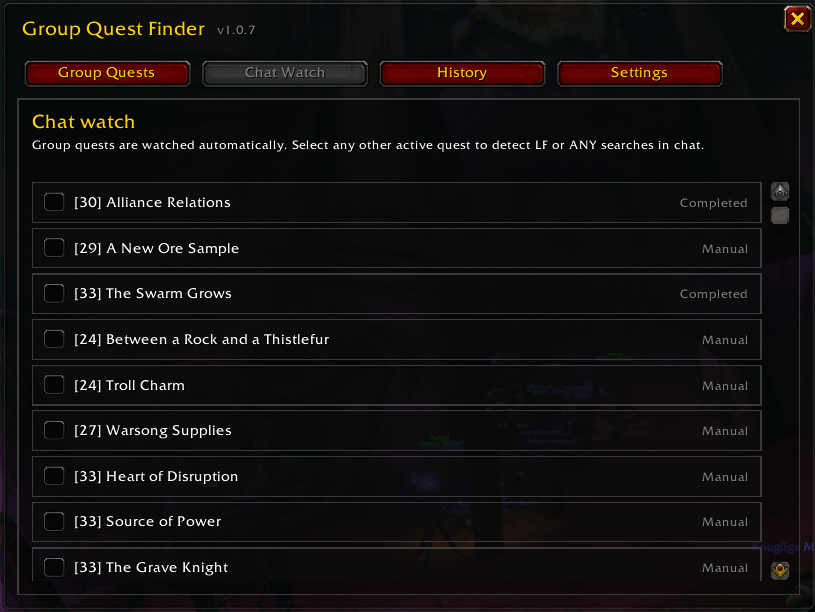
Incomplete open-world group quests are watched automatically. You can also manually watch any other active quest when you know it is difficult or players commonly ask for help with it.
When a matching search is found, Group Quest Finder can:
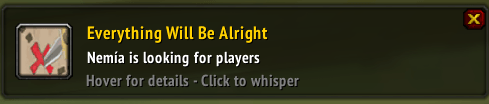
- Show a small notification popup
- Play the original Trail Signal notification sound
- Save the complete original message in History
- Open a whisper draft when you click the notification
- Show the original message on mouseover so you can check requirements before responding
Completed quests waiting to be turned in no longer create notifications.
QuestPing network
QuestPing is a completely optional network that helps addon users find each other for outdoor group quests across layers.
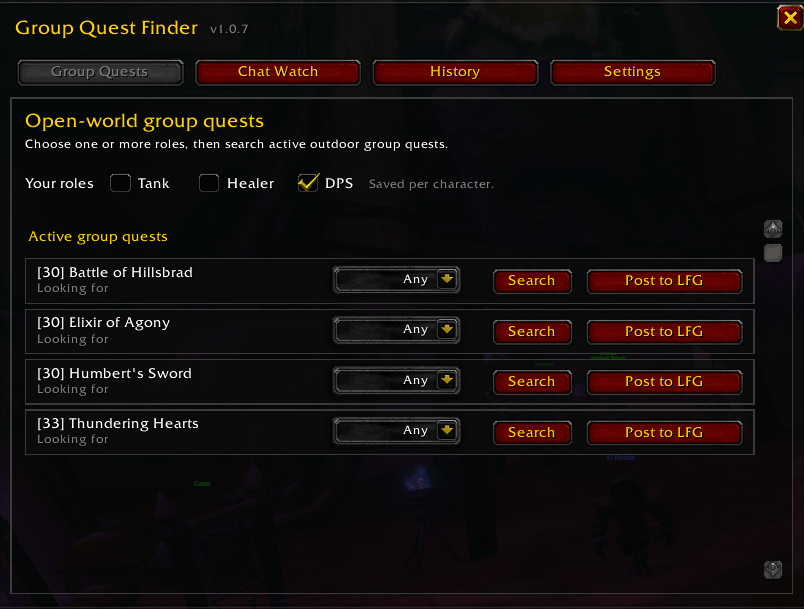
Select one or more roles you are willing to play:
- Tank
- Healer
- DPS
Each search can request:
- Any
- Tank
- Healer
- DPS
Press Search next to an eligible quest to reach connected addon users who have the same quest active or saved under Planned Quests. Role-specific searches are only shown to matching players.
After a short response window, the sender is told whether zero, one, or multiple compatible addon users reported a relevant match. This does not automatically accept the search or contact anyone—it only confirms that matching users were found.
The network:
- Sends nothing until you manually press Search
- Never publishes your complete quest log
- Never whispers or invites automatically
- Only supports eligible outdoor group and escort quests
- Excludes dungeon, raid, and PvP quests
- Is not intended to replace the dungeon or raid group finder
- Keeps its technical channel hidden and away from the
/1channel position
QuestPing becomes more useful as more players install and connect to the addon.
Planned Quests
You can plan eligible outdoor group and escort quests before accepting them.
The bundled catalog can be searched by:
- Quest name
- Quest ID
- Zone
Planned Quests are stored separately for each character. Every planned quest includes:
- A requested-role selector
- A QuestPing Search button
- A Post to LFG button
- A Remove button
Minimum-level requirements are respected. Quests above your current level remain visible, but cannot be added until your character can accept them.
A planned quest automatically leaves the Planned Quests section when it becomes active in your quest log.
Post to LookingForGroup
The Post to LFG button complements QuestPing by reaching ordinary LookingForGroup users who do not have the addon.
It posts a simple TBC-compatible quest reference to LookingForGroup and joins the channel first when necessary.
All Post to LFG buttons share a one-minute cooldown to prevent accidental spam. Nothing is ever posted without a manual click.
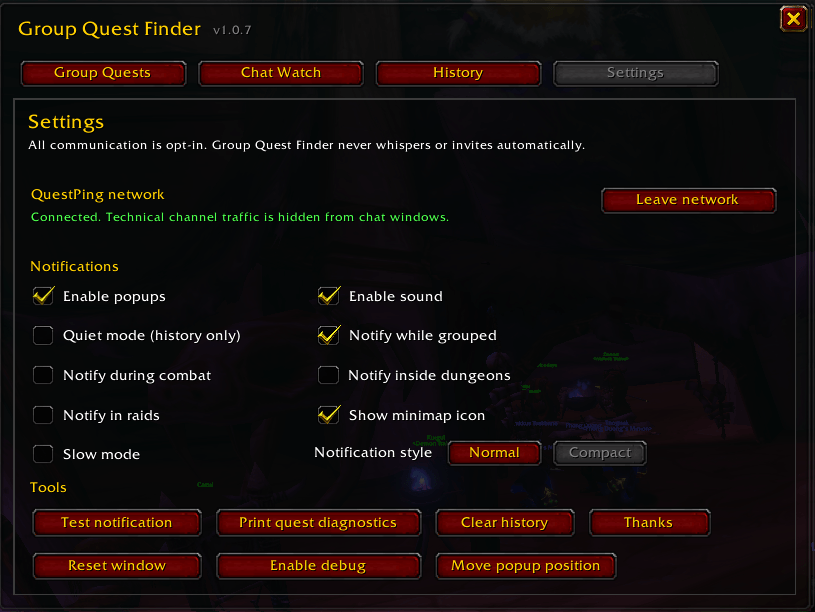
Notifications on your terms
Popups and sound can be controlled separately. Notifications can be suppressed while:
- In combat
- Already grouped
- Inside a dungeon
- Inside a raid
Available notification options include:
- Normal popup style
- Compact popup style
- Full original-message details on mouseover
- Quiet mode for History-only operation
- Slow mode with at most one popup and sound every five minutes
All relevant matches are still saved in History when Slow mode suppresses additional popups.
Searches from ignored characters and players already in your current party or raid are filtered out completely.
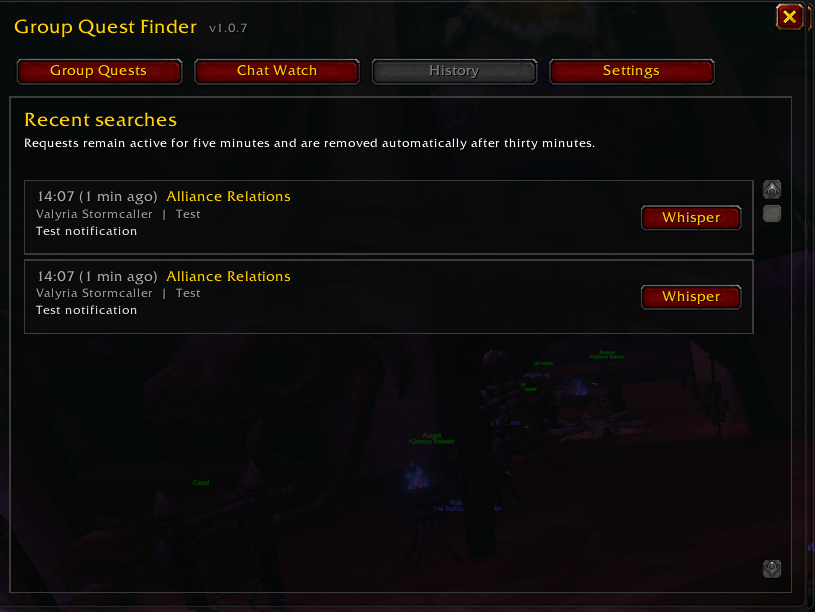
History
Relevant searches remain active for five minutes and are stored in History for thirty minutes.
Each entry includes:
- Quest name
- Sender
- Source channel
- Complete original chat message
- Requested and available roles when supplied by QuestPing
- A button that opens a whisper draft
This lets you check missed searches after combat or when returning from being AFK.
Upcoming changes — Cross-Character Quest Watch
The next major update is currently in development.
Cross-Character Quest Watch will let you keep an eye on quests belonging to your other characters while playing an alt.
After your characters have been registered by logging into them, you will be able to select one or more of them from the character you are currently playing. Group Quest Finder will then passively watch for matches involving:
- Your current character's watched quests
- Your current character's Planned Quests
- Selected characters' saved watched quests
- Selected characters' Planned Quests
For example, you could continue leveling an alt while Group Quest Finder watches for a group needed by your main.
Cross-character notifications will make the target character impossible to miss. The character name will be the most prominent part of both Normal and Compact popups, with a clear message such as:
SWITCH TO: [CHARACTER NAME]
The Ata'mal Terrace
History will also record which character each match belongs to. If the same quest is being watched for more than one selected character, the addon will combine the result and show every relevant character instead of creating duplicate notifications
Getting started
-
Click the minimap icon or type
/gqf. -
Select every role your character is currently willing to play.
-
Type
/gqf testto test the popup and Trail Signal sound. -
Use Chat Watch to select additional active quests.
-
Join the optional QuestPing network under Settings.
-
Use Planned Quests to prepare for outdoor group quests you intend to do later.
Questie is not required
Group Quest Finder uses World of Warcraft’s own quest log and quest information. Questie is not required.
If Questie is installed, it can turn the TBC-compatible quest references posted by Post to LFG into clickable quest links.
Privacy and player control
Group Quest Finder never automatically:
- Publishes your quest log
- Sends a search
- Posts in LookingForGroup
- Whispers another player
- Invites another player
- Accepts or shares a quest
The addon finds opportunities, but every social action remains your decision.
Feedback and development
Group Quest Finder 1.0 is the first stable release and remains under active development.
Bug reports, feedback, quest-database corrections, and feature suggestions are very welcome.
Special thanks to Dobban, Robban, Ivan, Muffinz, Didde, and the entire guild [GibbaGubbar] for helping create this addon and for all the ideas, feedback, and testing.
— Axberg
If you enjoy this addon, consider buying me a coffee:
Group Quest Finder Team