Dual Quest Log Forever
- By
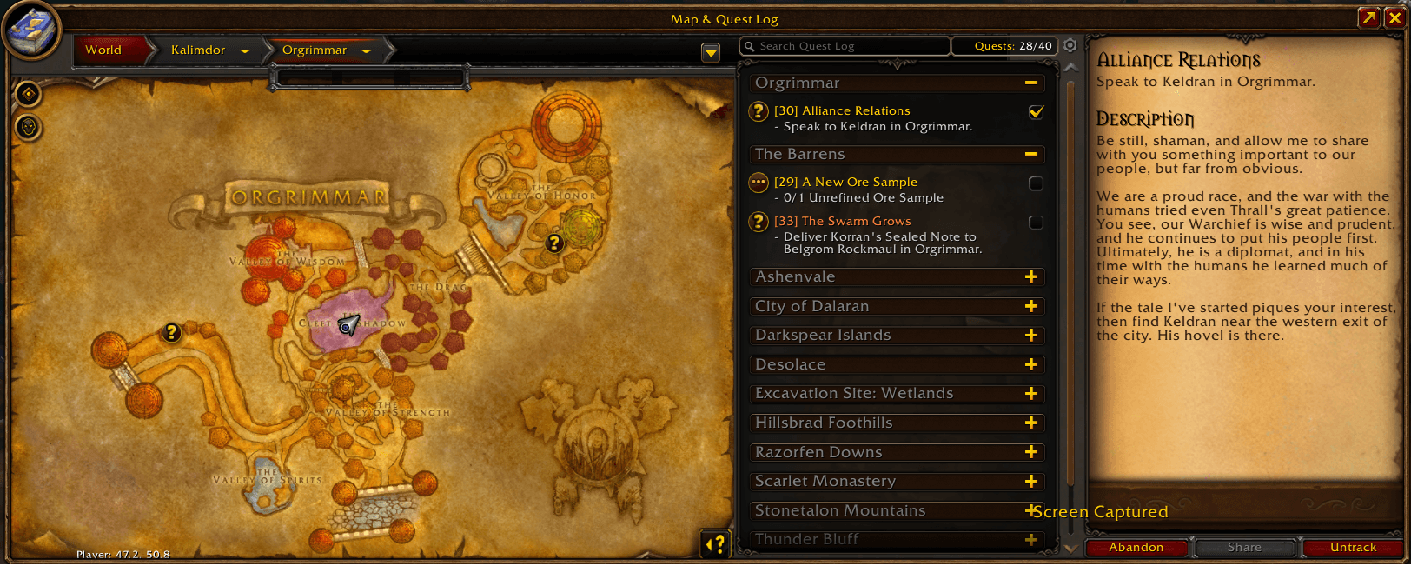
View your quest list, selected quest details, and world map together in one window.
Dual Quest Logs Forever.png
Description
Dual Quest Log Forever
View your quest list, selected quest details, and world map together in one window.
Dual Quest Log Forever adds a side-by-side quest detail panel to WoW Forever’s Map & Quest Log, using the game’s native quest text, rewards, and buttons.
Features
- Read quest details while keeping your quest list visible.
- Expand and collapse quest categories without leaving the detail panel.
- Select quests from the list or by clicking their map icons.
- View objectives, descriptions, and rewards, with the native Abandon, Share, and Track buttons.
- Scroll quest descriptions with the mouse wheel while the detail scrollbar stays hidden.
- Switch between the windowed quest layout and fullscreen World Map.
Leatrix Maps Compatibility
Version 0.4.7 beta adds compatibility with Leatrix Maps Forever 1.60.19 and its Use simple map frame option. The detail panel follows the quest list’s height while preserving Leatrix’s compact map layout.
Leatrix Maps is optional. Players without it retain the standard Dual Quest Log Forever layout.
Beta Status
The addon is currently being tested by our guild, Oathbound on WoW Forever. Core functionality has been tested in-game; the latest Leatrix compatibility changes are awaiting wider testing.
If you encounter an issue, please include your addon version, steps to reproduce it, a screenshot, and whether you use Leatrix Maps.
Installation
Extract the DualQuestLogForever folder into your game’s Interface/AddOns directory, then restart the game or type /reload.
Commands
/dqlf reset— Reset the addon’s layout./dqlf debug— Print diagnostic information for bug reports.
Designed for WoW Forever. Compatibility with other WoW clients is not supported.
If you enjoy this addon, consider buying me a coffee: buymeacoffee.com
Dual Quest Log Forever Team