
GRIP-EMS Dynamic Theme
- By
Recolor the **GRIP-EMS** window to match your taste and improve readability, without changing a single thing about how the addon works.
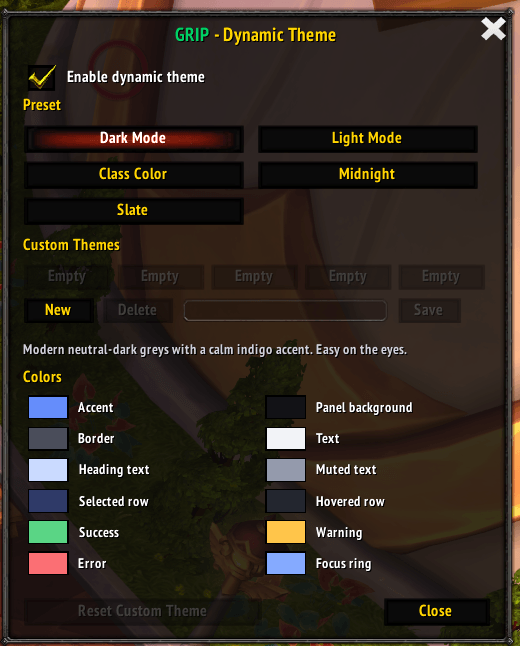
dyntheme.png
Description
GRIP-EMS Dynamic Theme
Recolor the GRIP-EMS window to match your taste and improve readability, without changing a single thing about how the addon works.
Dynamic Theme is a lightweight companion for GRIP-EMS. It restyles the existing interface in place: same layout, same tabs, same behavior, just the colors and fonts you choose. Not happy with it? Turn it off and you are back to the stock GRIP-EMS look instantly.
Features
- One-click presets - Dark Mode, Light Mode, Class Color, Midnight, and Slate.
- Class Color preset - automatically tints the UI with your character's class color.
- Full color control - a color picker for every part of the UI: accent, backgrounds, text, list rows, status colors, and the focus ring.
- Up to 5 custom themes - save, name, and switch between your own themes.
- Account-wide themes, per-character selection - build your theme library once, then let each character pick its own look from it.
- Readability first - text contrast is checked and corrected automatically so labels stay legible on any color you choose.
- Safe and reversible - your existing GRIP-EMS theming is snapshotted before any change and restored the moment you disable the theme.
Presets
| Preset | Look |
|---|---|
| Dark Mode | Neutral-dark greys with a calm indigo accent. |
| Light Mode | Light panels with dark text and a clean blue accent. |
| Class Color | Dark UI accented with your character's class color. |
| Midnight | Deep blue-black panels with soft blue accents. |
| Slate | Lighter neutral-grey panels with a teal accent. |
How to use
- Install the addon (GRIP-EMS is required).
- Type
/gdtto open the theme window. - Tick Enable dynamic theme, pick a preset, or click a color swatch to make it your own.
Editing any color automatically creates a custom theme, so the built-in presets are never overwritten.
Slash commands
/gdt- open the theme window/gdt on//gdt off- enable or disable theming/gdt list- list presets and saved custom themes/gdt set <name>- apply a preset (darkMode,lightMode,classColor,midnight,slate) or a custom theme (custom1-custom5)/gdt reset- reset the active custom theme to its starting colors
Requirements
- GRIP-EMS v2.0+
Good to know
- Custom themes are shared across your whole account; the selected theme and the enable toggle are saved per character.
- If you remove the addon from the WoW AddOns list while a theme is still active, its colors stay saved in your GRIP-EMS profile (the addon is no longer loaded to remove them). Use
/gdt reset, or disable it from the GRIP-EMS plugin list first, to revert cleanly.
Feedback
Bug reports and suggestions are welcome - please leave a comment or open a ticket on the project page.
GRIP-EMS Dynamic Theme Team

