GoldCraftForever
Find out what’s worth crafting on WoW Forever, using prices from all three auction houses, with clear advice on what to craft, sell, buy, gather or disenchant.
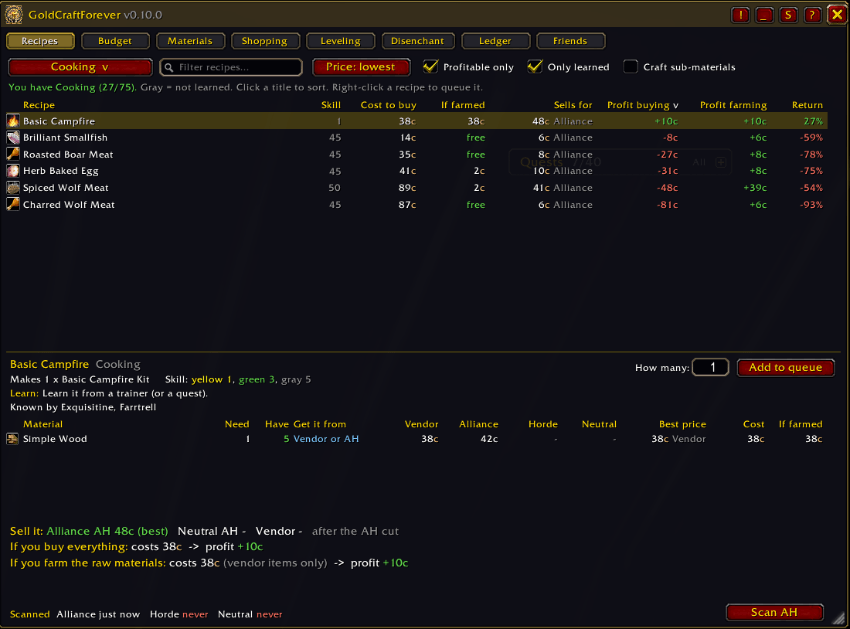
Every recipe in every profession, with the cost to buy or gather the materials, sale price, and the profit both ways. Sort by gold per hour or sells per day, filter to recipes you’ve learned or have materials for, and see how many you can make right now.
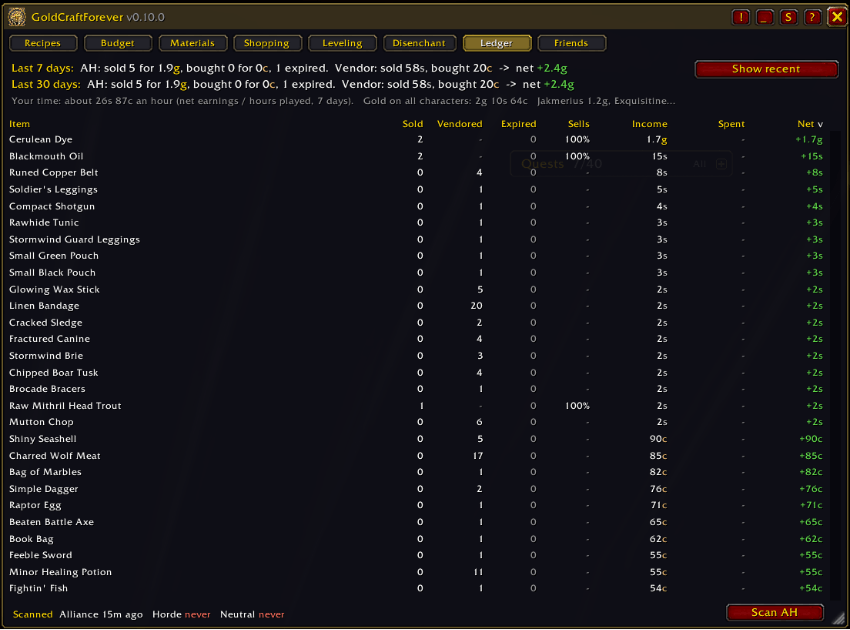
What actually sold, from your auction mail and vendor visits, with totals for 7 and 30 days and gold across your characters. See your best and worst markets, and where your gold goes: flights, repairs, trades, loot and more.
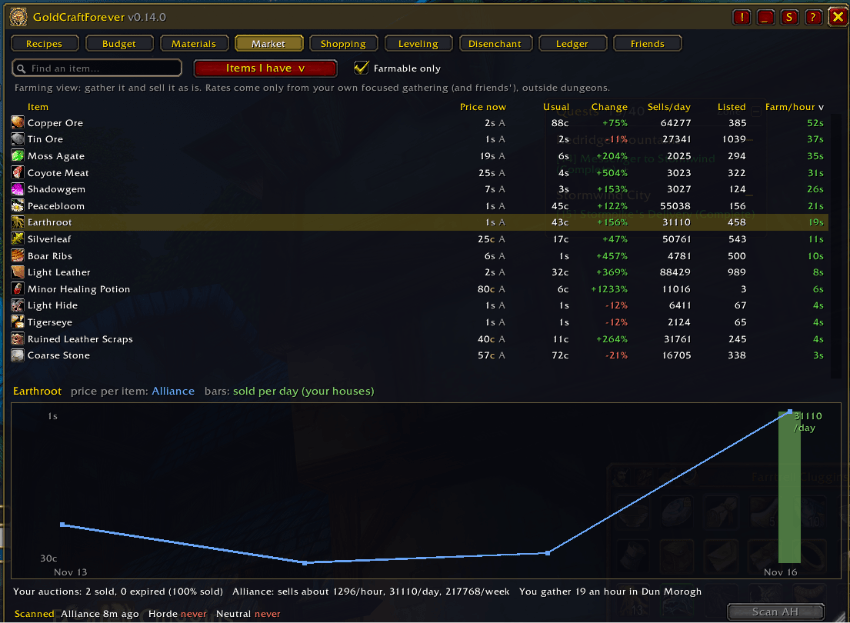
Every crafting item you’ve scanned: price now, usual price, change, sales per day, and a price chart for each auction house. Filter to staples to see raw material trends, or to flips: items listed cheap that you can buy and resell.
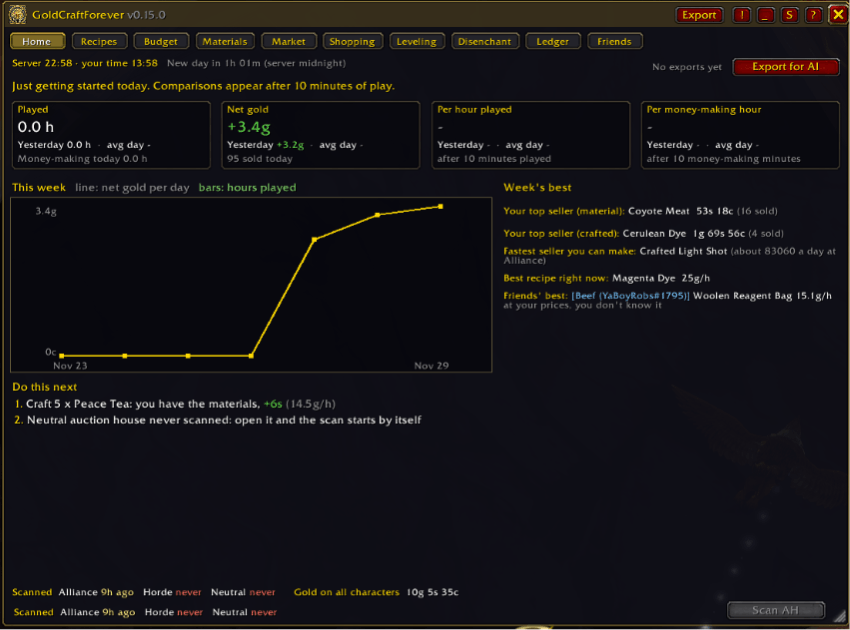
Your day at a glance: hours played, net gold and gold per hour, today against yesterday and your average day. It adds this week’s chart, your best sellers, gold goals, and up to 5 suggestions for what to do next.
Description
GoldCraftForever
Know what to craft, what to sell, and what to gather on WoW Forever, across all three auction houses.
GoldCraftForever turns your auction house scans, your bags and your professions into plain answers: CRAFT, SELL, BUY, GATHER or DISENCHANT. It's built for WoW Forever, needs no other addons, and every number it shows comes from your own scans and your own play.
Why GoldCraftForever?
- All three auction houses. Alliance, Horde and the Neutral auction house are scanned and kept separately, with the right cut for each (5% faction, 15% Neutral). You only see buy and sell advice for houses your character can actually use.
- Honest profit. Materials you already own count at what they'd sell for, so "profit" means what you gain over just selling them. Farmed materials are free; vendor items like vials and thread are not.
- Measured, not guessed. Gathering speed, drop chances and sell rates come from your own looting, mail and scans. When there isn't enough data yet, it says so instead of making something up.
- Every profession, every recipe. All 2,400+ Forever recipes are built in, so you can see what any profession would earn before you train it.
Features
Home: your day at a glance
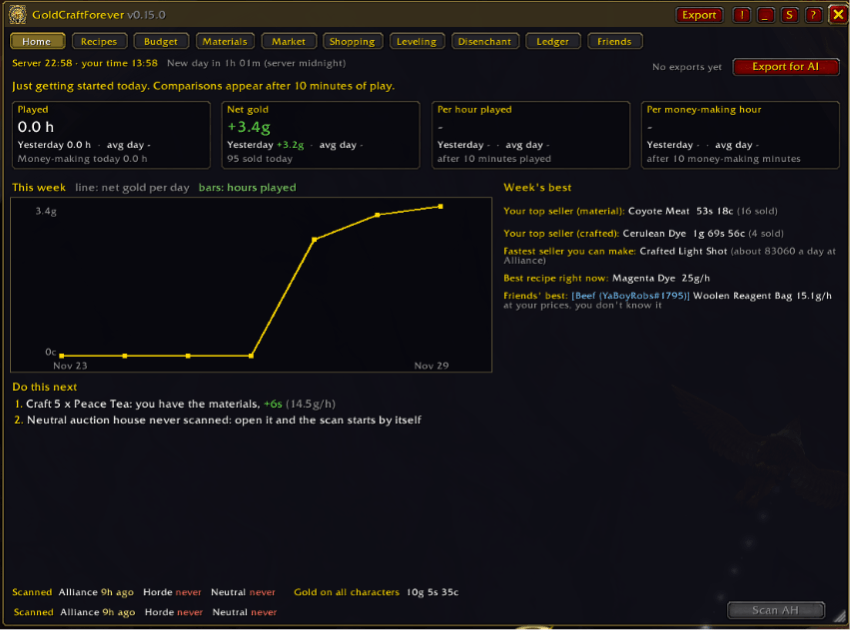
- Hours played, net gold, gold per hour played and gold per money-making hour: today vs yesterday vs your average day. Days are compared by rate, so a short session isn't judged against a long one.
- This week's chart, your top-selling material and crafted item, the fastest seller you can make, the best recipe right now, the biggest staple price move and your friends' best find.
- Do this next: up to 5 suggestions built from measured data, like "Craft 8 Bronze Bars, you have the materials", "Buy 40 Wool Cloth at Alliance, resell at Neutral: +3s", "1 more Heavy Stone unlocks 3 profitable recipes" or "Your Mooncloth cooldown is ready: +12s". Click one to go there.
- Gold goals: set a daily and weekly target and watch your progress.
- Days start at server midnight, so you and your friends share the same days. The window opens on the tab that fits where you are: Market at an auction house, Recipes at a profession, Ledger at the mailbox.
Export for AI: a weekly review in one paste
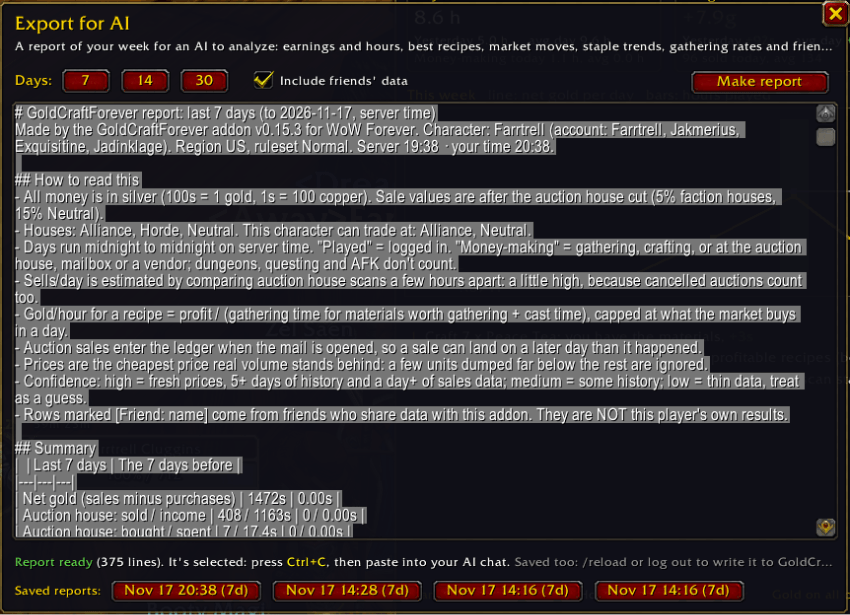
- One click makes a report of your last 7, 14 or 30 days to paste into Claude, ChatGPT or any AI: earnings and hours, best recipes, your sales, market moves, staple trends, gathering rates and friends' finds.
- Written for an AI to read: it explains its own numbers, says how much to trust each row, marks friends' data as theirs, and ends with the questions to ask.
- Keeps your last 4 reports, and each new one starts with what changed since the last.
Recipes: what every recipe earns
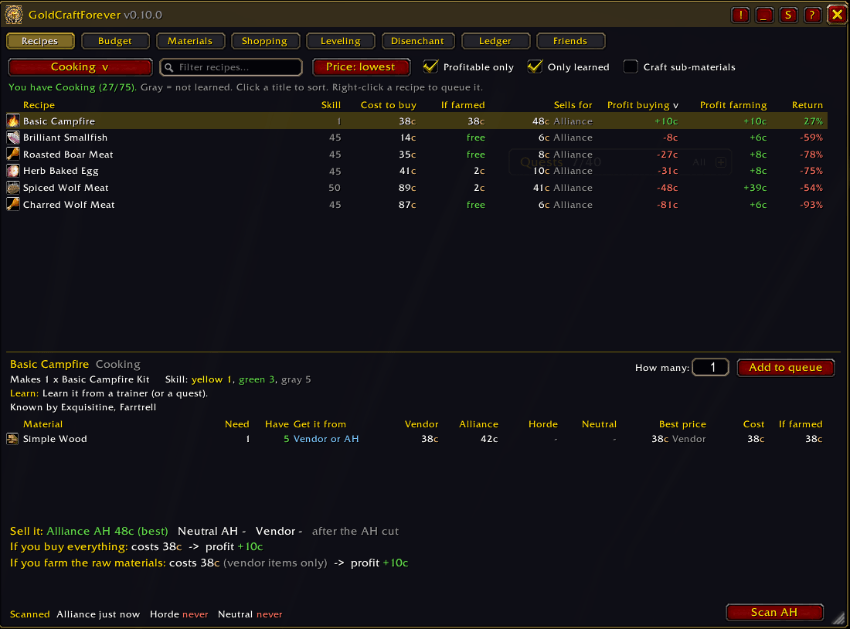
- Every recipe of every profession, with cost to buy, cost if you farm the materials yourself, sale price and profit both ways.
- Click any column title to sort. Filter by name. Show only learned recipes, only profitable ones, or only ones you have materials for, with how many you can make right now.
- Set "How many" and see exactly what you'd buy, what you'd spend, and which of your own materials it uses.
- Crafted materials (bolts, bars, oils) are priced at their own crafting cost when that's cheaper than buying them.
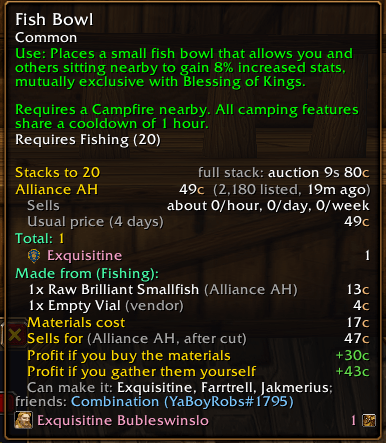
- Recipe details: every material's price at each house, where to learn the recipe and what it costs, how many crafts until it pays for itself, and which of your characters know it.
Market: prices, trends and farming
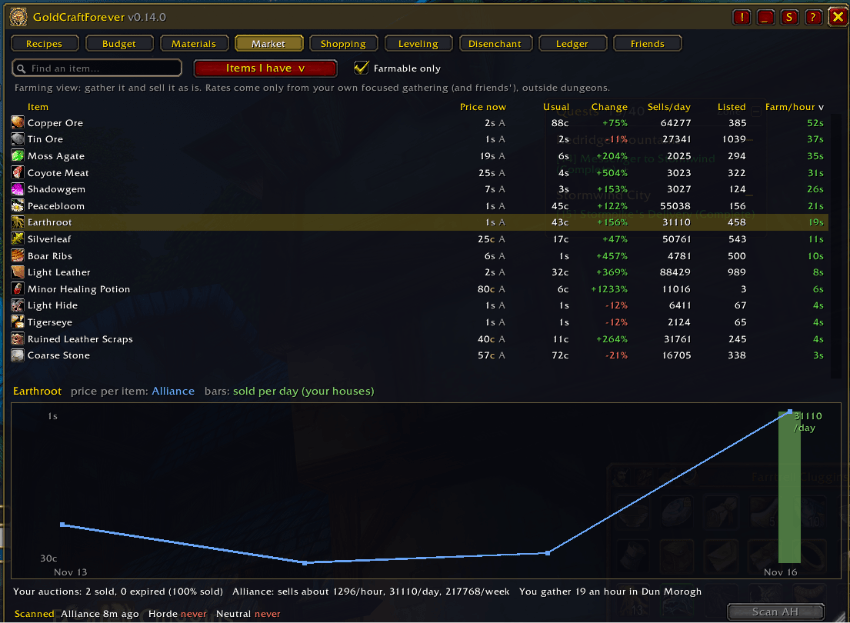
- Every crafting item you've scanned: price now, usual price, how much it changed, sales per day and how many are listed. Sort to find bargains, spikes and what actually moves.
- Click an item for a chart of its price at each house over recent days, with bars for sales per day.
- Flips: items listed well under what they reliably sell for, with how many the market will take and the profit after the cut and deposit risk.
- Staples: herbs, ore, leather, cloth, fish, elemental and enchanting materials keep 30 days of history, with a trend column so you can see what's slowly getting cheaper or more expensive.
- Farming view: gold per hour for gathering raw materials and selling them as they are, from your own measured gathering speed.
- Price alerts: Alt-click any item to be told when a scan finds it cheap enough to buy or dear enough to sell, with a chat line and a sound.
- Auto-scan: opening an auction house scans it by itself when it hasn't been scanned for 15 minutes or not yet today.
Sales rates and gold per hour
- Compares your auction house scans to estimate how many of each item sell per hour, day and week at each house.
- Gold per hour for every recipe: your time spent gathering (measured) and crafting, capped at what the market actually buys, so the top of the list is the best use of your time.
Budget: "I have 40 silver. What should I craft?"
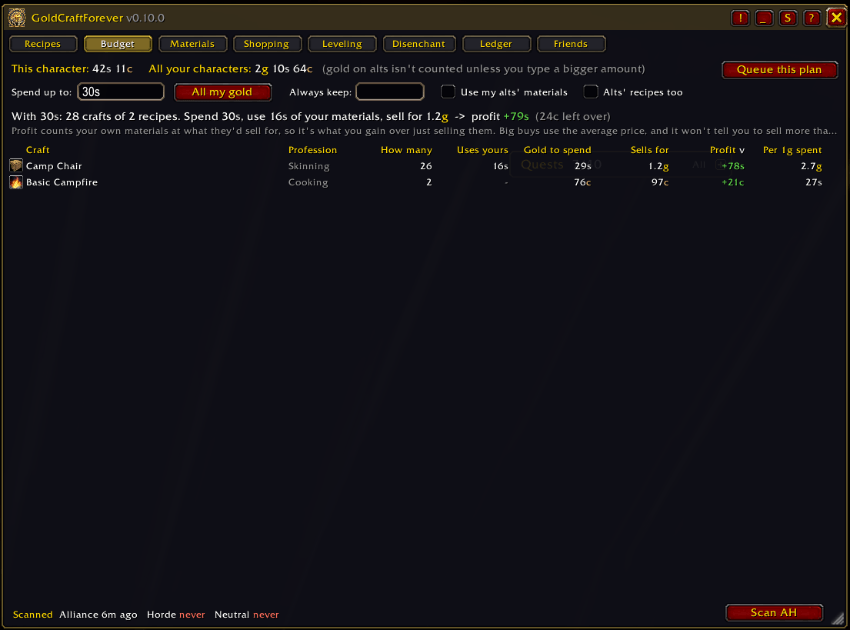
- Reads your gold (or type an amount like
40sor2.5g) and builds the most profitable crafting plan you can afford. - Uses the materials in your bags and bank first, then buys the rest from the cheapest place.
- Stays realistic: big buys use the average price, it never plans to buy more than is listed, and never plans to sell more than about a day of real sales.
- One click sends the plan to the Shopping tab.
Materials: "I have this. What do I do with it?"
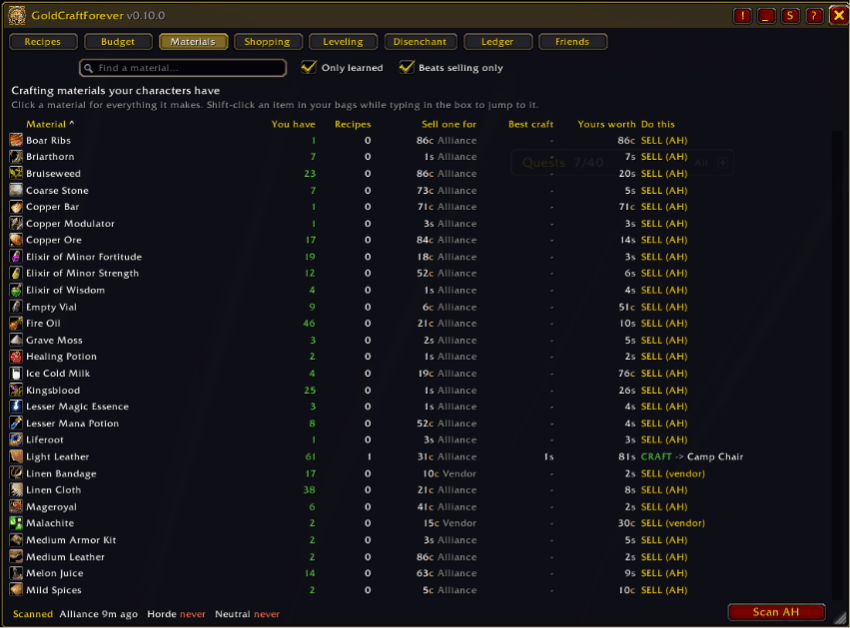
- Lists the crafting materials your characters own, with a clear verdict: COOK → Longjaw Mud Snapper, SEW → Bolt of Linen Cloth, or SELL (AH).
- Search any material, or Shift-click one from your bags, to see what one is worth in every recipe compared with selling it.
- Crafting is only recommended when it beats selling by a margin you choose (10% by default).
Shopping: queue and shopping list
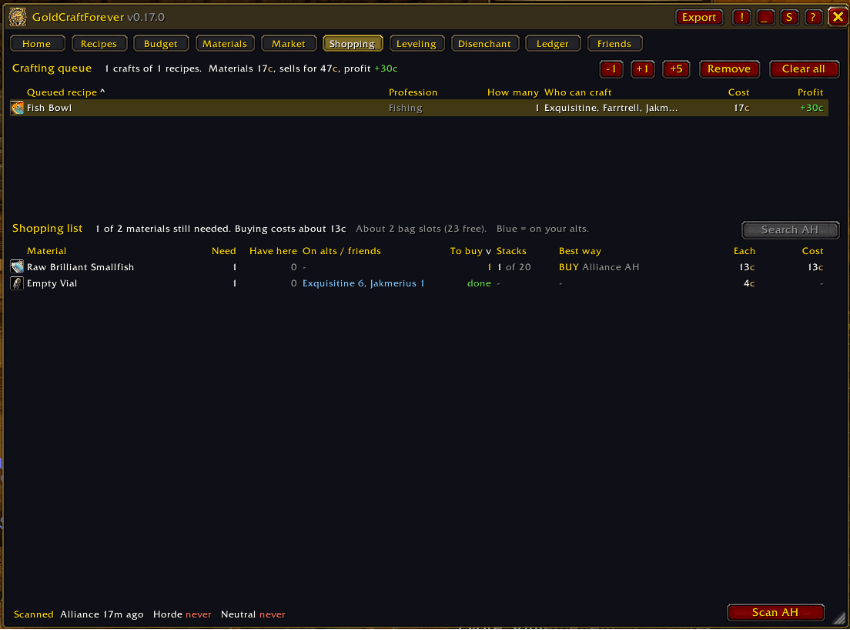
- Queue recipes, then get one shopping list for everything: what you need, what's in your bags, what's on your alts (mail it over), and what's left.
- For each material: BUY (and where it's cheapest) or GATHER (and how long it takes you, in which zone).
- With the auction house open, double-click a material to search for it. Crafting counts the queue down.
Buy or gather: is farming worth your time?
- Times your focused gathering per zone (herbs, ore, fishing, skinning and mob drops; dungeons and questing don't water it down) and learns drop chances per creature.
- Works out what your time is worth from what you actually earn per money-making hour (gathering, crafting, trading), or you can set it yourself.
- Then compares the two: "Buy 40 for 6s, or gather them in 18 minutes in Elwynn Forest."
Leveling: the cheapest way up
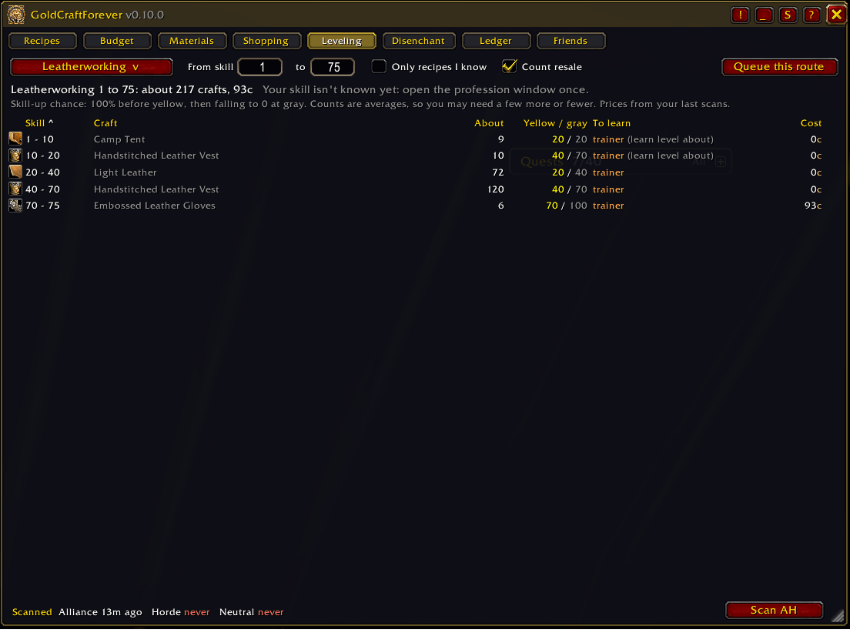
- The cheapest route from your current skill to any target, using real skill-up chances (100% before yellow, falling to 0 at gray).
- Counts what you can sell the crafts for, and adds the price of recipes you'd need to buy.
- Queue the whole route in one click.
Disenchant: sell it or disenchant it?
- For every green, blue and purple item in your bags: what it sells for, what disenchanting it gives, and a clear verdict.
- Only shown when one of your characters has Enchanting.
- Starts from the standard disenchant table and switches to your own results once you've disenchanted enough of a kind.
Ledger: what actually sold
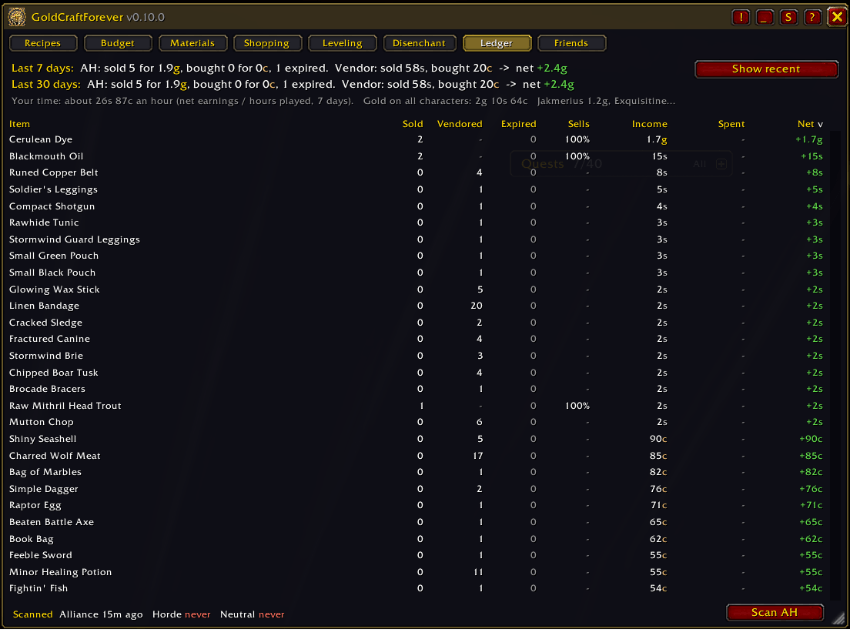
- Reads auction mail (sales, purchases, expired auctions) and records vendor sales and purchases.
- Totals for the last 7 and 30 days, sell rates per item, gold across all your characters, and your earnings per hour.
- Your markets: which kinds of items your auctions sell best and worst, so you know where to focus.
- Where your gold goes: every gold change with its cause: flights by route, repairs, training, postage, vendor items, trades, mail, loot, quests and more. Tag trades as sales, tips, gifts or loans, and see who owes you what.
Prices you can trust
- Price now ignores bait: a few units dumped far below the rest don't set the price, and the tooltip says what was stepped over.
- Prices are colored by age, and marked when few are listed (
!), when they're far from their usual price (?), or when the scan is old (~). - Keeps 10 days of price history for crafting materials and products to work out the usual price (30 days for raw materials).
- Shows listing deposits, and can subtract the deposit you're likely to lose.
Tooltips
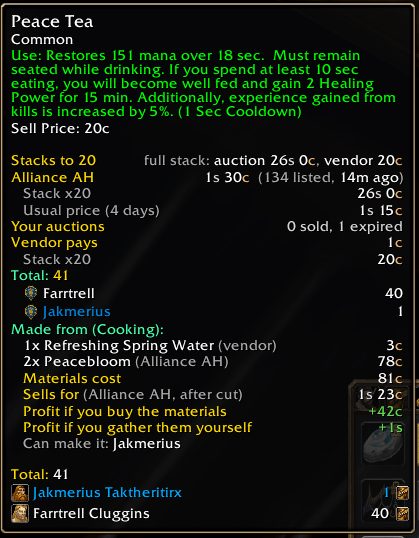
- Short by default: the cheapest auction price you can use, the vendor price, stack value and how many each character has.
- Hold Shift for everything: prices at all three houses, usual price, what it's made from and used to make, its best use, disenchant value, and where you've gathered it.
- Each section can be turned on or off.
Friends
- Share scans, known recipes, loot sources, gathering rates and disenchant results with friends who also use the addon.
- Works between characters on the same faction, and between Battle.net friends on either faction. There's also an export/import text as a backup.
- Each house keeps whichever scan is newer, so a group of friends keeps all three houses fresh.
Item locks
- Alt + left-click an item in your bags to lock it (works with Bagnon too). Locked items get a lock icon.
- If a locked item gets sold by a misclick or a junk-selling addon, it's bought straight back with a warning.
Comfort
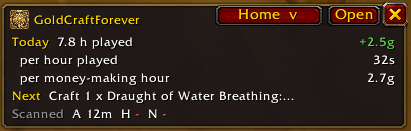
- Mini mode: a small window showing a short version of the tab you're on (today's numbers, your best crafts, the item you're watching, what's left to buy), plus cooldowns and scan ages.
- Minimap button and addon tray entry, key bindings, resizable window, opacity, scale, fade when the mouse is away, lock, close with Escape.
- Cooldown tracking (Mooncloth, transmutes) across your characters.
- A step-by-step tutorial the first time you open it (replay it with the ? button), and What's new after every update.
Getting started
- Type /gcf or click the minimap button. The tutorial walks you through the window.
- Open an auction house: it scans by itself (or click Scan AH). Scan your faction's house and the Neutral house in Gadgetzan, Booty Bay or Everlook.
- Open each of your profession windows once so the addon knows your recipes and skill.
- Open your mailbox after auction sales so the Ledger can record them.
Commands: /gcf window · /gcf export · /gcf alert <item> · /gcf support · /gcf mini · /gcf budget · /gcf settings · /gcf tutorial · /gcf use <item> · /gcf help
Good to know
- One full auction house scan is allowed every 15 minutes (a game limit).
- An addon can only read the auction house you're standing at. Friends sharing their scans fills in the others.
- GoldCraftForever never buys, sells or crafts anything on its own. Every action is your click.
- WoW Forever is still changing. If something looks wrong, please leave a comment with what you saw. Settings > Support > Copy debug info gives you everything to paste with it, including any errors the addon caught.
GoldCraftForever is all rights reserved (see the LICENSE file): use it and change your own copy freely, but please don't re-upload or reuse it without asking. The disenchant odds table is adapted from Disenchantry under the MIT License (see NOTICE). Recipe data comes from WoW Forever's game files. Not affiliated with Blizzard Entertainment.
GoldCraftForever Team