Gold Circuit
- By
Keeps track of every weekly, world quest and event that pays gold across all your alts, tells you where to go next, and shows where your gold actually comes from.
If you run a handful of alts through the Midnight weeklies, you know the routine: log in, try to remember what this one has already done, fly around, log the next one, and somewhere along the way lose track of which caches you've opened. Gold Circuit takes care of that for you.
Log each character in once and the addon remembers what they have left this week. On the character you're playing, it lays out a route sorted by gold per minute, points you to the quest givers, and keeps a ledger of where your gold came from and where it went.
What it tracks
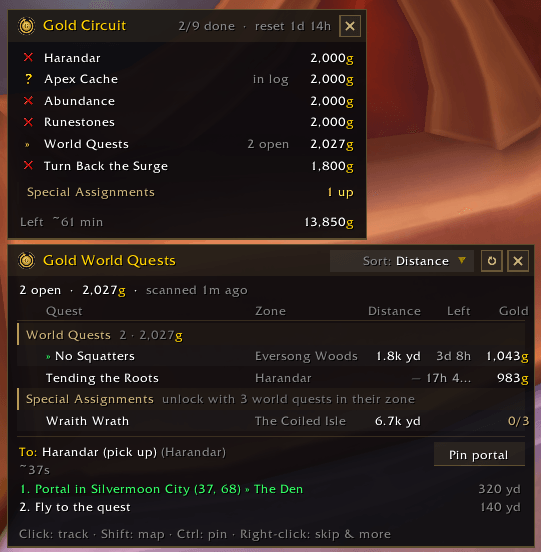
Apex Cache, Turn Back the Surge, Harandar, Runestones, Abundance, Special Assignments and Crafting Orders, plus Aqir and Stormarion Assault if you want them.
Completion comes from the game's own quest flags, so it's right on every alt, including things you did before you installed the addon. It knows the level rules too: nothing shows up below 80, some weeklies and the Coiled Isle need 90, and Runestones, Harandar and Abundance open up again when you hit 90.
A couple of the trickier ones are handled properly:
- Apex Cache: the "Midnight:" weeklies and Trailing Xal'atath each reset every second week, a week apart, so you can have one or both available. The addon counts them separately and won't mark the cache done while the second one is still waiting.
- Crafting Orders: these are counted per profession. Finishing your Tailoring orders won't hide the Enchanting ones.
If the addon ever gets something wrong, right-click it and mark it done or not done yourself.
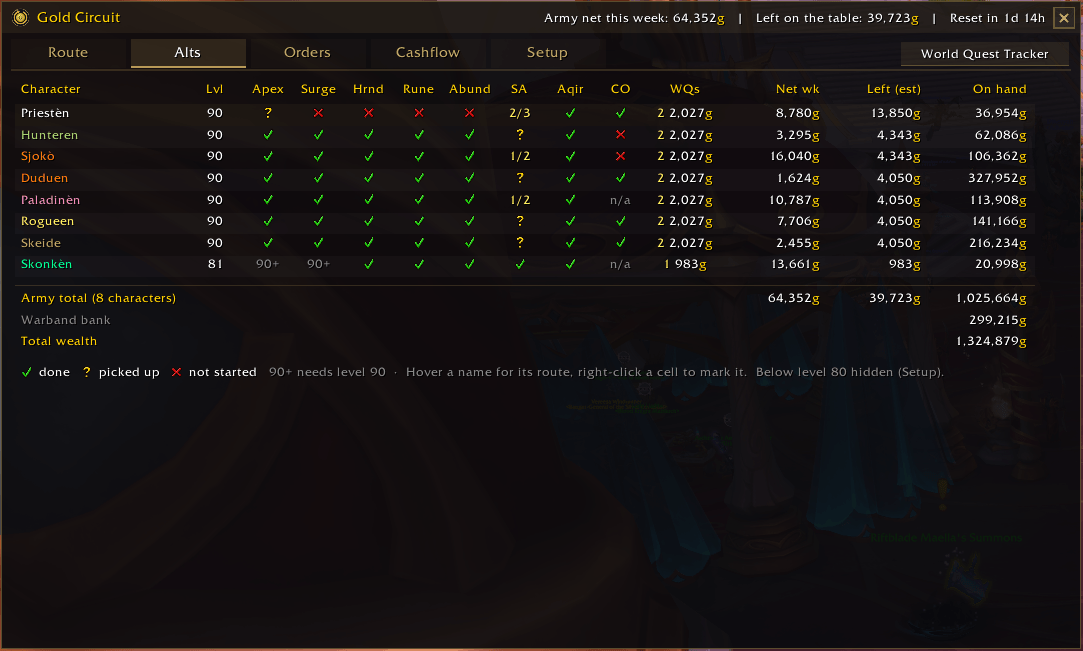
Seeing your whole army
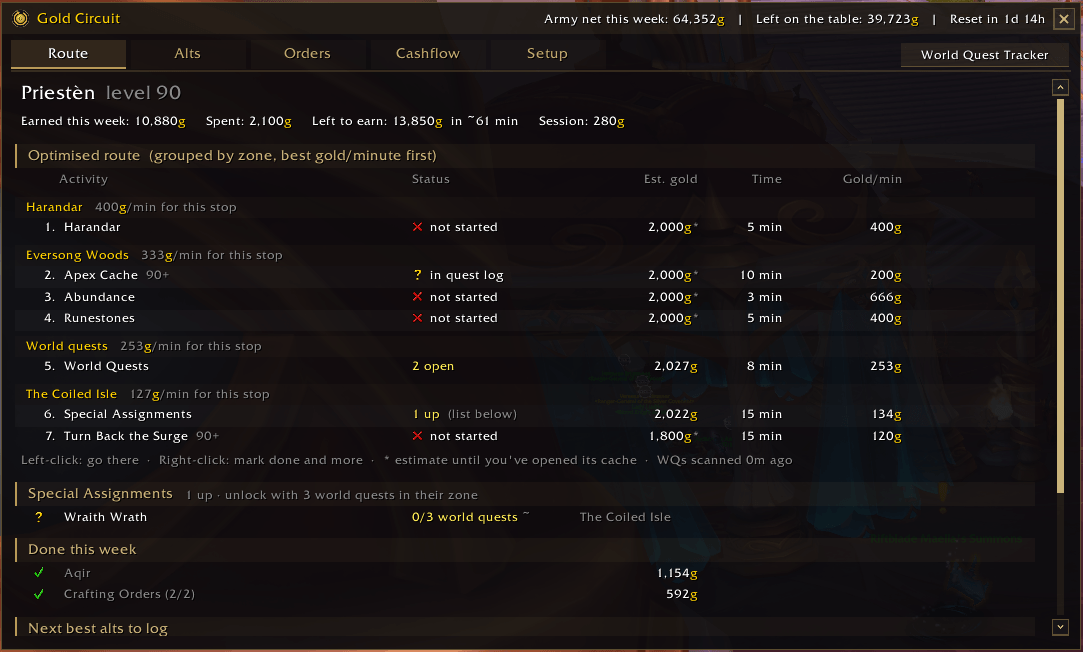
The Route tab shows what's left on the character you're on, grouped by zone so you're not flying back and forth, and suggests which alt to log next. The Alts tab puts every character and activity in one grid, along with this week's earnings, the gold you're still leaving on the table, and what everyone is holding (warband bank included). There's also a small on-screen tracker if you'd rather not open the full window.
World quests and Special Assignments
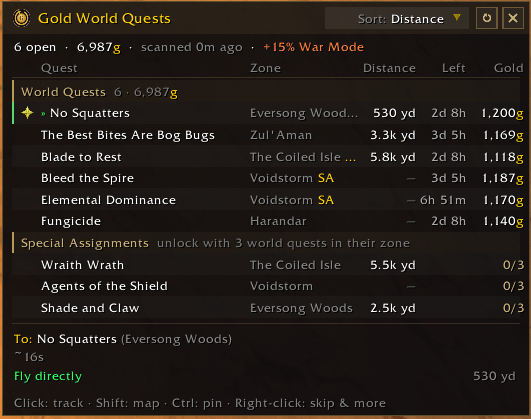
The World Quest Tracker lists every gold world quest in the Midnight zones with its reward (War Mode bonus included), time left and distance. Hover a quest to see its objectives, click to track it, or right-click to skip it for the session or for good. When one of your level-90 characters finds a new gold world quest, your other level-90 alts get it suggested too.
Special Assignments show how many are up and how close each one is to unlocking.
Events
For Aqir, the addon reads the map's Events tab, so it knows when an invasion is actually running (not just scheduled), when the next one starts, and whether you've already had this week's reward on each character. You can turn on a reminder before it starts. Abundance and Stormarion Assault use the same Events tab to find this week's location.
Getting there
Track a quest and the addon works out the quickest way there: flying straight, or using your Hearthstone, a teleport or a portal if that's faster. A Use button casts it for you. It learns your hearthstones, teleport toys and portals as you play. Clicking a weekly pins its quest giver on the map, and the pin removes itself once you've picked up the quest or arrived. If you'd rather navigate yourself, you can turn all of this off in Setup.
Where your gold goes
The Cashflow tab splits your income and spending by source: quests, world quests, caches, loot, crafting orders, the auction house, vendors, repairs and more, per character and per week. Gold you move between your own characters and banks isn't counted as income, so the numbers stay honest.
For crafters, the Orders tab prices every patron, public and personal order using TradeSkillMaster or Auctionator: mats, commission, rewards and the profit at the end, so you only craft the ones worth it.
Getting started
- Install it, log in, and type /gc (or click the minimap coin).
- Log each alt once so it shows up in the Alts tab.
- Untick anything you don't do in the Setup tab.
That's it. The more you play, the better it gets: quest IDs, quest givers, reward averages and travel routes are all learned along the way. If the chat messages get too chatty, you can mute them in Setup.
Useful commands
- /gc opens the dashboard
- /gc mini shows or hides the small tracker
- /gc wqwin shows or hides the World Quest Tracker
- /gc route prints your route to chat
- /gc help lists everything else
A note on languages
Zone scanning, world quests, completion checks and navigation work in every language. Weekly names are matched in English, so on other clients the addon relies on its built-in quest IDs and the ones it learns while you play.
Found a bug?
Let me know on the issue tracker. If it's about Aqir or Special Assignments, include the output of /gc aqir or /gc sa, because that shows exactly what the game is reporting.
Gold Circuit Team