Goblin Character
- By
A complete character panel overhaul for stats, gear, titles, reputation, currencies, and PvP tracking.
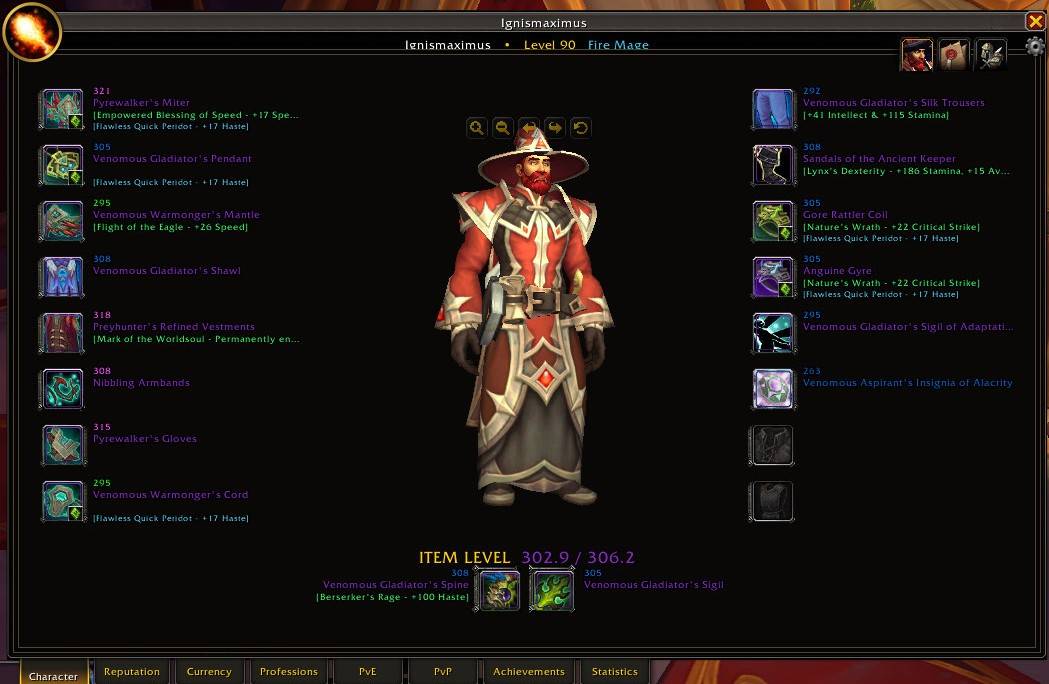
Goblin PaperDoll.jpg
Description
GoblinCharacter
A complete character information interface for gear, progression, PvP, reputations, currencies, professions, achievements, statistics, and inspection.
GoblinCharacter replaces World of Warcraft's standard Character panel with a unified, information-focused interface built around one simple idea:
Pressing C should actually tell you about your character.
Instead of treating the Character panel as little more than a paper doll, GoblinCharacter brings information scattered across multiple Blizzard windows into one consistent place.
Browse your equipment, titles, equipment sets, reputations, currencies, professions, Mythic+ activity, raid progression, Great Vault progress, rated PvP history, achievements, and character statistics without bouncing between unrelated interfaces.
And when you inspect another player, GoblinCharacter does more than compare gear.
Using information available through Blizzard, Raider.IO, and Murlok.io, GoblinCharacter turns inspection into a browsable character profile.
GoblinCharacter — Because pressing C should actually tell you about your character.
Character
The Character page keeps the familiar equipment-and-model layout while making substantially better use of the available space.
Equipped items are displayed around the character model with useful information visible directly beside each slot, including:
- Item names
- Item levels
- Upgrade information where available
- Enchant status
- Enchant information
- Socketed gems and bonuses where available
- Missing enchant or gem warnings
- Main-hand and off-hand information
- Equipped item level
- Overall item level
Missing enhancements are immediately visible instead of requiring you to inspect every item individually.
The familiar WoW paper doll remains recognizable, but the information you normally have to hunt for is brought directly into the interface.
Character Stats
GoblinCharacter provides a detailed character-statistics view organized into readable sections rather than a single crowded list.
Available information can include:
- General character information
- Attributes
- Offensive stats
- Defensive stats
- Utility stats
- Spell and healing power
- Armor and mitigation
- Critical Strike
- Haste
- Mastery
- Versatility
- Leech
- Avoidance
- Speed
- Other Blizzard-supported character statistics
Stats can be viewed as a broader complete list or filtered toward the values most relevant to the character.
Equipment Sets
Saved equipment sets can be browsed directly from GoblinCharacter.
Rather than simply showing another set of item icons, GoblinCharacter can compare a selected saved equipment set against your currently equipped gear.
The comparison shows:
- Which equipment slots changed
- The item from the selected saved set
- The currently equipped replacement
- Aggregate stat differences produced by those changes
This turns equipment-set comparison into a quick answer to:
"What actually changed when I switched gear?"
Equip an existing set, update it with your current equipment, or create a new set without leaving the character interface.
Titles
Browse titles known by the character without leaving GoblinCharacter.
The Titles view displays:
- Current title
- Known title count
- Available titles in a compact browser
Select a title directly from the list without opening another Blizzard panel.
Reputation
The Reputation page turns the character's reputation data into a categorized overview designed for scanning rather than scrolling endlessly through one giant list.
Reputations are grouped by expansion, faction, or related content.
Supported progression types use their appropriate Blizzard systems, including:
- Traditional reputation standings
- Renown
- Friendship-style progression
- Other Blizzard-supported reputation systems
Categories can be expanded or collapsed so the page stays focused on the content you care about.
Currency
The Currency page provides a categorized overview of currencies associated with the character.
Currencies are automatically organized into useful groups such as:
- Current expansion
- Crests and upgrade currencies
- Delves
- Seasonal content
- Professions
- Zones
- Dungeons and raids
- Player vs. Player
- Legacy expansions
- Miscellaneous
Currency icons and current quantities are displayed directly beside each entry.
Instead of digging through Blizzard's increasingly enormous collection of currencies, GoblinCharacter presents them as something you can actually scan.
Professions
The Professions page provides a clean overview of the character's learned professions and current skill levels.
Primary and secondary professions can be displayed together with information such as:
- Profession icon
- Current skill
- Maximum skill
- Progress
- Learned or unlearned state
- Expansion progression where available
Click a learned profession to open Blizzard's corresponding profession interface.
No more remembering which character knows what before opening another window to check.
PvE Profile
The PvE section brings the character's current PvE activity and progression together in one interface.
Mythic+
The Mythic+ overview displays available information such as:
- Mythic+ Score
- Best Key
- Average Key
- Completed Runs
- Fastest Recorded Run
- Average Recorded Run
- Current Keystone
Instead of reducing Mythic+ activity to a single number, GoblinCharacter provides a broader overview of the character's current dungeon activity.
Mythic+ Run History
Recorded Mythic+ activity can also be browsed through a dedicated run-history view.
Individual runs may display:
- Dungeon
- Key level
- Completion time
- Timer result
- Time above or below the dungeon timer
This provides useful context behind the character's overall Mythic+ score.
Raid Progression
Current raid information is displayed using progression and lockout information available to GoblinCharacter.
Raid entries can include:
- Raid name
- Difficulty
- Current completion
- Boss-by-boss status
- Active lockout state
- Reset timer
GoblinCharacter does not invent progression information that its available data sources do not provide.
When only current lockout information is available, the interface says so rather than presenting incomplete data as a complete historical record.
Great Vault
Great Vault progress can be viewed directly from the PvE section.
Raid, Dungeon, and World/Delve reward tracks are displayed together with their current unlock progress.
Quickly see:
- Which reward slots are unlocked
- Which thresholds remain locked
- Current progress toward each threshold
- How much additional activity is required
No need to visit the Great Vault just to check your progress.
PvP Profile
The PvP section provides a single overview of rated and general PvP information available for the character.
Your Honor Level and Honorable Kills are displayed at the top.
Rated sections can include:
- 2v2 Arena
- 3v3 Arena
- Rated Battlegrounds
- Solo Shuffle
- Rated Battleground Blitz
Depending on the information available for the character, each bracket may display:
- Current rating
- Season win/loss record
- Season-best rating
- Career information where available
GoblinCharacter distinguishes between zero and unavailable data.
A character with a legitimate rating or match count of zero is not treated the same as a character whose information simply is not available.
Achievements
The Achievements page provides a dedicated achievement browser inside GoblinCharacter.
Browse achievement categories and individual achievements without leaving the character interface.
Available information can include:
- Achievement name
- Category
- Point value
- Completion state
- Completion date where available
- Total achievement points
The page is designed around browsing the character's accomplishments rather than treating achievements as nothing more than a single score.
Statistics
The Statistics page exposes Blizzard's character statistics through a categorized browser.
Available categories can include:
- Character
- Wealth
- Consumables
- Kills
- Deaths
- Quests
- Skills
- Travel
- Social
- Delves
- Dungeons and Raids
- Player vs. Player
- Pet Battles
- Proving Grounds
- Legacy statistics
Depending on what Blizzard exposes for the character, statistics can range from general activity to detailed PvP, PvE, economic, and historical information.
If Blizzard tracks a statistic and makes it available to addons, GoblinCharacter can present it as part of the character's record.
Custom Inspection
GoblinCharacter includes its own inspection interface instead of simply presenting Blizzard's default Inspect window.
Inspection is designed around a different question.
Not simply:
"How does their gear compare to mine?"
But:
"What can I learn about this character?"
When another player is inspected, GoblinCharacter builds a browsable character profile using information available through Blizzard's supported addon APIs together with supported character information from Raider.IO and Murlok.io where available.
Inspection pages can include:
- Character
- Equipment
- Item levels
- Gems and enchants
- PvE information
- Mythic+ information
- Raid progression
- PvP information
- Achievements
- Statistics
Instead of turning inspection into a side-by-side equipment comparison, GoblinCharacter lets you browse the information available for that player.
Whether you want to know what someone is wearing, what they have accomplished in PvP, what PvE content they have completed, or what their character statistics look like, inspection is treated as a character profile rather than just a gear check.
Persistent Inspection Snapshots
Once character information has been successfully retrieved, GoblinCharacter keeps the visible inspection snapshot available even if the inspected player:
- Walks away
- Flies away
- Changes target
- Leaves inspection range
- Phases
- Enters or leaves an instance
You do not need another player to continue standing beside you while you browse information that has already been retrieved.
Once GoblinCharacter has the information, you can continue browsing the visible snapshot until you choose to inspect another player or close it.
Information that was not retrieved before the player became unavailable may remain unavailable.
One Character. One Interface.
GoblinCharacter is built around a broader definition of what a Character panel should be.
The goal is not simply:
"Show my equipment."
The goal is:
"Tell me about this character."
For your own character, GoblinCharacter brings together information including:
Character • Titles • Equipment Sets • Reputation • Currency • Professions • PvE • PvP • Achievements • Statistics
When inspecting another player, GoblinCharacter presents the character information available from its supported data sources through:
Character • PvE • PvP • Achievements • Statistics
All through the same compact black-and-gold interface.
Press C and get more than a paper doll.
Data Sources and Limitations
GoblinCharacter uses information available through Blizzard's supported World of Warcraft addon APIs and, for supported character-inspection features, information available from Raider.IO and Murlok.io.
Different information comes from different sources, and not every source provides every type of character data.
Some character, equipment, PvE, PvP, achievement, progression, or statistical information may:
- Not be exposed by Blizzard's addon API
- Only be available while another character is inspectable
- Require Blizzard data to finish loading
- Only represent the current season or current lockout
- Differ between your own character and an inspected character
- Depend on the availability or coverage of Raider.IO or Murlok.io data
- Be unavailable for a particular character, activity, region, or game state
GoblinCharacter does not estimate or fabricate unavailable information.
When reliable information is unavailable, GoblinCharacter displays what is actually known and marks unavailable information accordingly.
Raider.IO and Murlok.io are third-party services and are not affiliated with GoblinCharacter.
Standalone Addon
GoblinCharacter is completely standalone.
It does not require GoblinPlates, GoblinFrames, GoblinBags, GoblinLedger, or any other Goblin addon.
Use the Goblin addons you want.
Ignore the ones you don't.
Bug Reports and Contact
Bug reports are welcome.
When reporting an issue, please include:
- Your GoblinCharacter version
- Your class and specialization
- The page or feature where the problem occurred
- The complete Lua error, if one appeared
- What you were doing when the issue occurred
- A screenshot when the issue is visual
For issues involving inspected characters, PvE, PvP, reputation, currencies, professions, achievements, or statistics, please also include enough character or activity information to reproduce the problem when possible.
Contact
- Email: Goblin.AddonSuite@gmail.com
- Alliance: IgnisMaximus–Blackwing Lair
- Horde: Taurenproud–Blackwing Lair
In-game whispers or mail are welcome.
The GoblinCharacter Team
IgnisMaximus — Blackwing Lair (Alliance)
Taurenproud — Blackwing Lair (Horde)
Creator and Maintainer
The Goblin Character Team