Glowing Nodes
- By
Ore veins, herbs, skinnable corpses and chests glow in WoW Forever, with the profession level they need on top, an alert and a map of every node you gather.
gn15_01_hero.png
gn15_02_world.png
gn15_03_notebook.png
gn15_04_map.png
gn15_05_fishing.png
gn15_06_arrow.png
Description
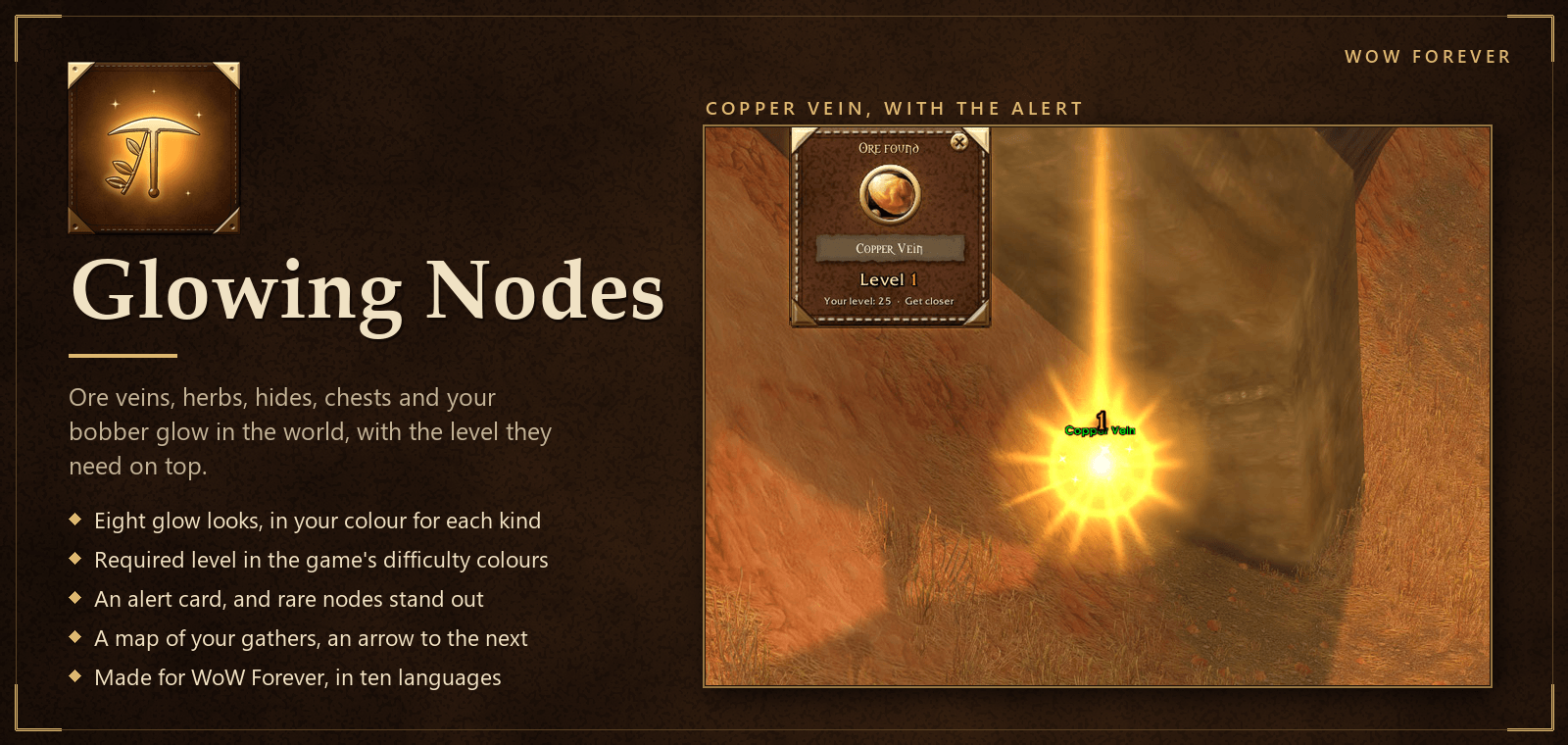
Glowing Nodes makes ore veins, herbs, skinnable corpses, treasure chests and your fishing bobber glow in the world of WoW Forever, with the profession level they need on top, a soft sound and a RareScanner-style alert. Every node you gather goes on your map, and an arrow leads you to the next one.
In the world
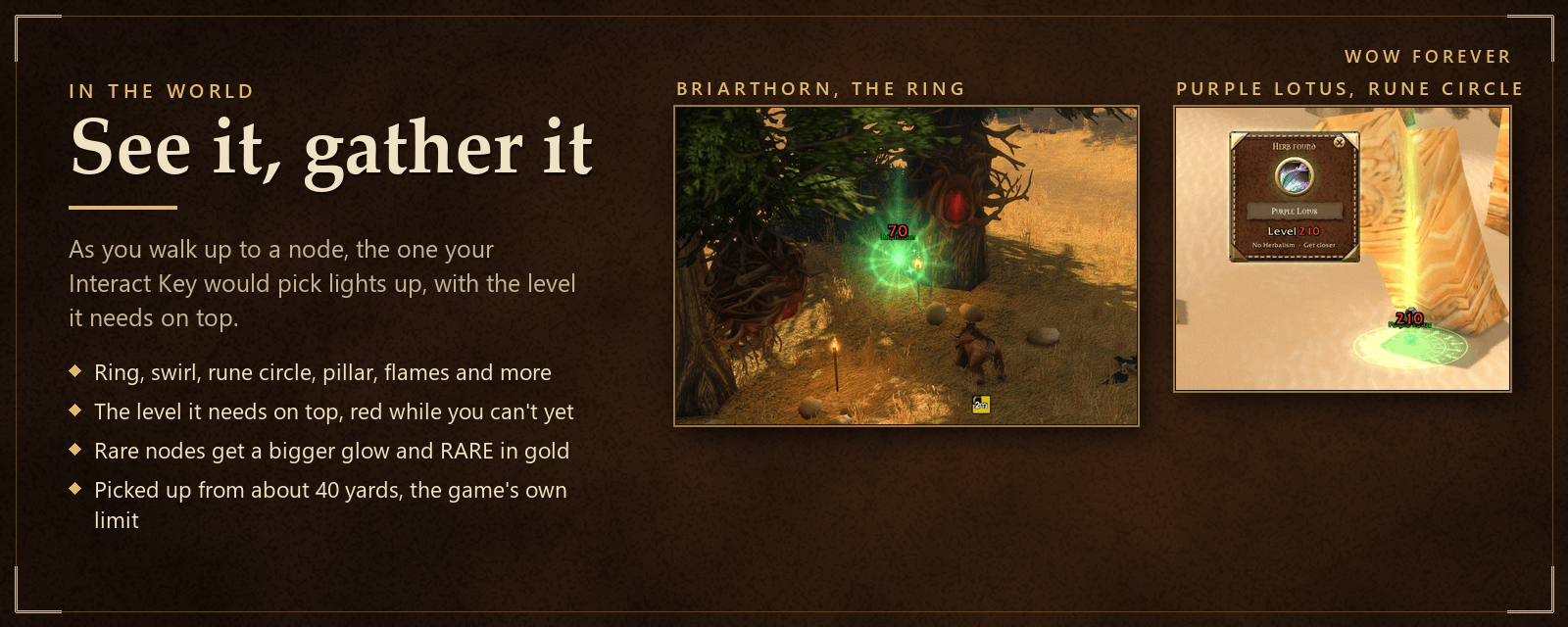
- Eight glow looks: Ring, Swirl, Rune circle, Pillar of light, Spark shower, Flames, Fireflies and Aura. Pick one for ores, herbs, hides and chests, each in its own colour, size, brightness and pulse.
- The level it needs on top, in the game's difficulty colours: red while you can't gather it, then orange, yellow, green and grey.
- Rare nodes stand out: silver, gold, truesilver, dark iron, rich thorium and Black Lotus get a bigger glow with its pillar of light, RARE in gold over the level, a sound of their own and a "Rare node!" alert.
- From about 40 yards, as far as the game picks a node, and the glow keeps its full size out there.
- Glow lasts: keep the glow on as long as the node is your target, or let it go out softly after a few seconds.
- Chests glow in gold: treasure chests, lockboxes and other things you open in the world, with their own tab and alert.
- Skinning: a looted corpse you can skin glows too, with the level its creature needs.
- Keeps the Interact Key on the node: the game moves it to whatever you have selected, like the mob you just killed. Glowing Nodes keeps it on what's nearest, so the node next to you doesn't lose its glow. You can switch this off.
- Learns as you play: Forever's new nodes get their level the first time the game tells you what they need.
The alert
- An alert card with the material's icon, the node's name, the level it needs and yours, and whether it's in reach. Drag it anywhere; right-click or the X closes it.
- A soft sound for each kind (anvil, leaves, drum, and more to choose from), at three volumes.
- New nodes unlocked: when Mining or Herbalism goes up, the chat names the nodes you saw but couldn't gather yet that you now can, with their level, how many and in which zones.
Fishing
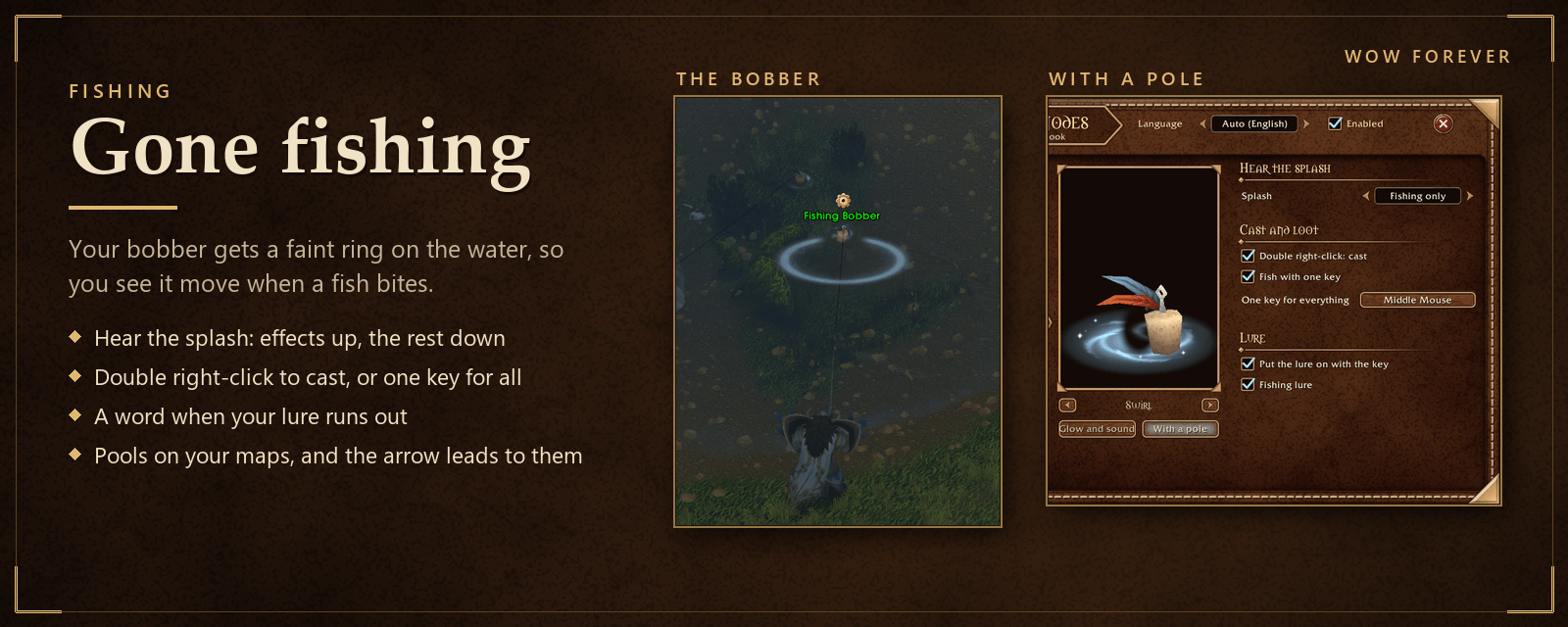
- Your bobber glows: a thin, faint ring on the water round it, its middle empty, so nothing covers the bobber and you see it move when a fish bites. The other looks work on it too, with a soft hole where the bobber floats.
- Hear the splash: with a fishing pole on, sound effects go up and music, ambience and voices go down (Balanced) or silent (Fishing only). Take the pole off and your own settings come back. Your master volume is never touched.
- Double right-click to cast, out of combat with a pole on. A single right-click stays as it was.
- Fish with one key (off by default): your Interact key casts when the line is in, loots the bobber when it's out, and puts on the best lure from your bags when the pole has none. You press every time; nothing is done on its own.
- The lure: the chat tells you when it has 30 seconds left and when it has run out.
- Fishing pools go on your maps: where they can appear, and the ones you fish, with what each one gave.
The arrow
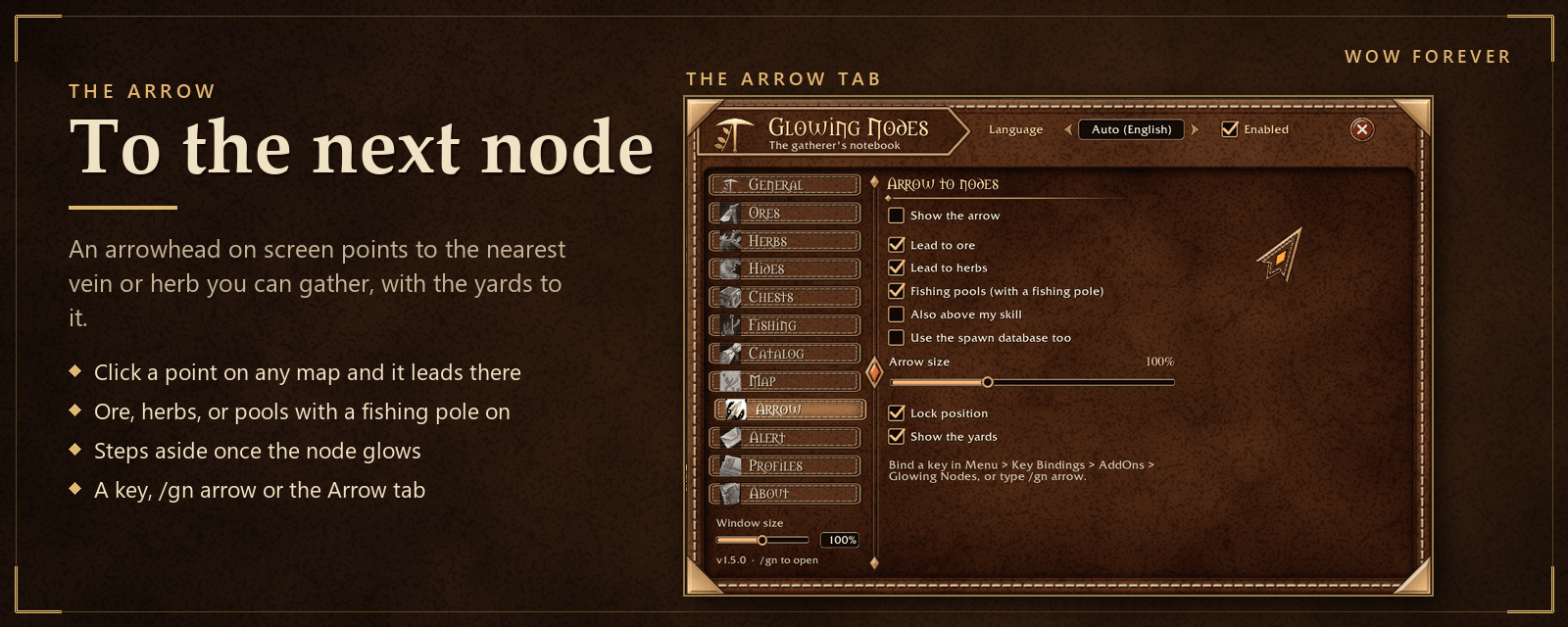
- A leather and bronze arrowhead on screen points to the nearest ore vein or herb you can gather, with the item's icon and the yards to it. Once the node glows, the arrow steps aside.
- Click a point on the world map, the minimap or the Map page and the arrow leads there, even above your skill. Click it again to let go.
- With a fishing pole on, it leads from pool to pool.
- A spot you reach and find empty is skipped for 10 minutes. It hides in combat, in instances, on flight paths and while dead.
- Turn it on with a key (Key Bindings > AddOns > Glowing Nodes), /gn arrow or the Arrow tab. It is our own frame, not a map waypoint.
The gathering map
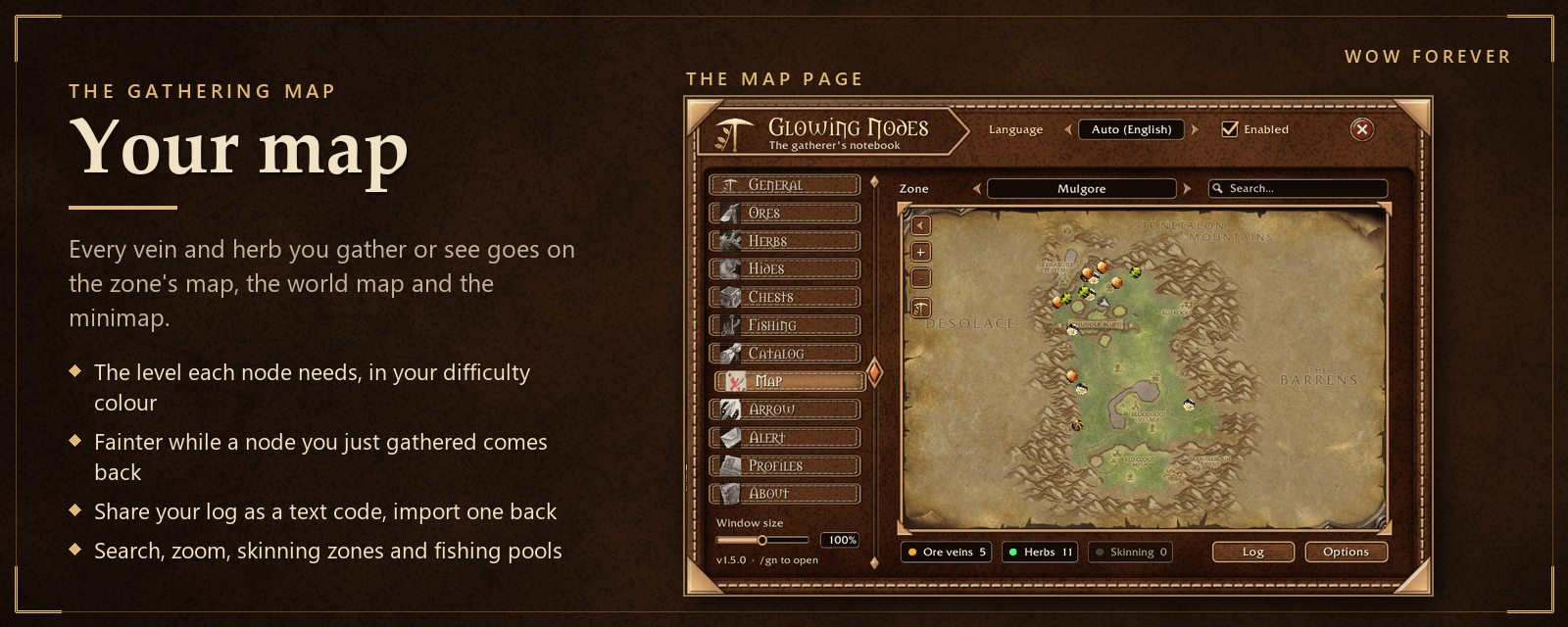
- Every node you mine or pick goes on the zone's map, on the world map and the minimap, with the icon of what it gives. Gather it again and it counts up instead of adding a point.
- The level each node needs, in the game's difficulty colour against your skill, as on the glow.
- Fainter for 5 minutes after you gather it, while it comes back.
- Seen, not gathered yet: nodes are logged as soon as the glow finds them, even if you walk past, with the level they need.
- What each node dropped: ore, stones, gems and rare herbs, most often first, in the item's quality colour, right in the map tooltip.
- Share your log: export this zone or everything as a text code, to keep as a backup or pass to another character or a friend, and import one back. Nothing is doubled.
- Database spots (optional): where veins, herbs and fishing pools can spawn, from the 1.12 world database. Forever's new zones aren't in any open database, so there the maps show what you gather.
- Skinning zones: purple areas where skinnable creatures roam, each with the skinning level it needs. Hides are areas, not points: mobs wander.
- A Map page in the options: the zone's map with the parts you explored, your points, your latest gathers, search (zones, nodes, creatures, drops), zoom, drag and back. /gn map opens it.
- Works with Open Map: the switches go in its menu, and its seamless map shows the zones around you too.
Options
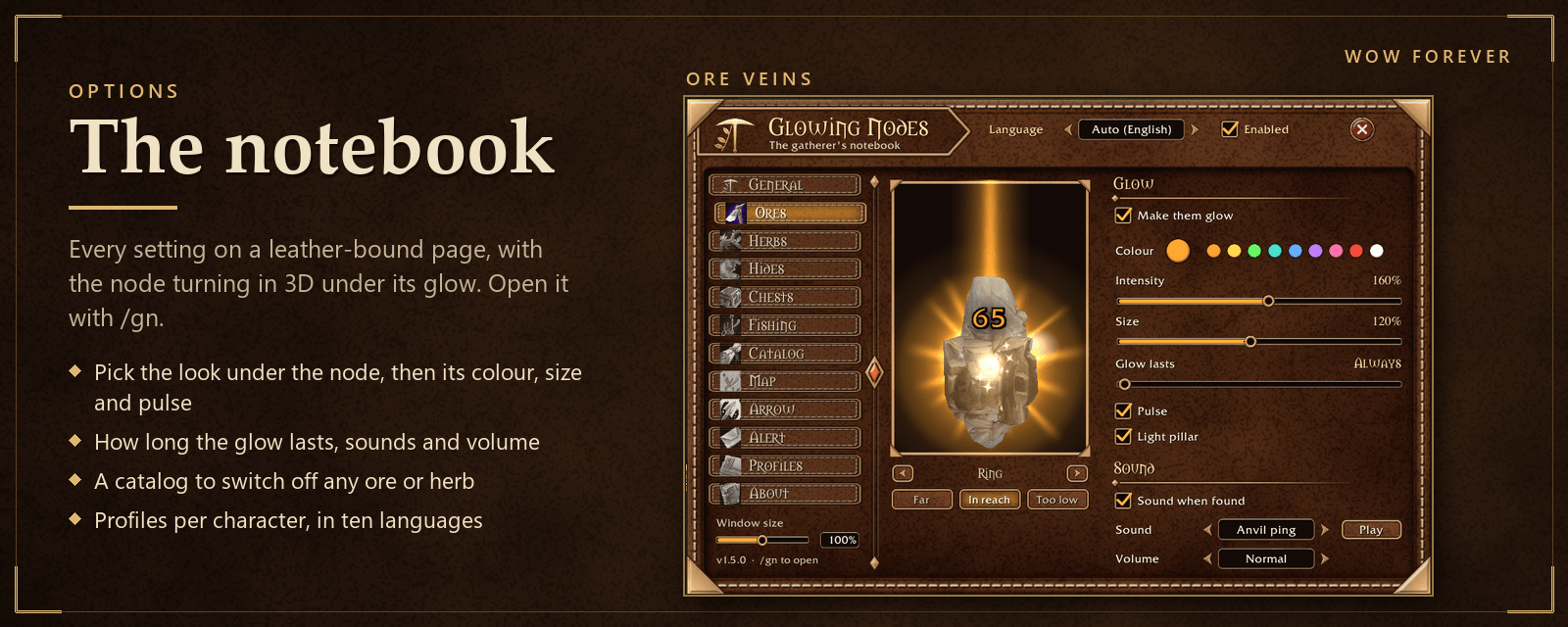
- The notebook: every setting on a leather-bound page, with the node turning in 3D under its glow. Pick the look with the arrows under it.
- Look, colour, intensity, size, pulse, light pillar and how long the glow lasts for each kind; sounds and volume; how long the alert stays, its size and where.
- Catalog: every ore and herb with its icon and level. Switch one off and it no longer glows, shows on the maps or draws the arrow.
- Profiles: shared settings, settings of its own for each character, or named profiles to copy and switch.
- Switch Find Herbs and Find Minerals (optional): with both professions, the minimap tracks herbs and minerals by turns while you move.
- Window size from 50 % to 150 %, with the ruler, the mouse wheel or Ctrl + mouse wheel over the window.
- In ten languages, picked on the window's cover: English, Español, Deutsch, Français, Italiano, Português, Русский, 한국어, 简体中文 and 繁體中文.
How it works
WoW doesn't let addons see the nodes around you. The one way in is the game's Interact Key (soft targeting): it picks the node you are about to gather and can give it a nameplate, which is where the glow hangs. So:
- One node glows at a time: the one your Interact Key would pick, up to about 40 yards away.
- The addon turns the Interact Key on for you, and puts your own settings back if you switch it off.
- During combat the game doesn't let addons change those settings, so the glow comes back when the fight is over.
Getting started
- Install the addon and log in.
- Walk up to an ore vein or a herb: it lights up.
- Type /gn to pick looks, colours, sounds and the alert, /gn map for your map and /gn arrow for the arrow. It is also under Esc > Options > AddOns.
FAQ
Why does only one node glow at a time?
The game picks one node for the Interact Key, up to about 40 yards away, and only that one gets a nameplate for the glow. For nodes further away, the arrow and your map show where they are.
In dungeons the alert says "Name and level hidden here".
Inside instances the game keeps a node's name and your position from addons. The node still glows and tells you when it's in reach, but it can't be named or put on the map there.
The level shows a gold "?"
The addon doesn't know that node yet. Try to gather it or hover it once and the level is learned for good.
Can I use it with other addons, like Forever Loot Sparkles or GatherMate2?
Yes. Glowing Nodes works on its own, whatever else you have installed. With Open Map, its switches go in Open Map's menu and your points and skinning zones show on its seamless map.
Something broke or I have an idea.
Join the Discord or open an issue on GitHub. Type /gn diag and paste the text it gives you: it has the addon version, the settings and what the addon sees, never your character's or realm's name.
Also by KullThran
KullThranUI Forever: a complete interface for WoW Forever, with unit frames, action bars, nameplates, armory, minimap and much more, visual styles to choose from and a setup wizard.
Glowing Nodes Team
Owner