
Glamourer
- By
Glamourer is a TBC gear outfit manager that lets you save, update, and apply equipment sets from your bags, auto-switch them on spec change, and use minimap/UI controls with draggable macros for fast swapping.
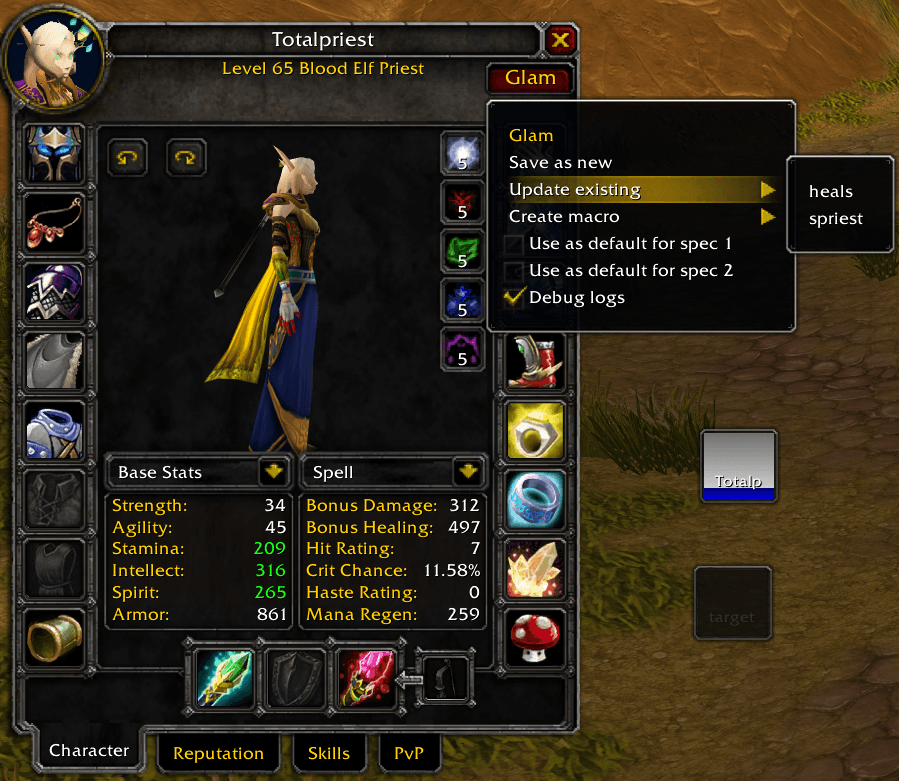
ui2.png
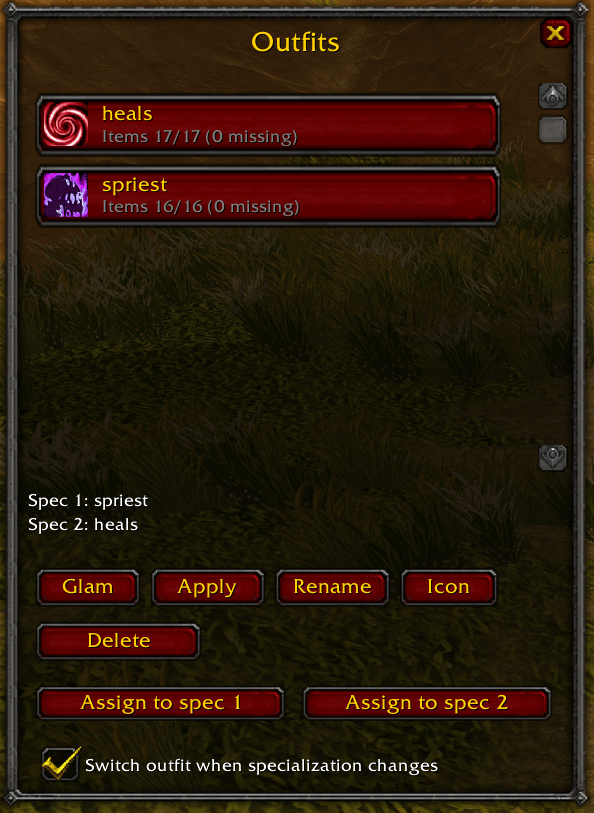
ui.png
Description
Glamourer (TBC Anniversary)
What it does
- Save outfits from your currently equipped gear.
- Apply outfits by equipping items from your bags.
- CRUD: rename/delete outfits, update an existing outfit from what you're wearing.
- Spec support: optionally auto-apply an outfit when your active talent group changes.
- Partial outfits: if an outfit does not include a slot, Glamourer will unequip that slot into your bags (warns + aborts if you don't have enough free bag space).
- Minimap button: Questie-style minimap ring button (drag to move). Left-click toggles UI, right-click opens menu.
- Macros: create a per-outfit macro and drag the outfit icon to your action bar.
- Per-outfit icons: choose an icon from the WoW icon list; used for both UI and macro icon.
- Debug logs: step-by-step apply logs saved in
GlamourerDB.logsand optionally echoed to chat. - Bag markers: items used in saved sets are marked directly in your bag slots.
- Bag tooltip set info: bag item tooltips show which saved set(s) use the item.
- Slot alternatives: show equippable alternatives from bags for each character slot (Alt-hover, Alt-click, or slot
+button). - Quick slot swap: click an alternative item icon to equip that exact bag item into that slot.
How to use
- Open UI:
/glamor/glamourer - Character sheet menu: open Character → click Glam (right-click also opens the menu)
- Minimap: click the Glamourer minimap button
- Slot alternatives:
- Hold Alt while hovering a character equipment slot, or
- Click the
+button next to that slot - Then click an alternative icon to equip it.
Menus
From the Glam menu (character sheet / main UI / minimap right-click):
- Save as new
- Update existing
- Create macro
- Icon (set icon for selected outfit)
- Use as default for spec 1 / spec 2
- Debug logs
- Minimap button (show/hide)
Notes / limitations
- You cannot equip/unequip in combat.
- Gear swaps may fail if:
- required items are not found in bags, or
- you don't have enough free bag space to unequip items that must be removed.
SavedVariables
GlamourerDB.outfits: list of outfits (id,name,slots,icon)GlamourerDB.specOutfit: mapping of talent group → outfit idGlamourerDB.switchOnSpecChange: booleanGlamourerDB.minimap: position + hidden flagGlamourerDB.logs: recent debug logs (last ~250)
Glamourer Team

