
Enemy List
- By
A list of enemies, their target and the aggro on them as well as a unit grid for the raid.
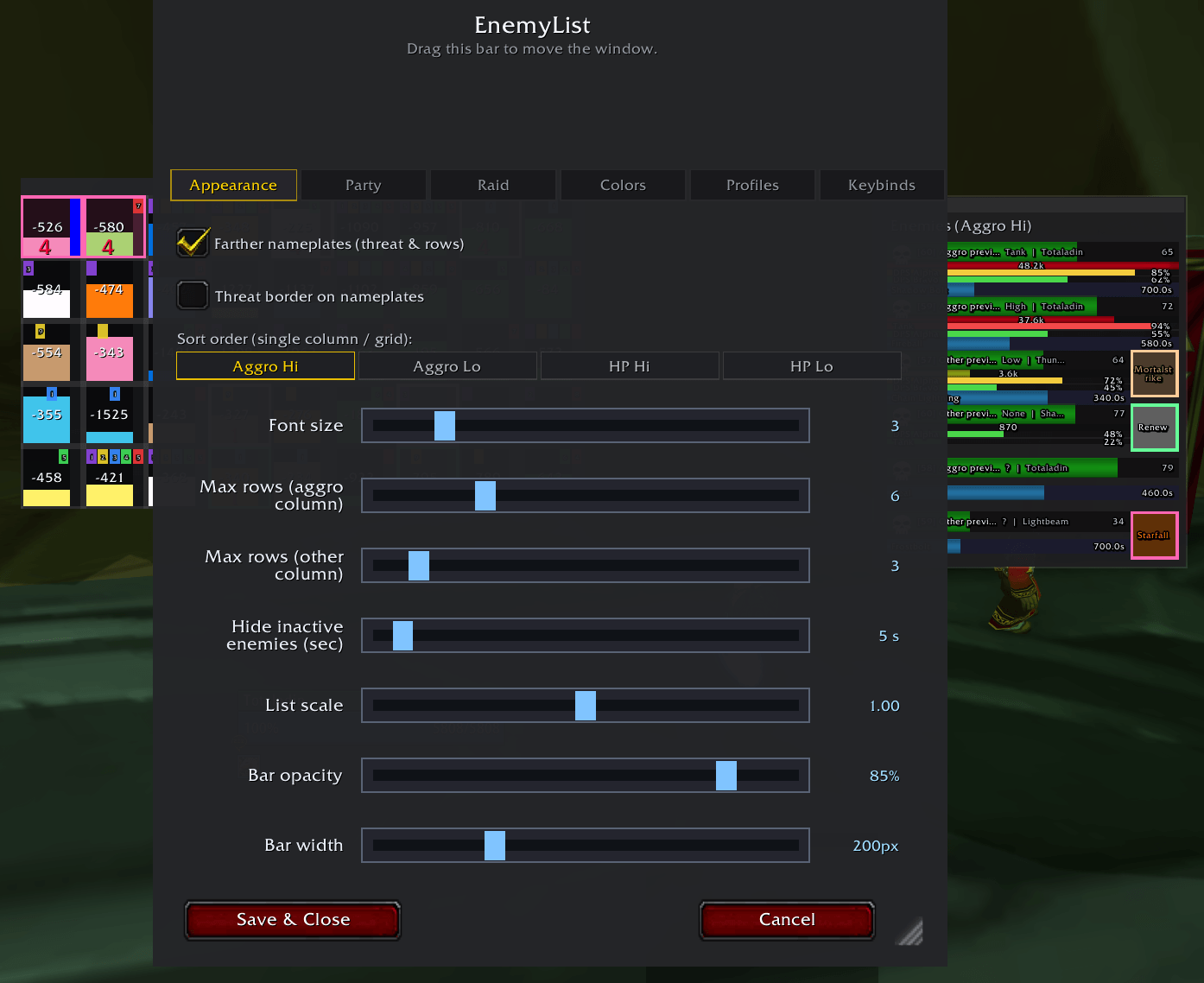
settings.png
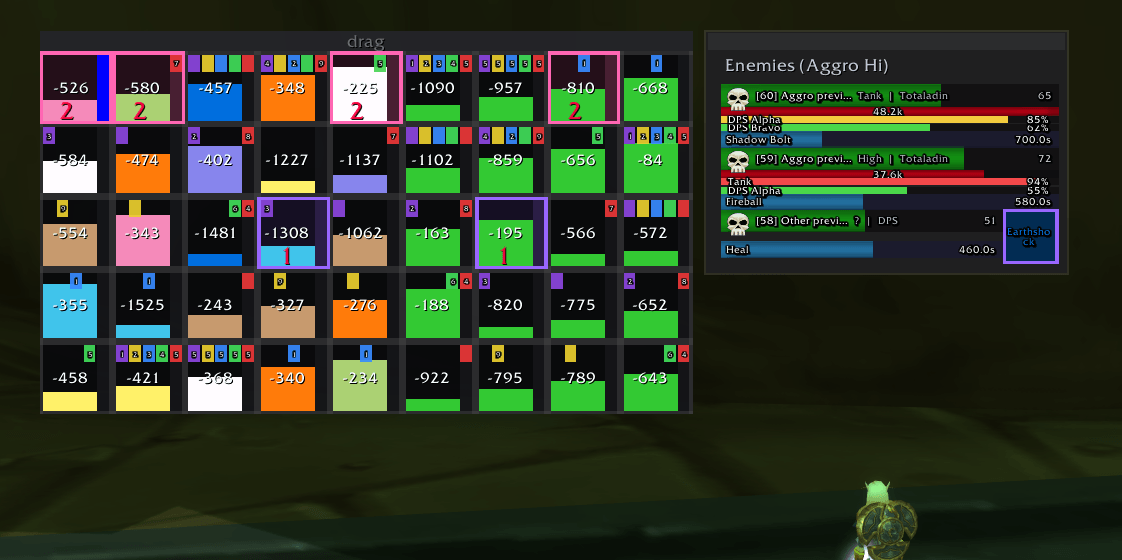
frames.png
Description
EnemyList
A live enemy + party/raid tracker for World of Warcraft Anniversary / Classic.
EnemyList watches the fight around you and turns it into clean, readable frames: who is attacking whom, how much threat everyone has, who is hurt, who is out of mana, and who is casting what. It helps tanks hold aggro, healers see emergencies before they happen, and DPS stay off the top of the threat list.
Enemy list
- Shows every enemy fighting you or your group, sorted however you like.
- Health bar with enemy name, level and current HP.
- Threat bar with your own aggro % and raw threat value (48.2k, 1.2M…).
- Runner-up threat bars — a stacked vertical list of the top 5 people also building threat, each with their name and % shown on the bar. Perfect for seeing who's about to pull off you.
- Cast bar with spell name and live countdown.
- Target-of-target square — a colored mini-name showing who each enemy is currently attacking, class-colored and color-matched to your party frames.
- Aggro swap flash — rows pulse when an enemy switches target.
- Raid markers — skull/cross/etc. icons render on the row.
- Creature-type coloring — enemy names tinted by type (Undead, Demon, Humanoid…).
- Target highlight — a gold border marks the enemy you currently have selected.
- Nameplate highlight — hovering a row lights up the matching enemy nameplate.
- Click to target — left-click any enemy to target it (out of combat; Clique handles in-combat targeting).
- Right-click menu — place a raid marker, focus, or announce in /say.
Display modes
- Dual column — "Aggroed (on you)" on one side, "Not aggroed" on the other.
- Single column — one merged list, sorted by your chosen rule.
- Compact rows — name + info on a single line, tightest possible layout.
- Grid mode — square cells with a vertical aggro bar, HP bar, and small cast strip; great at a glance during AoE pulls.
Every mode respects your sort preference (highest aggro, lowest aggro, highest HP, lowest HP) and caps on number of enemies per column.
Party & raid frames
- Up to 40 player frames auto-built from your group; vertical or horizontal layout; raid frames group by subgroup (1–8).
- Health bar with optional HP deficit number when someone is damaged (e.g. -2.4k).
- Mana / power bar with optional power-type coloring (blue mana, red rage, yellow energy…), placed above, below, left, or right of the HP bar.
- Player name overlay with class color, optional, positionable (top/middle/bottom) and offsettable pixel-by-pixel; long names are truncated cleanly.
- Role icon (tank / healer / damager) badge in the top-left of each frame — optional and size-adjustable.
- Aggro indicator — the frame's border tints to a unique color per person when an enemy is attacking them, and a count on the frame shows how many enemies are currently on them. Up to 15 distinct colors so everyone is individually identifiable. The color is shared with the ToT square on the enemy list, so you can instantly see "mob X is hitting party member in yellow."
- Incoming heals — a bright fill bar shows heals on the way, so healers don't overheal each other. Self-heals are visually separated.
- Low-HP flash — frame border pulses in a configurable color when a party/raid member drops below a threshold.
- Low-mana flash — same idea for healers/casters. Rage/energy/focus bars don't flash (they're meant to be empty).
- Out-of-range dimming — HP bar recolors when a party member leaves heal range.
- Dispellable debuff strip — colored squares show curse / disease / magic / poison / healing-reduction debuffs, with a stack count if applicable.
- Click-to-cast — works with Clique for fully customizable click spells.
- Draggable container with saved position; auto-scales; locked once set up.
Profiles
- Full Party profile and Raid profile — every frame setting (layout, name placement, colors, flash thresholds, role icon, mana bar, aggro border, etc.) saves independently.
- Auto-switch between profiles based on whether you're in a party or a raid, so the layout you want for 5-man dungeons doesn't follow you into 40-man raids.
- Create and save custom profiles too.
Colors
An entire Colors tab lets you tint just about anything:
- Enemy HP / aggro / cast bars.
- Party HP fallback + out-of-range color.
- Party mana bar (flat color, or power-type colors).
- Class colors for party health bars (toggle on/off).
- Low-HP flash color, low-mana flash color.
- Debuff-type colors: curse, disease, magic, poison, healing-reduction.
- Aggro border (per-player auto-color, or a custom color you pick).
- HP deficit text color, aggro count text color.
Quality-of-life options
- Truncate long names — keeps frame labels clean with a configurable max length.
- Nameplate threat overlay — colors hostile nameplates by your threat level (pulses when a tank is about to lose aggro).
- Extend nameplate range — raises the client's nameplate distance toward its maximum so threat reports remain accurate at long range.
- Fade out of combat — optional, keeps the frame subtle when nothing's happening.
- Lock / unlock the enemy list so it doesn't move by accident.
- UI scale and frame width/height sliders for independent sizing.
- Show/hide toggles for background, threat bar, cast bar, raid markers, aggro count digit, and more.
- Minimap button — left-click to toggle the list, right-click for settings, middle-click to hide the button.
Click-casting
EnemyList doesn't ship its own keybind system. Instead, every clickable frame (enemy rows, grid cells, party/raid frames) registers with Clique — so all of your left-click, right-click, Shift+Click, Ctrl+Right-Click etc. spell bindings you set up in Clique just work on EnemyList frames too.
If you don't use Clique: left-click on an enemy row targets the mob, right-click opens a menu (mark, focus, announce).
Commands
| Command | What it does |
|---|---|
/el or /enemylist |
Show help |
/el config |
Open settings |
/el show / /el hide / /el toggle |
Show, hide, or toggle the enemy list |
/el test |
Preview with sample enemies and party members |
/el lock / /el unlock |
Lock or unlock frame position |
/el reset |
Reset everything to defaults |
/el debug on |
Verbose logging (developer use) |
Installation
- Extract the
EnemyListfolder into yourInterface/AddOns/directory. - Log in, or type
/reloadif you're already in game. - Type
/el configto open the settings window. First-time users get a short setup wizard.
Compatibility
- World of Warcraft Anniversary Edition / Classic era (1.x).
- Also loads on Classic TBC, Wrath, Cata, and modern Retail — feature availability scales with the client's APIs (e.g. role icons fully resolve on Retail, fall back to main-tank assignments on Classic).
- Plays nicely with Clique for click-casting.
Enemy List Team

