GearScore Forever
- By
GearScore for World of Warcraft: Forever: inspect any player to see their GearScore and their full talent trees, plus scores in tooltips, character sheet and enchants.
1.png
2.png
3.png
Description
GearScore (Forever)
A GearScore addon made for World of Warcraft: Forever, inspired by the Classic and TBC Classic GearScore, with a fully custom, animated interface.
Inspect talents
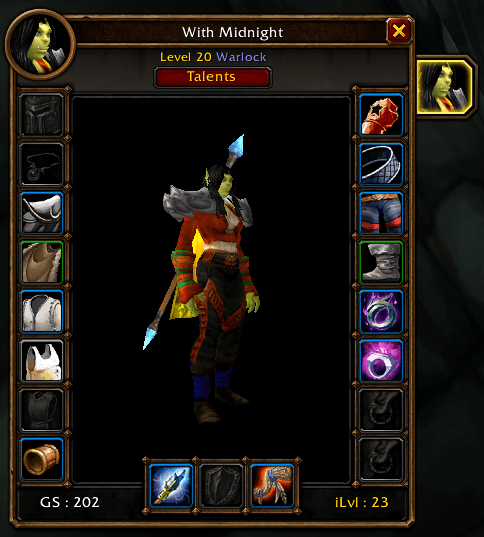
• Inspect a player and click the Talents button next to the inspect window to see their complete talent trees
• One tab per tree (for example Arms / Fury / Protection) with the points spent in each; switch trees with a click, with an animated tab marker
• Opens on the player’s main tree, the one with the most points
• Every talent in its real grid position, with its rank (3/5), prerequisite lines and a full tooltip
• Gold border for maxed talents, green for partly learned ones, greyed icon for unspent ones
• Header with class-colored name, level, class, GearScore and point split (31 / 20 / 0)
• Talents stay viewable after the inspection ends
• Also available without the inspect window: /gs talents for your target, or your own talents without a player target
Tooltips
• GearScore of the item under your mouse
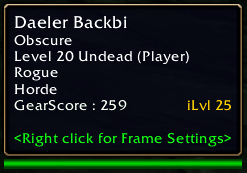
• GearScore and average item level of the players you mouse over
• Automatic inspection on mouseover, so scores show up without opening the inspect window
• Separate score for hunters
Character and inspect windows
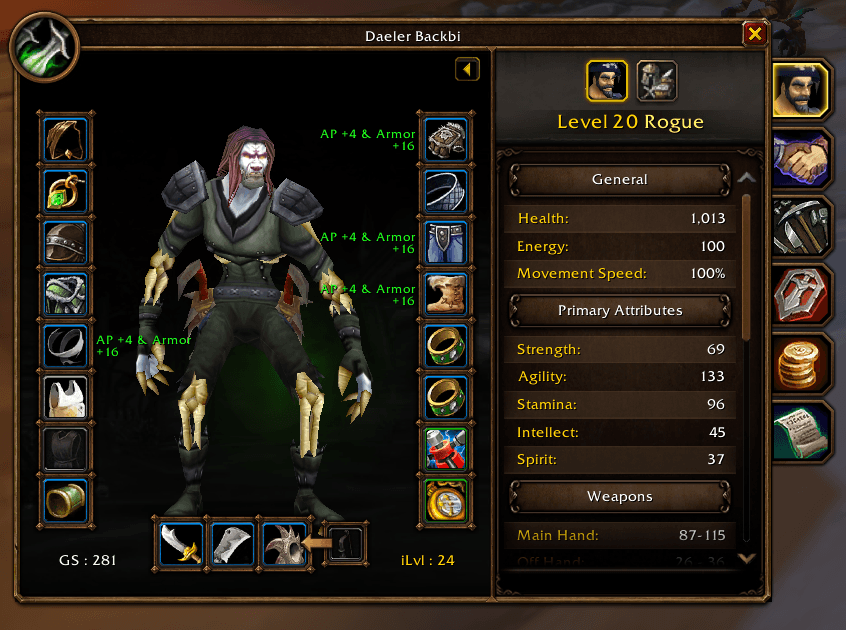
• GS and iLvl under your character model and in the inspect window
• Enchant name next to each equipment slot
• Score colors based on quality, with an automatic color bracket based on the best GearScore seen
Group
• /gs group lists the known GearScores of your party or raid, sorted from best to lowest
Interface
• Custom animated windows: rounded panels, tabs, collapsible sections, toggle switches and smooth transitions
• Options window with every setting, from the minimap button or /gs config
• English and French, automatic or chosen in the options
Commands
• /gs : your GearScore
• /gs target : inspect and show your target’s GearScore
• /gs talents : talent trees of your target, or your own
• /gs group : GearScores of your party or raid
• /gs config : options window
• /gs options : state of every option
• /gs <option> : turn an option on or off (talentbutton shows or hides the Talents button)
GearScore Forever Team

Owner