Gear Grid
- By
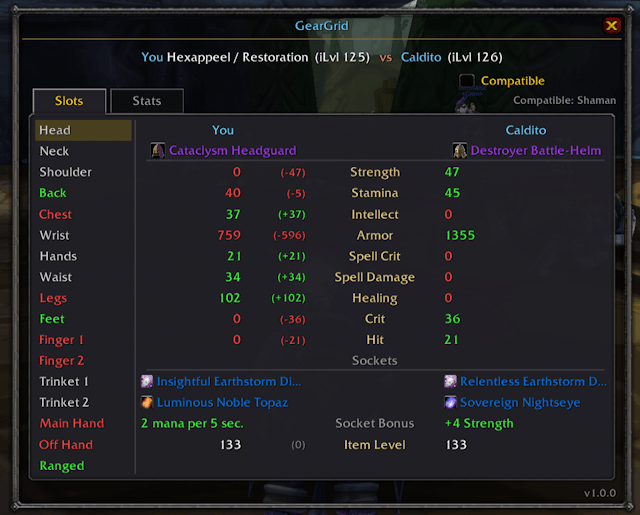
Compare any player's gear against yours in one side-by-side table for stats, gems, and item levels at a glance.
GearGrid
Stop hovering over items one at a time. GearGrid inspects a player and lays their whole set next to yours in a single clean table, so you can see exactly where you're ahead or behind at a glance. You can even compare alternate faction character gear to your own.
Features
- Slots view : every equipment slot side-by-side: your item vs theirs, per-stat differences, item icons, gems & sockets, socket bonus, and item level.
- Stats view : totals grouped by Primary / Offense / Spell / Defense, with green/red differences.
- Compatibility filter : one click dims gear you can't use (wrong class) or that doesn't fit your spec.
- Full item tooltips on hover, enriched automatically if you run GearScore, AtlasLoot, Pawn, etc.
- Minimap button and a clean, movable, resizable window.
How to use
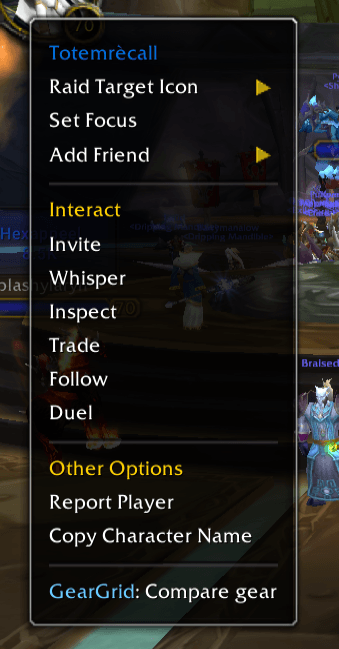
- Right-click any player → "GearGrid: Compare gear." That's it.
- Or target a player and type
/gg, or click the minimap button. - Switch the Slots / Stats tabs, toggle the Compatible filter, and click a slot on the left to see its full breakdown.
The target must be within ~28 yards — standard inspect rules. Out of range, your character will say so.
Commands
- /gg target : opens Gear Grid on selected toon, useful when viewing alternate faction details.
- /gg : open gear grid, same as "/gg target"
- /gg minimap : toggle minimap button
- /gg lock/unlock : lock and unlock dialog location
- /gg reset : reset dialog display position
- /gg help : Command descriptions

Lightweight and dependency-free.
Gear Grid Team