
gawaHUD
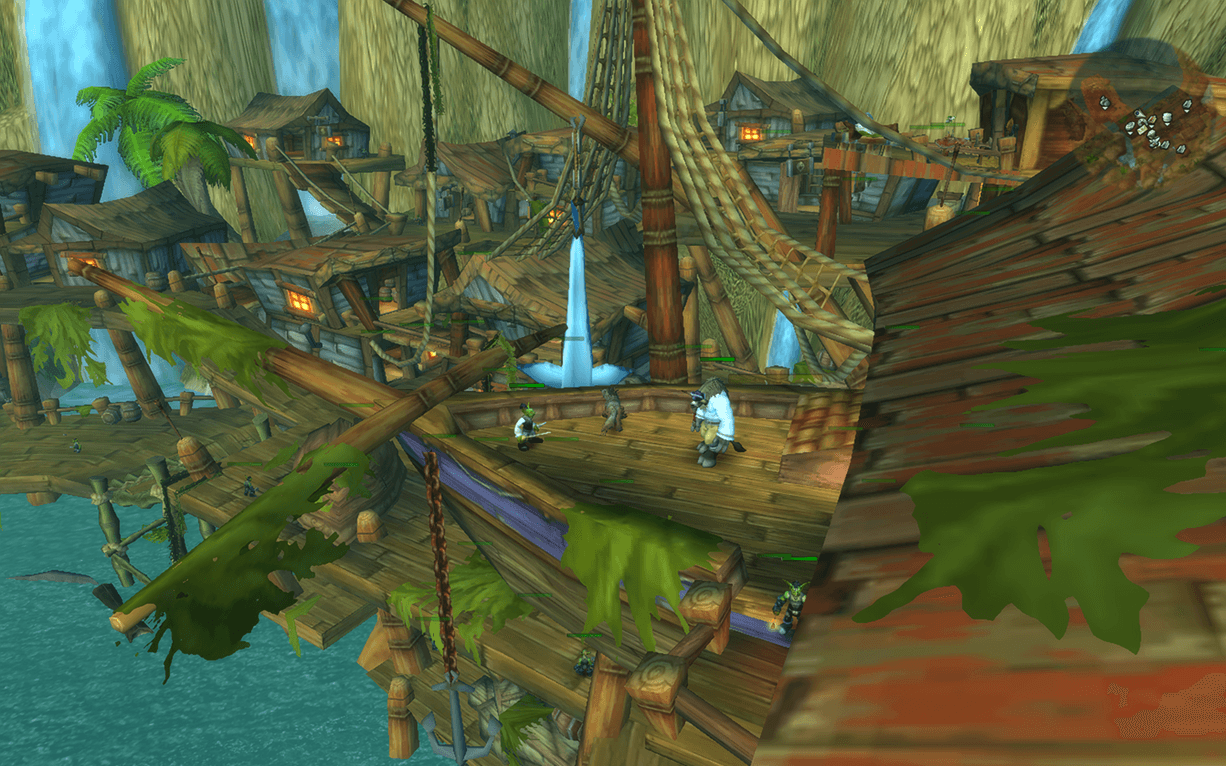
Interfce configuration out of combat to fully hide all elements (minimap overlay is separately configurable from the base minimap), with the minimap hidden at 75% opacity. On mouse over each group of frames, they would reveal.
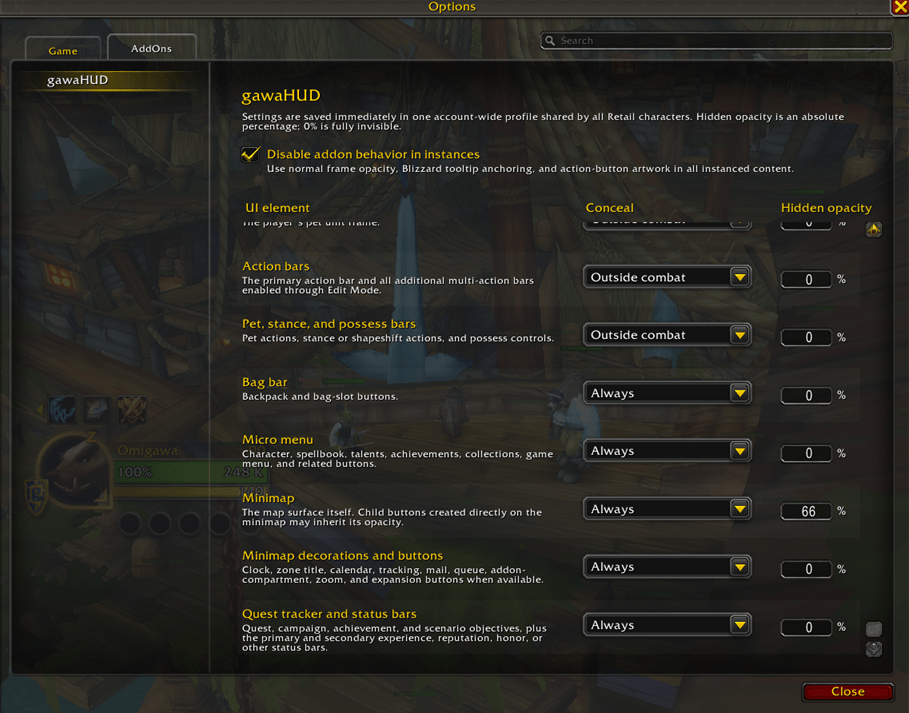
Example of the options panel. Should be very simple to understand and configure to your liking.
Description
gawaHUD aims to provide a minimal, all-in-one package for improving the baseline World of Warcraft UI with the following base features:
- Make the tooltip positioned at the mouse cursor
- Remove the gray grid around the default action bar buttons
- Make it possible to have sensible settings for hiding the vast majority of the UI out of combat, to aid OLED monitor burn-in, reduce visual clutter, and in general make it possible to better appreciate the stylistic beauty of World of Warcraft.
The hiding behavior is configurable to set each set of elements to either be always hidden, hidden in combat, or hidden out of combat. The definition of hidden is configurable as an alpha number from 100 to 0, where 0 would be invisible, 50 would be half-visible, and 75 would be 3/4ths visible.
Nothing that is hidden is truly gone from the UI, mousing over the position of the element (or group of elements) will reveal them, with an auto-fade back to the configured opacity once the mouse exits. The chat frame is configured to auto-reveal when a new message comes in, then auto fade-out shortly after.
OPTIONS
Open:
Escape > Options > AddOns > gawaHUD
or enter:
/gawahud settings
The top-level "Disable addon behavior in instances" checkbox suspends the
addon's presentation changes whenever the player is in instanced content. This
includes dungeons and Mythic+, raids, scenarios, arenas, and battlegrounds.
While active, managed frames use their normal alpha, default tooltips keep
Blizzard's anchor, and action-button artwork is restored. Existing settings are
not changed and resume automatically after leaving the instance.
Every supported UI element has two standard settings:
- Conceal behavior:
Never
Outside combat
During combat
Always
- Hidden opacity:
0 through 100 percent; 0 is fully invisible.
The combined Player frame, buffs, and debuffs row also has an optional
low-health override. Enable its checkbox and enter a percentage from 1 through
100 to keep the entire group fully visible whenever player health is at or
below that threshold. The override is disabled by default; its initial
threshold is 35 percent.
Changes are saved immediately to one account-wide profile shared by every
Retail character. There are no profile-copy or save buttons. Existing settings
for the old separate main/additional action-bar entries migrate automatically
to the unified Action bars entry. Existing Player unit frame and Buffs and
debuffs settings migrate to the combined row, preferring the customized Player
unit frame policy when both old rows were customized.
DEFAULT BEHAVIOR
- Default-position tooltips appear at the cursor.
- Permanent action-button rims and empty-slot rims are removed.
- Instance suppression is disabled until explicitly enabled in settings.
- Chat is concealed except while hovered or while typing.
- A newly rendered chat message reveals chat for 8 seconds, after which chat
fades to its configured hidden opacity over 2 seconds.
- All primary and additional action bars share one Action bars setting. They
are concealed outside combat and reveal on hover.
- Pet, stance, and possess bars remain a separate setting.
- Bag and micro-menu bars are concealed and reveal on hover.
- The minimap, its extra controls (including the clock), and the objective
tracker are concealed in combat and reveal on hover.
- The player frame, buffs, and debuffs share one visibility policy and reveal
together when any member of the group is hovered.
- The combined player group, target, focus, and pet frames are visible by
default until configured otherwise.
- The optional low-health override keeps the combined player group visible at
or below its configured health percentage, regardless of conceal behavior.
- Every managed element becomes visible immediately when its reveal condition
applies and fades to its hidden opacity when concealment resumes.
FADES
Ordinary concealment uses the shared duration in Config.lua:
visibility = {
fadeSeconds = 2,
},
Chat's new-message hold and fade durations are configured separately:
chatNotifications = {
enabled = true,
holdSeconds = 8,
fadeSeconds = 2,
},
INSTANCE OVERRIDE
The override uses WoW's current instance state rather than maintaining a list
of dungeon, raid, or PvP map IDs. It therefore also applies to other content
reported by the game as instanced. Entering an instance restores tracked UI
state immediately. Leaving one reapplies the saved policies and normal fades.
MINIMAP LIMITATION
The addon manages the Minimap frame separately from known surrounding controls,
including the zone title, clock, calendar, tracking, mail, queue, zoom, and
addon-compartment controls when those frames exist.
Buttons created as direct children of Minimap inherit the map's effective alpha,
so they cannot remain visible when their parent Minimap is fully transparent.
Hiding only "Minimap decorations and buttons" does not hide the map itself.
CHAT WAKE AND FADE
The addon securely hooks each Blizzard chat frame's AddMessage method. It wakes
chat only when a message is actually rendered into a chat window; it does not
register a large hard-coded list of CHAT_MSG events. Hovering chat or opening a
chat edit box keeps it immediately visible; concealment fades after that reveal
condition ends.
COMMANDS
Primary command: /gawahud (short alias: /ghud).
/gawahud settings Open the native AddOns settings page.
/gawahud audit List resolved and missing managed frames and instance state.
/gawahud disable Restore managed frame alpha until reload or /gawahud enable.
/gawahud enable Re-enable visibility policies.
/gawahud apply Re-resolve frames and reapply saved settings.
TROUBLESHOOTING
- Run /gawahud audit after a major patch or expansion.
- Use /fstack while hovering a UI element to discover its runtime frame name.
- If the AddOns screen marks the addon as out of date after a future patch,
update the Interface value in gawaHUD.toc to the number printed by:
/run print(select(4, GetBuildInfo()))
gawaHUD Team
