
GatherSlave
- By

The compact view is used when actively farming.

Inspired from LootAppraiser for dopamine hits! Pops up if the total value of looted items from a single node exceeds the limit set in the Options window.
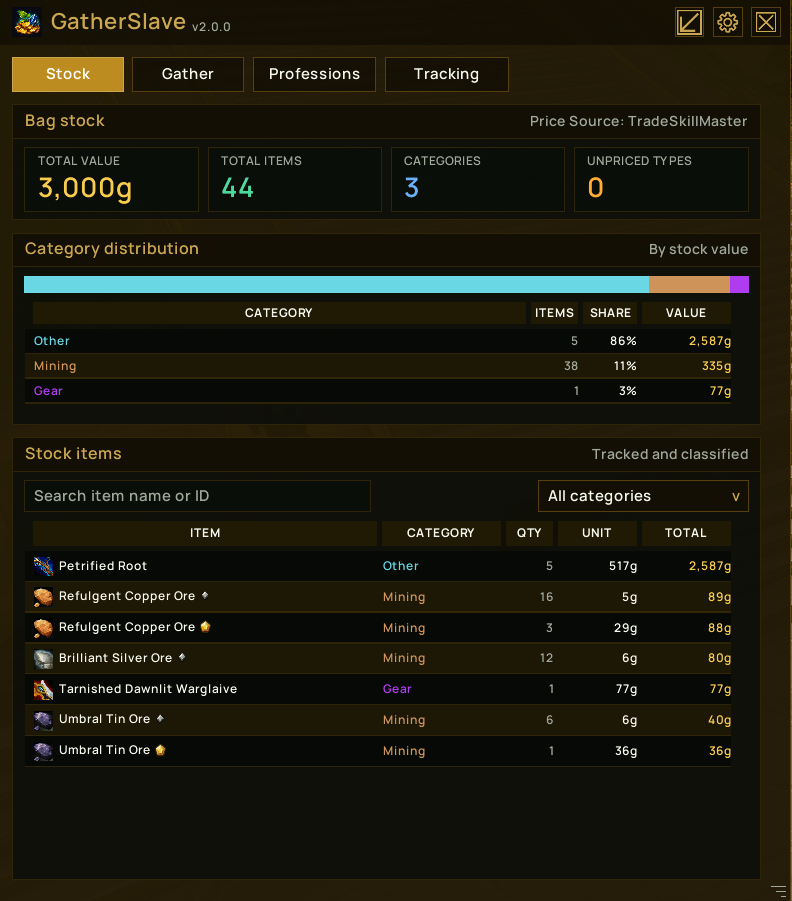
A summary of tracked stock currently in your bags.
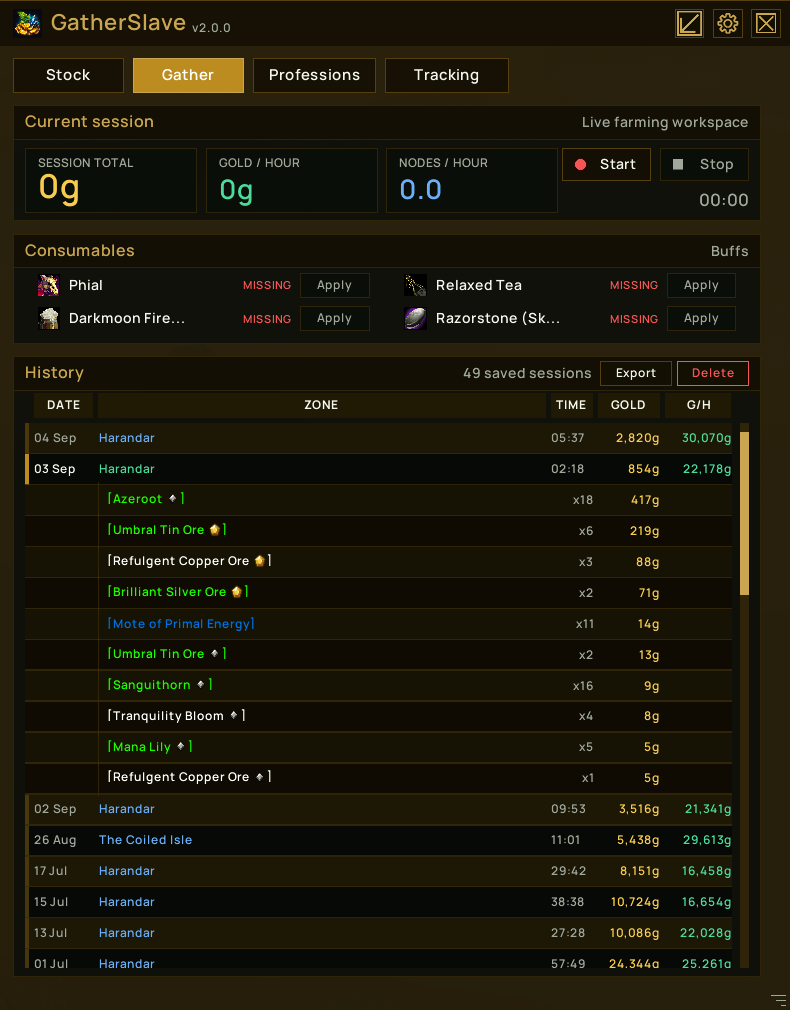
The Gathering Page is used to look at the current farming session (if active), as well as consumable status. Previous farming sessions can also be viewed.
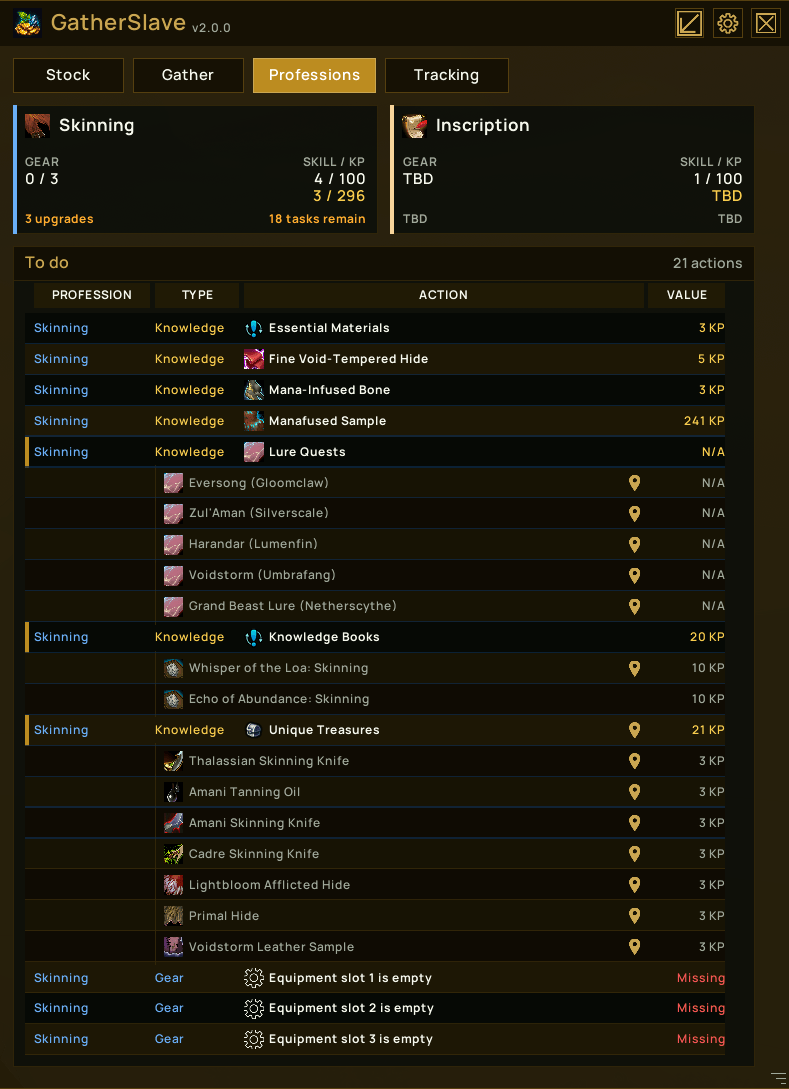
The professions page provides details on your current professions and outstanding tasks or gear improvements for each profession.
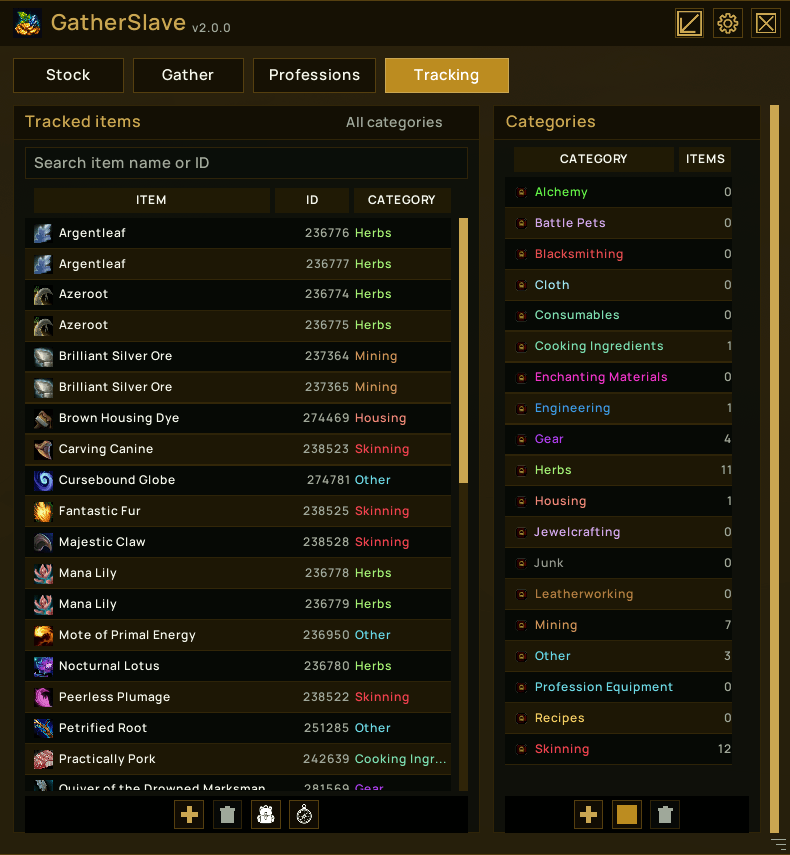
The tracking page allows you to specify which items you are interested in tracking, which categories these belong to, create new categories, set colours for categories, etc.
Description



GatherSlave
GatherSlave is a gathering and farming assistant for World of Warcraft. It tracks farming sessions, values bag stock, monitors gathering readiness, and keeps profession tasks and tracked items together in a compact, themed interface.
GatherSlave 2 introduces a replacement frontend and a cleaner internal architecture. The farming engine, SavedVariables repositories, event processing, and UI communicate through neutral state snapshots and commands rather than being tied to individual panels.
Highlights
- Compact mode is shown by default and uses very little screen space.
- Idle compact mode shows current tracked bag-stock value.
- Active compact mode shows elapsed time, session value, gold per hour, and nodes per hour.
- Start, pause, resume, and stop session controls.
- A restrained missing-consumables warning in compact mode.
- A vertically resizable detailed window with Stock, Gather, Professions, and Tracking pages.
- Selectable Classic Gold, Emerald, Azure, Crimson, Violet, Pink, and Grey UI tints.
- Shared themed tables, tooltips, dialogs, sidecar windows, and controls.
Detailed View
Stock
The Stock page shows the value and quantity of tracked items currently in your bags. Its category-distribution bar and table are based on total gold value rather than item count.
Only tracked items contribute to normal stock totals. Tradeable Bind-on-Equip gear is also included automatically under Gear. Soulbound, Warbound, account-bound, and already-bound equipment is excluded from automatic Gear stock.
Values can come from Auctionator or TradeSkillMaster. Items without usable pricing remain visible as unpriced types where applicable.
Gather
The Gather page contains the current session, consumable readiness, and history.
- The timer counts active farming time and excludes paused time.
- Session totals include recorded item value and optional raw gold.
- Gold per hour and nodes per hour use active session duration.
- Missing configured consumables can be applied directly when suitable items are in your bags.
- Saved sessions expand in place to show their recorded loot.
- Selected sessions can be exported or deleted.
Stopping a session with discovered loot offers a review step. Selected discoveries can be categorised and added to tracking before the session is committed to history.
Professions
The Professions page detects the current character's learned primary professions. Each profession panel provides an at-a-glance view of skill, knowledge, equipment, upgrades, and remaining tasks where that data is available.
The To do table combines configured knowledge tasks and profession-equipment actions. Expandable task groups expose their child objectives, and configured locations can be sent to Blizzard waypoints, TomTom, or both.
Crafting professions without configured knowledge or equipment data may show TBD.
Tracking
The Tracking page manages item IDs and categories without leaving the table.
- Search tracked items by partial name or item ID.
- Filter items by selecting a category.
- Add an item manually, choose one from your bags, or review discovered loot.
- Edit an item's ID or category directly in its selected row.
- Create custom categories and adjust category colours.
- Built-in categories are derived from the WoW API and cannot be removed.
Built-in categories include Alchemy, Battle Pets, Blacksmithing, Cloth, Consumables, Cooking Ingredients, Enchanting Materials, Engineering, Gear, Herbs, Housing, Jewelcrafting, Junk, Leatherworking, Mining, Other, Profession Equipment, Recipes, and Skinning.
Loot And Discovery
GatherSlave supports two recording modes:
- Configured Items records tracked items and automatically eligible tradeable BoE gear.
- All Eligible Loot can additionally collect eligible untracked loot for review after it reaches the configured cumulative value threshold.
The discovery threshold defaults to 100 gold. Quest items, keys, Bind-on-Pickup items, Soulbound items, Warbound items, and account-bound items are excluded from automatic discovery.
Loot notifications are separate from session inclusion. Eligible gear can still produce a toast and floating gold value even when it is not yet part of a recorded session. Floating values use the GatherSlave font, support a numeric point size, and render sub-1-gold values six points smaller.
Options
The standalone Options window opens beside the detailed GatherSlave window and provides controls for:
- UI scale and tint
- Locale override
- Minimap button visibility
- Price source and tracking mode
- Discovery value threshold and raw-gold recording
- Toast threshold, sound, and idle notifications
- Floating gold text, point size, and category colours
- Expansion selection and waypoint mode
Auctionator, TradeSkillMaster, and TomTom are optional dependencies. Their related features degrade gracefully when unavailable.
Useful Commands
/gs                         Show command help
/gs show                    Open the detailed window
/gs hide                    Hide all GatherSlave windows
/gs reset position          Reset the main window position
/gs debug [on|off]          Show or change debug logging
/gs buffs                   Print tracked buff debug information
/gs tools                   Print profession-tool tooltip debug information
/gs toasttest               Display a test loot toast
/gs lootreview              Open the discovered-loot review window
/gs stockvalue              Print tracked bag-stock value
/gs knowledge [args]        Print profession knowledge completion
/gs knowledge debug [args]  Print raw profession quest state
/gs history [last|clear]    Show or manage session history
/gs track ...               Manage tracked items, categories, and discovery
/gs classify <itemID>       Print automatic classification details
/gs classify bag <bag> <slot>  Include binding state in classification details
/gs kp, /gs tasks, and /gs quests are aliases for /gs knowledge.
Feedback
Feedback and bug reports are welcome. Reports involving unusual profession combinations, pricing integrations, SavedVariables upgrades, binding states, or translated clients are especially useful.
Credits
GatherSlave's pixel-perfect border handling was informed by studying how EllesmereUI approaches WoW UI scale and texture-snapping issues. No EllesmereUI code is included.
GatherSlave Team
