


FreeMog
- By
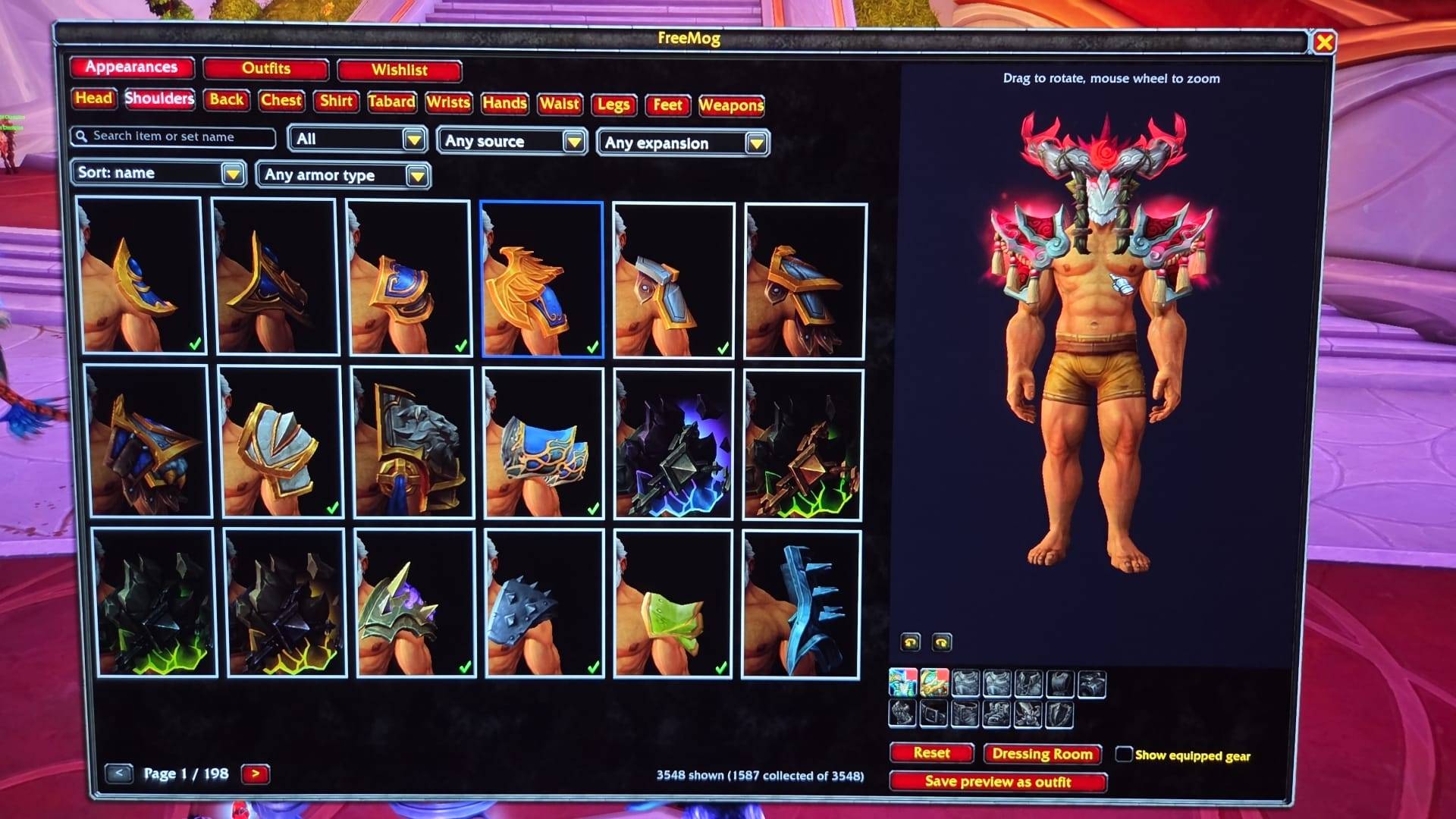
Browse every transmog appearance per slot regardless of armor type, preview it in 3D on your character and save outfits.
1
Description
FreeMog
Browse every transmog appearance per slot, regardless of armor type. Cloth, leather, mail and plate helms side by side, previewed on your own character, mixed freely and saved as outfits.
Built for Midnight (12.x) and ready for patch 12.2.5, which is expected to lift armor-type restrictions on transmog.
Features
- 3D appearance grid: every appearance rendered on your own character, spell effects included, just like Blizzard's Appearances tab. Prefer speed? Switch to an icon grid in the options.
- All armor types in one list: armor type is an optional filter, never a grouping.
- Filters & search: collected / not collected, source (boss drop, quest, vendor, world drop, achievement, profession, Trading Post), expansion, armor type, and text search across all source item names and set names. Sorted by newest by default.
- Detailed tooltips: every source of an appearance, with boss, raid/dungeon, difficulty and expansion for drops, plus sets it belongs to and whether your class can use it.
- Free preview: left-drag to rotate, right-drag to move, mouse wheel to zoom. Optionally wear your current gear underneath, or open the look in Blizzard's Dressing Room.
- Item list: a checklist of every item in your preview with where to get it. Tick items off as you farm them; collected appearances tick themselves.
- Outfits: save, load, rename, duplicate, add notes. Account-wide.
- Export / import: compact share strings, plus Blizzard's own
/customsetline. - Blizzard custom sets: turn an outfit into a real custom set and apply it at the Transmogrifier.
- Wishlist: track appearances you want, with an optional alert when you collect one.
Usage
/fmog(or/freemog), the minimap button, or the Addon Compartment opens the browser.- Left-click an appearance to preview, Shift-click to link it in chat, right-click to add it to your wishlist.
/fmog optionsfor settings,/fmog helpfor all commands.
Notes
- FreeMog never applies transmog itself. Applying always goes through Blizzard's Transmogrifier, so the addon cannot spend your gold.
- The first time you open a slot, FreeMog scans it in the background (a few seconds). Enable Pre-scan all slots after login to have everything ready right away.
- No libraries required.
Bug reports and ideas are welcome in the comments.
The FreeMog Team
