ForeverSell
- By
A lightweight selling and auction-price helper built specifically for World of Warcraft: Forever.
# ForeverSell
ForeverSell is a lightweight auction-house addon created specifically for **World of Warcraft: Forever**.
The addon focuses on selling items efficiently, checking your own auctions, scanning current market prices, and displaying those prices in item tooltips while you are away from the auction house.
ForeverSell does **not** try to replace the entire Blizzard auction-house interface. Instead, it adds the tools needed for selling and price awareness while keeping the workflow simple and focused.
## Selling
ForeverSell provides a compact selling interface with support for:
- Commodities and normal items
- Current lowest market price
- No automatic 1-copper undercutting
- Maximum quantity button
- 12h / 24h / 48h auction durations
- Deposit preview
- Normal bags and reagent bag
- Scrollable item list
- Session-based ignored items
ForeverSell follows the World of Warcraft: Forever auction-house behavior where matching the current lowest price is sufficient.
## Own Auctions
The Own Auctions view lets you track:
- Item
- Quantity
- Your price
- Current market price
- Remaining-time band
- Auction status
Market prices are checked automatically when the view is opened and can also be refreshed manually.
ForeverSell can highlight:
- Active auctions
- Undercut auctions
- Sold auctions
- Auctions that have not yet been checked
Sold auctions remain visible and clearly show the final sale price.
Auctions can also be cancelled directly from ForeverSell.
## Full Auction House Scan
ForeverSell adds a dedicated **Scan AH** button directly to the Blizzard auction-house header.
The full scan reads available auction-house browse data and stores the lowest known market price for each item for the current session.
The ForeverSell window does not need to be open for this feature.
## Market Prices in Tooltips
After completing an AH scan, ForeverSell can show known market prices in item tooltips while you are:
- Questing
- Looting
- Browsing your bags
- Viewing item links in chat
Tooltip data includes:
- Current known AH minimum
- Stack value where applicable
- Age of the scanned price
Price age is color-coded:
- Green: less than 30 minutes old
- Yellow: less than 2 hours old
- Gray: older data
## Welcome / Home Screen
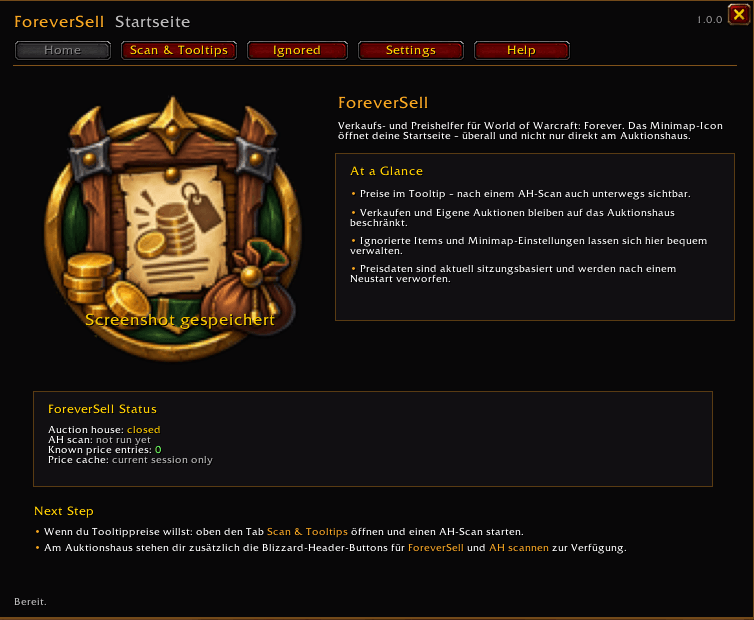
Left-clicking the minimap icon opens the movable ForeverSell home screen.
Available tabs:
- Home
- Scan & Tooltips
- Ignored Items
- Settings
- Help
Selling and Own Auctions remain auction-house-only features.
## German / English Localization
ForeverSell automatically starts:
- In **German** on `deDE` WoW clients
- In **English** on all other client languages
The language can be switched live between **DE** and **EN** during the current session.
No `/reload` is required.
## Minimap Button
ForeverSell includes a fully embedded LibDataBroker / LibDBIcon minimap button.
Controls:
- Left click: open / close the ForeverSell home screen
- Right click: lock / unlock the minimap button
- Drag: move the button while unlocked
All required libraries are included directly in the addon.
No additional library addon is required.
## Slash Commands
`/fs`
`/foreversell`
Compatibility aliases:
`/fa`
`/foreverseller`
Useful commands:
`/fs sell`
Open the selling window while at the auction house.
`/fs auktionen`
Open Own Auctions while at the auction house.
`/fs hide`
Close ForeverSell windows.
## Current WoW Forever Limitation
The scanned market-price cache and manually selected language are currently session-based because SavedVariables are not yet fully reliable in the current WoW Forever client.
Minimap persistence is already prepared through SavedVariables and can benefit automatically once the client-side issue is resolved.
## Compatibility
Built specifically for **World of Warcraft: Forever**.
**Author:** Loyftwa
The ForeverSell Team