ForeverGear
- By
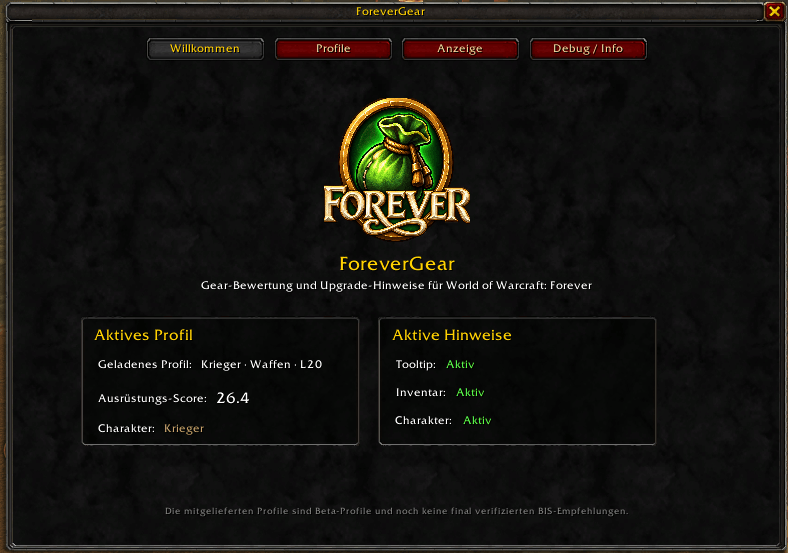
Gear scoring and upgrade comparison for WoW Forever with tooltip scores, inventory, character and quest reward upgrade markers, and spec-based profiles.
Highlights
- English localization is now available.
- ForeverGear automatically starts in German on German WoW clients and in English on all other client languages.
- DE / EN can also be switched live during the current session without /reload.
# ForeverGear
**ForeverGear** is a lightweight gear scoring and upgrade comparison addon built specifically for **World of Warcraft: Forever**.
It evaluates items using a manually selected class/spec profile and shows at a glance whether an item is an upgrade, a downgrade, or unsuitable for the active profile.
## Features
- Item score directly in item tooltips
- Upgrade and downgrade comparison against currently equipped gear
- Compact stat differences such as `+1 Stamina`
- Green upgrade markers directly in your bags
- Upgrade markers in the character equipment frame
- Upgrade arrows directly on quest rewards before you choose them
- Ring and trinket comparison against the weaker matching slot
- Weapon-aware comparisons for:
- One-handed weapons
- Two-handed weapons
- Main hand / off hand
- Shields
- Ranged weapons
- Protection/shield rules for relevant class profiles
- Shield Block Value support
- Class- and specialization-based Level 20 profiles
- Manual profile selection per character
- Custom profile copies with editable stat weights
- Minimap launcher using LibDataBroker and LibDBIcon
- No external library addon dependencies
## Class & Spec Profiles
ForeverGear currently contains **28 built-in profiles**, with **24 available for use**.
Profiles are based on publicly available **WoW Forever Level 20 stat priorities** where enough information is available. These priorities are translated into ForeverGear scoring weights.
The weights are intended as a practical gearing aid. They are **not simulations, exact EP values, or BiS lists**.
Some profiles are marked as **provisional** while WoW Forever is still in Beta.
The following profiles intentionally remain unavailable until sufficiently reliable Level 20 data is available:
- Marksmanship Hunter
- Survival Hunter
- Arcane Mage
- Fire Mage
ForeverGear does not invent weights for profiles that do not yet have enough reliable data.
## Manual Profile Selection
ForeverGear **does not automatically change your active gear profile**.
This is intentional. Choose the profile you want to use under:
`/fg → Profiles`
The selected profile is saved per character and remains active until you change it yourself.
## Quest Rewards
ForeverGear can mark better quest rewards before you complete a quest.
If one or more reward items are upgrades for your active profile, a green upgrade arrow is displayed directly on the corresponding reward buttons.
The same comparison logic used for bags and tooltips is used for quest rewards.
## Weapon & Shield Logic
ForeverGear does more than compare raw item scores.
The comparison system understands common equipment situations such as:
- 1H + Shield versus 2H
- 2H versus both currently occupied hand slots
- Main-hand and off-hand comparisons
- Shield requirements for Protection profiles
- Ranged weapon slots
- Dual-wield-compatible comparisons
Items that are incompatible with the active profile are not shown as upgrades.
## Standalone Addon
ForeverGear is fully standalone.
The following libraries are embedded directly inside the addon:
- LibStub
- CallbackHandler-1.0
- LibDataBroker-1.1
- LibDBIcon-1.0
You do **not** need to install BugSack, Ace3, LibDBIcon, LibDataBroker, LibStub, or any other library addon.
The minimap button position and visibility are stored in ForeverGear's own SavedVariables.
## Minimap Button
- **Left Click:** Open / close ForeverGear
- **Right Click:** Open ForeverGear
- **Drag:** Move the minimap button
The minimap launcher uses LibDataBroker + LibDBIcon and supports persistent positioning across reloads and restarts.
## Installation
### CurseForge App
Install ForeverGear through the CurseForge App and select the **WoW Forever** game flavor.
### Manual Installation
Extract the archive so the addon is located at:
`World of Warcraft/_classic_beta_/Interface/AddOns/ForeverGear/`
The folder must directly contain:
`ForeverGear.toc`
ForeverGear also includes a dedicated:
`ForeverGear_Camelot.toc`
for WoW Forever.
## Commands
- `/fg` — Open / close the ForeverGear window
- `/fg profiles` — List available profiles
- `/fg profile <name>` — Select a profile
- `/fg weights` — Show active profile weights
- `/fg tooltip` — Toggle tooltip scoring
- `/fg compare` — Toggle upgrade comparison
- `/fg equipped` — Toggle equipped comparison score
- `/fg bags` — Toggle bag upgrade markers
- `/fg character` — Toggle character frame upgrade markers
- `/fg minimap` — Toggle minimap button
- `/fg debug` — Toggle stat debug mode
- `/fg stats` — Show unknown item stat keys
- `/fg stats clear` — Clear collected stat diagnostics
- `/fg reference` — Show known Forever stat types
- `/fg help` — Show command help
## Beta Status
ForeverGear is currently in **Beta**.
The core functionality has already been tested in WoW Forever, including:
- Tooltip scoring
- Inventory upgrade markers
- Character frame upgrade markers
- Quest reward upgrade markers
- One-hand / two-hand comparisons
- Shield requirements
- Shield Block Value
- Manual profile selection
- Minimap button positioning and persistence
### Known Limitations
- Four class/spec profiles currently remain unavailable because sufficiently reliable Level 20 data is not yet available.
- Some active profiles are marked as provisional while WoW Forever theorycrafting is still evolving.
- Item procs, special effects and highly situational bonuses cannot always be represented accurately by a static stat score.
- Additional Forever-specific stat keys may appear during the Beta. ForeverGear includes a stat debug mode to help identify them.
## Feedback & Bug Reports
If you find an incorrect upgrade recommendation, please include:
1. A screenshot of the item tooltip
2. Your active ForeverGear profile
3. The currently equipped comparison item
4. The tooltip with `/fg debug` enabled, if possible
5. Any Lua error message that appeared
Feedback is especially useful during the WoW Forever Beta.
## Independence
ForeverGear is an independent addon with its own scoring and comparison implementation.
It does not require Pawn and does not include Pawn source code.
The ForeverGear Team