ForeverQuest
- By
ForeverQuest is a quest-helper addon for WoW: Forever featuring a customizable tracker, clustered map markers, dotted minimap guidance, and usable quest-item buttons.
Clipboard_09-23-2026_0111111.jpg
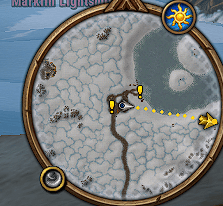
image.png
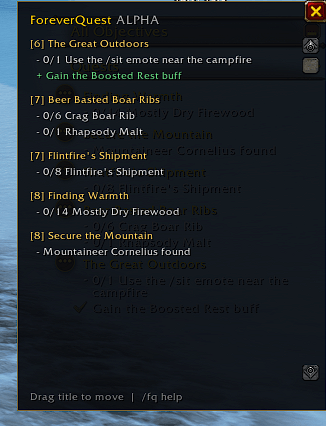
image1.png
234234234234.jpg
578675834763524.jpg
Description
ForeverQuest
ForeverQuest is a Questie-style quest helper for WoW Forever. Find available quests in your zone, choose an objective, and follow a dotted line on the minimap toward your destination. When you arrive, nameplate labels help you identify which creature to kill, which NPC to talk to, or where a needed item may drop.
Version 0.22.7 · Target client: WoW Forever 1.60.1,
New in 0.22.7: World-map pickups use a gold ! with a dark outline and a transparent background. The outline follows the symbol, leaving the map visible around it. The marker’s clickable area and the minimap guide are unchanged.
Getting started
Type /fq or left-click the round ForeverQuest minimap button to open settings. Right-click the button to browse nearby quest pickups. To start guidance for a quest already in your log, left-click its title in the ForeverQuest tracker. Right-click the title to open the full quest details.
Features
-
World-map quest markers. See known pickups, objectives, and turn-ins on the zone map. Click a marker to set a waypoint. When several destinations overlap, click the group to choose the one you want.
-
Nearby quest list. Browse available pickups on your current map, sorted by distance when known. Each entry shows its coordinates and where the location came from. Select a pickup to pin it and start guidance.
-
Automatic or manual guidance. Choose the nearest destination, finish accepted quests first, or prioritize turn-ins. Pin a destination to keep it selected, or skip one inaccessible spot without skipping the whole quest. The dotted minimap line shows a straight-line bearing; it does not plot a route around terrain.
-
Quest target highlights. Matching creature and NPC nameplates can show Kill, Talk, Collect, Buy, Pickup, or Turn in. Hover over a unit to see the associated quest. Enable friendly or enemy nameplates in the game to see the corresponding labels.
-
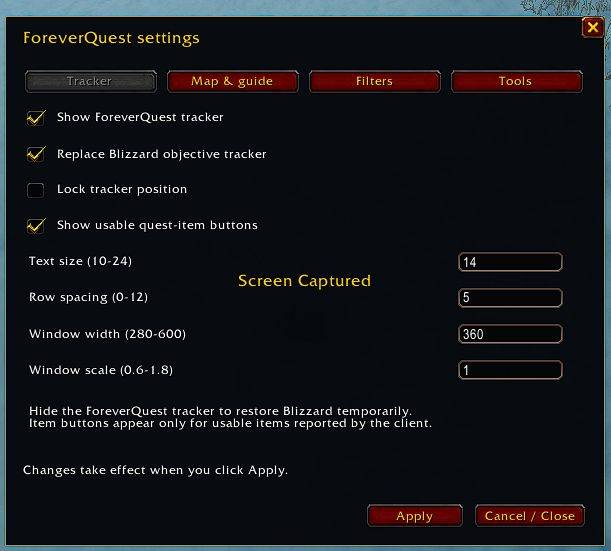
A tracker that fits your screen. Replace the Blizzard objective tracker or keep it. Collapse zone headings, focus on one quest, or switch to compact titles and progress counts. Expand a quest when you need details; usable quest-item buttons remain accessible in compact mode.
-
Multiple objectives. Choose a remaining objective when ForeverQuest can match it to a location. Reliably matched completed objectives drop out of guidance, so the addon can move on to the next one.
-
Personal location corrections. Found the quest giver somewhere else? Save the corrected location where you stand, flag the old spot as wrong, or restore the original later. Corrections save per character and survive updates when you keep your SavedVariables. Temporary pins and skips reset on reload or logout.
-
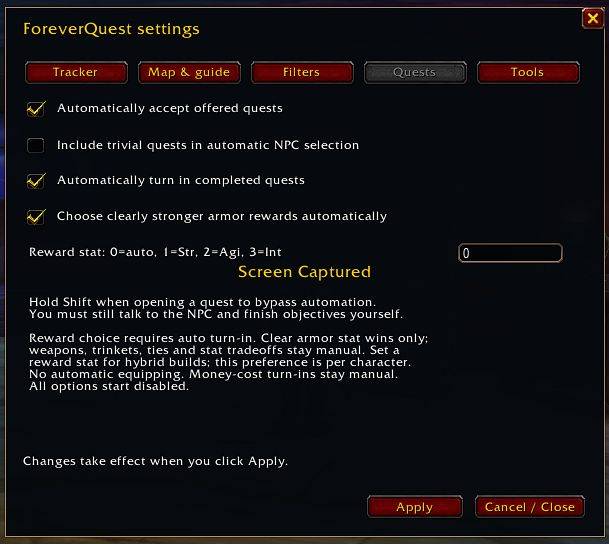
Optional quest automation. Enable automatic acceptance and turn-ins independently. For supported armor choices, the reward preview explains its recommendation and lets you confirm or choose manually. It compares the offered rewards; it does not rate upgrades against your equipped gear.
-
Per-character settings and profiles. Adjust tracker position, width, text size, spacing, scale, and background transparency. Save named profiles to switch layouts and automation preferences without changing your personal quest notes.
Commands
Type /fq by itself for the settings window. For the shortcuts below, add the command after /fq. For example, /fq nearby opens the pickup list.
Command after /fq |
What it does |
|---|---|
settings, options |
Open settings. |
nearby |
Browse nearby available quests. |
guide |
Toggle dotted minimap guidance. |
nearest, pickups |
Toggle automatic destination selection or the inclusion of available pickups. Turning pickup guidance on also enables nearest selection and dotted guidance. |
priority nearest, priority accepted, priority turnins |
Choose how automatic guidance ranks destinations. |
pin, skip, resetskips |
Hold or release the current destination, skip its location, or clear temporary skips. |
objectives, objectives QUEST_ID |
Choose a remaining objective for the selected quest or a specific quest ID. |
pins, available, database, clientpins |
Toggle world-map markers, available quest suggestions, legacy data, or extra copies of Blizzard markers. |
targets, minimap |
Toggle quest target highlights or the ForeverQuest minimap button. |
location, corrections |
Correct the selected location or review saved corrections. |
mark QUEST_ID available, mark QUEST_ID objective, mark QUEST_ID turnin |
Save your current position as a pickup, objective, or turn-in note. |
unmark QUEST_ID |
Remove your location notes for that quest. |
show, hide, toggle |
Control ForeverQuest tracker visibility. |
replace, blizzard |
Replace the Blizzard objective tracker or restore it. |
compact, focus, zones, expand |
Toggle compact mode, focused view, or zone grouping; expand opens all collapsed zones. |
items, complete |
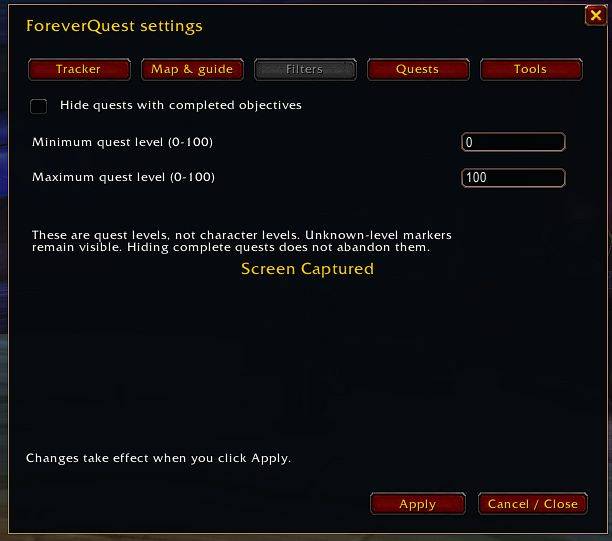
Toggle quest-item buttons or the filter that hides completed quests. |
lock, resetpos |
Lock or unlock the tracker, or return it to its default position. |
font 14, spacing 5, width 360, scale 1.0 |
Adjust tracker appearance. The numbers shown are examples. |
transparency 0–100, levels MIN MAX |
Set window background transparency or the quest-level range. |
autoaccept, autoturnin, autoreward, rewardpreview |
Toggle quest acceptance, turn-ins, automatic reward selection, or the recommendation preview. |
profiles |
Open the character’s settings profiles. |
profile save NAME, profile load NAME, profile delete NAME |
Save, apply, or remove a named profile. |
refresh, debug, about, help |
Refresh quest data, open diagnostics, view addon information, or list commands. |
Quest data and coverage
ForeverQuest combines live client information with 3,772 legacy Classic quest records, offers observed while speaking to NPCs, and your own notes and corrections. Source labels distinguish client locations from legacy estimates. WoW Forever can move NPCs or change quest requirements, so a legacy marker is a lead rather than a guarantee.
If a marker appears in the wrong place, use /fq location to correct it. If an expected marker is missing entirely, open the affected zone map, run /fq debug, copy and include the quest name and zone in your report.
ForeverQuest Team