


ForeverPlus
- By
Description
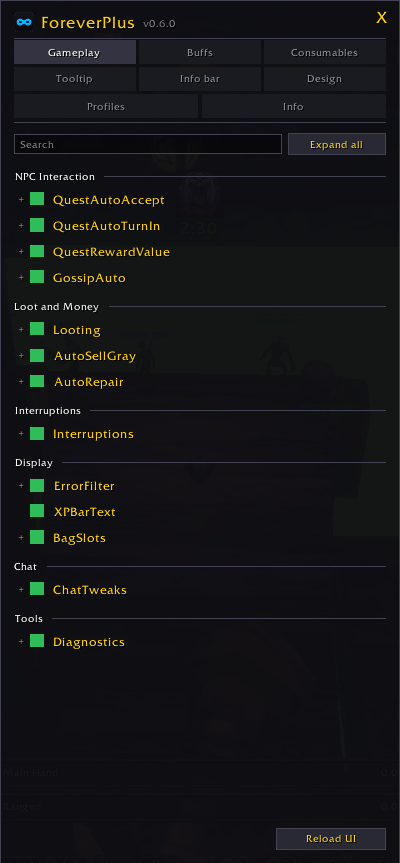
ForeverPlus is a modular quality-of-life addon. Every feature is a module
you can switch off on its own, and every setting lives in one window behind
/fplus: searchable, with an explanation on every option, and stored in
named profiles your characters share.
Features
| Module | What it does |
|---|---|
| QuestAutoAccept | Accepts quests without clicking, including from gossip windows. |
| QuestAutoTurnIn | Hands in finished quests, but never picks a reward for you. When a quest offers a choice, it stops, leaves the window open, and writes what each reward sells for into the corner of its button. |
| QuestRewardValue | Writes what each quest reward sells for into the corner of its button, on the accept window as well as the reward window. It never picks one for you: the point is to answer the question without taking it away. |
| AutoSellGray | Sells gray items at any merchant and reports what you earned. Sells in batches and then checks the bags again, so anything the server refused is retried rather than left behind quietly. |
| AutoRepair | Repairs at merchants that can. If you cannot afford it yet, it waits for the money instead of refusing. |
| Looting | Takes every slot at once instead of waiting the client out. It only makes looting faster, it never decides whether to loot: that stays with your own auto loot setting and its modifier key. Can also roll greed on greens, off by default. |
| GossipAuto | Some NPCs put a line in front of their shop. This clicks it, and only it: a service the addon has measured, alone in its window, with no quest attached. Everything else is left where it is. |
| Interruptions | Declines duels, and releases when you die in a battleground. Both off until you switch them on, because both act on your behalf. |
| ErrorFilter | Hides the red spam above the action bar. All of it by default, or by category, "Not enough mana", "Ability is not ready yet", "Out of range". Quest progress and other information messages are never touched. |
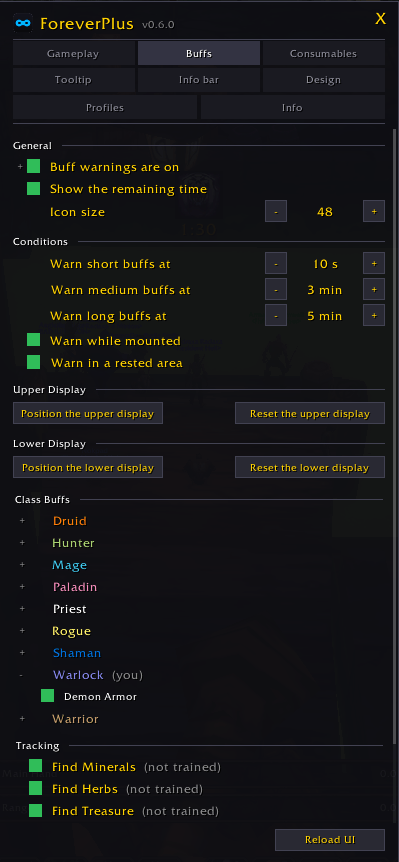
| BuffExpiry | An enlarged icon in the middle of the screen when one of your buffs is missing, running out, or a rank behind what you have trained. Group buffs also say how many people near you are without it. Gathering tracking is watched the same way. |
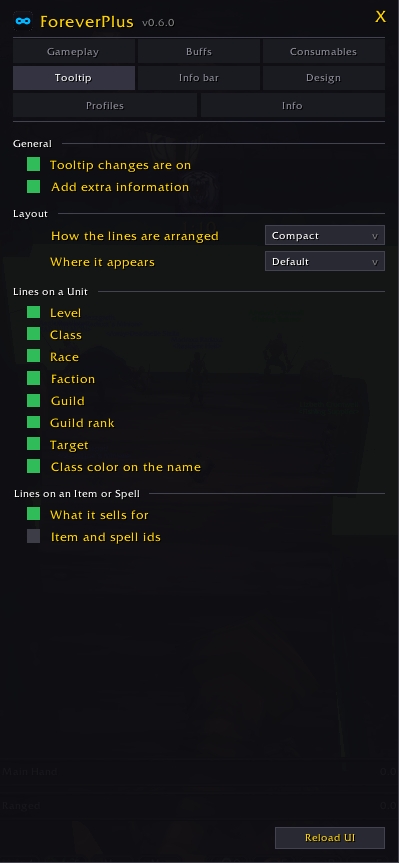
| Tooltip | Extra lines on the unit tooltip, a switch for each, and three ways of arranging them. See below. |
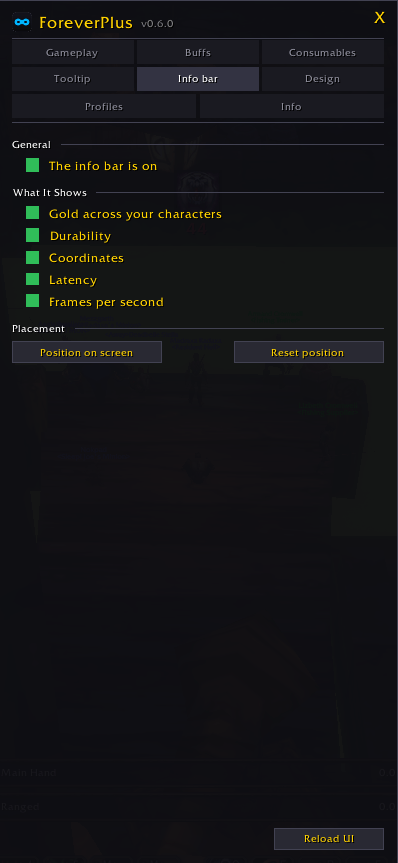
| InfoBar | A row at the top of the screen with the numbers this game shows nowhere: gold, durability, coordinates, latency, frame rate. Hover the gold for every character's gold, or the durability for every damaged piece. |
| BagSlots | How many bag slots are free, out of how many, written on the backpack. |
| BagWindow | Hold Shift and drag the bag window by its title bar to put it where you want it, while your bags are combined into one window. The reagent bag beside it switches sides rather than leaving the screen. |
| XPBarText | Keeps the experience bar text visible instead of showing it only on hover. |
| Chat | A page of its own: shorter names with race and class icons, channel numbers and labels of your own, timestamps you can quote with a Shift click, a search bar, a sound for whispers and raid warnings, and the chat kept across sessions. Switched off, the game's own chat comes back. |
Every automation has a brake
Hold Shift and any of the automatic modules stands aside for as long as you hold it. You can read a quest text, keep a finished quest for later, or skip a sale without turning anything off.
Buffs that are missing, not just running out
A buff warning that only counts down cannot tell you about the buff that is already gone, and that is the moment it was for. A Warrior whose Battle Shout dropped mid fight used to get nothing at all.
BuffExpiry works from a curated list of spells for your class, so it knows
what you are supposed to have. Three things it can say:
- Missing. You know it, you can cast it, it is not on you. The icon loses its color and its border turns red, with a dash where the countdown goes.
- Running out, with the time left.
- A better rank exists. Frost Armor while Ice Armor is trained is neither missing nor expiring, and it is the one nobody notices. Only ever within one family, so nobody in Ice Armor is told to switch to Mage Armor.
Group buffs carry a count: how many people near you do not have it. Only who is in range, so it is something to act on rather than a statistic, and a Warrior never appears in the count for Arcane Intellect.
Shaman imbues and Rogue poisons are watched as well, read off the weapon rather than off you. A shield in the off hand is never mentioned, and neither is a weapon you cannot enchant yet.
Two timings rather than one: short buffs warn at ten seconds, long ones at five minutes, with the boundary at ten minutes of total length. Nothing at all while you are dead.
Tracking that switches itself off
Find Minerals and Find Herbs go out every time you die, and half a session can pass before you notice. Tick the trackings you want running and an icon appears whenever none of them is, and goes the moment you switch one back on.
Nothing is ever said about a tracking your character has not learned, so a character with no gathering profession never sees any of this at all.
The two gathering trackings count as one, because they cancel each other out: a character with both professions could not otherwise satisfy it. Find Treasure sits on its own, since it runs alongside anything else here.
Quiet in a fight and while you are dead, so it turns up when you can act on it.
Every buff has its own switch, on a page that lists all nine classes. Turn off Thorns on a Druid who does not tank without losing the rest. Hover a row and the game's tooltip names the buffs it covers.
A tooltip you arrange
Every line on a unit tooltip has a switch: level, class, race, faction, guild, guild rank, and who they are targeting. Switch off what you never read.
Three arrangements. Compact, which is the default, pairs them up: level with class, race with faction, guild with its rank. One per line gives each entry a line of its own. Blizzlike leaves the game's own lines in the game's own order and adds the rest underneath.
Two lines the game does not offer. The rank somebody holds in their guild, beside the guild name. And who they currently have targeted, which reads "you" when it is you, so a glance tells you what is coming for you.
And it can sit in a corner. This client offers no way to move the tooltip, so the addon does: pick a corner, or leave it where the client puts it. It grows inward from whichever corner it is pinned to, so a long name never runs off the edge.
Item tooltips carry what the item sells for, with the total for the whole stack beside the price of one.
A chat you arrange
Names the way you want them: in full, as initial and surname, first name only, surname only or initials, and hovering a shortened one shows it in full with class and guild. Race and class icons sit in front of every name.
Channel labels you can read at a glance. Numbered channels read as just their number, [1] and [2], and every channel and group chat has a field for a label of your own, with its color beside it. A label moves with its channel when you reorder them.
Timestamps in brackets, and a Shift click on one puts the whole line into the chat input, time and sender included, without sending it.
A search bar in the corner of the chat that prints every matching line again, the chat kept across sessions for every character, Up and Down in the input line bringing back what you sent, and a sound when somebody whispers you or a raid warning goes out, each kind with its own sound from the game's own.
Text size, spacing, outline and fading, the chat buttons and the tabs are all on the same page, and every feature has a switch of its own. Switch the page off and the game's own chat comes back.
A row of numbers the game never shows
Gold, the condition of your worst piece of gear, where you are in the zone, your latency and your frame rate, in one row at the top of the screen. Each has an icon and its own switch, and the whole row can be dragged anywhere.
Two of them open up when you hover them. The gold lists every character you have logged in with and what each one carries, richest first, and a character you no longer play can be removed from the list. The durability lists every damaged piece with its slot and its condition, worst first, colored the way the game's own armor figure colors it.
Nothing in it repeats something the client already displays. These are the figures this game shows in no window at all, which is the reason the row exists.
Profiles
Every setting lives in a named profile, and your characters share them. Each character remembers which one it uses, so a bank alt and a main can differ without either being set up twice.
Profiles can be created, copied, renamed, reset and deleted, and switching one takes effect immediately, in combat it waits until you are out of it rather than refusing.
They can also be exported as text and imported on another character, or kept somewhere as a backup. An import never overwrites anything: it arrives as a new profile, and switching to it is a separate step. A string that is damaged or incomplete is refused outright rather than half applied.
Made to be read
- Every option explains itself on hover, rather than in a caption clipped to one line.
- A search box over the module list, and one button that opens or closes everything at once.
- Options that another setting has made pointless are grayed out and say why, instead of quietly doing nothing.
- Three color schemes and a text size, applied the moment you pick them. The size is a percentage of the client's own, so headings stay larger than small print, and the font itself is never replaced, which matters on Korean, Chinese and Russian clients.
Commands
| Command | Effect |
|---|---|
/fplus |
Open the settings window |
/fplus sell · /fplus repair |
Run the vendor or repair pass now |
/fplus buffs |
Position the buff display |
/fplus buffs status |
Explain why a buff is or is not showing |
/fplus profile |
List profiles, or use, new, copy, rename, reset, delete, export, import |
/fplus diag print |
Report which API this client offers |
License
Free to use, but not open source. All rights reserved.
You may install ForeverPlus, read its code and change your own copy. You may not redistribute it, publish a changed version, charge for it, or reuse parts of it in other addons. CurseForge is the only place to get it.
The code is readable because WoW loads addons as plain Lua and Blizzard's policy requires it to be visible: that is not the same as it being free to take. If you would like to do something the license does not cover, ask on Discord; permission may well be given.
The full terms ship with the addon in LICENSE.
The ForeverPlus Team
