Forever Stats - Auction
- By
Auction house prices for ForeverStats: one-click scans, daily price history, tooltips and guild sharing.
Captura de pantalla 2026-11-26 005245.png
Description
ForeverStats - Auction
Auction house prices for ForeverStats. Scans the auction house and keeps the cheapest price of every item, with the lowest and highest of each day, so you can see what your items are worth today and how their price has moved over weeks, months and years.
Requires ForeverStats 0.89 or later. It is a separate addon: install it only if you want auction prices.
Features
Scanning (with the auction house open)
- Full scan: the "Scan (ForeverStats)" button in the auction house window reads every auction at once. The game only allows it every 15 minutes, and it never runs on its own.
- Scan my items: searches one by one what your characters on this realm have (bags, bank and warband bank) and the items you marked "Of interest". It does not wait the 15 minutes. Optionally, it runs when you open the auction house ("Scan my items when opening", off by default).
- While you browse: the cheapest price of whatever you search for or open in the auction house is saved automatically, with no scan.
Prices and history
- For each item, the cheapest price per unit; for each day, the lowest and the highest of those cheapest prices (how far the cheapest one went down and up, without odd prices sneaking in).
- History for the items that matter to you: what you have or had, sold, crafted, looted, have on your shopping list or marked "Of interest". For the rest, only the latest price. One option keeps the history of everything.
- Days become weeks after 60 days and weeks become months after a year, kept forever: a year of history for 2,000 items takes about 3 MB.
- Account-wide, per realm (and per faction in Classic).
Auction tab (under Economy, after Money)
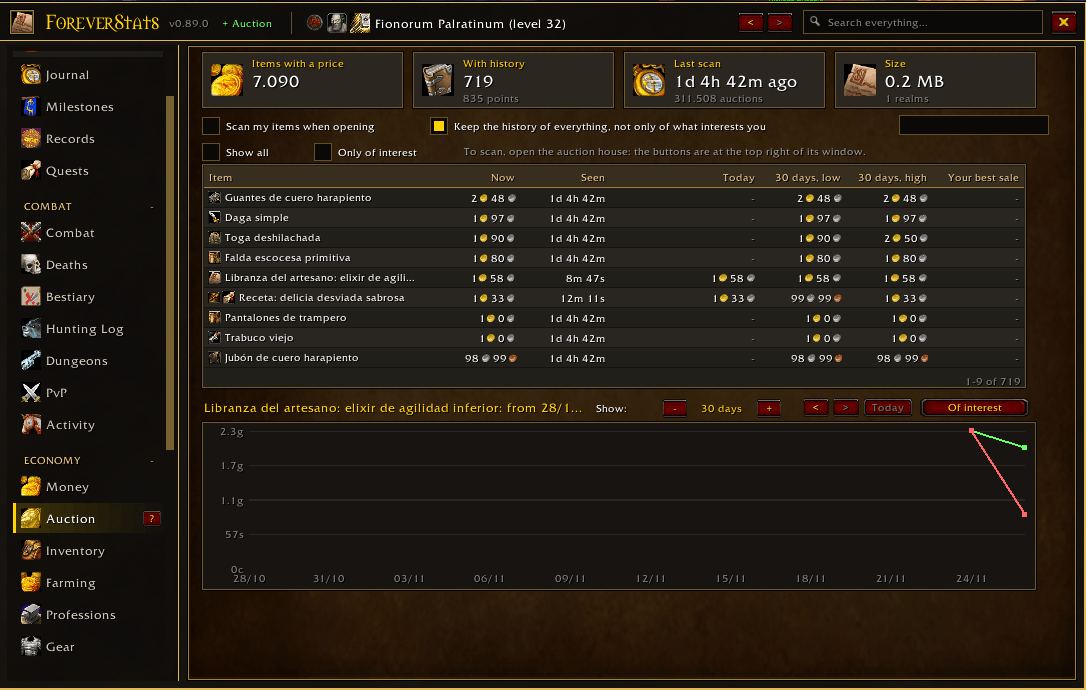
- Cards: items with a price, items with history, last full scan and saved size.
- A list with the price now, when it was seen, today's range, the 30-day low and high and your best sale. A star marks the items "Of interest" and a bag the ones you have; filters "Show all" and "Only of interest", and a search box.
- A chart of the chosen item: lowest, highest and your own sales per unit, by 30 or 90 days, a year or everything.
In the auction house window
- "Of interest" for the item you have open, and "Open in ForeverStats", which opens the Auction tab with that item's chart.
Item tooltip
- "Auction", "Today" and "Your best sale" next to the rest of the ForeverStats lines.
Game versions
- Retail and Forever: tested on Forever.
- Classic: full scan with the classic auction house; not yet tested in the game.
Languages
English, Spanish and Basque. It follows the language chosen in ForeverStats.
Data and privacy
- Everything is saved on your computer (
ForeverStats_AuctionDB), shared by all characters of the account. Nothing is sent anywhere. /fstats diagnosticoshows what your client allows and how the last scans went.
Commands
/fstats subasta: opens the Auction tab./fstats subasta escanear: full scan (with the auction house open)./fstats subasta mios: scan my items (with the auction house open).
Suggestions and bugs
Welcome in the comments. Please include the result of /fstats diagnostico.
ForeverStats - Auction (español)
Precios de la casa de subastas para ForeverStats. Escanea la subasta y guarda el precio más barato de cada objeto, con el más bajo y el más alto de cada día: lo que valen hoy tus objetos y cómo ha cambiado su precio en semanas, meses y años.
Necesita ForeverStats 0.89 o posterior. Es un addon aparte: instálalo solo si quieres los precios de la subasta.
Qué hace
Escanear (con la subasta abierta)
- Escaneo completo: el botón «Escanear (ForeverStats)» de la ventana de la subasta lee todas las subastas de golpe. El juego solo lo deja cada 15 minutos y nunca se hace solo.
- Escanear mis objetos: busca uno a uno lo que tienen tus personajes de este servidor (mochilas, banco y banda guerrera) y lo marcado con «Me interesa», sin esperar los 15 minutos. Si quieres, se hace solo al abrir la subasta («Escanear mis objetos al abrir», desactivado al empezar).
- Mientras miras: el precio más barato de lo que buscas o abres en la subasta se guarda solo, sin escanear.
Precios e historial
- De cada objeto, el precio por unidad más barato; de cada día, el más bajo y el más alto de esos mínimos.
- Historial de lo que te importa: lo que tienes o has tenido, vendido, fabricado, saqueado, en la lista de la compra o marcado con «Me interesa». Del resto, solo el último precio. Una opción guarda el historial de todo.
- Los días pasan a semanas a los 60 días y las semanas a meses al año, que se guardan para siempre: un año de historial de 2.000 objetos ocupa unos 3 MB.
- Para toda la cuenta, por servidor (y por facción en las Classic).
Pestaña Subasta (en Economía, tras Dinero)
- Tarjetas: objetos con precio, con historial, último escaneo completo y lo que ocupa.
- Lista con el precio de ahora, cuándo se vio, el de hoy, el más bajo y el más alto de 30 días y tu mejor venta. Estrella para lo de «Me interesa» y bolsa para lo que tienes; filtros «Ver todos» y «Solo Me interesa», y buscador.
- Gráfico del objeto elegido: más bajo, más alto y tus ventas por unidad, de 30 o 90 días, un año o todo.
En la ventana de la subasta
- «Me interesa» para el objeto que tienes abierto, y «Abrir en ForeverStats», que abre la pestaña Subasta con su gráfico.
Tooltip de los objetos
- «Subasta», «Hoy» y «Tu mejor venta», junto a las demás líneas de ForeverStats.
Instalación
Copia la carpeta ForeverStats_Auction a Interface\AddOns (junto a la de ForeverStats) y reinicia el juego.
Comandos
/fstats subasta: abre la pestaña Subasta./fstats subasta escanear: escaneo completo (con la subasta abierta)./fstats subasta mios: escanear mis objetos (con la subasta abierta).
Sugerencias y fallos
Se agradecen en los comentarios. Incluye el resultado de /fstats diagnostico.
Forever Stats - Auction Team