Forever Solo
- By
An all-in-one companion for solo players: a quest guide and tracker, gear advice, a dungeon journal and map helpers, every feature a switch.
01-overview.png
02-quest-guide.png
03-where-next.png
04-gear-advisor.png
05-dungeon-journal.png
Description
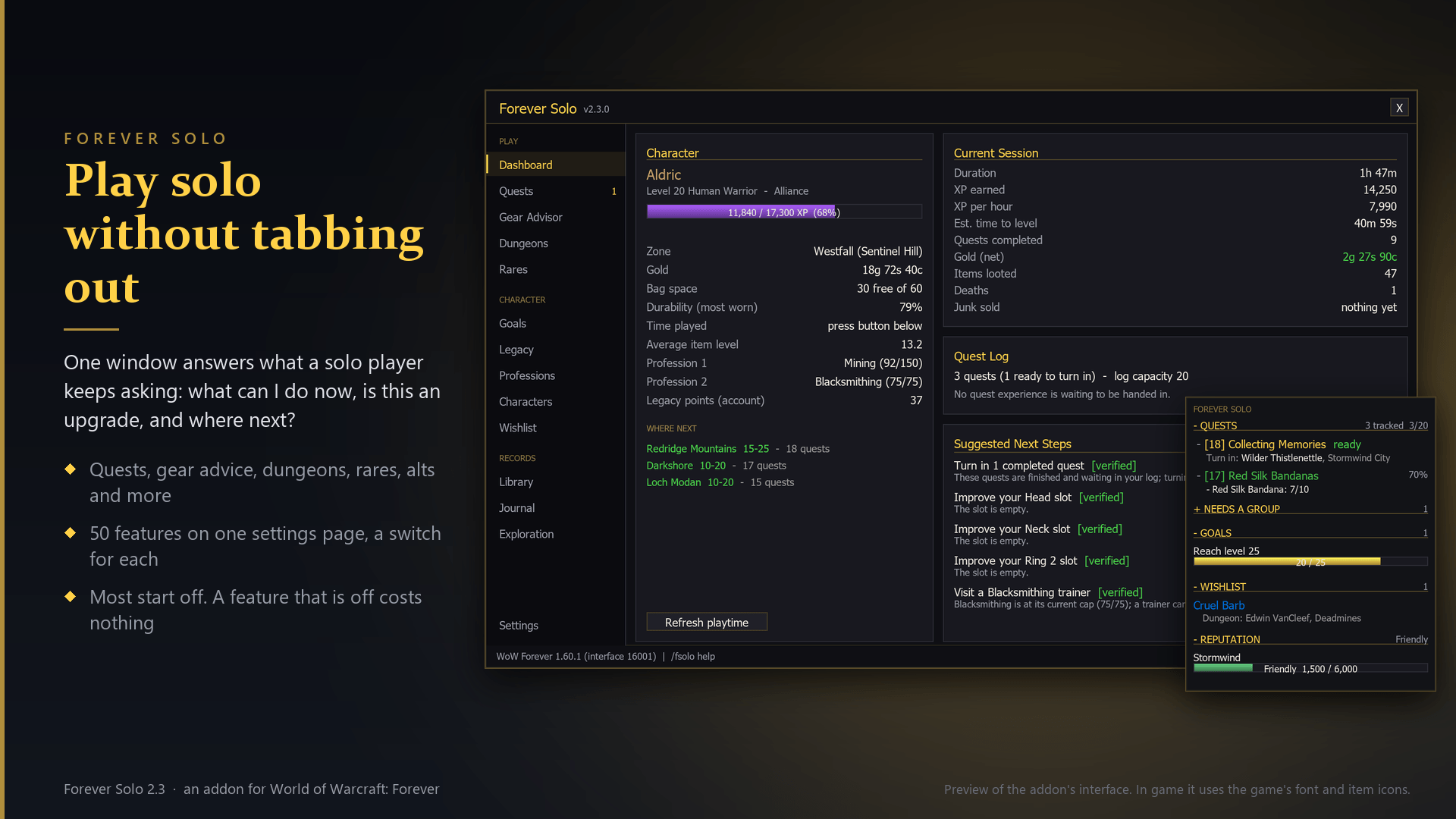
Play solo without tabbing out
Forever Solo answers the questions a solo player keeps asking: which quests can I take right now and where is the quest giver, is this item an upgrade for me, where does my next upgrade come from, is that creature going to kill me, where is the nearest repair vendor, and what should I do next?
- Quests: the quests you can pick up now, nearest first, with a waypoint to each giver; a tracker that works beside the game's own; reward advice that tells you which choice is the upgrade and never picks for you.
- Gear: every item tooltip says whether the item is an upgrade for your class and by how much; upgrade marks in your bags (Baganator, BetterBags, Bagnon and the game's own bags); a wishlist that tells you the next step for each item.
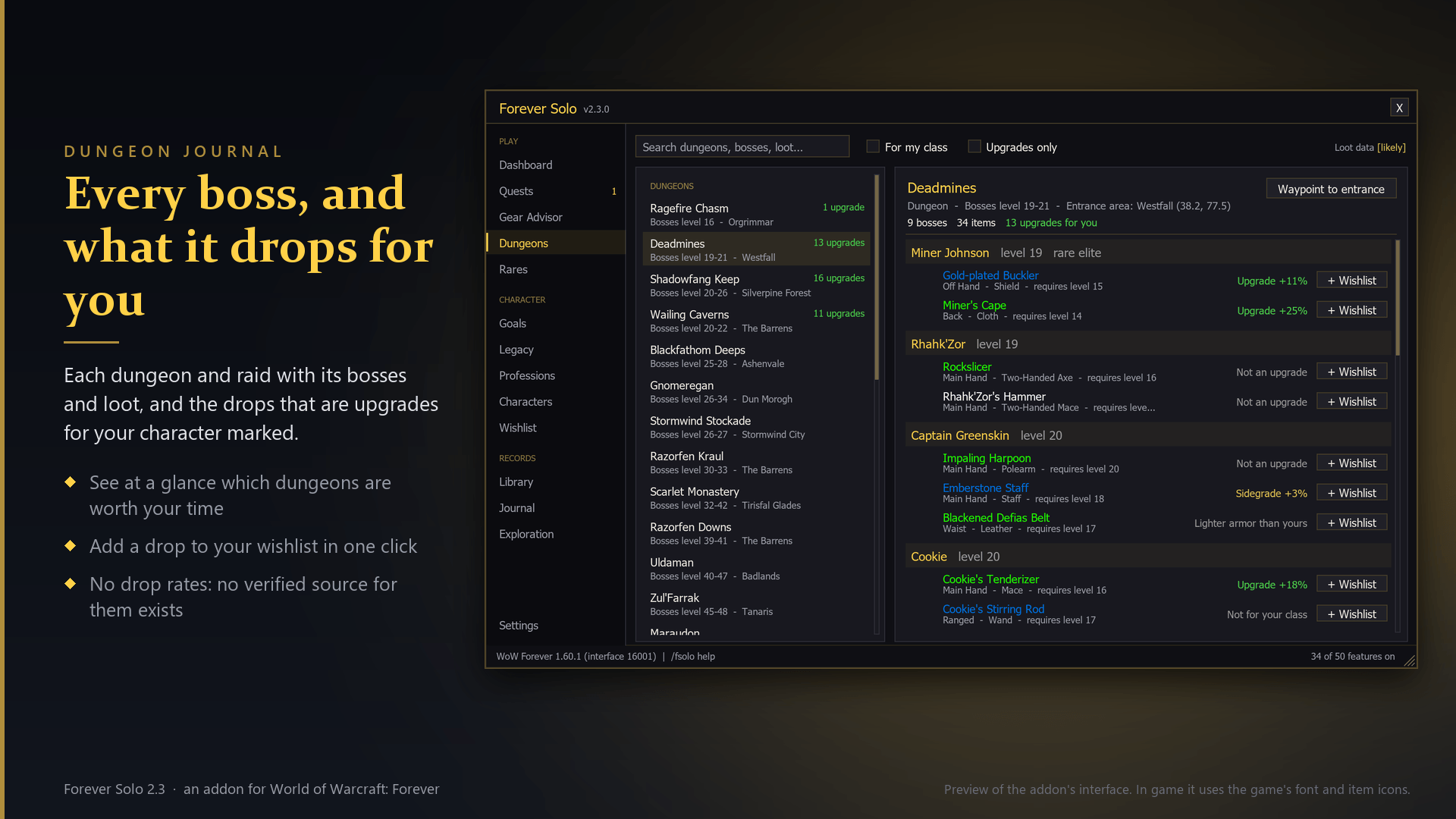
- Dungeons: every boss and its loot, with the bosses that matter for your character called out.
- Finding your way: waypoints, zone level ranges on the map, where to level next, the nearest repairer, innkeeper, mailbox or trainer from places you have been.
- Staying alive alone: a danger line in hostile creatures' tooltips, a supplies check when you leave town, a reminder for a missing buff.
Everything is a switch on one searchable settings page. Most features start off, a feature that is off costs nothing, and a short welcome setup helps you choose. Nothing needs a reload.
Honest about what it knows
Everything the addon tells you is labelled: [verified] (your own game client proves it, or you saw it yourself), [likely] (community data, probably right) or [reference]. It learns from your own play (flight times, quests, vendors, rare sightings, auction prices) and prefers that to shipped data. It never shows a drop rate, because no verified source for one exists.
Features
Quests & Tracker
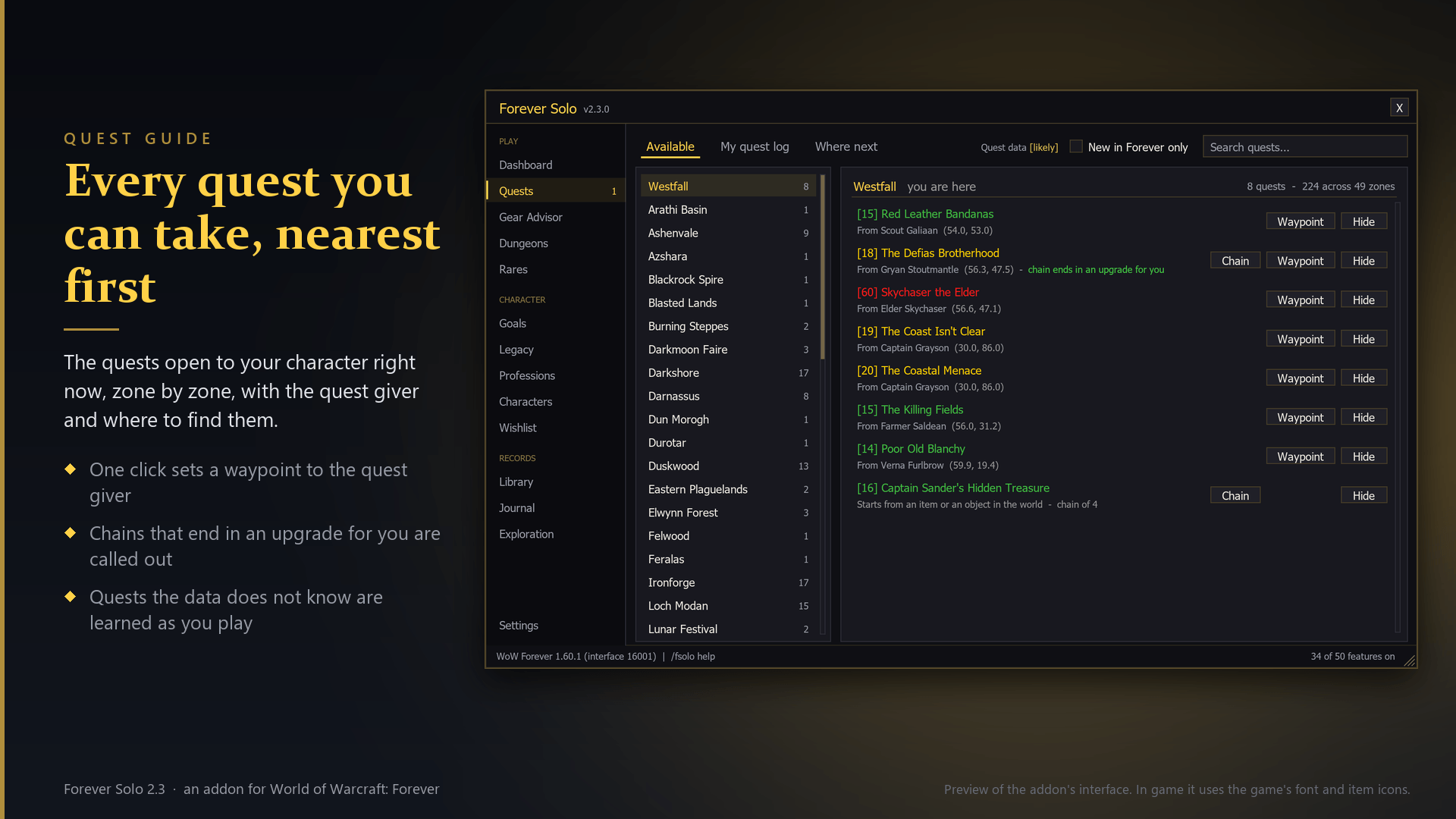
- Quest Guide: Lists the quests you can pick up right now, nearest first, with the quest giver's location and a one-click waypoint.
- Learn Quests as You Play: When you accept or hand in a quest the quest data does not know, or knows with a different quest giver, Forever Solo remembers who gave it and where.
- Quest Pins on the Map: Marks quest givers with a quest for you (!) and the places to hand finished quests in (?) on the world map and the minimap.
- Quest Progress Alerts: A banner and a sound the moment an objective is finished or a quest is ready to hand in, including where to hand it in when the Quest Guide knows.
- Reward Advisor: When a quest offers a choice of rewards, marks the best upgrade for your gear profile with an arrow and the one that sells for the most with a coin, right on the reward window.
- Objective Tracker: The on-screen list of what you are working on: quests with live objectives, pinned goals, professions and your watched reputation.
Gear & Loot
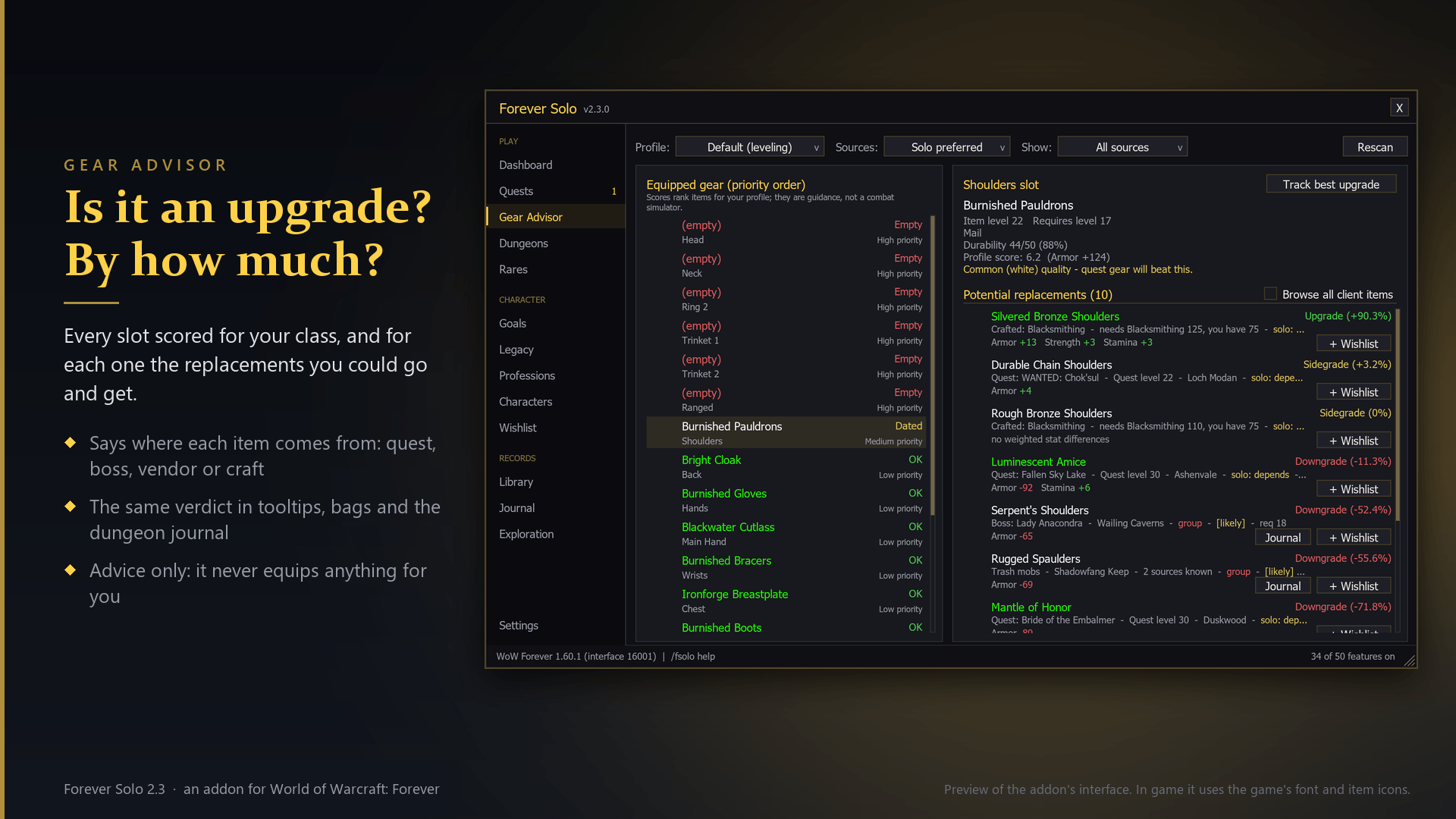
- Item Sources in Tooltips: Adds a line to item tooltips saying where the item comes from: which boss in which dungeon, which quest, or which vendor.
- Tooltip Details: Adds the small facts the default tooltip leaves out.
- Upgrade Advice in Tooltips: Every item tooltip tells you whether the item is an upgrade for you, by how much, and under which gear profile it was judged.
- Wishlist Marks in Tooltips: Items on your wishlist are flagged in their tooltip wherever you meet them.
- Upgrade Marks in Bags: Marks the gear in your bags that is better than what you are wearing, so you see what to look at the moment you open them.
- Auction Prices: Adds a Scan prices button at the auction house.
- Gear Advisor Settings: How the Gear Advisor judges items.
- Character Sheet Item Levels: Shows each equipped item's level on its slot in your character sheet, colored by quality.
Dungeons
- Dungeon Journal: A page for every dungeon and raid: each boss, what it drops, which drops are upgrades for you, and your own kill record.
- Run Sheet: Walk into a dungeon and Forever Solo tells you which bosses carry upgrades for you, then keeps that list in the tracker and crosses bosses off as they fall.
- Boss Loot in Tooltips: Point at a dungeon boss to see what it drops, with your upgrades marked.
Map & Travel
- Waypoints: One-click navigation to quest givers, turn-ins and dungeon entrances using the game's own map pin and arrow, or TomTom's when you prefer it.
- Remember Useful NPCs: Remembers the vendors, repairers, innkeepers, mailboxes, trainers and flight masters you visit, and where.
- Exploration Checklist: An Exploration page: for every zone, the areas you have discovered and the ones you have not, with progress per zone and overall and a waypoint to the middle of an undiscovered area.
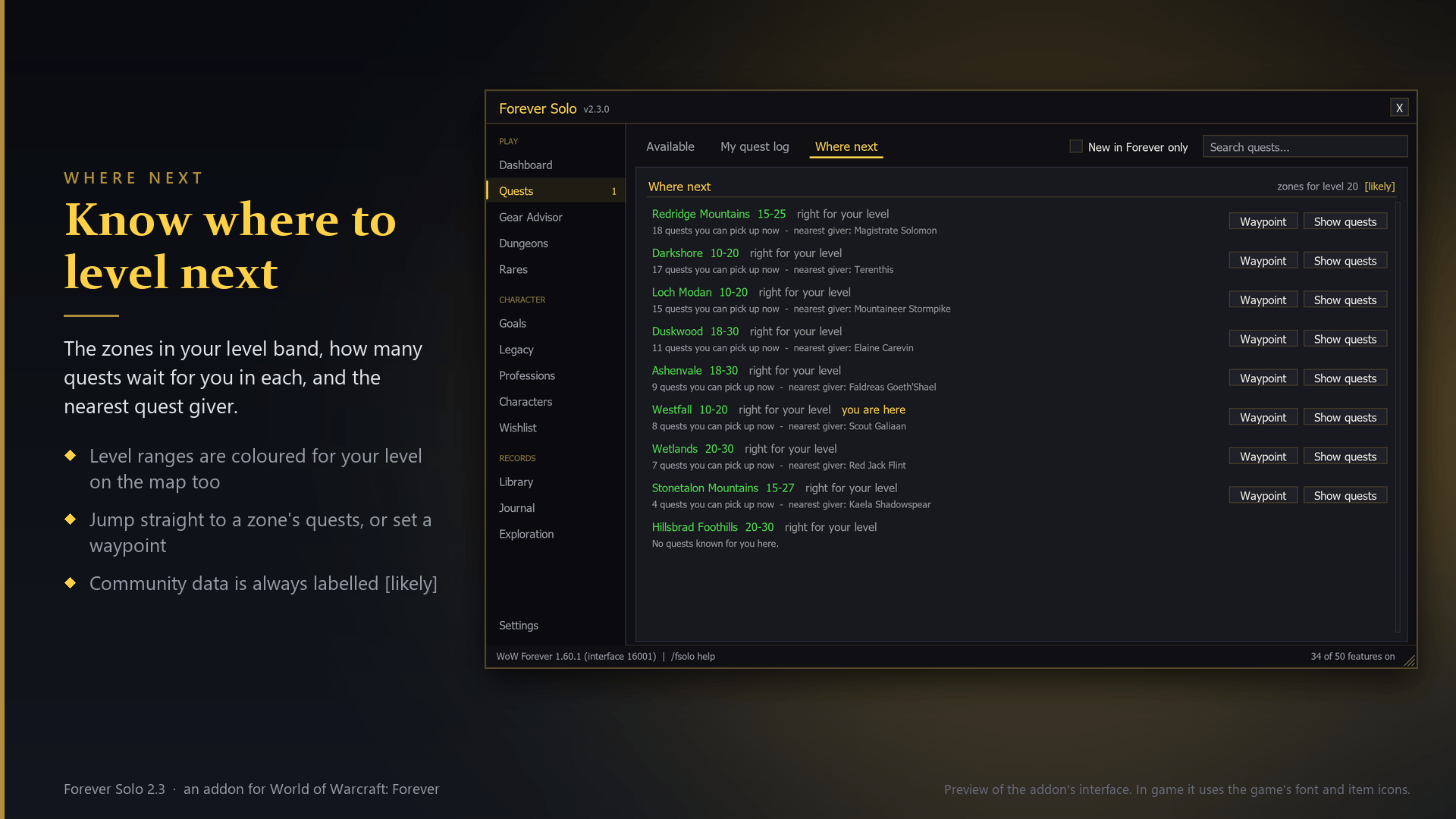
- Zone Levels and Where Next: Shows each zone's level range on the continent maps, coloured for your level, and adds a Where next list to the Quests page and the Dashboard: the zones in your level band, how many quests wait for you there, how many need a group, and a waypoint to the nearest quest giver.
- Dungeon and Transport Pins: Marks, on the world map, the dungeon entrances you have walked through (where the game shows none of its own) and the boats, zeppelins and tram you have taken, with where each one took you.
- Remember Gathering Nodes (opt-in): Remembers where you gathered herbs, mined veins, opened chests and fished schools, and can show them as pins on the world map and the minimap, by type.
- Flight Timer: Shows how long your flight has left, and on the flight map how long each route took you before.
- Coordinates: A small readout of your map coordinates under the minimap (drag it wherever you like), and a line on the world map with your coordinates and the cursor's.
Automation
- Sell Junk Automatically: Sells your gray items when you open a vendor and reports how many and for how much.
- Repair Automatically (opt-in): Repairs all your gear whenever you visit a vendor who can.
- Automate Quests (opt-in): Accepts quests and hands finished ones in for you when you talk to an NPC.
- Restock at Vendors (opt-in): Set how many of an item you always want, from what a vendor sells, and every vendor that sells it tops you up when you open it.
- Faster Auto Loot: When auto loot is on, takes everything from a corpse at once instead of item by item.
Alerts
- Notifications: Tasteful banners for the moments that matter: level-ups, upgrades, finished goals, rare spawns and more.
- Danger Check: Adds a line to the tooltip of hostile creatures when they are elite, several levels above you, or the target of a group quest in your log.
- Supplies Check: You set how much food, water, ammunition, class reagents, bandages and free bag space you want.
- Buff Reminder: Choose buffs from your own spellbook.
- Durability Watch: Warns you once when your most damaged item drops below a threshold, so a broken weapon never surprises you mid-fight.
- Rare Spawn Alerts: A banner and a sound when a rare creature comes into view, a log of every rare you have spotted and where, and a Rares page listing the known rares of each zone with waypoints.
Interface
- Quiet Error Text (opt-in): Hides the repetitive red messages ("Ability is not ready yet", "Not enough rage", "Out of range") while keeping every other warning visible.
- Welcome Back Briefing: A short summary a few seconds after you log in: how your last session went and what is waiting for you now (rested XP, finished quests, trainer skills, worn gear).
- Info Bar: A slim strip of live numbers you choose: gold, bag space, durability, XP, coordinates, clock and more.
- Feed Other Info Bars: Publishes the Info Bar's numbers (gold, bag space, durability, XP per hour, time to level, item level, flight time and more) so that Titan Panel, ChocolateBar, Bazooka and similar addons can show them on the bar you already use.
Character & Alts
- Library Books: A Library Books tab on the Library page for Forever's collectible books: which ones you have handed in to the librarian, which you are carrying, where each was found, and the rewards.
- Milestone Screenshots: Quietly takes a screenshot when you level up or defeat a dungeon boss, so your journey documents itself.
- Auto-Watch Reputation: Whenever you gain reputation, your watched faction switches to it, so the tracker and reputation bar always show the grind you are actually on.
- Trainer Reminders: Remembers what your trainer will teach you at each level and reminds you the moment it unlocks, with the exact skills and total cost.
- Alt Roster: One page for all your characters: level, gold, professions, where each one logged out and whether they are resting.
- Rested XP Estimates: Estimates the rested experience your other characters have built up since they logged out, on the Characters page, and can remind you when you log out outside a rest area.
- Items Across Characters: Remembers what each of your characters has in bags, bank and mailbox.
- Legacy Challenges: A Legacy page that lists every Legacy challenge the game knows, by category, as done or not done for this character, with the ones you are closest to finishing first.
- Lore Library: Every book, letter and plaque you read is kept in a personal library you can browse any time, with a checklist of the readable items the game contains.
Social & PvP
- Solo Shield (opt-in): For players who want to be left alone: politely declines duel requests and invitations from strangers.
- PvP Companion: Counts your honorable kills this session and can release your spirit automatically in battlegrounds so you are back in the fight sooner.
Also: a Dashboard with session statistics and suggested next steps, a Goals planner, an Adventure Journal, settings profiles with export and import, key bindings, and Quiet mode (no banners or sounds until you turn it off).
What it will not do
- It never picks a quest reward, and never equips, casts, moves or uses anything for you.
- Anything that acts for you (accepting and handing in quests, repairing, restocking, declining invitations, hiding error text) is opt-in: off by default, switched on by no preset, and its card says exactly what it will do.
- It never shows a drop rate and never presents community data as verified.
- It does not rebuild what the game already has: Edit Mode, the objective tracker, quest markers, the one-bag window, the damage meter, the cooldown manager, the swing timer and controller support are the game's own.
- No in-game advertising and no donation requests.
Slash commands
| Command | Effect |
|---|---|
/fsolo |
Open or close the window |
/fsolo settings |
Open Settings |
/fsolo setup |
The welcome setup |
/fsolo quests, /fsolo dungeons, /fsolo rares, /fsolo alts |
Open that page |
/fsolo way <x> <y> [name] |
Set a waypoint (/fsolo way clear removes it) |
/fsolo track |
Show or hide the tracker |
/fsolo unlock |
Move and resize the addon's frames |
/fsolo quiet [minutes or off] |
Quiet mode |
/fsolo perf |
Memory, login time and what is running |
/fsolo report |
Text for a bug report, ready to copy |
/fsolo help |
Every command |
Companions
Two companion addons carry the data and are installed together with Forever Solo. They are separate projects because their data comes from other projects under other licences.
- Forever Solo Data: quests, quest givers, dungeons, items and rares.
- Forever Solo Loot: raid and boss loot, crafted gear and reputation rewards.
Privacy
Forever Solo sends nothing: not to other players, not to their addons, not to any server. Everything it records stays in your own saved-variables files on your computer. /fsolo report builds a bug report without your character's name, realm or gold, and you copy it out yourself.
Credits and licences
- Forever Solo (this addon): MIT licence.
- Forever Solo Data is generated from QuestieDB by the Questie contributors, and is offered under the GNU GPL version 3.
- Forever Solo Loot is generated from AtlasLootClassic, and is offered under the GNU GPL version 2.
- Item, map and quest tables come from the game client, exported per build by wago.tools.
- Embedded libraries, each under its own licence: LibStub, CallbackHandler-1.0, HereBeDragons and LibEditMode.
- The full list of sources, with what was taken from each, is in NOTICE.md.
World of Warcraft and Blizzard Entertainment are trademarks or registered trademarks of Blizzard Entertainment, Inc. Forever Solo is not affiliated with or endorsed by Blizzard Entertainment.
Forever Solo Team