Forever Quest Items
- By
See which quests need your items, where those quests are located, and whether your character has already completed them—all in the item tooltip.
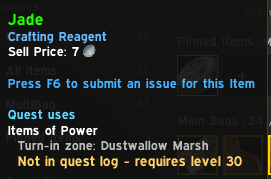
image.png
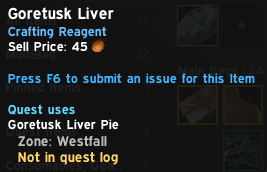
image1.png
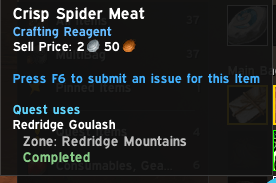
image2.png
Description
Forever Quest Items
About
Still carrying stacks of meat, livers, and spider parts because you can't remember which quests need them?
Forever Quest Items adds quest information directly to item tooltips in WoW Forever. Hover an item to see its known quest uses, the associated zones, and your character's quest status. Spend less time looking things up and more time leveling.
It works with meats, creature parts, and other items used in quest turn-ins—not just items labeled “Quest Item” by the game.
Features
- Quest names and zones: See which known quests need an item and where those quests belong.
- Character-specific completion: Distinguish quests you've already turned in from quests that aren't in your log.
- Active quest progress: See collection counts when a matching objective is available.
- Multiple quest uses: Items needed by several quests list each one separately, with active quests first.
- Repeatable quest labels: A previous turn-in doesn't hide an item's repeatable use.
- Future quest uses: Database-backed entries can appear before you accept the quest.
- New Forever race support: Uses faction compatibility when inherited race restrictions don't recognize your race.
- Bag and item-link tooltips: Check items in your inventory or through clicked item links.
- Optional completed entries: Keep completed quests visible or hide them with a command.
Examples of known item uses include Goretusk Liver → Goretusk Liver Pie in Westfall and Crisp Spider Meat → Redridge Goulash in Redridge Mountains.
Quest statuses
| Status | Meaning |
|---|---|
| Not in quest log | The quest isn't active and the game hasn't flagged it as completed. |
| In progress | The quest is currently in your log. |
| Ready to turn in | The quest is active and its completion requirements are met. |
| Completed | The game reports that this character has already completed the quest. |
| Previously turned in — repeatable | A past completion is known, but the quest can be repeated. |
Completed quests are shown by default. Completion checks use your current character, including known quests completed before you installed the addon.
“Not in quest log” does not guarantee that a quest is available to accept. Prerequisites, reputation, profession requirements, and other restrictions may still apply.
Required dependency
QuestieDB must be installed and enabled. It provides the quest and item database.
The supported setup uses QuestieDB from the Forever-compatible Questie bundle. The Questie map and tracker addon itself is optional; keep QuestieDB enabled.
The initial release was developed against QuestieDB 1.0.4, supplied with the Questie 12.0.2 + QuestieDB 1.0.4 bundle. QuestieDB is not included in the Forever Quest Items download.
Installation
- Install the Forever-compatible Questie bundle and enable QuestieDB.
- Extract the
ForeverQuestItemsfolder into your Forever client'sInterface/AddOnsfolder. - Restart WoW and enable Forever Quest Items on the AddOns screen.
- Log in, allow a few seconds for indexing, and hover an item.
The folder should contain Interface/AddOns/ForeverQuestItems/ForeverQuestItems.toc.
When updating an existing installation, replace the addon folder and run /reload. After turning in a quest, move your mouse away and hover the item again to refresh its status.
Commands
| Command | Action |
|---|---|
/fqi |
Show command help. |
/fqi on |
Enable quest tooltip information. |
/fqi off |
Disable quest tooltip information. |
/fqi completed |
Toggle completed quest entries. |
/fqi refresh |
Rescan your quest log. |
/fqi debug |
Show version and diagnostic information. |
/fqi item |
Inspect the last item detected by the tooltip hooks. |
/fqi item 723 |
Inspect a specific item by ID. |
You can also type /fqi item and Shift-click an item to insert its link, then press Enter.
Beta notes and limitations
This addon is currently in beta for WoW Forever. Quest coverage depends on QuestieDB, and some new or changed Forever quests may be missing or outdated.
For missing quests, the addon can learn an item association when you hover that item while a matching collection objective is active. Learned associations are shared between your characters by client language; completion remains character-specific. Live objective matching currently supports the English Item Name: current/required format.
An item without an annotation may still have a quest use that isn't known to the addon. Unknown locations are labeled accordingly. New-race faction fallback is a compatibility check, not a guarantee of race-specific quest eligibility.
The addon tracks known item requirements. It does not calculate raw ingredients needed to craft a different quest item, annotate creature tooltips, or automatically sell or delete items.
Reporting an issue
Please include:
- Your addon version and
/fqi debugoutput. - The affected item link and quest name.
/fqi itemoutput for that item.- Your race, class, and faction.
- A screenshot or the complete Lua error, if applicable.
For a missing tooltip, first confirm that QuestieDB and Forever Quest Items are enabled and run /fqi on.
Credits
Quest and item data are provided by QuestieDB. Thanks to the Questie and QuestieDB contributors for maintaining the database this addon relies on.
Version 0.1.2
- Fixed quest entries being hidden for new Forever races, including High Order Skyborne.
- Added faction-based fallback for inherited race restrictions while preserving class filtering.
- Retains the tooltip compatibility improvements and item diagnostics introduced in 0.1.1.
Forever Quest Items Team