Forever Pulse
- By
A lightweight Census, data collection and population observation addon for World of Warcraft: Forever.
sdfsdfsfsfs.png
sdfsdfsdsdfsdf.png
sdfsdfsdfsdfsdfsdfsdfs.png
sdgsdgsdgsdfsdfsdfsdfsdf.png
fgjfggsgsgfsdfsfsdfs.png
Description
Forever Pulse
Discover the community. Compare your stats.
data website : https://forever-pulse.com
Which classes do you encounter most? Which specializations do they play? Which guilds keep showing up around you? How does your character compare with the adventurers you meet?
Forever Pulse turns real character observations into clear charts, guild insights, specialization breakdowns and personal statistic comparisons — directly inside World of Warcraft: Forever.
Explore the characters you observe
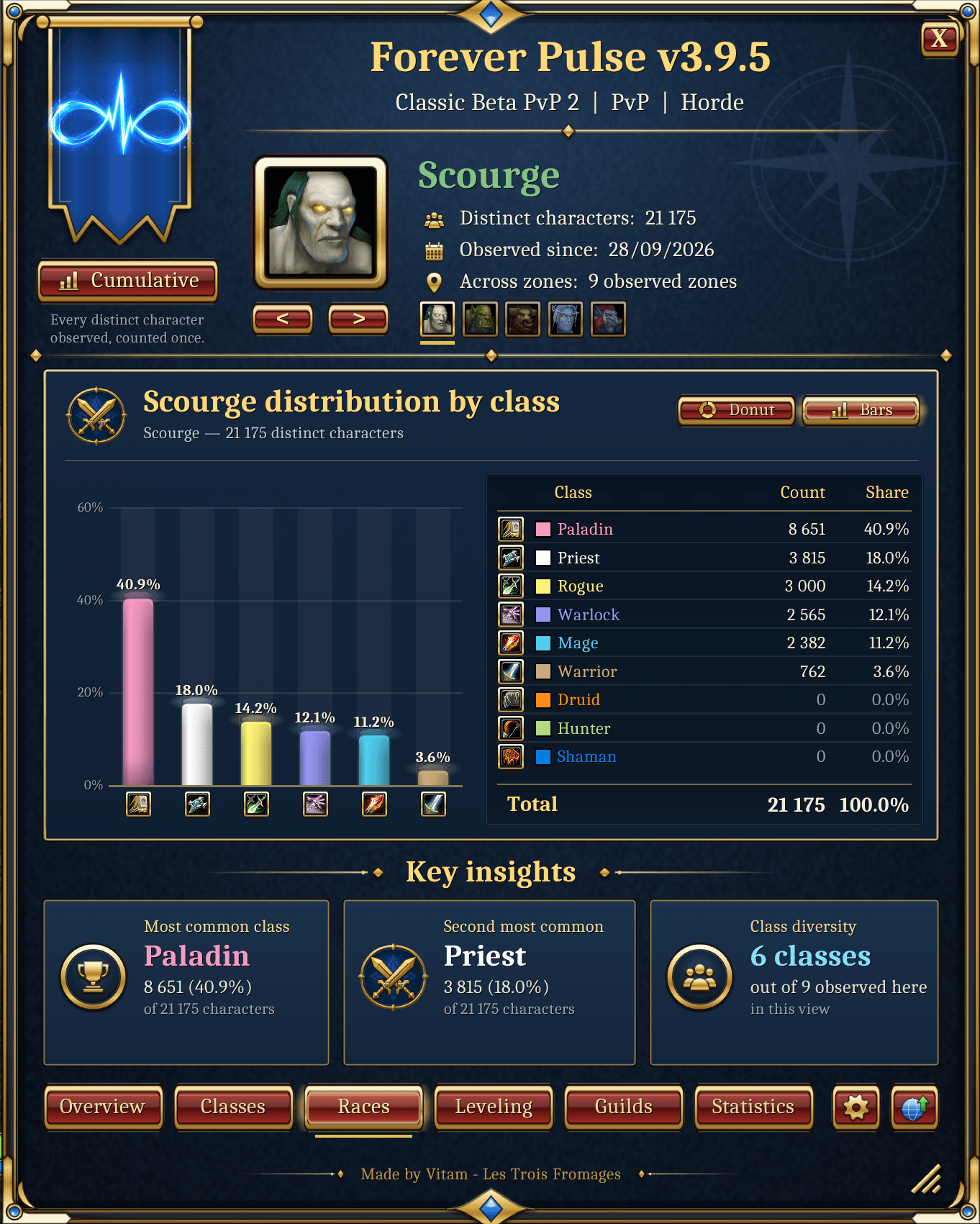
Classes & Races
See how the characters around you are distributed across classes and races.
Switch between donut charts and bar charts, then select any class or race directly from the icon ribbon.
Choose between:
- Latest zone snapshot — characters observed during your latest scan
- Cumulative observations — everything your addon has observed over time
Quickly see which classes and races appear most often in your adventures.
Specializations
In the Classes tab, the Spec button shows which talent branch the players of that class actually favor.
Forever Pulse reads the talents of the players you pass by, straight from their nameplate, without targeting them. Their specialization is the talent branch holding the most points.
For each class you get:
- The three specializations, with the number and share of observed players for each
- An Undetermined line for ties and characters without points
- How many observed players the figures are based on
Talents change rarely, so each player's talents are read at most once a day, or again when their level changes.
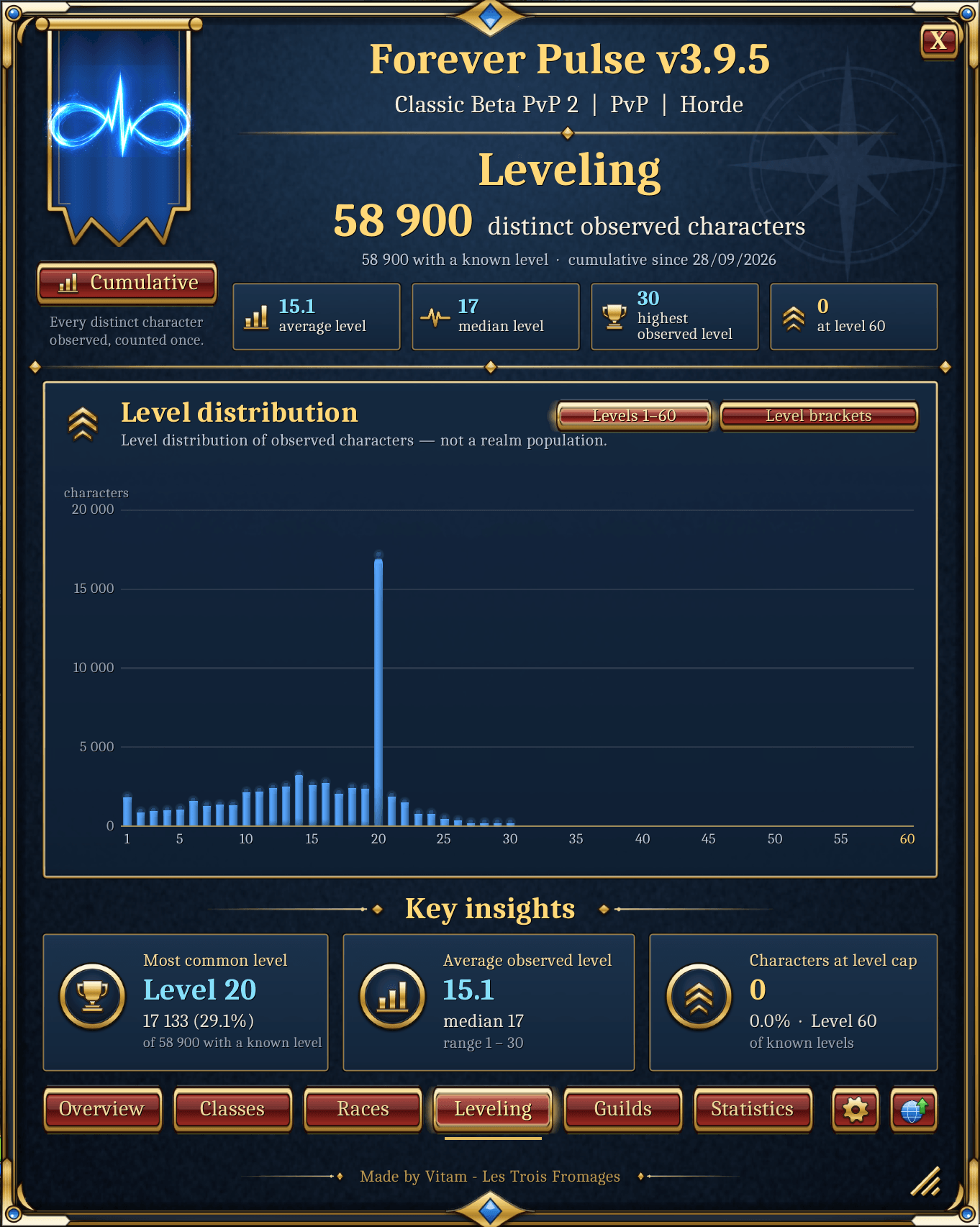
Leveling
Get a clearer picture of character progression around you.
View:
- Individual levels
- Level brackets
- Average level
- Median level
- Maximum-level characters
- Distribution across the leveling curve
Your observations build a progressively richer picture of the players you encounter.
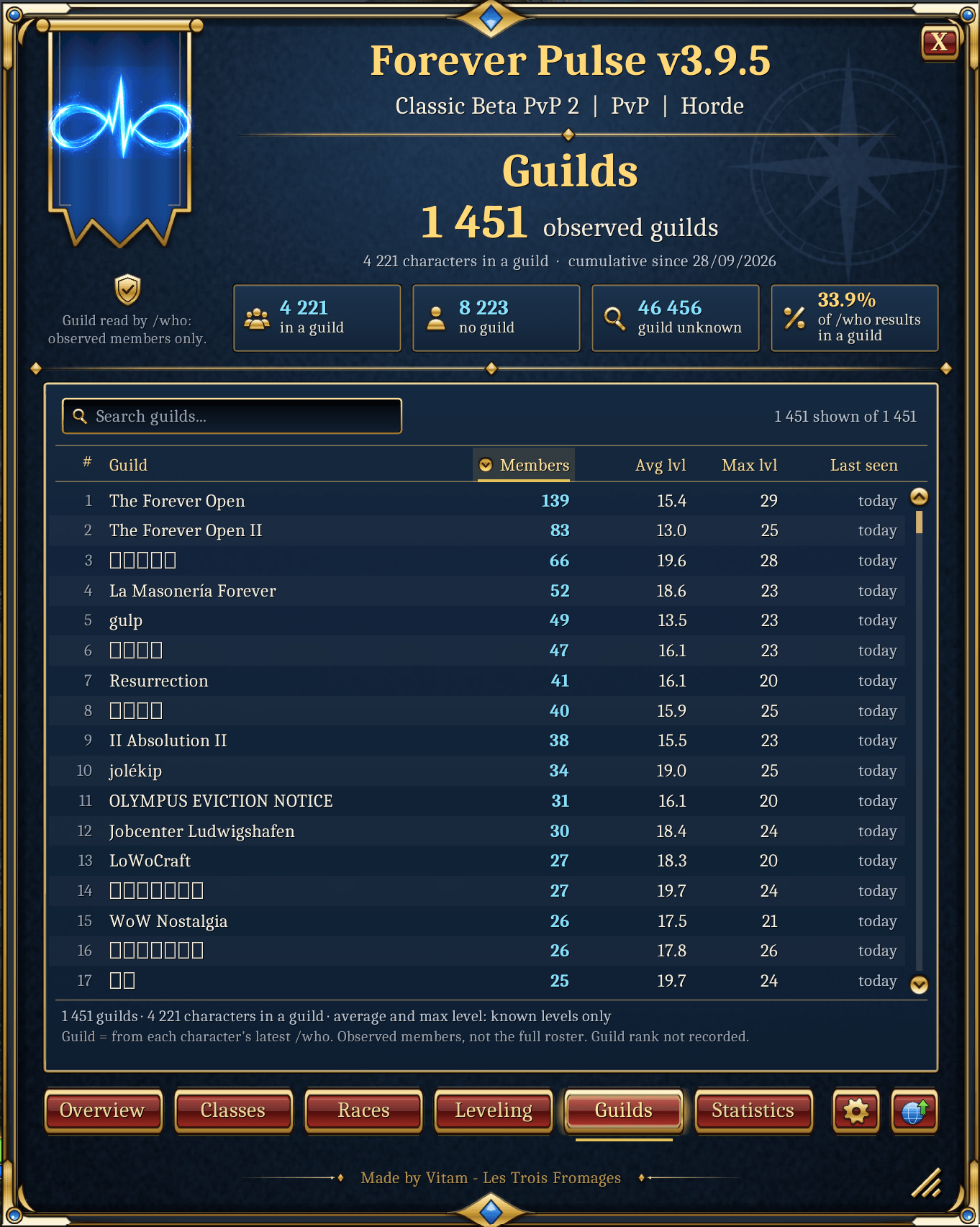
Guilds
Discover the guilds that appear around you.
For every observed guild, Forever Pulse can display:
- Members observed
- Average level
- Maximum level
- Last observation
- Class distribution
- Level distribution
Sort columns, search guild names without worrying about accents or capitalization, and open any guild to explore its observed members.
From the member list, you can jump directly into a character comparison.
The /who searches you type yourself are read too, and help fill in guild information.
Put your statistics in perspective
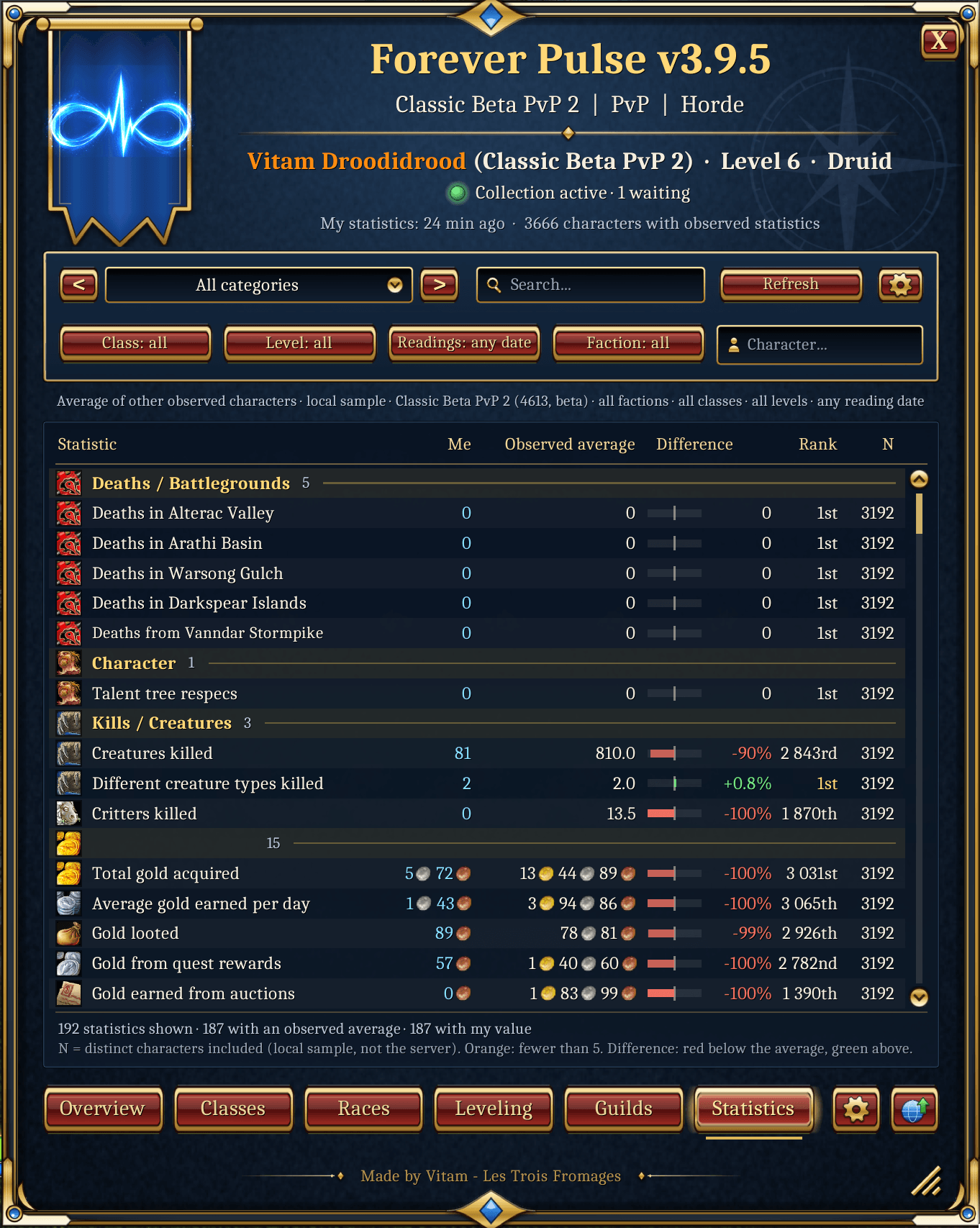
The Statistics tab lets you compare your own in-game statistics with characters you have actually observed.
See:
- Your value
- Observed average
- Difference from the average
- Your position within the observed sample
- Number of characters included in the comparison
Filter comparisons by:
- Category
- Class
- Level
- Faction
- Observation age
You can also search for a previously observed character and compare your statistics directly.
Forever Pulse only compares against characters for which compatible statistics have actually been observed. Statistics the game computes from your own character (such as professions learned) are never read on other players, so they cannot skew the comparison.
How nearby players are read
Statistics and talents come from the players whose nameplate is on your screen, or your target.
- One request to the server at a time
- 2 seconds between two requests by default, adjustable from 1 to 30 seconds in the Statistics tab
- A player's talents are requested half a second after their statistics, so they are fully recorded before walking away
- A player already read is read again after 30 minutes at the earliest
Collection pauses automatically in combat, in raids, battlegrounds and arenas, when your frame rate drops, and while you or another addon inspect someone. Your own inspect and achievement comparison windows are never cleared.
Six tabs. One clear interface.
Everything is organized into six main sections:
Overview · Classes · Races · Leveling · Guilds · Statistics
Open Forever Pulse with:
| Command | Action |
|---|---|
/fp |
Open or close Forever Pulse |
/pulse |
Open or close Forever Pulse |
/pulse stats |
Open the Statistics tab directly |
/pulse diagnostics |
Copyable report for bug reports |
Prefer using the mouse?
Click the Forever Pulse minimap button.
Make it yours
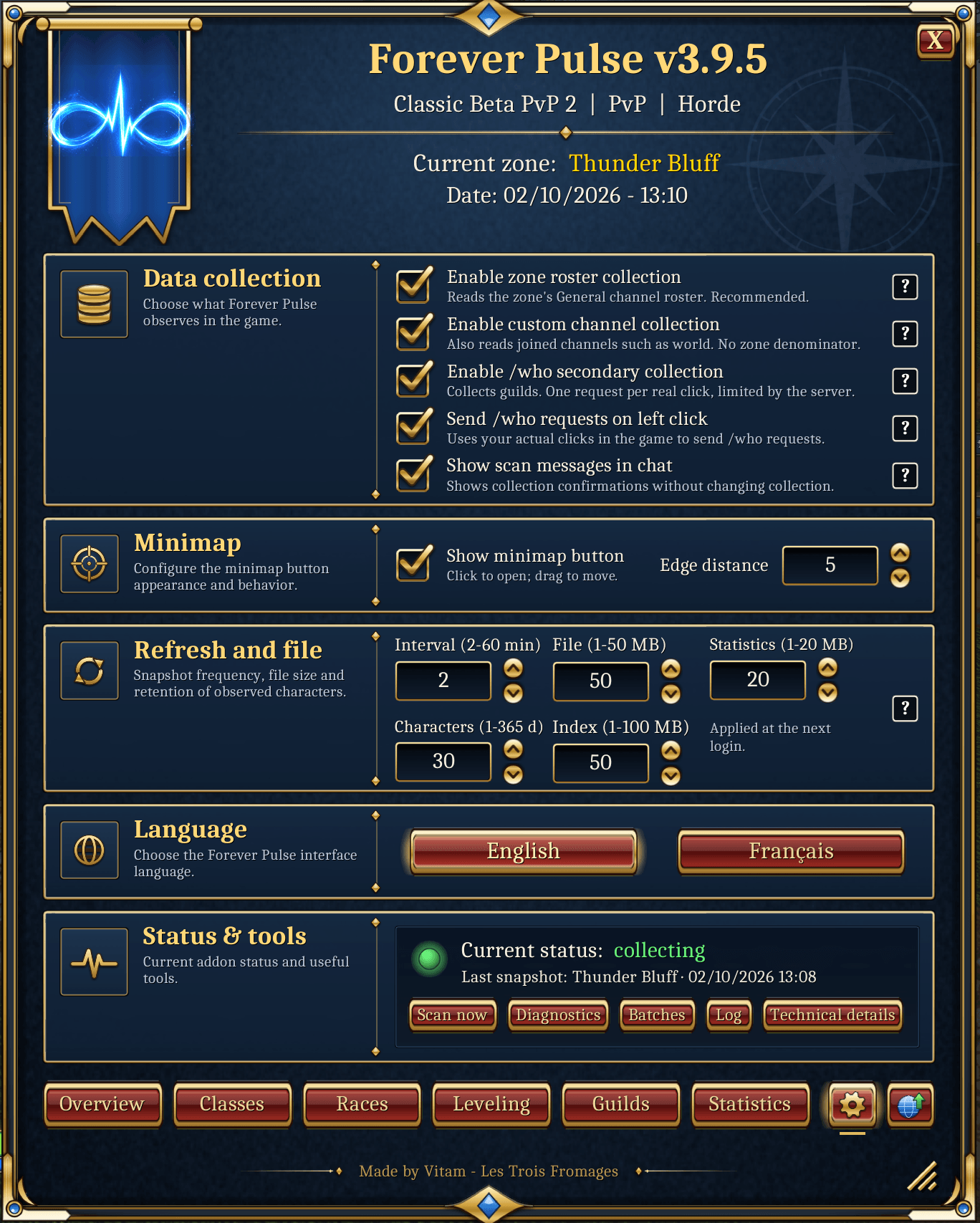
Forever Pulse gives you control over how the addon behaves.
You can:
- Choose your collection sources
- Set the pace of nameplate reading
- Enable or disable scan messages in chat
- Show or hide the minimap button
- Resize the interface
- Switch between English and French
Your observations remain available directly inside the addon.
Designed to stay light
Forever Pulse is built to minimize its impact on gameplay.
The addon limits its processing workload to approximately 3 ms per frame.
Large operations such as:
- Channel roster processing
/whoresults- Interface redraws
- Statistics and talents processing
- Report generation
are distributed across multiple frames instead of being processed all at once.
When your latency gets too high, every scan pauses and resumes on its own once it is back to normal.
The goal is simple: collect useful information without getting in the way of the game.
Real observations. Clear limits.
Forever Pulse works with observed characters.
It does not claim to represent the entire server population.
Population charts, averages, rankings and distributions describe the characters your addon has actually observed — your local sample.
Likewise:
- Guild pages show observed guild members, not complete guild rosters.
- Specialization figures describe the observed players of each class, not every player on the server.
- Statistics rankings describe the available observed sample, not a server-wide leaderboard.
- Characters outside your observations are not inferred or invented.
Your data
Everything the addon collects is stored on your computer, in the game's SavedVariables. The addon itself never sends anything over the internet.
If you install the separate Forever Pulse Companion, it sends the addon's observations to the Forever Pulse website. That includes the statistics and talents of the characters you observed: the website shows them on its public character pages (latest reading only) and in its statistics rankings.
Without the Companion, nothing leaves your computer.
Any player can ask for their character to be removed from the website by writing to foreverpulsesupport@gmail.com.
Help build the bigger picture
Forever Pulse can contribute character observations to the wider Forever Pulse project through the separate Forever Pulse Companion desktop application.
Addon → SavedVariables → Companion → Forever Pulse
World of Warcraft writes the addon's SavedVariables after:
/reload- Logout
- Normal game exit
The Forever Pulse Companion detects those changes and handles communication with the project infrastructure.
The addon itself never uploads data directly.
Every contribution helps build a broader picture of the World of Warcraft: Forever community.
Project website:
https://forever-pulse.com
Download the Companion:
https://forever-pulse.com/data-sources/contribute
Updating Forever Pulse
Current version: 4.2.1
Coming from 4.2.0, a simple /reload is enough.
Coming from an older version, restart the game completely: a /reload may not be enough when an update introduces new files.
Since version 3.9.6, Forever Pulse stores its character index in a more compact format.
Existing data is converted automatically.
Because older versions cannot read the new format correctly, do not downgrade to a version older than 3.9.6 after the conversion has occurred.
Forever Pulse also checks the size of its SavedVariables data during logout and applies safeguards designed to keep the database within what the game can reliably load.
Join the project
Enjoying Forever Pulse?
Share it with your guild, report bugs, send feedback or suggest features you would love to see next.
Every observation, every test and every piece of feedback helps the project grow.
Install it. Type /fp. Discover something new.
Made by Vitam
Forever Pulse Team