Forever IRS
- By
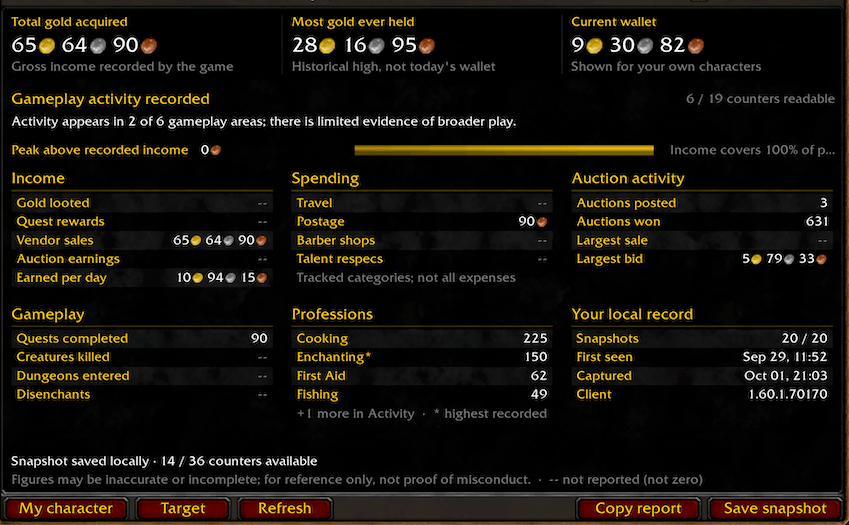
Forever IRS uses the achievements statistics page to show you how much gold people have earned and from what source.
Forever IRS — Ironforge Revenue Service
A character statistics ledger for WoW Forever. View your own gold statistics, inspect the counters the game exposes for a nearby player, and compare locally saved snapshots over time.
Features
- Total gold acquired, historical peak gold, and your own current carried gold.
- Income sources, selected spending counters, auction activity, gameplay, and profession statistics.
- A movable ledger that fits the screen, with an optional panel beside the normal Inspect window.
- A searchable directory of all retained characters, sortable by peak gold, total acquired, level, name, last seen, or snapshot count.
- Up to 20 snapshots per character, with history and a manually copied text report.
- Standalone operation: no other addon, website, account, or companion program required.
Install and use
Extract the release ZIP into your Forever client's Interface/AddOns directory. The result must be Interface/AddOns/ForeverIRS/ForeverIRS.toc, without another nested folder. Restart WoW after first installation and enable Forever IRS in the addon list. For an update to the same folder, /reload loads the new version; saved history is retained.
| Command | Action |
|---|---|
/irs |
Show the selected player, or yourself when no player is selected. |
/irs me |
Show your statistics and current carried gold. |
/irs target |
Request a nearby selected player's statistics. |
/irs history or /irs list |
Open the saved-character directory without requesting live data. |
/irs refresh |
Request a fresh observation for the current unit. |
/irs auto off / /irs auto on |
Disable/enable opening beside Inspect. On by default. |
/irs status |
Print addon/client versions, API availability, and request status. |
/irs reset |
Reset the window position; retain saved history. |
/irs close |
Close the ledger. |
The normal Inspect window also has an IRS button. Drag the ledger to move it; Escape closes it. History shows saved captures. Copy report opens selectable text for manual copying; nothing is sent to chat. Readable snapshots are saved automatically. Save snapshot does not turn an old capture into a new observation.
Saved-character directory
Click All characters or use /irs history. Each row shows the character's latest saved capture. The default is highest peak gold first. Click a column heading to sort; click it again to reverse. Your chosen sort order is saved. Search matches literal text in a character's name, realm, guild, or class.
Click a row to open that character's saved ledger, then History to view earlier captures. Browsing is local and preserves the original observation time. To refresh a saved character, target that same player nearby; IRS will not silently substitute your current target or your own character. Missing numeric values appear as a dash and sort last in either direction; an older known value is not substituted for a missing value in the latest capture.
Understanding the numbers
Accuracy disclaimer: Figures may be inaccurate, incomplete, or out of date. Game counters, resets, and addon errors can affect the results. Use them as a reference, not proof of a player's wealth or misconduct.
Total gold acquired is the game's recorded gross income, not profit or current wealth. Another player's current wallet is not exposed. Peak gold is a historical high, not their present balance.
The peak-above-recorded-income gap is max(0, peak gold − total acquired). The bar shows recorded income divided by peak, capped at 100%. Transfers, incomplete counters, and resets can affect these values. They do not identify misconduct or the source of someone's gold.
- Not reported: WoW returned no value. This is not a confirmed zero. Unavailable: no safely readable value was captured, or the statistic/API was not available. Hover a statistic row or copy the report for details.
- A reported numeric zero stays zero. Standard coin-icon amounts are converted to exact copper. Unknown localized formats remain display-only; the addon does not guess their value.
- Spending shows only the listed categories, not every expense. Income minus these counters is not a complete profit calculation.
- Profession ranks marked
*are highest recorded ranks and may belong to a profession no longer learned. The card shows the four highest positive ranks; the report includes every queried profession. - First seen means the first locally saved observation, not character creation. History increases compare neighboring observations only when client builds match and total acquired has not decreased.
Privacy and storage
ForeverIRSDB is account-wide SavedVariables data, written by WoW on UI reload or logout. It contains preferences and character GUID, name, realm, class, level, guild, capture time, client build, and the available statistics. Your current wallet is stored only for self-captures. Each character retains their latest 20 snapshots; older captures are removed. Characters are no longer removed automatically when the directory exceeds 50 entries, so the file grows as you inspect more people. Characters already discarded by an older version cannot be recovered by this update. A failed request without a readable capture does not create a directory entry.
There is no telemetry, automatic upload, addon-message exchange, chat broadcast, or background player scanning. The addon does not read other addons' saved data or require another addon. SavedVariables and copied reports can contain player identities; they are not included in release archives. To erase local history, close WoW and remove ForeverIRS.lua and its .bak file from your account's SavedVariables folder. /irs reset only resets the window position.
Requests and troubleshooting
Requests occur when you use the panel/commands or inspect with auto-open enabled. One request can be pending, with five seconds of local spacing and a 15-second response timeout. There is no automatic retry; the server can impose additional limits. Another addon or the achievement comparison window can take over the shared comparison request; IRS yields rather than clearing their request. It does not clear the native gear-inspection target.
If a request times out, keep the player nearby, leave combat, and click Refresh. If counters are missing, compare them with the game's Statistics/Compare view: IRS cannot recover information the game does not expose. /irs status reports client and API information. When reporting a bug, include these versions, what you clicked, and any Lua error; remove player names from screenshots or reports if you do not want to share them.
Compatibility
Version 0.3.0 Beta targets Forever 1.60.x, Interface 16001. All 31 statistic IDs and labels were verified against client data 1.60.1.70124. Other WoW branches are not supported by this release. The interface is English; unknown localized numeric formats remain display-only. Later game patches may change statistic coverage or meaning.
License
MIT License; see LICENSE. An independent community addon, not endorsed by Blizzard or the U.S. Internal Revenue Service. The project icon is AI-assisted fantasy artwork included with this MIT-licensed project; in-game fonts and standard UI textures are supplied by the game and belong to their respective owners.
Development
The test harness simulates WoW APIs; it cannot prove live server behavior. Run from the project root:
lua tests/test_irs.lua
lua tests/test_release.lua
lua tests/test_directory.lua
python3 tests/test_package.py
python3 scripts/package.py
The package script uses an explicit file list, checks versions and load order, verifies ZIP contents, and writes a checksum. Research, tests, local records, screenshots, and machine-specific files are excluded. The optional source-only design preview uses synthetic data and is not an in-game screenshot.
Statistic definitions: Wago Achievement data, build 1.60.1.70124. API references: Forever UI source. Reference source files retained for development are excluded from the release.
The Forever IRS Team