Forever Forgotten Buffs
- By
One-click prep buffs for Forever Forgotten: Battle Shout, sharpen/weight stones, food, scrolls, elixirs, campfire sit, fishing lure, and post-combat bandages. Class-aware, secure buttons, scalable UI.
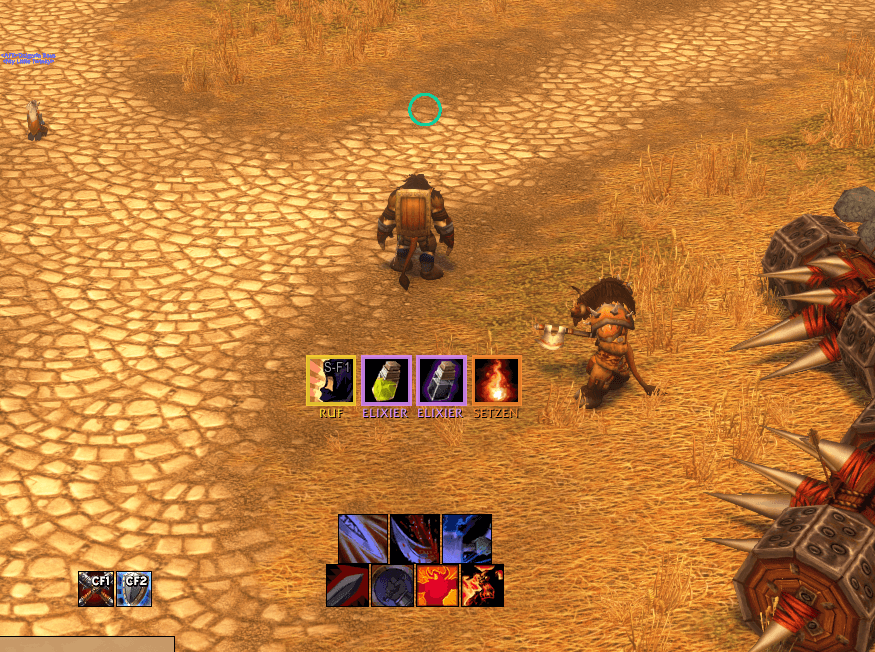
2026-10-17_20-24.png
Description
Forever Forgotten Buffs
English · Deutsch
English
A lightweight prep checklist for World of Warcraft: Forever. It shows a small bar of clickable buttons, but only for buffs and consumables you actually forgot. Once everything is in place, the bar stays empty.
What it reminds you of
- Battle Shout (Warriors only): appears out of combat when the shout is missing and Bloodrage is ready, and stays up after Bloodrage until you shout. In combat it fades in 15 s before the buff runs out, with a glow.
- Weapon: a sharpening stone or weightstone that fits your weapon. Rogues get a poison/stone picker with a default poison per weapon.
- Food: buff food only (Well Fed), best value first. Right-click to choose another one.
- Scrolls: class-aware (no Strength scroll for Warlocks). Stays silent while the matching class buff is up.
- Elixirs: detected through the item's own buff. Right-click picks a rank.
- Campfire: reminds you to sit at a Forever campfire for the camp benefits. Profession objects (e.g. Fish Bowl, Lodestone, Camp Chair) are recognised when you hover them. If an object's bonus is missing from your Camp Benefits, the reminder comes back.
- Fishing lure: only with a fishing pole equipped and lures in your bags.
- Bandages: only when they are worth it:
- Your health regeneration during the channel is taken into account, and the last tick may overheal.
- Forever hides health values from addons, yet the button only becomes visible below your real HP threshold, because the game checks it through a health curve.
- A red X warns you while a damage-over-time effect would interrupt the bandage.
- After Recently Bandaged runs out, the button comes back if a bandage would still be worth it.
- Gathering tracking: Find Herbs / Find Minerals (Forever allows only one at a time) and Treasure Finding for Dwarves, e.g. after you died.
- Class buffs: your own class buffs, without group or reagent buffs, each with a selectable default. Covers the Paladin blessing, Priest (Fortitude, Divine Spirit, Inner Fire, Touch of Weakness, Shadowguard), Mage, Druid, Warlock (Demon Armor/Skin, Soul Link), the Hunter aspect, and Shaman shields and weapon imbues. Talent spells are only checked when talented.
Stock
The food, elixir, poison/stone and bandage buttons show how many you have left. The number turns yellow when the stock is low and red for the last one; for food it counts all your buff food together. When you ran out, a grey KEINE ("none") button appears. Clicking it opens Cooking, Alchemy, Poisons or First Aid, if you know the profession.
Usage
- Every button is a secure action button: click to use, right-click for a picker where there is a choice.
- Key bindings: Key Bindings → Forever Forgotten Buffs. There is one key per reminder type, plus "use first reminder".
Options (/ffb config)
- Darstellung (look): button shape (square, rounded, round), icon size, scale and position lock.
- Allgemein (general): addon on/off, hide in combat, and stock thresholds and hints.
- One tab per class: modules (each with "hide in cities/inns" and "show in combat"), class buffs, rogue poisons, scrolls and elixirs. Settings are stored per class, and other classes can be set up in advance.
Install
- Extract the archive so you get
World of Warcraft/_classic_beta_/Interface/AddOns/ForeverForgottenBuffs/. - Start the game and enable the addon. When updating from 1.4.0 or older, restart the game once, because a new file was added.
- Type
/ffb unlock, drag the bar into place, then type/ffb lock.
Client: WoW Forever 1.60.x (## Interface: 16001). Not for Classic Era or Retail.
Notes
- Buttons cannot appear or move in combat (secure action buttons). A module that should work in combat must be visible before the pull.
- License: MIT
Deutsch
Eine schlanke Vorbereitungs-Checkliste für World of Warcraft: Forever. Sie zeigt eine kleine Leiste anklickbarer Buttons, aber nur für Buffs und Verbrauchsgüter, die du wirklich vergessen hast. Ist alles erledigt, bleibt die Leiste leer.
Woran es erinnert
- Schlachtruf (nur Krieger): erscheint außerhalb des Kampfs, wenn der Ruf fehlt und Blutrausch bereit ist, und bleibt nach Blutrausch stehen, bis du rufst. Im Kampf blendet er 15 s vor Ablauf mit Leuchten ein.
- Waffe: ein Wetz- oder Gewichtsstein passend zur Waffe. Schurken bekommen eine Gift-/Stein-Auswahl mit Standard-Gift pro Waffe.
- Essen: nur Bufffood („Satt“), sortiert nach Wert. Per Rechtsklick wählst du ein anderes.
- Schriftrollen: abhängig von der Klasse (kein Stärke-Scroll für Hexer). Keine Erinnerung, solange der passende Klassenbuff aktiv ist.
- Elixiere: Erkennung über den Buff des Items. Per Rechtsklick wählst du den Rang.
- Lagerfeuer: erinnert ans Hinsetzen am Forever-Lagerfeuer für die Lagervorteile. Berufsobjekte (z. B. Fischglas, Leitstein, Lagerstuhl) werden beim Darüberfahren erkannt. Fehlt der Bonus eines Objekts im Lagervorteil, erscheint der Hinweis erneut.
- Köder: nur mit angelegter Angel und Köder in den Taschen.
- Verbände: nur wenn sie sich lohnen:
- Die Lebensregeneration während des Verbindens wird eingerechnet, der letzte Tick darf verfallen.
- Forever verbirgt die HP vor Addons; trotzdem wird der Button erst unter der echten HP-Schwelle sichtbar, denn das Spiel prüft sie über eine HP-Kurve.
- Ein rotes Kreuz warnt, solange ein Schaden-über-Zeit-Effekt das Verbinden abbrechen würde.
- Nach Ablauf von Kürzlich bandagiert erscheint der Button wieder, wenn sich ein Verband noch lohnt.
- Sammel-Suche: Kräuter- oder Mineraliensuche (in Forever nur eine gleichzeitig) und Schatzsuche für Zwerge, z. B. nach dem Tod.
- Klassen-Buffs: eigene Klassenbuffs ohne Gruppen- oder Reagenzien-Buffs, jeweils mit einstellbarem Standard. Abgedeckt sind der Paladin-Segen, Priester (Seelenstärke, Göttlicher Wille, Inneres Feuer, Berührung der Schwäche, Schattenwache), Magier, Druide, Hexenmeister (Dämonenrüstung/-haut, Seelenverbindung), der Jäger-Aspekt sowie Schamanen-Schilde und -Waffenverzauberungen. Talent-Zauber werden nur geprüft, wenn sie geskillt sind.
Vorrat
Die Buttons für Essen, Elixiere, Gifte/Steine und Verbände zeigen, wie viele du noch hast. Die Zahl wird gelb, wenn es knapp wird, und rot beim letzten Stück; beim Essen zählt alles Bufffood zusammen. Ist etwas aufgebraucht, erscheint ein grauer KEINE-Button. Ein Klick darauf öffnet Kochkunst, Alchemie, Gifte oder Erste Hilfe, wenn du den Beruf gelernt hast.
Bedienung
- Jeder Button ist ein Secure Action Button: Klick zum Benutzen, Rechtsklick für eine Auswahl, wo es eine gibt.
- Tastenbelegung: Tastaturbelegung → Forever Forgotten Buffs. Es gibt je eine Taste pro Erinnerungstyp und dazu „Erste Erinnerung benutzen“.
Optionen (/ffb config)
- Darstellung: Button-Form (eckig, abgerundet, rund), Icon-Größe, Skalierung und Position sperren.
- Allgemein: Addon an/aus, im Kampf ausblenden sowie Vorrat-Schwellen und -Hinweise.
- Ein Reiter pro Klasse: Module (je mit „in Stadt aus“ und „im Kampf“), Klassen-Buffs, Schurken-Gifte, Schriftrollen und Elixiere. Die Einstellungen werden pro Klasse gespeichert, andere Klassen lassen sich vorab einstellen.
Installation
- Entpacke das Archiv so, dass
World of Warcraft/_classic_beta_/Interface/AddOns/ForeverForgottenBuffs/entsteht. - Starte das Spiel und aktiviere das Addon. Beim Update von 1.4.0 oder älter musst du das Spiel einmal neu starten, weil eine neue Datei dazugekommen ist.
- Gib
/ffb unlockein, zieh die Leiste an ihren Platz und gib dann/ffb lockein.
Client: WoW Forever 1.60.x (## Interface: 16001). Nicht für Classic Era oder Retail.
Hinweise
- Buttons können im Kampf nicht erscheinen oder sich bewegen (Secure Action Buttons). Ein Modul, das im Kampf wirken soll, muss vor dem Pull sichtbar sein.
- Lizenz: MIT
Commands / Befehle
Every command also works as /forgottenbuffs … or /prep …. /ffb without an argument opens the options.
Alle Befehle funktionieren auch als /forgottenbuffs … oder /prep …. /ffb ohne Zusatz öffnet die Optionen.
| Command / Befehl | Aliases / Aliasse | English | Deutsch |
|---|---|---|---|
/ffb config |
options, opt |
Open the options | Optionen öffnen |
/ffb unlock |
move |
Unlock the bar to drag it | Leiste zum Verschieben entsperren |
/ffb lock |
— | Lock the bar position | Position der Leiste sperren |
/ffb on |
ein |
Enable the addon | Addon einschalten |
/ffb off |
aus |
Disable the addon | Addon ausschalten |
/ffb defaults |
reset |
Reload the class defaults (modules, scrolls, elixirs) | Klassen-Standards neu laden (Module, Schriftrollen, Elixiere) |
/ffb camp |
campfire, lager |
Camp object detection (diagnostics, copy window) | Erkennung der Lager-Objekte (Diagnose, Kopierfenster) |
/ffb debug |
— | Diagnostics in a copy window (Ctrl+C), also saved in the SavedVariables | Diagnose im Kopierfenster (Strg+C), zusätzlich in den SavedVariables gespeichert |
/ffb help |
— | Short command list in the chat | Kurze Befehlsliste im Chat |
Key bindings / Tastenbelegung
Key Bindings → Forever Forgotten Buffs / Tastaturbelegung → Forever Forgotten Buffs:
| English | Deutsch |
|---|---|
| Use first reminder | Erste Erinnerung benutzen |
| Battle Shout | Schlachtruf |
| Weapon / poison | Waffe / Gift |
| Food | Essen |
| Scroll | Schriftrolle |
| Elixir | Elixier |
| Campfire: sit | Lagerfeuer: setzen |
| Fishing lure | Köder |
| Bandage | Verband |
| Gathering tracking | Sammel-Suche |
| Class buff | Klassen-Buff |
Forever Forgotten Buffs Team