Forever Combat Meter
- By
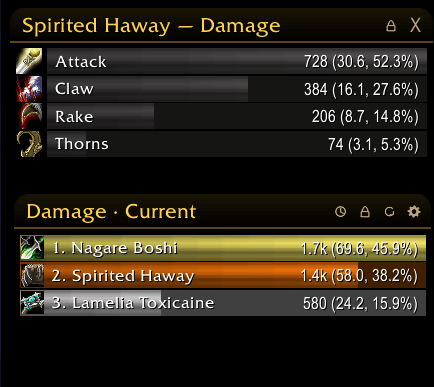
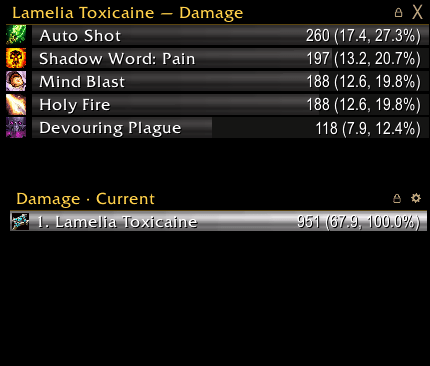
Damage, healing, absorbs, damage taken, interrupts, dispels, deaths and threat for WoW: Forever — up to four meter windows in the Forever look or a compact Details!-like style, with spell breakdowns, death recap, threat warning and chat reports.
combatmeter.png
combatmeter2.png
Description
Forever Combat Meter
A combat meter built for WoW: Forever. It reads Blizzard's own server-side meter (C_DamageMeter), so the numbers match the game's and nothing depends on the combat log, which this client keeps from addons. Written from scratch, in the look of the other Forever addons. English, Deutsch, Español, Français.
Modes
- Damage, Healing, Absorbs, Damage taken, Interrupts, Dispels, Deaths — plus Enemy damage taken and Avoidable damage taken when the client offers them.
- Right-click the window title to pick the mode (or use the mouse wheel over it).
- Threat on your current target for the whole group (pets optional), with the tank on top.
Sessions
- Current fight, Overall, and every earlier fight the client keeps. Pick one with the session button in the header.
Up to four windows
- Each window has its own mode, session, position, size and lock — damage and healing side by side, threat in a third.
- Unlock and drag the header to move; drag one of the corner arrows to resize towards that corner.
- Layout page per window: exact X/Y, width, rows, scale, "below the minimap", reset position.
Two looks
- Forever: the header of Forever Quest Log — gold glow, rounded corners, a fine line — with border, shadow and background of your choice.
- Compact: a slim header, bars edge to edge, name and numbers inside the bars, like Details!.
Bars
- Class colours (or one colour), spec icon or class icon, rank and name.
- Columns: total, per second, percent — each switchable.
- Bar texture (LibSharedMedia textures too), height, spacing, background; animated fill.
Details
- Hover a bar: that player's top 5 spells.
- Click a bar: a breakdown panel with every spell — icon, total, per second, share — resizable while unlocked, scrollable.
- Deaths: time of death and the last hits before it.
Threat warning
- A centred warning ("Threat: 95%") and an optional sound when you pass your threshold and are not the tank — even without a threat window open.
Chat report
- Report a window's top N or a player's top spells to raid, party, instance chat or say (in instances), from the gear menu or with
/fcm report.
Combat-safe
- In combat the game hides the exact numbers from addons ("secret values"). The meter shows them as the game hands them out and sorts, percents and fills in the details as soon as combat ends — no errors, no blocked actions.
Options
- Its own options window in the Forever style (
/fcm, the minimap button or the addon compartment): General, Windows, Layout, Bars, Appearance, Text, Threat, Profiles. - Profiles shared across characters, export and import as text.
- Optionally hide Blizzard's own damage meter.
Commands
/fcm options · /fcm mode [window] <mode> · /fcm report [lines] · /fcm reset · /fcm toggle · /fcm lock / unlock · /fcm windows <1-4>
Forever Combat Meter Team