Forever Boosted UI (FBUI)
- By
Modern unit frames with live 3D portraits for World of Warcraft: Forever, plus an info bar, a threat meter, an interrupt alert and a range finder.
Forever Boosted UI
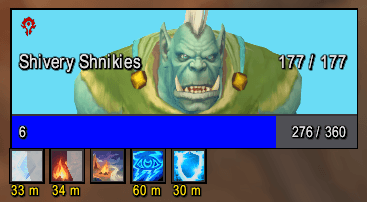
Modern unit frames with live 3D portraits for World of Warcraft: Forever, with an info bar, a threat meter and an interrupt alert to go with them. Forever runs on the modern engine and ships a modern interface of its own, so Forever Boosted UI does not try to replace everything. It replaces the player, target, target of target, pet and focus frames with flat, clean frames, and around them adds the pieces the default interface lacks.
What it does
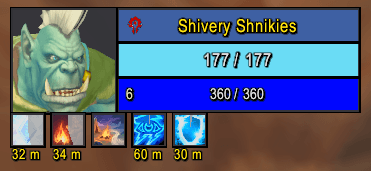
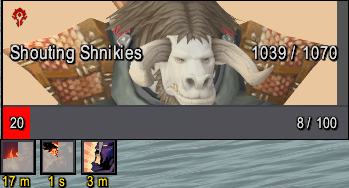
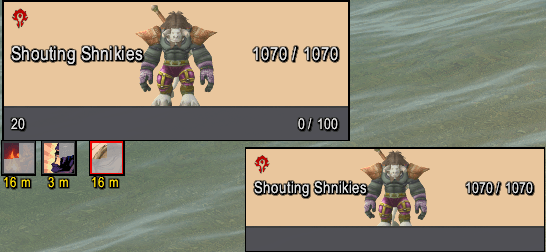
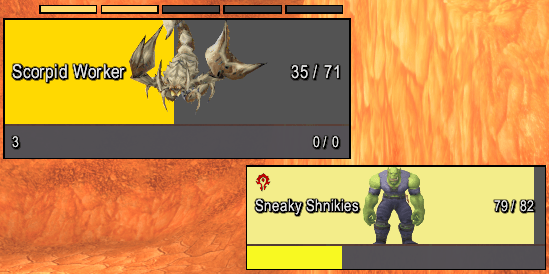
Unit Frames: player, target, target of target, pet and focus, each with a live 3D portrait, either a head box beside the bars or the whole health bar as the animated model. Class and reaction colors, the Alliance or Horde crest, health and power as 200 / 200 with an optional percentage, cast bars that show whether a cast can be interrupted, raid markers, combo points, and buffs and debuffs. A camera and text size per portrait, two starting layouts, and every frame can be sized on its own.
Info Bar: a movable bar of clickable panels for the bottom of the screen: the key ring, the bags (right to left, as on Blizzard's own bar) with the reagent bag slot, character, spellbook, talents, Legacy, quest log, guild, Group Finder, account collections, world map and help, plus durability, location, gold, FPS and latency. Tick the panels you want and the bar sizes itself to them. A click on a bag, the key ring or a launcher with a button in Blizzard's own menu is handed to that button, so it opens as it does from Blizzard's own bars, in combat too. Blizzard's own menu bar and bags can each be hidden while it is on.
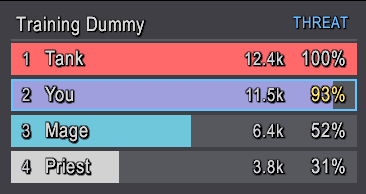
Live Threat Meter: a threat list for your target, one bar per group member and pet, highest first, with each one's rank, threat and share of the top. Whoever has aggro is red, your row is outlined, and your percentage turns yellow as you close on pulling. Shows only in combat; against a boss the game keeps the threat numbers to itself, so the meter shows nothing there.
Interrupt Alert: a center-screen alert and a sound the moment your target or focus starts a cast, with your interrupt lit on the action bar, so you can kick it with the key you already use. An optional clickable button bound to your interrupt, with a cooldown sweep, for a mouse-driven setup. It can stay quiet while your interrupt is on cooldown.
Range Finder: how far away your target is, green up close and red at distance, placed anywhere with Move Frames. The game tells an addon only whether something could reach the target, never the distance, so the reading is the range those answers pin down, such as 8-10 yds or 40+ yds, from your own spells' ranges, items with a known range, the duel and follow distances and your melee reach. No other addon needed. On a friendly target in combat only your spells answer, so the range can be wider there.
Set up in minutes
Every feature is on from the first login. That login opens a welcome window: first the profile for this character, then the four features, each with its switch and a line on what it does, and a button into its page. Turn off what you do not want, press Done, and play. A button's color says what it does: blue applies, gold changes mode, grey leads on, red deletes. There is no wizard to click through; the window comes back after a profile is picked or made in it, after a profile made from the defaults or a reset, and any time with /fbui welcome. Move Frames clears the screen so any frame can be dragged into place, over a grid like Edit Mode's; a dropped frame snaps to the lines while Snap is on.
Its own options window
Type /fbui, or pick Forever Boosted UI from the addon menu by the minimap. Every feature has a page, settings apply as you change them, a search box finds the page holding any setting, and pages open with a live preview where the game allows one. Blizzard's Settings window keeps a front door to it, and each feature's page has a switch in its title row.
Profiles
Each character remembers its own profile, and changes save into it as you make them; there is nothing to save by hand. Switch, copy, reset or delete a profile on the Profiles page, with one undo; any profile can be deleted from its row without switching to it. Export a profile as a text string to back it up or share it, and import it on another character.
Fonts
One font for everything the addon draws: the unit frames, buff timers, Info Bar, Threat Meter, Interrupt Alert and the addon's own windows. Choose from thirteen always available, eight of them bundled with the addon, plus any your other addons provide, on the Home page of the options window.
Built for what Forever allows
In combat, in instances and in PvP the game keeps another unit's health, power, auras and casts to itself. The frames draw them through the game's own widgets, so they show without the addon reading them, and nothing errors when the game says no. Your own frame, your pet's and everything out of combat are unaffected.
Compatibility
Works alongside most addons. Disable any other addon that replaces the unit frames, since two addons cannot own the same frame. No dependencies.
Beta Note
The beta client writes addon settings to disk but does not read them back, so every session starts fresh, for every addon. This is a client bug tracked on the Blizzard forums, not something an addon can fix from inside; the addon says so on its loaded line when a login finds no settings. The community workaround is ForeverSVFix (https://github.com/nobewayo/ForeverSVFix), run once with the game closed.
Support
Bugs, suggestions and help: Discord (https://discord.gg/Gs3CsusY99). /fbui report prints a paste-ready bug report. The full changelog is on the Files tab and inside the addon.
Created by Shnikies.
The Forever Boosted UI (FBUI) Team