Forever Aura HUD
A class combat HUD for WoW Forever: one shared Core plus your class, damage left and everything else right, native combat-safe tracking, a retracted seal and tray, and spell suggestions.
Screenshot 2026-11-13 111252.png
Screenshot 2026-11-13 111319.png
Screenshot 2026-11-13 111344.png
Description
ForeverHUD
A class combat HUD for WoW Forever, built on ForeverAuras (required). The addon carries its own auras, so there's no import string to paste: ForeverAuras offers them for install.
Features
- One Core plus your class. Health, resource, cast bar and cooldown rows are shared by every class. Your class adds its spells, effects and art. All nine classes are supported.
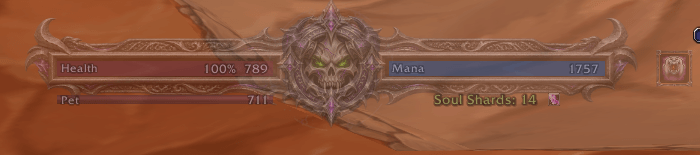
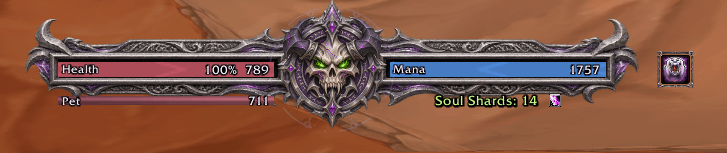
- Damage left, everything else right. Your DoTs and damage cooldowns sit over Health. Your buffs, utility cooldowns and upkeep sit over Mana. Every row starts at the seal in the middle and grows outward.
- Spell suggestions for every spec. Rotation actions line up above your DoTs, with the top action next to the seal. Mana and pet cues sit under their bars.
- Shields on the Health bar. A pale ice-white segment shows your remaining absorb, such as Ice Barrier, Mana Shield or Power Word: Shield.
- Upkeep reminders. Demon Armor, Arcane Intellect, Fortitude and Mark of the Wild show when they're missing or about to run out.
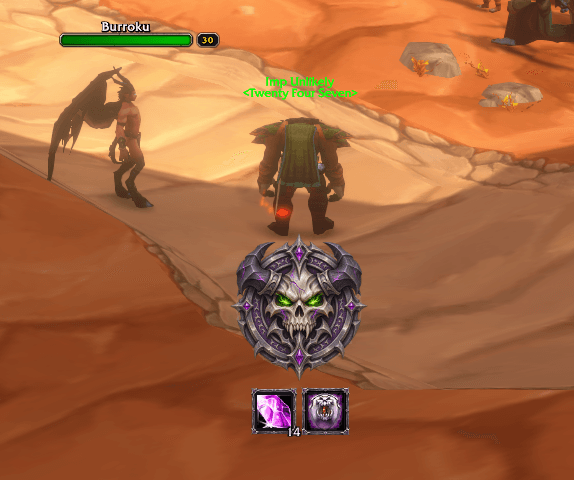
- Retracted seal and tray. Out of combat with no hostile target, the HUD folds to a seal showing your class counter, missing buffs and food.
- Native and combat-safe. Everything comes from ForeverAuras' own triggers. Nothing is guessed from the combat log.
- English and Simplified Chinese.
How to use
1. Install
- Install ForeverAuras and ForeverHUD. ForeverHUD doesn't load without ForeverAuras.
- Log in on the character you want to set up, and stay out of combat.
- Type
/fhud install. ForeverAuras opens its import window for ForeverHUD | Core. Confirm Import. - Type
/fhud installagain for your class, such as ForeverHUD | Warlock, and confirm.
You can also open /fa and click ForeverHUD | Core and your class under ready to be installed. Install the Core first. It's shared, so install it once; on another class, log in on that character and install its class group.
2. Update after a new version
ForeverHUD tells you at login when your auras are older than the addon. /fhud also shows it in red, with an Install / update auras button.
- Out of combat, type
/fhud install, or open/faand click the group under updates. - In the update window, under What do you want to do?, choose Update Auras. Don't choose Create a Copy.
- Do it for the Core, then for your class.
If you ended up with a copy such as ForeverHUD | Warlock 2, delete that whole group in /fa and update again. Your /fhud settings and position are kept across updates.
3. Use the HUD
- Left-click the seal to open the HUD out of combat. Click it again to fold it. It opens by itself when you enter combat or target an enemy.
- Hover the seal to see the whole HUD faintly.
- Right-click the seal for settings. To move the HUD, unlock it there, then drag the seal.
4. Settings (/fhud)
Type /fhud or /foreverhud. Settings are saved per class.
- Modules: turn parts on or off, such as suggestions, DoTs, cooldowns and reminders. A module you turn off stops tracking.
- Suggestion spec: follow your talents, or pick a spec.
- Cooldown layout: the game's Cooldown Manager order (Forever), or the class plan.
- Cast bar display: the game's bar (the default), the ForeverHUD bar, or both.
- Position: X/Y, scale and opacity. Reset position changes only X/Y.
5. Keep the cooldown rows working
ForeverHUD reads the game's Cooldown Manager.
- In
/fa, leave Hide Blizzard's CDM off. - In Game menu → Edit Mode, set Essential, Utility, Tracked Buffs and Tracked Bars to Visibility → Always. Hidden stops the rows from updating.
Troubleshooting
- Nothing shows: check that both ForeverAuras and ForeverHUD are enabled, then run
/fhud installout of combat. - The bars sit in the middle of the screen and can't be dragged: an import stopped partway. ForeverHUD warns at login and lists the loose groups. Delete them in
/fa, run/fhud install, and/reloadafter the import finishes. - A spell is missing from the rows: run
/fhud spellsout of combat. It lists what ForeverHUD found. - Report a problem: https://github.com/tomqwu/wow_forever_weakaura/issues. Lua errors are in
_forever_/Logs/General.log.
Source and full documentation: https://github.com/tomqwu/wow_forever_weakaura
Forever Aura HUD Team