TBC Gear Exporter
A small World of Warcraft TBC Classic addon that saves the current character's bag and bank items, groups them into categories, lists item stats, quality colors for every item, and shows a localized GUI with an auto-selected AI-ready text export.
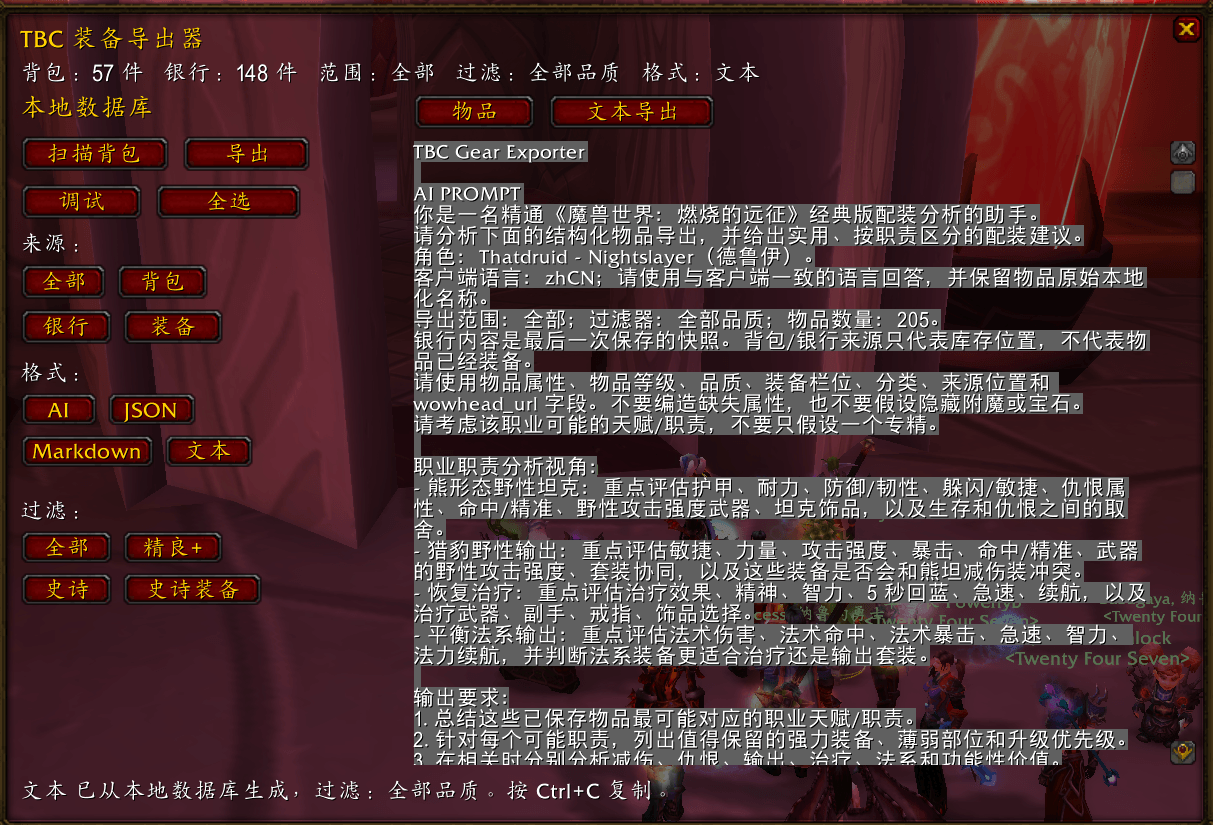
å±å¹æªå¾ 2026-06-06 210548.png
Description
TBC Gear Exporter









A small World of Warcraft TBC Classic addon that saves the current character's bag and bank items, groups them into categories, lists item stats, adds TBC Wowhead links and quality colors for every item, and shows a localized GUI with a visual item browser plus AI-ready text export.
Reusable addon listing copy is available in docs/listing.md, including an exact 256-character summary and a full Markdown description.
Install
- Download the latest zip from the Releases page.
- Extract the
TBCGearExporter/folder, the one containingTBCGearExporter.toc, into your WoW AddOns directory:- TBC Classic / Anniversary:
<WoW install>/_anniversary_/Interface/AddOns/ - Windows example:
F:\World of Warcraft\_anniversary_\Interface\AddOns\TBCGearExporter
- TBC Classic / Anniversary:
- Restart the game or run
/reload. - Look for the small bag icon on the minimap, or run
/tbcgear gui.
For this local machine, install or refresh the Anniversary client copy with:
powershell -NoProfile -ExecutionPolicy Bypass -File .\scripts\install-local.ps1When I create a GitHub release or tag from this workspace, I also run that local install command so your F:\World of Warcraft\_anniversary_\Interface\AddOns copy stays in sync.
First-run checklist
/tbcgear scan    -- scan visible bags and save the snapshot to TBCGearExporterDB
/tbcgear export  -- open the export popup from the saved local DB
/tbcgear json    -- open the export popup in JSON format
/tbcgear markdown -- open the export popup in Markdown format
/tbcgear text    -- open the export popup in plain text format
/tbcgear debug   -- print bag API, slot, and first item-link diagnostics
/tbcgear gear    -- export only gear from bags and saved bank snapshot
/tbcgear gear epic -- export only epic-quality gear
/tbcgear rare+ text -- export rare-or-better items in plain text
Open the bank once and scan while it is open so the addon can save the bank snapshot. WoW only exposes bank contents to addons while the bank is open.
The minimap bag icon opens the export popup on left-click. Right-click scans and saves bags, and also saves bank contents if the bank is currently open.
Commands
/tbcgear guiopens the export popup from the saved local DB./tbcgear exportopens the export popup with bags and the last saved bank scan in AI Text format./tbcgear export json,/tbcgear export markdown, and/tbcgear export textopen the same saved data in that format./tbcgear json,/tbcgear markdown, and/tbcgear textare shortcuts for exporting all saved data in those formats./tbcgear bagsexports bag items only./tbcgear bankexports the last saved bank scan./tbcgear gearexports only real equippable gear from bags and bank; consumables/food with non-equip placeholder slots are excluded./tbcgear gear epicexports only epic-quality gear./tbcgear rare+,/tbcgear epic, and/tbcgear export gear epic jsonapply quality filters before export./tbcgear scansaves visible bag data intoTBCGearExporterDB. If your bank is open, it saves bank data too./tbcgear debugprints the detected bag API, visible bag slots, saved counts, and first visible item link./tbcgear clearclears this character's saved bag and bank snapshots.
The export panel pops up from saved TBCGearExporterDB data. It shows saved bag/bank counts, scan/debug controls, source buttons for All, Bags, Bank, and Gear, format buttons for AI, JSON, Markdown, and Text, filter buttons for All Q, Rare+, Epic, and Gear Epic, and right-side tabs for a visual item browser or copyable text export. The item browser uses saved item icons, colored names, counts, item levels, locations, quality, type, and item-link tooltips so you can review gear without staring at raw JSON. The text export contains a class-aware AI prompt, character info, local DB metadata, scan timestamps, categories, export filters, items, item links, TBC Wowhead URLs, item level, quality color, colored item names, and stat arrays. GUI labels, status text, tooltips, slash help, and scan chat lines follow the WoW client locale for English, simplified Chinese, and traditional Chinese clients.
AI Text exports begin with an AI_PROMPT block before DATA_JSON. JSON exports include the same instructions under ai_prompt, so external GenAI tools can consume either the prompt text, the structured data, or both. The prompt uses the character class to add role lenses, for example Druid bear mitigation/threat, cat DPS, Restoration healing, and Balance caster analysis. It also follows the client locale from GetLocale(): Chinese clients get Chinese prompt wording and localized filter labels, while English clients keep English wording.
Item names use WoW quality colors, such as rare blue and epic purple. Item level remains a numeric field, while item type/category remains a separate classification for AI analysis.
On login, the addon prints a loaded message with item and slot counts. Opening a bag scans bag contents and prints a debug line in chat. Opening the bank scans bank contents and prints a matching debug line.
Tests
The addon is pure Lua and headless-testable. The suite stubs the WoW API surface it needs.
lua tests/run.lua
luac -p TBCGearExporter/TBCGearExporter.lua
CI runs syntax checks for every Lua file and the local WoW API mock suite on every push to main and every pull request. The test runner includes a line coverage gate of 99% for TBCGearExporter.lua.
Release workflow
This repo follows the same shape as ArenaCoachTBC:
- Every
mainpush builds a prerelease zip likeTBCGearExporter-v0.1.0-dev.<run>.zip. - Stable tags named
v*, for examplev0.1.0, build a GitHub Release using notes fromCHANGELOG.md. - The release zip contains the addon folder as the top-level entry, so extraction into
Interface/AddOns/works directly. - Local release mirroring is done with
scripts/install-local.ps1because GitHub Actions cannot access yourF:\drive.
The TBC Gear Exporter Team