Forever Aura Durations
- By
Shows clean countdown timers on your target’s buffs and debuffs in WoW Forever, with adjustable fonts, sizes, colors and short time formats.
Description
More from the same author
https://www.curseforge.com/wow/addons/forever-portrait-frames
https://www.curseforge.com/wow/addons/foreverhatelist
Forever Aura Durations
Shows clear countdown timers on the buffs and debuffs of your target in WoW Forever, right where the target frame shows its auras. No clutter, just readable timers.
Features
- Countdown timers on your target’s buffs and debuffs, also in combat
- Short time format:
45,3m,2h,1d - Stack counts stay visible
- Own debuffs first, or show only your own debuffs
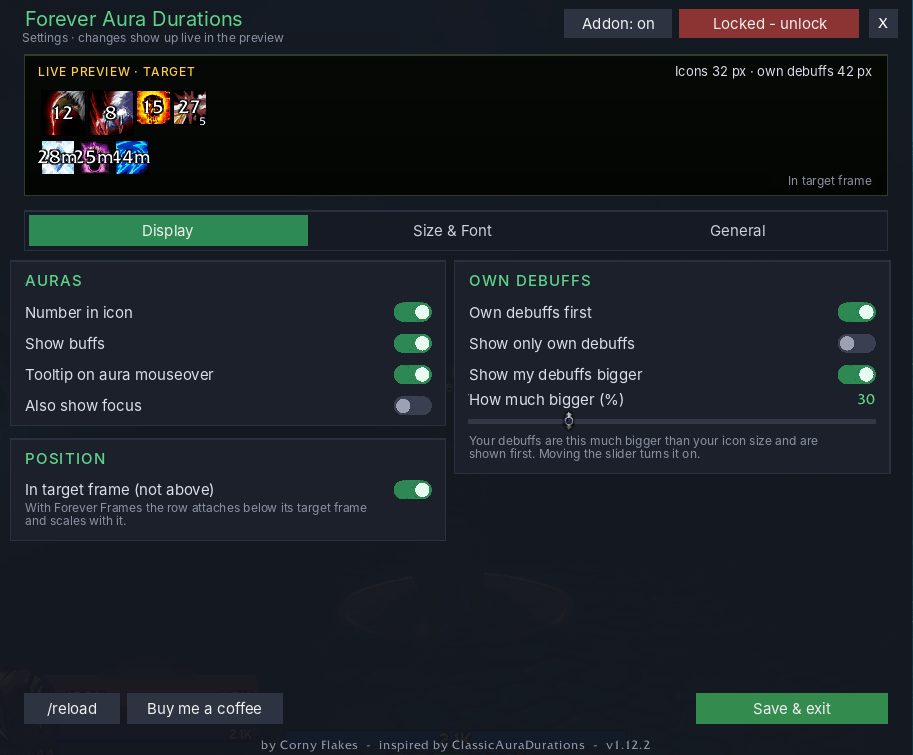
- Show my debuffs bigger: your own debuffs 10% to 100% bigger than the rest (slider in 5% steps)
- Optional: aura tooltips on mouseover, focus auras, buff row on / off
- Inside the target frame or above it, freely movable
- Settings menu with live preview:
- font selection
- icon size and icons per row
- timer and stack size and color
- everything applies instantly, no
/reloadneeded
- Works together with Forever Portrait Frames: the auras hang below its target frame and scale with it
- Minimap button (can be hidden in the menu)
- German and English, follows your game client (other languages get English)
Usage
- Open the menu with
/fador with a left click on the minimap button. - Type
/fad helpfor all commands.
Commands
/fad– open settings (or left-click the minimap button)/fad help– list all commands/fad on//fad off– enable / disable/fad unlock//fad lock– move the bars / lock them/fad reset– reset positions/fad size 14-40– icon size/fad row 4-20– icons per row (only above the target frame)/fad timer– number in icon on / off/fad own– show only your own debuffs/fad big– own debuffs bigger on / off,/fad big 10-100sets the percentage/fad tooltip– aura tooltip on / off/fad buffs– buff row on / off/fad cover– show inside the target frame on / off/fad focus– also show focus/fad minimap– minimap button on / off/fad coffee– show donation link/fad debug– print diagnostics
Installation
- Download the file.
- Extract the folder
ForeverAuraDurationsintoWorld of Warcraft\_forever_\Interface\AddOns\. - Restart the game or type
/reload.
Troubleshooting
- Buffs or debuffs missing or doubled? Turn off “Freeze Blizzard auras” in the General tab.
- Nothing shows? Target something with auras and type
/fad debug.
Credits
By Corny Flakes, inspired by ClassicAuraDurations. License: All rights reserved.
Support
Found a bug or have an idea? Leave a comment. If you like the addon, you can buy me a coffee.
Forever Aura Durations Team