

Font Manager
Font Manager lets you customise the fonts used throughout the game.
Set separate fonts for the UI, names, combat text, tooltips and chat, or use a single font across the entire game.
Includes 5 custom fonts.
Type /fm or /fontmanager to open the settings.
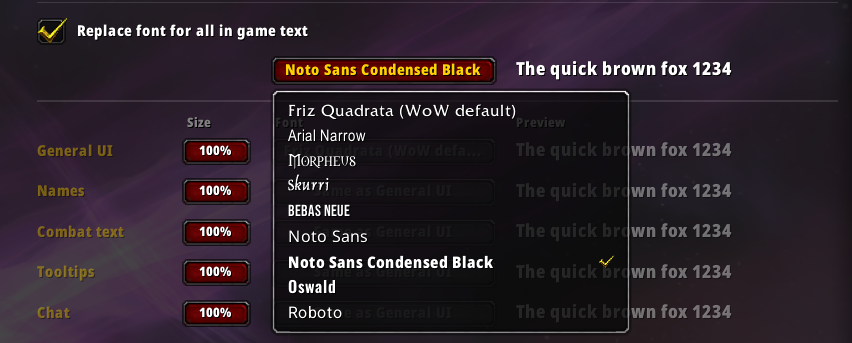
Features
- Separate font settings for UI, names, combat text, tooltips and chat
- Option to replace the font for all in-game text
- Font size adjustment for each setting
- Support for your own .ttf fonts
- Fonts registered through LibSharedMedia are listed automatically
- Reset to default button
Adding your own fonts
- Place your .ttf files in
Interface\AddOns\FontManager\Fonts - Restart the game. New files are not detected after a /reload.
- Type /fm and enter each file name at the bottom of the settings page.
Notes
Font changes to character names and floating combat text take effect after logging out and back in.
Some addons use fonts to display icons or symbols, which may not display correctly when Replace All In Game Text is enabled. If you experience any issues, disable this option and set the fonts individually for each type of text.
Please report any bugs or font requests in the comments.
Credits
The included fonts are licensed under the SIL Open Font License. Copies of each license are included in the Licenses folder.
- Bebas Neue by Dharma Type
- Noto Sans by the Noto Project Authors
- Oswald by the Oswald Project Authors
- Roboto by the Roboto Project Authors
The Font Manager Team
