Afterglow
- By
A smooth, glowing cursor trail that follows your mouse. Fully customizable colors, glow, size, and length.
Screenshot 2026-09-25 224813.png
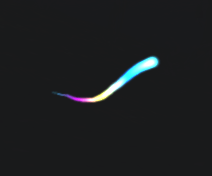
image.png
Description
Afterglow
Afterglow adds a smooth, glowing cursor trail that follows your mouse cursor. It's lightweight, easy to set up, and fully customizable. Never lose track of your cursor again.
Features
- Smooth, curved trail that keeps up with fast mouse movement
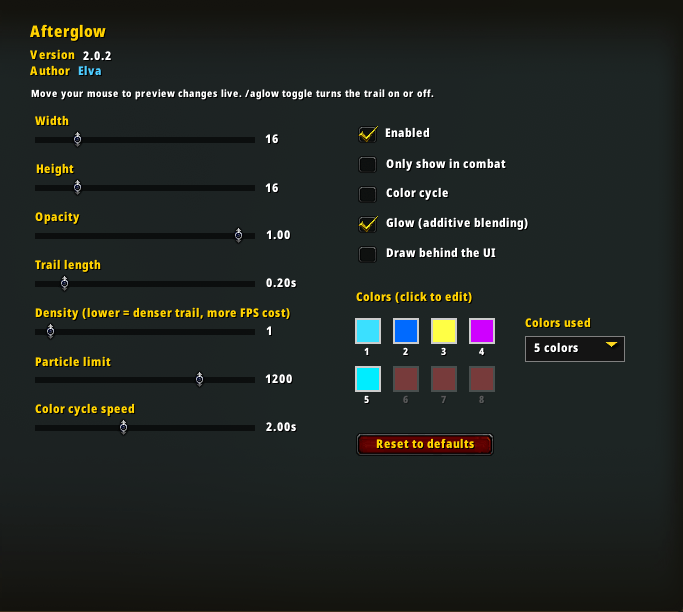
- Up to 8 colors that shift along the trail
- Color Cycle mode to rotate your colors over time for a rainbow effect
- Glow mode for a bright, blended look
- Adjustable size, opacity, trail length, density, and particle limit
- Only show in combat option
- Draw the trail on top of or behind your UI
- Every change previews live while you adjust it
Commands
| Command | What it does |
|---|---|
/aglow or /afterglow |
Opens the options panel |
/aglow toggle |
Turns the trail on or off |
You can also find the options under Esc > Options > AddOns > Afterglow.
Performance tip
Density and Particle limit have the biggest impact on FPS. If you notice any slowdown, raise Density or lower the Particle limit.
Installing and updating
- Delete any older version of the Afterglow folder from
Interface/AddOns/. - Extract the new
Afterglowfolder intoInterface/AddOns/. - Fully restart the game (not just
/reload) so the trail texture loads properly.
The Afterglow Team