image_2026-09-27_165024307.png
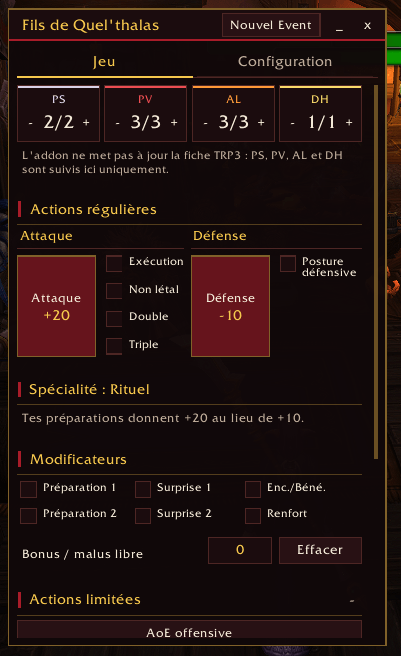
image_2026-09-27_165048962.png
Description
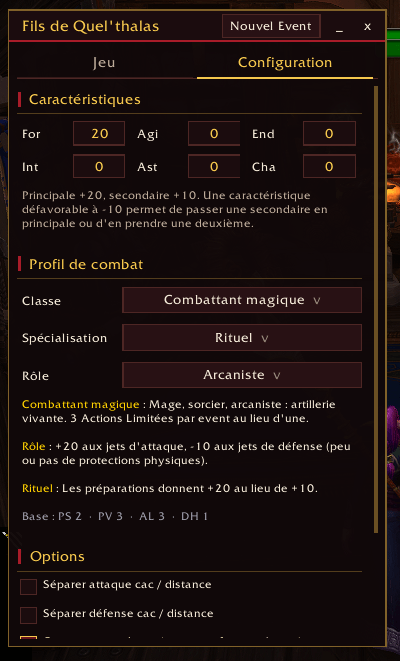
A custom combat dice-roller built for the "Fils de Quel'thalas" guild's homebrew tabletop-style RP combat system.
What it does
- Tracks your combat resources — Save Points (PS), Health (PV), Limited Actions (AL) and Heroic Dice (DH), with quick +/- controls and a one-click "New Event" reset.
- One-click rolls — Attack and Defense buttons compute your full modifier (role bonus, stance, active checks) and launch
/trp3 roll 1d100+Xautomatically. No Total RP 3? It falls back to a plain/randroll and tells you the modifier to add by hand. - Toggle modifiers instead of doing math: Exécution, Non-létal, Double/Triple attacks, Defensive Stance, Surprise 1/2, Preparations, Encouragement/Blessing and Reinforcement are all simple checkboxes that plug straight into the next roll.
- Every class and specialization covered: all four classes (Heavy, Light, Magic, Support) and their 28 specializations get their own dedicated buttons, checks and rule reminders, from Berserker's rage to Precision's boosted preparations to a Priest-type's advanced healing.
- Limited Actions handled for you: AoE (offensive, defensive, utility) and Coup de Grâce rolls use the correct
/randrange for your character, automatically widened by preparations, reinforcements, or specializations like Destruction and Mage de Guerre.
Good to know
- Designed specifically around the Fils de Quel'thalas ruleset (stats, roles, classes, specializations and limited actions as defined by the guild's GM). It won't map onto a different homebrew system out of the box, though the code is a reasonable starting point to adapt.
- Total RP 3 is optional but recommended — install it for proper
/trp3 rollresults with your character's name attached; without it, the addon still works via/rand. - Open the window anytime with
/fdq(aliases:/quelthalas,/fdq config,/fdq event,/fdq reset).
The Fils de Quel'thalas Team