FightNotes
- By
Keeps every fight after it ends: personal bests per boss, each try next to the last, a raid night summary and a small bar window.
A World of Warcraft: Forever addon that keeps your fights after they end.
A small bar window shows the game's own meter while you fight. When the fight ends, FightNotes keeps it, remembers your best numbers on each boss, sets each try next to the one before it, and sums up the raid night: who died, who stood in things, how many tries each boss took.
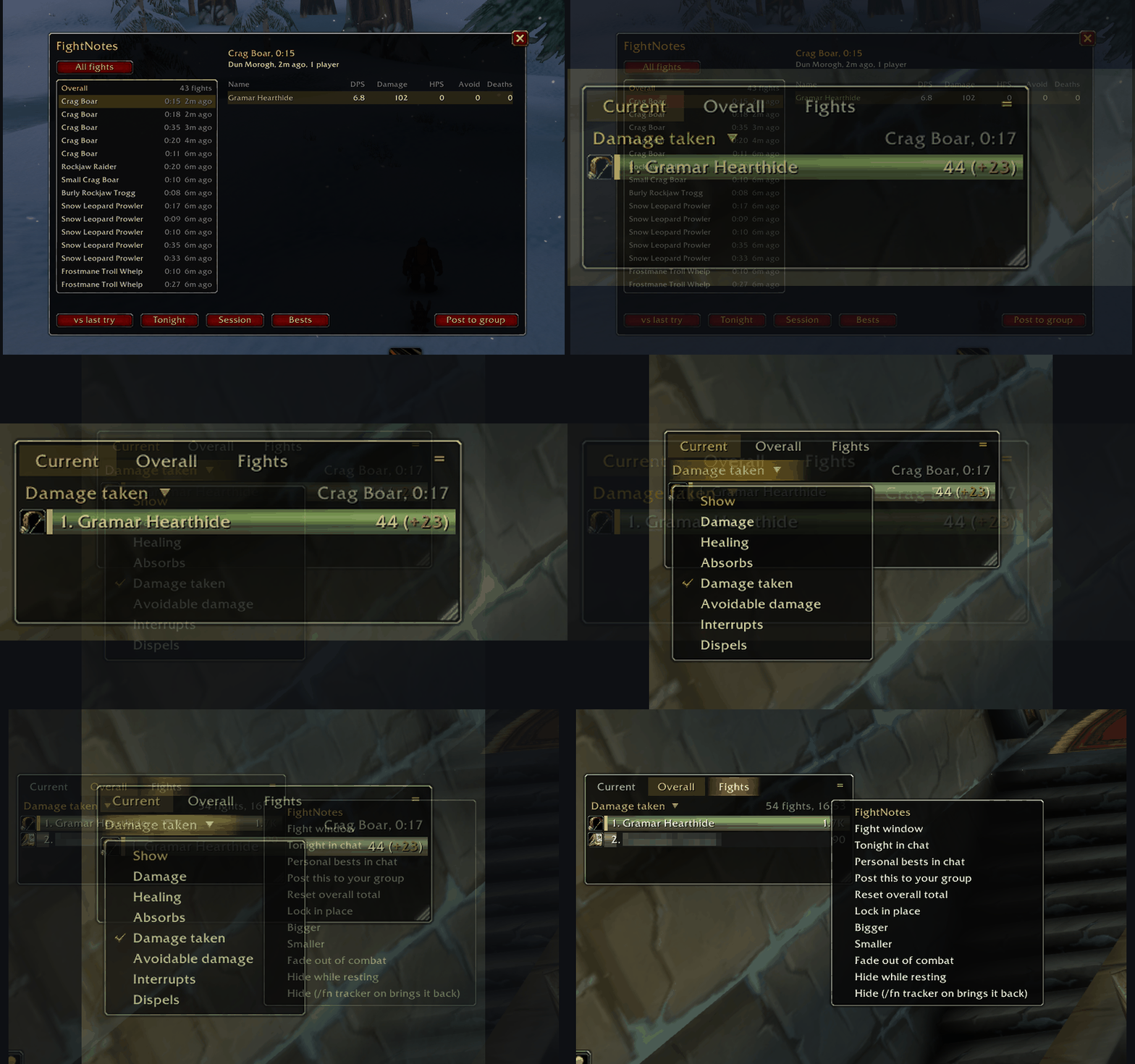
Fights, personal bests, tries side by side and summaries
- A small bar window. During a fight it shows the game's meter as it counts: damage, healing, absorbs, damage taken, avoidable damage, interrupts or dispels, with class colours and your bar marked. When the fight ends it shows the fight FightNotes kept, each bar with its change against the try before. Tabs switch it to your overall total or to one of your recent fights.
- An overall total. Every fight added up until you reset it, in the bar window and at the top of the fight window's list. Resetting it starts the total again and keeps every fight in the history.
- Every fight. When combat ends, FightNotes reads the finished fight from the game's damage meter and keeps it: everyone's damage, DPS, healing, absorbs, interrupts, dispels, damage taken, avoidable damage taken and deaths, plus how long it took and where.
- Personal bests per boss. Best DPS, best HPS and fastest kill for each
boss and difficulty. Beat one and chat tells you:
new best DPS on Lucifron: 230, up 15% on 200. - A line after each boss fight.
Lucifron (Normal) kill in 1:10. You: 230
DPS, best 230.
/fn announce offturns off this line and the personal best lines. - This try next to the last one. In the window,
vs last tryshows each player's DPS change and the change in fight time against the try before. - Tonight. Every boss from the last 8 hours: tries, kills, best kill time and deaths, then who died most and who took the most avoidable damage.
- Your session. Fights since you logged in or reloaded, time in combat, your damage and DPS over that time, and your best fight. Handy while levelling.
- Post a fight to your group. Only when you click or type it, never on its own.
- A minimap button. Left-click opens the window, right-click puts tonight's summary in chat, hover for your last fight. Drag it around the minimap's edge. FightNotes is also in the game's addon menu by the minimap.
Boss fights are kept whatever their length. Trash fights shorter than 6
seconds are not (/fn min <seconds> changes that, /fn trash off stops
keeping trash). Up to 500 boss fights and 200 trash fights are kept per
character, oldest first out.
Why the sums wait until combat ends
WoW: Forever does not let addons read the combat log, and the game's damage meter hides its numbers from addons while you are in combat. FightNotes does not try to get around either. During a fight the bar window hands the game's numbers straight to its bars and text, which the game allows, but it cannot add, compare or sort them. So the bars come in the game's order, with the game's rounding, and bests, the try before and spells wait for the end.
When combat ends FightNotes reads the finished fight and keeps it. In a group the game can keep the numbers hidden for a while after you leave combat, so while they are hidden FightNotes tries again every couple of seconds, for up to three minutes.
Install
Install FightNotes from the CurseForge app for World of Warcraft: Forever, or
download the zip from the Files tab and extract it so that you end up with
World of Warcraft/<forever client folder>/Interface/AddOns/FightNotes/.
Restart the game and enable FightNotes on the character select screen.
After an update, restart the game rather than using /reload, so the game
loads any new files.
The bar window
It sits on the right of the screen to start with. Drag it to move it, drag its bottom right corner to resize it, and it shows as many bars as fit.
| Part | What it does |
|---|---|
| Current tab | This fight while it lasts, then the fight FightNotes kept |
| Overall tab | Every fight since you last reset the total. During a fight it waits, and adds the fight when it ends |
| Fights tab | Your recent fights: each boss on its own, and trash fought in a row in one zone as one entry that adds it up. Pick one to see it, a single fight against the try before. The next fight brings back Current |
| Title | Click for the list of numbers: damage, healing, absorbs, damage taken, avoidable damage, interrupts, dispels. The mouse wheel steps through them |
= button |
The fight window, tonight and your bests in chat, post to your group, reset the overall total, lock, make bigger or smaller, fade out of combat, hide while resting, or hide the bar window |
| A bar | Hover for that player's numbers and the spells behind them, click for the fight window. Each bar has the player's spec icon, or their class icon. Your own bar stays in the last row when you are further down |
The fight window
Type /fn. Your fights are on the left, newest first: green for a boss kill,
red for a wipe, grey for trash. Click one to see everyone in it on the right,
sorted by DPS, with your row marked. Scroll either side with the mouse wheel.
| Button | What it does |
|---|---|
| All fights / Bosses only / Trash only | Click to switch between every fight, bosses only and trash only |
| vs last try | Show the change against the try before, on the same boss and difficulty |
| Tonight | Bosses, tries, deaths and avoidable damage from the last 8 hours |
| Session | Your fights since you logged in or reloaded |
| Bests | Your personal bests per boss |
| Post to group | Post the chosen fight's top five to your raid or party. Solo, it shows in your own chat |
Commands
/fightnotes works in place of /fn in every command below.
| Command | What it does |
|---|---|
/fn |
Open or close the window |
/fn last |
Your last fight in chat |
/fn night |
Tonight's summary in chat |
/fn session |
Your session in chat |
/fn records |
Your personal bests in chat |
/fn report [say|party|raid|guild|instance] |
Post your last fight. With no channel, goes to your raid or party, or to your own chat when solo |
/fn trash on|off |
Keep trash fights (on by default) |
/fn min <seconds> |
Shortest trash fight to keep (6 by default) |
/fn announce on|off |
The lines in chat after each boss fight, including personal bests (on by default) |
/fn tracker on|off |
The bar window (on by default) |
/fn tracker lock|unlock |
Stop or allow moving and resizing the bar window |
/fn tracker reset |
Put the bar window back on the right of the screen, at its first size |
/fn tracker bigger|smaller |
Make the bar window bigger or smaller |
/fn tracker fade on|off |
Fade the bar window out of combat until the mouse is over it (off by default) |
/fn tracker rest on|off |
Hide the bar window while resting in a city or inn, except in a fight (off by default) |
/fn scale tracker|window <0.5 to 2.5> |
Set the size of the bar window or the fight window |
/fn overall |
Your overall total in chat |
/fn overall reset |
Start the overall total again. Every fight stays in the history |
/fn button on|off |
The minimap button (on by default) |
/fn status |
How many fights are kept |
/fn help |
List the commands in chat |
/fn clear |
Delete every fight and personal best on this character, once you confirm with /fn clear yes |
/fn debug on|off |
Keep a short diagnostic log in the saved data |
What it does not send or keep
- It does not send anything anywhere unless you post a report yourself.
- It does not keep fights from before you logged in or reloaded.
Known limits
- It needs the game's damage meter. If the meter is not available to you, FightNotes says so at login.
- Personal bests count kills only, so a short wipe never beats a real kill.
- Within a fight, players are told apart by the game's own id when it gives one, otherwise by name. Across fights they are matched by name.
- Fights are kept per character. Settings are shared by all your characters.
Reporting a problem
Open an issue on GitHub with
your game build, what you fought, and what you expected to see. If you can,
run /fn debug on, reproduce the problem, type /reload, and attach
WTF/Account/<account>/SavedVariables/FightNotes.lua.
Source
The source, the tests and the issue tracker are on GitHub.
License
FightNotes is licensed under the MIT License. See LICENSE.
FightNotes Team