FarmWise
- By
Farmwise tracks your gathering data and shows which materials are most efficient for you to farm. Get personalized insights and gold-per-hour estimates based on your own stats and performance in each zone.
0001.png
0002.png
0003.png
0004.png
Description
FarmWise
Smart, data-driven farming and selling assistant for World of Warcraft Retail
FarmWise watches your own farming and tells you what it is worth. It records what you gather in every zone and sub-zone, measures your time, reads the Auction House prices of your realm, and now it also helps you sell what you farmed, straight from the Auction House window, and keeps a history of what you sold.
No generic guides and no guesses for other players: everything is built from how you play.
Beta. FarmWise is in active development. If something does not work as you expect, please report it in the comments or the issue tracker.
What is new
- A FarmWise tab in the Auction House. Sell what is in your bags with the live lowest price, a price you can step up and down, the amount, the value after the 5% cut, a trend arrow and a Post button.
- Sales history. A History page that counts what you sold from your mails: pieces, gold earned, average price, how much came back unsold. Sortable columns.
- Never sell below my average price. An optional floor made of your own last sales, so you do not sell cheaper than you usually get.
- Scanner levels. Trade materials always; commodities (potions, food, runes…) too; or the whole Auction House.
- A manual inside the game, chapter by chapter.
- Redesigned options: grouped in sections, plain action-first texts, nothing hidden or cut off.
(Screenshot: the FarmWise tab in the Auction House)
The main window
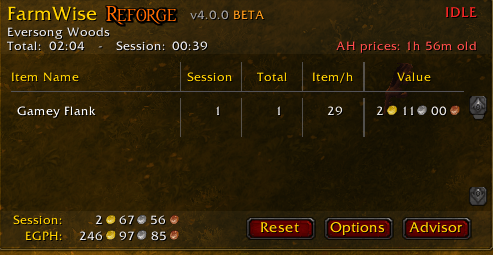
- Items gathered per zone and sub-zone, for the Session and in Total, with items per hour and farming time.
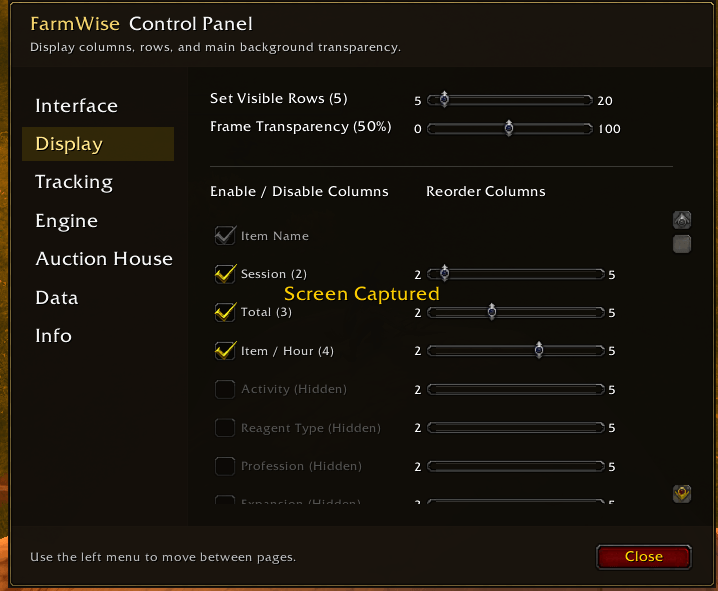
- Optional columns: activity (where it came from), reagent type, profession, expansion, zone, sub-zone, character, Price and Value.
- Session gold per hour: looted gold, vendor value of grey items and Auction House value of materials, after the 5% cut.
- Three ways to start a new session: only when you press Reset, every day at a time you choose, or when you leave an area.
- Lock and minimize: the window turns into a small button on the corner you choose. Columns keep the width they needed, so the window never jumps around.
(Screenshot: the main window)
The Advisor
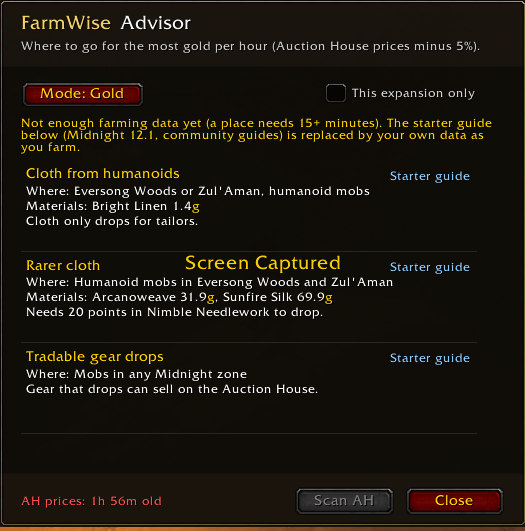
- Gold: the places ranked by estimated gold per hour, from your results.
- Item: your best yields so far, or the best places for one item (type it, shift-click it, or drag it in).
- Every result tells how sure it is: Low from 15 minutes of farming in a place, High from 60.
- New to a profession? A starter guide is shown until you have data of your own.
(Screenshot: the Advisor)
Selling from the Auction House
The FarmWise tab sits next to Buy, Sell and Auctions and lists what is in your bags that the Auction House sells by amount (materials, potions, food, runes and more). Gear and bound items are never listed.
- Live prices. The tab asks the Auction House for the lowest price of each item as it goes, so it does not depend on an old scan.
- Price you control. The price starts at the lowest price and follows it until you press + or −. The step is yours to choose, from 1% to 20%.
- Amount, value and trend. The amount to post, what you will receive after the 5% cut, and an arrow for the price of the last days.
- One click, one post. The game accepts one post for each click. Post next posts the next item that is ready, and you can use the mouse wheel for it (by default with Shift held down, so a scroll by accident never posts).
- Item options (right-click). Hide an item, keep a number of it in your bags, give it its own posting time (12, 24 or 48 hours, with the deposit shown), or turn the price check on or off.
- A vendor pays more? Items that a vendor pays more for than the Auction House (after its 5%) are left out of the list, and their tooltip says so.
(Screenshot: right-click options on an item)
Price check
FarmWise finds the usual price of an item: the price where the cheapest 15% of the whole amount ends. A few listings at a silly price do not move it. If the price you are about to post is unusually low, Post waits, the first + goes straight to the lowest usual price, and − stops there. A red ! after the name tells that the price is not right, and the tooltip of Post says why.
Never sell below my average price
Optional, for all items or for one item. The price starts at the higher of the lowest price now and the average of your last sales (you choose how many, 5 to 30; sales older than 30 days are not counted). − and Post stop at that average. The market going up never makes you sell cheaper, and you never sell below what you usually get. If the market stays under your average, the item waits unsold. That is the price of not selling cheap.
Sales history
A History page next to Sell in the FarmWise tab keeps what you sold:
- Pieces sold, gold earned after the cut, average price of one piece, pieces returned unsold, and the share that was sold.
- Counted when you take the gold of a sale (or the items of an expired auction) from your mailbox. It works with Open All. Each mail is counted once.
- One line for each item and quality. Click a column title to sort. The round arrow goes back to the order FarmWise chose: the most gold earned first.
- Purchases, gifts and gold from other players are never counted.
(Screenshot: the History page)
The Scanner
- Reads the lowest price of items from the Auction House when you open it, and again by itself when the prices get older than the time you chose.
- Levels: trade materials are always read. Scan commodities too adds everything else sold by amount. Scan the whole Auction House reads everything.
- Progress is shown in the tab as a percentage. A sound can tell you when it is done.
- Prices appear in item tooltips ("FarmWise AH"), in the Price and Value columns, in the Advisor and in the vendor comparison.
Options and the manual
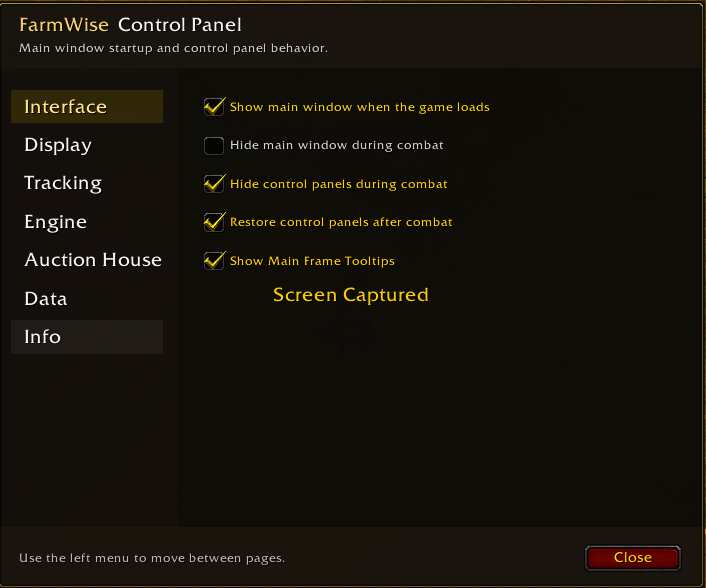
- Options (
/fw optionsor the Options button) are grouped in clear sections: Interface, Display, Tracking, Engine, Scanner, Auction House, AH Tab List, Data and Info. - Manual: the last page of the options has a short manual with a chapter for each part of FarmWise, and a Back button.
(Screenshot: the options and the manual)
Commands
/fwor/fw status: Show what is stored/fw ui: Show or hide the main window/fw advisor: Open the Advisor/fw scan: Scan the Auction House prices now (Auction House must be open)/fw options: Open the options
Why FarmWise
- Your own data, not generic numbers.
- Decisions, not just lists: where to farm, what it is worth, what to sell and at which price.
- Plain and light: a small window, a few clear options, and every number explained in a tooltip or in the manual.
- Safe by default: price check and floors you can switch on or off, and the game's own one-click-one-post rule respected.
Compatibility and notes
- World of Warcraft Retail (interface 120100).
- The starter guide comes from community guides and is English only. Item names are matched in English for its price lookup.
- Your saved statistics from earlier versions are kept and read as they are.
- The sales history starts from the day you update. It cannot know what you sold before.
Author
Made by ChrGeo.
FarmWise Team