FarmWatcher
- By
Compact HUD for currencies and bag items you farm in WoW Midnight. Track Dawncrests, Season 1 tokens, and PvP currency on draggable panels with Blizzard tooltips. English & Russian. Retail, Interface 120005.
1.png
Description
Farm Watcher
A compact farming HUD for WoW Retail / Midnight.
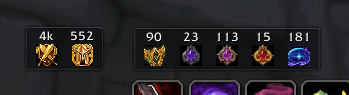
Shows live counts for currencies and bag items you care about — without opening the Currency tab or your bags.
What you get
- Dual HUD panels — main panel for Midnight + Season 1, separate PvP panel for Honor / Conquest / Bloody Tokens
- Pick what to track — enable only the currencies and items you are farming
- Micro slots — icon + count, horizontal or vertical layout, 1–2 rows/columns, mirror text, scale
- Blizzard tooltips — hover a slot for the full in-game currency or item tooltip (including seasonal progress on crests)
- Bag item count in tooltips — optional
Total: X/Всего: Xon every item tooltip - Panel controls — lock position, click-through mode (tooltips still work), drag to move
- Midnight database — open-world currencies, Season 1 Dawncrests, Radiant Spark Dust, Dark Particle, and more
- Locales — English and Russian
Settings and commands
- Options: Esc → Options → AddOns → Farm Watcher
/fwor/farmwatcher— open settings/fw lock·/fw reset·/fw reset pvp·/fw reset all/fw currencies— list character currencies (open Character → Currency tab first)
v1.0.0 — first release
- Main panel — Midnight and Season 1 Midnight trackables
- PvP panel — Honor, Conquest, Bloody Tokens on a separate HUD
- Core features — live counts, game tooltips, bag tooltip counter, layout options, settings panel, slash commands
Notes
Lightweight watchlist HUD — not a full currency manager. Enable only what you need in settings.
Watch what you farm — without opening bags.
Author: HeKuT
You can support the author by visiting Gamers Connect (mobile gaming communities — allies & alliances). Thank you.
FarmWatcher Team