FarmShift
- By
Track cloth, skinning, loot value, repairs, and estimated gold per hour on any character, with world-map and minimap farming hotspots.
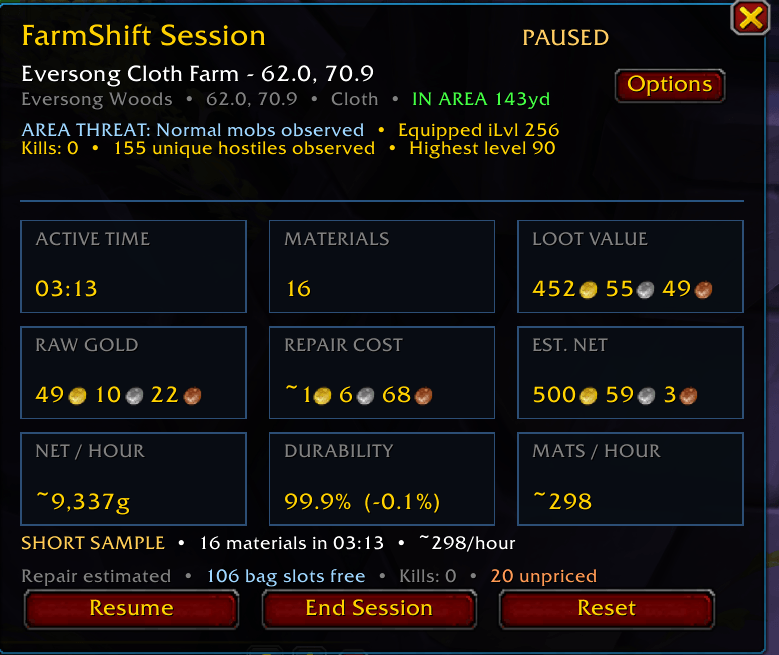
FarmShift live session tracker showing active time, materials collected, loot value, raw gold, repair estimate, durability, net value, and estimated gold per hour.
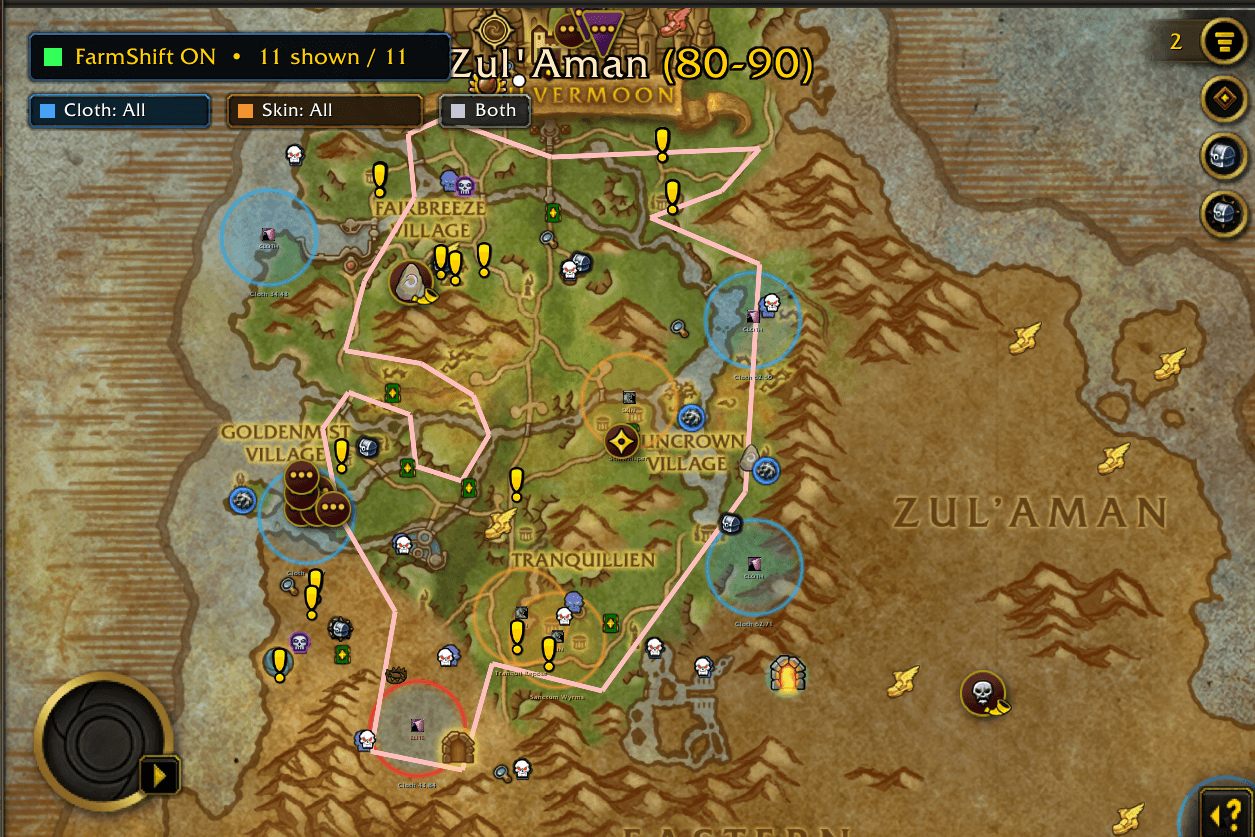
FarmShift world-map hotspots showing cloth and Skinning farm locations with material filters, larger visible hotspot circles, and combined Cloth + Skinning map layers.
Description
FarmShift
Know what your farming session is actually worth.
FarmShift is a World of Warcraft Retail farming companion built primarily for Midnight cloth and Skinning farms. It combines curated farming hotspots, world-map and minimap guidance, live loot valuation, repair tracking, material yield statistics, and estimated net gold per hour in one movable dashboard.
The included hotspot library currently focuses on cloth and Skinning locations across Eversong Woods, Zul’Aman, Harandar, Voidstorm, and Slayer’s Rise.
Live Farming Dashboard
Start a session and FarmShift tracks:
- Active farming time
- Profession materials collected
- Materials per hour
- Estimated value of all captured loot
- Raw gold looted directly from enemies
- Current and cumulative repair costs
- Estimated net session value
- Estimated net gold per hour
- Current durability and session durability loss
- Credited kills and personal material yield
- Remaining bag space
- Valuable, miscellaneous, and unpriced drops
Short sessions are clearly marked provisional so one lucky drop or brief cloth streak is not presented as a reliable hourly result.
Primarily Cloth and Skinning — Useful on Any Character
FarmShift’s curated map locations and material comparisons are designed primarily for cloth and Skinning farms.
However, the session tracker values all captured loot, not only cloth, leather, and scales. Any character can use FarmShift to measure a farming run, including characters without Tailoring or Skinning.
Outside the curated farming locations, session time and loot tracking can continue, but hotspot guidance and location-specific comparisons are naturally limited.
World Map and Minimap Hotspots
FarmShift displays farming areas on both the large world map and the minimap.
World Map
- Blue cloth hotspots
- Orange Skinning hotspots
- Farm details, materials, notes, and danger information
- Blizzard waypoint support
- Optional TomTom waypoints
- Optional Routes integration
- Quick session start from a selected hotspot
Minimap
- Active farming-area boundary
- Profession-colored center marker
- Player-position indicator
- Amber warning near the edge
- Red warning outside the hotspot
- Direction marker when the farm center is off-screen
- Delayed leave-area warning without stopping the timer
- Masked overlays that remain inside round or custom minimap shapes
Crossing a hotspot boundary warns you but does not automatically pause or discard the session.
Session Controls
Start
Begin tracking the selected or nearest supported farm.
Pause / Resume
Pause the timer and session accounting when taking a break, then resume from the same totals.
End Session
Finish and save the session summary.
Reset
Clear the current timer and totals after confirmation while preserving whether the session was paused or tracking.
Close
Hide the dashboard without ending the active session.
Minimap Button
The draggable FarmShift minimap button provides fast access without opening the full world map.
- Left-click while idle: Start the selected or nearby farm
- Left-click while active: Show or hide the live tracker
- Shift-left-click: Start, pause, or resume
- Right-click: Open session and minimap options
- Drag: Reposition the button around the minimap
Loot Valuation
FarmShift evaluates every captured item using the best available legitimate value:
- Selected TradeSkillMaster Auction House price source
- Optional TSM Destroy or disenchant value
- Blizzard vendor-sell value
- Zero only when no usable value exists
Tracked loot can include:
- Cloth, leather, and scales
- Crafting reagents
- Green and blue Bind-on-Equip items
- Lockboxes
- Recipes
- Consumables
- Vendor items
- Miscellaneous drops
Hover a loot row to see the selected valuation method, Auction House estimate, Destroy or disenchant estimate, vendor value, and whether it contributes to estimated gold per hour.
Repair Costs and Durability
FarmShift maintains a session repair ledger.
- At a repair merchant, it uses the full live Repair All quote.
- After repairing, the full amount paid remains recorded in the session.
- Durability loss remains visible after the equipment is repaired.
- Away from a merchant, the unpaid amount is marked with
~and estimated from prior repair samples.
Repair expense is deducted from estimated net value and net gold per hour.
Gold-Per-Hour Accuracy
FarmShift separates:
- Loot Value: Estimated value of captured items
- Raw Gold: Currency actually looted from enemies
- Repair Cost: Estimated or paid repair expense
- Estimated Net: Loot value plus raw gold minus repairs
- Net / Hour: Estimated net value extrapolated per active farming hour
Auction House prices represent potential market value, not guaranteed income. FarmShift does not claim an item has sold, and it does not deduct future deposits, fees, competition, sale time, or unsold inventory.
Optional Integrations
FarmShift works without third-party addons.
Optional integrations include:
- TradeSkillMaster: Auction House pricing, Destroy values, and sale-rate context
- Routes: Route creation and display using FarmShift hotspot data
- TomTom: User-requested waypoint creation
- WorthIt / WIT: Compatible as a separate farming companion
FarmShift does not alter TSM groups, TSM operations, RoutesDB, or companion-addon settings.
Quick Start
- Open the world map.
- Select a FarmShift cloth or Skinning hotspot.
- Shift-left-click the hotspot or use the minimap button to begin.
- Farm normally while the dashboard updates.
- Pause when taking a break.
- End the session when finished.
- Visit a repair merchant to record the exact repair expense.
Useful Commands
/fsor/fs tracker— Show or hide the tracker/fs map— Toggle world-map hotspots/fs minimap— Toggle the minimap hotspot/fs cloth— Toggle cloth hotspots/fs skinning— Toggle Skinning hotspots/fs start— Start the selected farm/fs pause— Pause or resume/fs switch— Switch to the hotspot currently containing you/fs reset— Reset the active session/fs stop— End and save the session/fs session— Print a compact session summary/fs status— Show integration status/fs errors— Show the latest protected FarmShift error
Supported Client
- World of Warcraft Retail
- Midnight 12.0.7
- English interface
Feedback
FarmShift is free to use. Comments, bug reports, farming-location corrections, and suggestions are welcome.
When reporting a problem, please include:
- FarmShift version
- WoW Retail version
- Zone and coordinates
- Whether TSM, Routes, TomTom, or WorthIt was enabled
- Screenshot or BugSack error when available
Support FarmShift
FarmShift is free to use, with no features or updates locked behind payment.
If FarmShift helps you find farming locations, track your sessions, or better understand what your farming time is worth, you can support continued development, testing, and future updates on Ko-fi.
Support is always optional.
FarmShift Team