Currency Coach
- By
Turn WoW’s crowded currency list into clear next steps with live balances, caps, uses, vendors, affordable uncollected rewards, native hover details, and Warband transfer access.
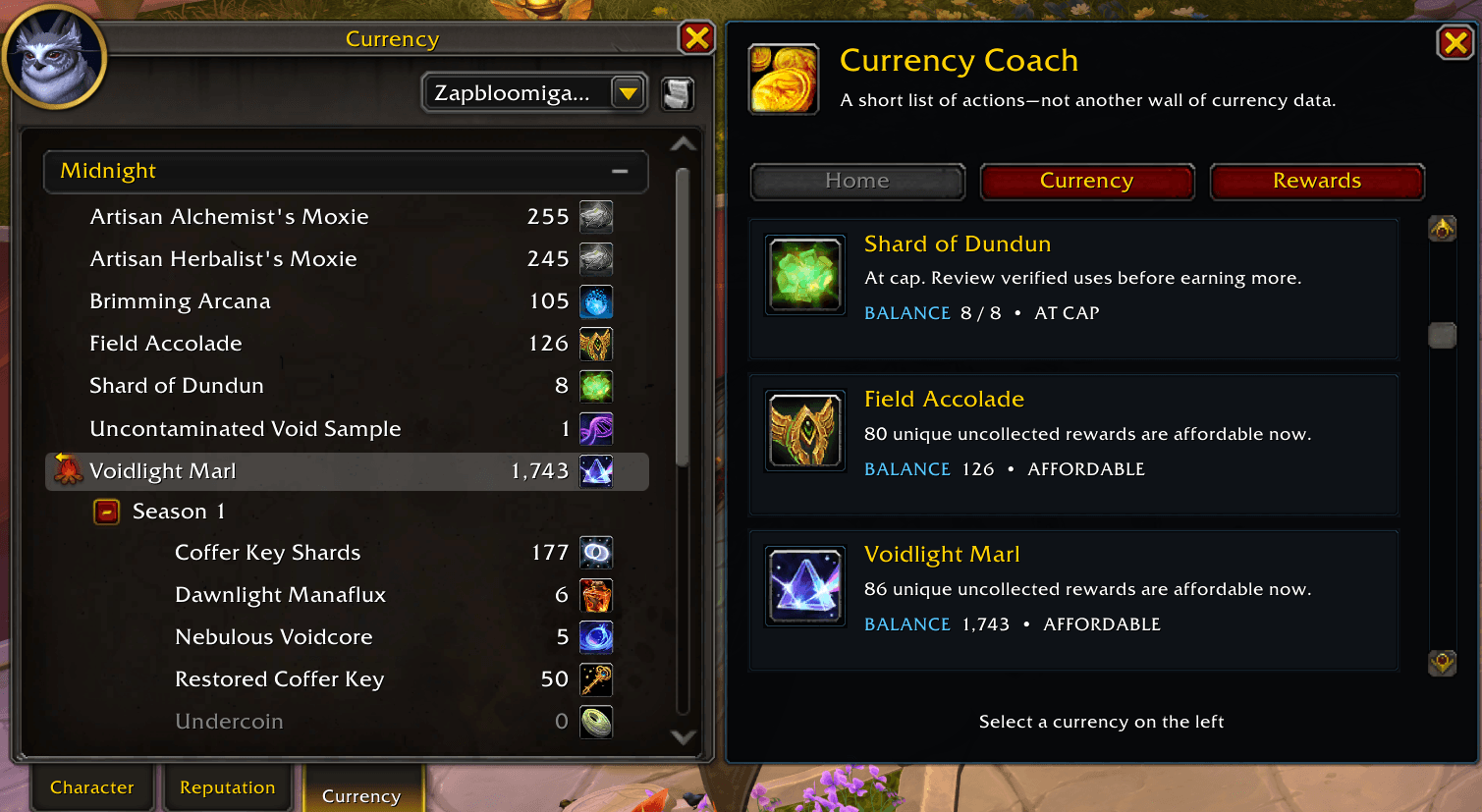
Currency Coach adds a smart companion panel to Blizzard’s Currency tab so you can quickly see which currencies need attention, which rewards are affordable, and what your current balances mean.
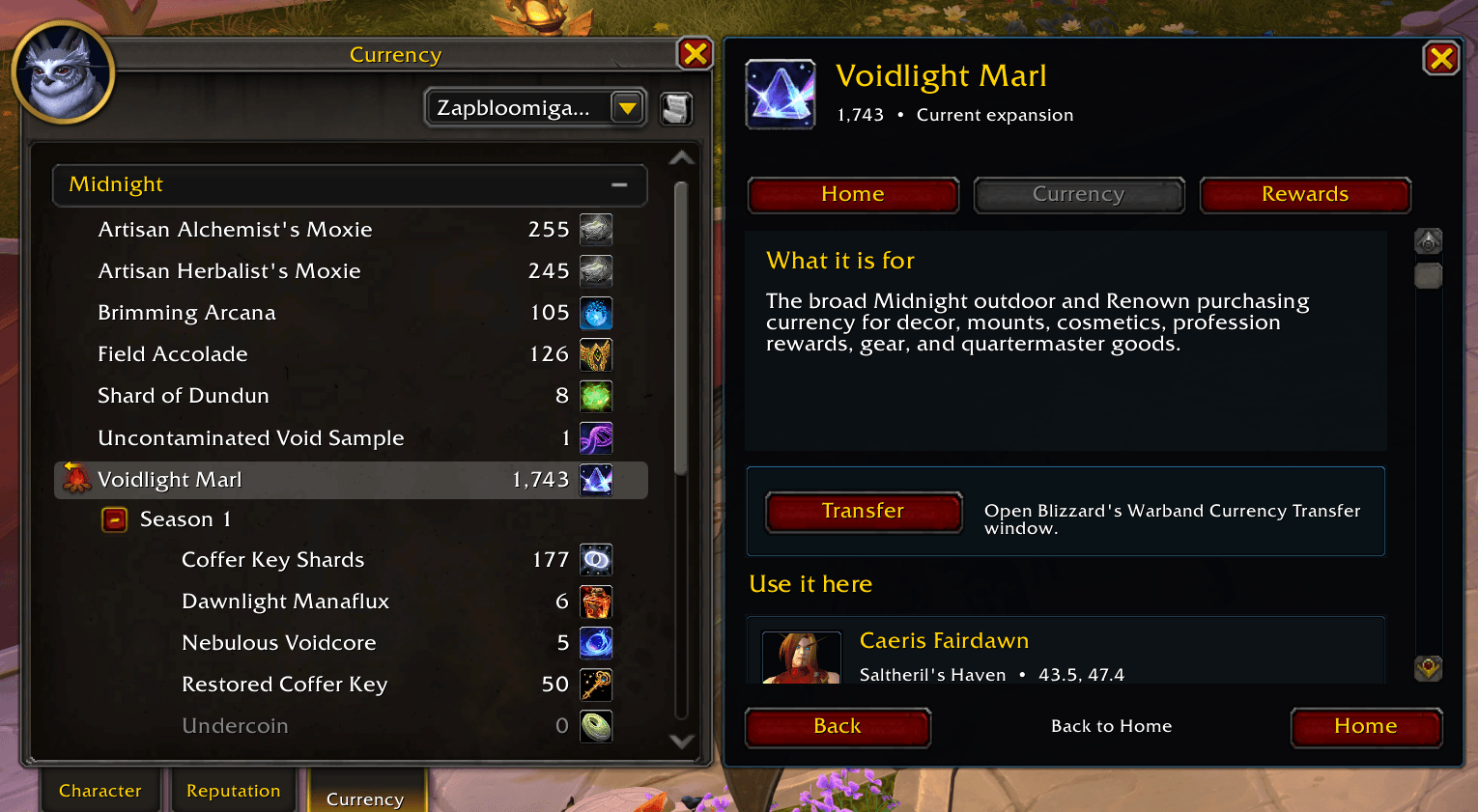
Select a currency to learn what it is for, view your balance, find where to spend it, browse vendors and rewards, and open Blizzard’s native Warband Currency Transfer window when supported.
Description
Currency Coach
World of Warcraft has accumulated a lot of currencies, but the default Currency tab often leaves players with the same questions.
What is this currency for?
Am I capped or close to capped?
Can I afford anything useful right now?
Where do I spend it?
Can I transfer it through my Warband?
Currency Coach is built to answer those questions directly inside Blizzard’s Character Info > Currency tab.
Instead of adding another wall of numbers, it turns your currency list into clear next actions.
What Currency Coach does
• Explains what supported currencies are used for • Shows live balances, caps, and weekly limits • Highlights currencies with affordable uncollected rewards • Connects currencies to vendors and locations • Displays reward catalogs and verified currency uses • Shows conversions and related vendor catalogs where relevant • Provides Blizzard’s native Warband Transfer option when available • Adds useful hover details for items, mounts, and other rewards • Suppresses distracting comparison tooltips for cosmetic rewards
Why use it
A lot of players feel buried under too many currencies and not enough explanation. Currency Coach helps make the Currency tab practical by showing what matters now and what each currency can actually do for you.
Instead of wondering whether a currency matters, Currency Coach helps you quickly see:
• whether you are capped or near cap • whether you can afford something uncollected • where to spend it • what the currency is really for • whether Blizzard’s Warband transfer is available
Action-first dashboard
The Home view highlights currencies that deserve attention right now.
It can surface currencies that are:
• At cap • Near cap • Able to buy uncollected rewards now • Backed by a useful catalog or vendor • Relevant because of verified uses and conversions
Balances and recommendation states are shown separately so it is clear how much currency you have and why the addon is calling attention to it.
Currency details
Select a currency from Blizzard’s list to see:
• what the currency is for • your current balance and cap • where it can be used • vendor details and locations • available rewards and affordability • collection information • requirements such as reputation, quests, or professions • transfer availability when supported by Blizzard
Rewards and vendors
Currency Coach includes hundreds of Midnight reward and currency-use records along with vendor support and searchable browsing.
Supported rewards can display:
• native item, mount, pet, spell, and housing-decor icons • Blizzard item and mount tooltips • collected, uncollected, or unknown ownership state • cost and affordability • vendor information • search and filtering • related vendor catalogs for conversion currencies
Native Blizzard integration
Currency Coach attaches to Blizzard’s existing Currency tab instead of replacing it.
When a currency supports Warband transfer, the addon provides a visible Transfer button that opens Blizzard’s native transfer window. Currency Coach does not automate purchases, transfers, confirmations, or gameplay.
After the transfer window closes, Currency Coach restores the previous state so you can keep browsing without losing your place.
Cleaner cosmetic tooltips
Cosmetic and transmog rewards show useful Blizzard tooltip information without opening distracting side-by-side comparison panes against your currently equipped gear.
Normal comparison still remains available for real gear where item level actually matters.
How to use
- Press C to open Character Info
- Select the Currency tab
- Currency Coach opens as a companion panel beside Blizzard’s Currency list
- Select a currency to explore its uses, vendors, rewards, and transfer options
You can also type /cc to reopen Currency Coach.
Notes
• Currency Coach does not buy items • Currency Coach does not execute transfers • Currency Coach does not replace protected Blizzard functions • Currency Coach is designed to help you understand and manage currencies more easily
If you are tired of too many currencies and not enough explanation, Currency Coach was made for exactly that problem.
Support Currency Coach
Currency Coach is free to use, with no features or updates locked behind payment.
If Currency Coach helps you understand your currencies, find useful rewards, or decide what deserves your attention, you can support continued development, testing, and expanded currency coverage on Ko-fi.
☕ Support Currency Coach on Ko-fi
Support is always optional.
Currency Coach Team