FarmLogs
- By
Track drop rates for groups of mobs — not individual ones. Auto-groups by name, zone & level. Merge/split groups, multiple sessions, fishing, auto-pause with countdown, compact view, CSV export. Built for Classic Era
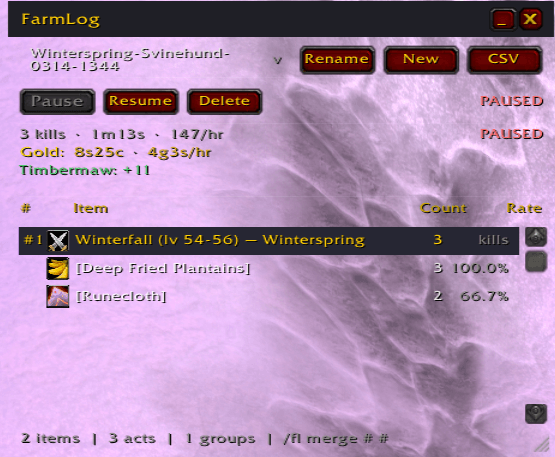
Now holds Gold, Honor and Reputation - and better naming of farming instance - and you can rename

Goes Transparrent 100% during battle
Description
FarmLogs
🎯 Track drops, gold, rep and honor by mob type and area — not individual mobs. Ever wanted to know the drop rate for a group of mobs, instead of having to piece together loot tables spread across multiple mob names at multiple levels? Now you can.
FarmLog automatically groups mobs by their shared name prefix, level range, and zone. Kill 200 Jadefire mobs in Felwood — Rogues, Shadowstalkers, Tricksters — and see one combined drop rate for Felcloth across all of them. A random bear you killed along the way stays in its own group.
If the automatic grouping doesn't match your farm, merge groups with a single command.
🔽 How it works
  Jadefire Rogue          ─┐
  Jadefire Trickster       ├──▶  Jadefire (lv 48-53) — Felwood  ×84 kills
  Jadefire Shadowstalker   │       Felcloth ........... 12.4%
  Jadefire Felsworn       ─┘       Runecloth .......... 67.2%
                                    Demonic Rune ....... 8.1%
  Angerclaw Bear ── omit ──✕
All mobs sharing the same name prefix + zone + level range (±3 levels) are combined into one group. Mobs that don't belong? Omit them. Groups that should be one? Merge them.
⚔️ Features
🗂️ Smart Auto-Grouping — Mobs grouped by name prefix + zone + level bucket. "Jadefire Rogue" and "Jadefire Shadowstalker" both land under "Jadefire".
🔀 Merge & Split — /fl merge 1 3 combines two groups. Omit mobs that don't belong.
🎣 Fishing Support — Automatically detects fishing casts. Tracks catches per zone alongside mob drops.
📋 Multiple Named Sessions — Farm satyrs today, fish tomorrow, switch back the day after. Each session keeps its own data and timer. Sessions are auto-named by zone, character and time — or name them yourself.
✏️ Session Rename — Rename any session from the GUI or with /fl rename OldName | NewName.
💰 Gold Tracking — Tracks gold gained per session with a gold/hr rate. Shown in the main window, minibar, and CSV export.
⚔️ Honor Tracking — Tracks honor gained from kills per session.
📯 Reputation Tracking — Tracks rep gains per faction per session.
⏱️ Auto-Pause with Countdown — Pauses after 5 min of inactivity. A visible countdown shows exactly when.
📉 Minimized Compact Bar — Shrink to a single tight bar: time · kills · gold · gold/hr · pause button. No overlap, no clutter.
📊 CSV Export — One click to copy-paste into Excel or Google Sheets. Includes gold, honor and rep summary.
🎯 GUID-Based Kill Attribution — Only YOUR kills are tracked. Nearby players won't mess up your numbers.
📈 Drop Rates Per Group — See exactly how many kills per item for each mob group.
🖥️ Clean GUI — Session dropdown with gold-per-session visible, group list with # numbers, item tooltips, shift-click to link in chat.
🗺️ Minimap Button — Left-click: toggle window. Right-click: start/pause session.
🖥️ GUI Overview
Open with /fl or click the minimap icon.
- Session dropdown at the top — pick, create, or rename sessions
- Pause / Resume / Delete / Rename controls
- Live stats — kills, elapsed time, kills/hr, gold, gold/hr, honor, rep gains
- Group headers with # numbers — prefix, level range, zone, kill count
- Item rows — icon, name, count, drop rate %
- Hover for full tooltip — Shift-click to link in chat
- Minimize to compact single-line bar (click _ next to close)
⌨️ Commands
Sessions
| Command | What it does |
|---|---|
/fl |
Toggle the GUI |
/fl start Felwood Satyrs |
Start or switch to a named session (blank = auto-name) |
/fl pause |
Pause active session |
/fl resume |
Resume |
/fl switch <name> |
Switch to another session |
/fl rename <old> | <new> |
Rename a session |
/fl delete <name> |
Delete a session |
/fl list |
List all sessions with gold earned |
Groups
| Command | What it does |
|---|---|
/fl merge 1 3 |
Merge group #3 into #1 |
/fl omitname Angerclaw Bear |
Stop tracking this exact mob |
/fl unomitname Angerclaw Bear |
Undo |
/fl omitprefix Angerclaw |
Stop tracking all "Angerclaw" mobs |
/fl prefixwords 2 |
Group by 2 words instead of 1 |
Data
| Command | What it does |
|---|---|
/fl export |
Open CSV export window |
/fl dump |
Print session to chat (incl. gold/honor/rep) |
/fl reset |
Clear main database |
/fl debug on/off |
Toggle debug messages |
🔧 Grouping: Under the Hood
When you loot a mob, FarmLog looks at three things:
🗺️ Zone — Felwood, Azshara, etc. 📝 Name prefix — first word of the mob name ("Jadefire" from "Jadefire Shadowstalker") 📊 Level bucket — rounded to the nearest 3-level range (48–50, 51–53, etc.)
Same zone + prefix + level bucket = same group.
Prefix depth — control how specific the grouping is:
/fl prefixwords 1→ "Jadefire" (all Jadefire mobs together) ← default/fl prefixwords 2→ "Jadefire Rogue" separate from "Jadefire Shadowstalker"
Level boundaries — if mobs span two buckets, they'll be in separate groups. Just /fl merge 1 2 to fix it.
📦 Installation
- Download and extract to
Interface/AddOns/FarmLog/ - Folder should contain:
FarmLog.toc,FarmLog.lua,FarmLogGUI.lua /reloador restart WoW- Type
/flto open
Built for Classic Era 1.15.x. One addon, no libraries, no dependencies. MIT license.
The FarmLogs Team